

An INPS text says your details need checking. With a pension or benefit payment on your mind, opening the link can feel like routine housekeeping.
Then a polished portal asks for documents, a clearer photo, and one more step. The INPS document upload scam makes that paperwork feel surprisingly convincing.
Overview
A document check is the bait, not the reason for the message
This is a confirmed impersonation campaign. Criminals use INPS branding to persuade people to surrender identity documents and other personal records on counterfeit websites.
INPS, Italy’s social security institution, is not running this scam. Its name gives the request credibility because the documents resemble information people associate with official administration.
The immediate danger is disclosure. You do not have to buy anything, authorize a transfer, or see an unexplained charge for the encounter to matter.
If you uploaded identification, focus on protecting your identity and checking your genuine accounts. Waiting for a payment to disappear can waste valuable response time.
Investigators found more than a copied logo
CERT-AGID’s August 11, 2026 investigation documented a five-stage collection process involving personal details, identification, payslips, income certification, and selfies.
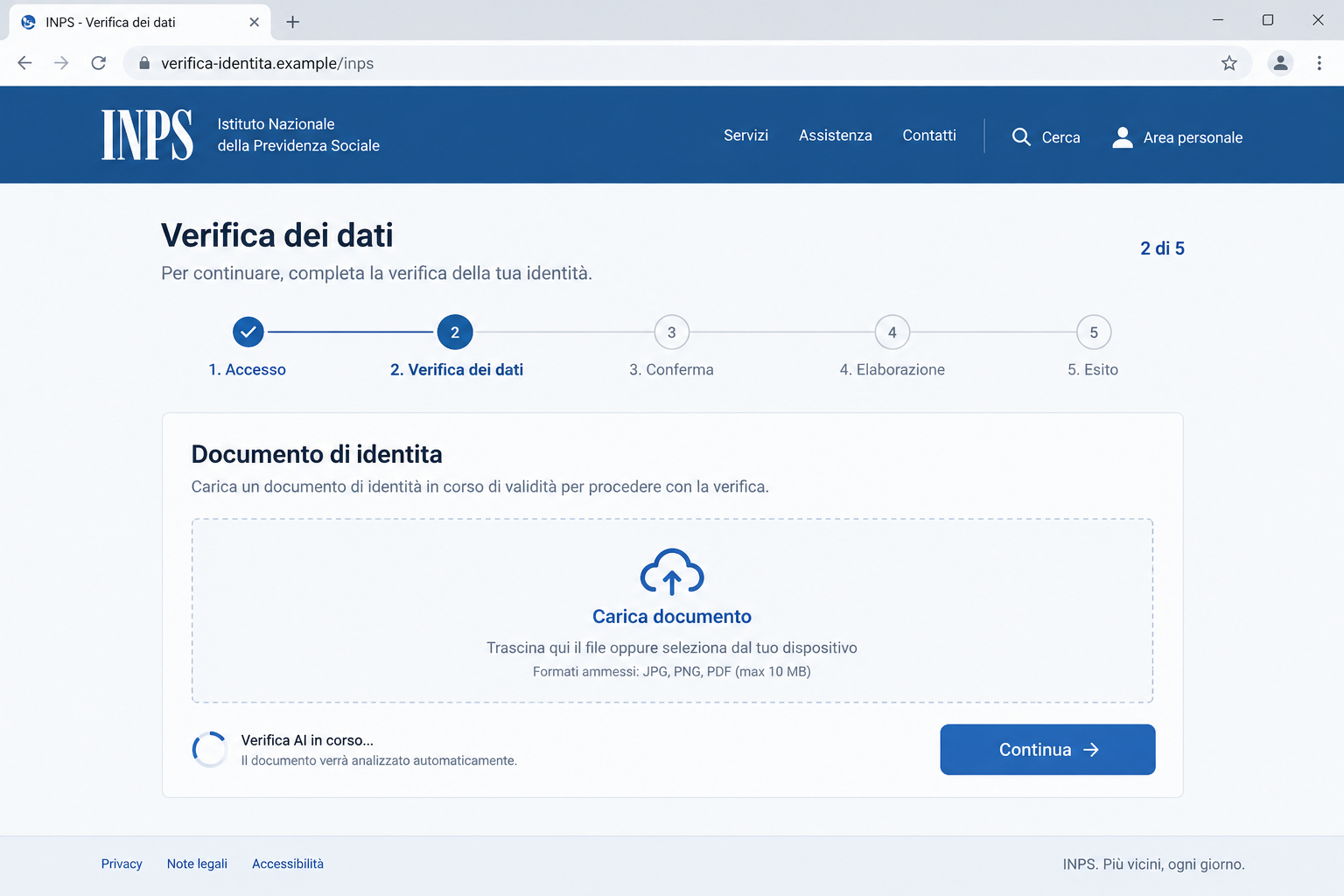
Researchers also tested a document-checking feature that recognized inappropriate uploaded pictures. Crucially, it still accepted an obviously fictitious identity document marked as a sample.
That distinction matters: a page can perform a convincing technical check without being an authorized government service or a trustworthy place for your records.
INPS issued its own warning about the campaign. The fraud finding does not depend on an anonymous complaint or a site’s visual appearance alone.
What deserves your attention immediately
- A text links a data check to continued access to an INPS service.
- The destination asks you to upload identification or financial paperwork.
- An apparent verification system encourages another, better-quality upload.
- The process continues outside the official service you opened independently.
The lead image is an illustration of the upload pretext, not a recovered victim session. It contains no real identification or working collection address.
The published investigation establishes the campaign; it does not establish that every related message uses AI or that every person who responded lost money.
Why an Upload Error Can Make the Trap Feel Safer
Most people expect a crude scam page to accept anything. A form that notices the wrong picture challenges that expectation and can lower your guard.
It feels as though someone is checking your application carefully. In reality, the person collecting the file and the software judging it are separate trust questions.
A convincing error message tells you something about the upload process. It tells you nothing reliable about who controls the destination or why they want the document.
Think of a stranger asking to photograph your passport. Their ability to notice a blurry image would not make them entitled to keep a sharper copy.
The same applies online. The useful question is not whether the portal can read a document. It is whether you reached an authorized service independently.
A progress indicator adds another nudge. Once you have completed several screens, abandoning the process can feel like leaving an important application unfinished.
That feeling is not evidence of an actual deadline. You can close the page and check your real INPS account without completing the suspicious workflow.
How the INPS Document Upload Scam Works
Step 1: A text turns routine administration into an urgent task
The opening message borrows an institution whose communications can affect household finances. A request to check your information sounds less extravagant than an unexpected prize.
The suggested consequence is interruption of a service. That directs your attention toward finishing the task rather than questioning why the text supplied the entry point.
You might already be expecting paperwork. That coincidence can make a mass-sent message feel personally relevant, even without proof that the sender knows your circumstances.
Do not reply with an explanation of your situation. A response can disclose more information and invites further conversation with a sender you have not authenticated.
Step 2: The link moves you onto a government-looking copy
The website supplies familiar styling and the appearance of a formal procedure. On a small screen, the form itself can dominate your attention.
The browser address deserves more weight than the design. A name inside a page heading or an address path does not establish control by INPS.
CERT’s published campaign indicators include dati-aggiungi[.]com and io-dati[.]com, with INPS-looking paths beneath those unrelated domains.
These are documented indicators, not links to visit. We could not obtain usable current captures of the sampled collection page through our isolated screenshot service.
Step 3: The form builds a detailed identity package
Documents should not be treated as interchangeable attachments. Each file can reveal different details about who you are, where you live, or how you receive income.
A payslip may contain employer information and identifiers. A photograph of an identity card can expose details that are not visible in an ordinary email address.
A selfie supplies a different kind of material again. Combining records can make later impersonation attempts more credible than using a name or telephone number alone.
That does not mean every verification service will accept stolen material. It means the collection is serious even when no password or card number was requested.
Step 4: Apparent quality checks encourage you to keep trying
In the investigated version, the site could object to an inappropriate image. That can push someone to replace a harmless or poor-quality file with useful identification.
Do not test the portal by submitting your own documents with a small alteration. An edited copy can still reveal your face, identifiers, address, or signature.
Likewise, an upload rejection does not prove the server discarded the original. A message on the screen is not a receipt confirming safe deletion.
If you stopped halfway through, write down what you already supplied. Your response should follow the exposed information, not the progress bar’s final position.
Step 5: The records can support further impersonation
The danger can continue after the fake website disappears. Removing a collection page does not retrieve files that were already transmitted.
CERT’s response guidance identifies attempted SPID identity registration and diversion of public payments among possible abuses of stolen records.
Those are risks to check, not outcomes to assume. A missing payment, unfamiliar account change, or unexpected identity-provider notice deserves direct investigation.
A later caller who repeats details from your paperwork is not automatically legitimate. Their knowledge may be a reason for extra caution rather than reassurance.
The Address Check That Matters More Than the Logo
Open a new browser tab and type inps.it yourself. From there, find the appropriate service and check whether the alleged request exists.
A search result is not an ideal substitute when you are already worried about impersonation. The important move is choosing your own trusted starting point.
On a fake page, almost every visible reference can say INPS. The organization name might appear in a banner, a button, a footer, and the URL path.
None of those placements changes the underlying domain. For example, an address ending in a different site’s domain remains that site’s address despite an institutional-looking prefix.
HTTPS also has limits. It protects a connection in transit; it does not turn the organization behind an unfamiliar website into a government agency.
You do not need to become a domain specialist to act safely. Leave the supplied route and check through the institution’s website or an independently obtained contact.
If you help a relative, avoid asking them to forward identification through ordinary chat. You can review the suspicious message without creating another copy of sensitive documents.
What to Do if You Have Fallen Victim to This Scam
-
Stop the upload process and make a short exposure list. Record which documents, photographs, contact details, passwords, or banking information you entered.
Include partial uploads and failed attempts. Save the message, the visible address, and any confirmation screen already available without revisiting the collection page.
Keep this record private. A public warning does not need your identity card, tax identifier, signature, or unredacted payslip attached to it.
-
Report the document theft to the appropriate police service. CERT recommends a formal report to Polizia Postale and bringing the relevant evidence.
Explain that you supplied records through an INPS impersonation link. List the document types and timing so the report describes the actual exposure.
Ask what further action is appropriate for the affected documents. Do not assume replacing one document will automatically neutralize every copied record.
-
Check your genuine INPS account and payment details. Reach it independently and review relevant contact information, notices, and the destination of expected benefits.
If something has changed without your approval, contact INPS through its official channels. Describe the change and ask how to secure the affected service.
Continue checking expected payments. A bank balance alone may not reveal that an upcoming payment destination was changed before the payment became due.
-
Speak to your identity provider if SPID misuse is possible. Ask about unfamiliar activation notices, access concerns, or the protection of an existing identity.
Use the provider’s official contact route. Do not buy an unsolicited service promising to search every identity system or erase all stolen copies.
A scammer cannot be trusted to certify that your documents have been deleted. Keep any such demand as evidence instead of paying for a promise.
-
Protect banking access if you also exposed financial credentials. Contact your bank promptly using its app, established website, or a number you already trust.
Tell the bank separately about passwords, card details, and approvals you supplied. These exposures may require different safeguards rather than a single password reset.
Ask how to report any unauthorized transaction you identify. Recovery depends on the circumstances; nobody should promise that a report guarantees reimbursement.
-
Check the device only when the encounter created a device risk. Opening a phishing page does not itself prove that malicious software was installed.
If you downloaded a file, installed an application, or see persistent suspicious behavior, a Malwarebytes scan can help investigate unwanted software.
AdGuard can reduce some intrusive advertising and risky browsing exposure. Neither tool recalls an uploaded identity document or secures an account on your behalf.
-
Expect personalized follow-up attempts. Be cautious about supposed officials offering to repair your INPS record, cancel a fraudulent identity, or recover diverted payments.
Do not confirm another code, provide another selfie, or transfer money because the caller knows your address. Verify the issue using a separate trusted channel.
Tell affected household members what happened in plain language. A calm explanation helps them recognize related approaches without making them afraid of legitimate official services.
What If You Only Opened the Link?
Merely seeing the page is different from sending records. If you entered nothing, uploaded nothing, and installed nothing, there is no basis to assume document theft.
Close the page, refuse unexpected permission requests, and avoid returning to investigate. You can still report the message and check your genuine account independently.
If your browser downloaded something automatically, do not open it. Review what was saved and seek security help if you cannot identify it safely.
When reporting the incident, be precise about the boundary you reached. Saying you viewed a form is more useful than assuming every possible consequence already occurred.
Make Your Incident Note Useful to the Next Person Helping You
A brief timeline is often easier to act on than a folder full of unexplained screenshots. Start with when the text arrived and what it claimed.
Next, list the files you selected and whether you pressed an upload or continuation button. Separate what the page displayed from what you personally confirmed afterward.
Finally, record the organizations you contacted and any reference numbers they supplied. This helps avoid repeating sensitive information while you follow up on different parts of the incident.
Keep original records unchanged where practical. Redact copies used for informal help, and avoid uploading everything to another unfamiliar “identity protection” website.
Frequently Asked Questions
Is the INPS document upload text a genuine request?
The campaign described here is fraudulent. Check any personal request through inps.it instead of assuming a text’s logo, sender label, or link proves authenticity.
Does the AI verification message prove the portal is official?
No. A criminal website can use sophisticated software. Researchers found image recognition behavior, not a trustworthy government identity-verification process.
Can an uploaded selfie matter if I did not enter a password?
Yes. A selfie combined with identification can support impersonation attempts. Treat the disclosed records seriously, without assuming every attempted misuse will succeed.
Should I finish the process to cancel it?
No. Providing more information does not cancel earlier disclosure. Stop, preserve available evidence, and work through the legitimate institution and relevant identity provider.
Does a failed upload mean the file was never received?
Not necessarily. Record it as a possible exposure. A rejection displayed by an untrusted website does not establish what its server retained.
Will antivirus remove my documents from the scammer’s system?
No. Security software can investigate a device, but uploaded records require identity-protection steps, reporting, and monitoring of the services those records could affect.
The Bottom Line
The INPS document upload scam turns believable paperwork into an identity-theft opportunity. A portal that checks a photograph can still belong to an impersonator.
Do not provide a better copy to satisfy it. Leave the link, verify through INPS, and act on the exact records you already exposed.








