

A refund notice says you paid too much waste tax. The page has a familiar payment logo, a case number, and money apparently waiting for you.
The PagoPA TARI refund scam starts with that welcome surprise. Before supplying the details it requests, look closely at what the supposed refund actually asks you to do.
Overview
The €95 refund page is a documented phishing trap
Criminals are impersonating PagoPA to collect personal information and payment card details through a false TARI refund procedure. This is not a dispute over legitimate service fees.
PagoPA is the real public-payment platform whose identity is being abused. TARI is Italy’s waste tax. Neither name makes an unsolicited refund page trustworthy.
CERT-AGID documented the campaign on September 3, 2026, including a page promising €95 for an alleged excess payment.
The observed procedure requested identification details, contact information, and a card’s number, expiry date, and CVV. Those requests are the important part, not the attractive refund amount.
A plausible file number makes the offer look settled
The investigated page presented a fabricated case reference and an apparent verification result. It made the money seem already approved rather than merely advertised.
That changes the question in the reader’s mind. Instead of asking whether the refund exists, they start thinking about the quickest way to receive it.
A number displayed on a website is not proof that the municipality reviewed your payments. The page creating the reference also controls the result it displays.
You need confirmation from the authority responsible for your tax account, reached independently. The link offering money cannot authenticate its own claim.
The warning signs belong to the collection process
- An unexpected message sends you into a refund procedure you did not request.
- The page appears to confirm a tax credit before independently verifying your account.
- It collects a detailed identity and contact profile.
- Receiving money supposedly requires full card credentials, including the security code.
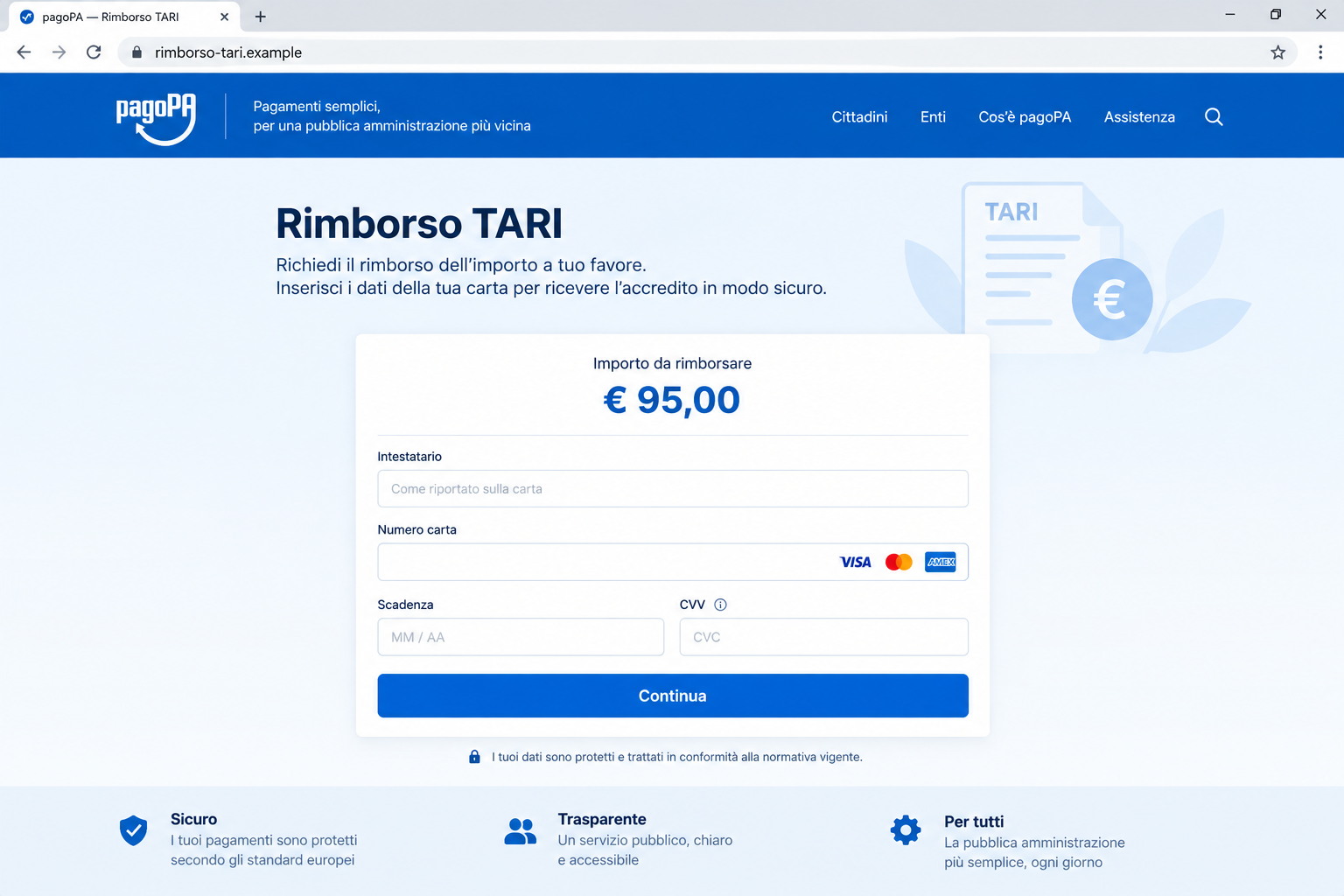
The image illustrates the card-collection stage using a nonfunctional example address. It is not an original capture of a taxpayer’s account.
The €95 figure belongs to the documented sample. A different amount does not make a similar approach safe, and this investigation establishes no universal debit amount.
Why a Small Tax Refund Is Such Effective Bait
A modest reimbursement feels believable. It does not require you to believe you won a competition or that a stranger wants to give away a fortune.
Taxes also produce real adjustments. Someone who has moved, paid installments, or handled household bills may not remember every transaction well enough to reject the message immediately.
The scam borrows that uncertainty. It offers to resolve a financial detail for you, then makes an unfamiliar website the place where you must supply the answer.
A payment-platform logo is particularly persuasive because it belongs near money. But a logo can be copied into a page without connecting that page to the platform.
Likewise, knowing the correct tax name does not prove access to your municipal record. Public terminology lets a mass campaign sound tailored to a local obligation.
The safest response is not to argue with the email. Compare the claim with your actual receipts and the account information available through the relevant authority.
How the PagoPA TARI Refund Scam Works
Step 1: An email offers to return an apparent overpayment
CERT’s campaign indicators identify email as a delivery channel. The lure takes the reader toward a website dressed as a refund service.
You may be curious even if you do not recognize the sender. Receiving money seems less dangerous than sending it, which is precisely the assumption to challenge.
A form can steal useful information without charging you immediately. The absence of an obvious purchase button does not make the destination harmless.
Do not forward the original link to relatives as something to try. If you want to warn someone, explain the pretext without encouraging another visit.
Step 2: The portal makes the refund look like an existing case
The fake case number gives the page an administrative feel. A continuation button turns the offer into a task that appears ready to finish.
In the recorded sample, the story referenced TARI for 2025 and an alleged excess payment dated August 28, 2026. Those dates were part of the claim.
Dates can make a story specific without making it true. Compare them against your records rather than treating specificity as evidence that the sender knows your account.
A genuine receipt stored independently carries more weight than a case number created by the same website requesting your information.
Step 3: An identity prompt becomes an apparent eligibility check
The documented flow asked for a tax identifier or identity-card number before displaying its refund result. That sequence can make the outcome feel personalized.
Yet a page can show the same favorable result after many different entries. A response appearing after you type is not proof of a genuine database lookup.
Do not experiment using your own tax code to see what happens. Testing with real information crosses the very boundary you are trying to evaluate.
Even when you stop before the final screen, note what you entered. Early-stage personal information can still matter if it was transmitted.
Step 4: Contact details connect the identity to a reachable person
The next requests assemble a broader profile. Names and addresses identify someone; email and telephone details provide ways to approach that person again.
That combination can make a later message unusually convincing. A caller may refer to the alleged refund and details that you remember entering yourself.
This does not authenticate the caller. It can simply mean the information supplied during one encounter is being used to support another.
Keep the original message and the timing of your response. They help explain why a later contact may be connected to this disclosure.
Step 5: The refund becomes a request for card credentials
At the payment stage, the site asks for information that can support card misuse. A small promised credit is being exchanged for access to much more valuable data.
A CVV is a card security code, not a tax reference. Describing it as necessary to complete a reimbursement does not change its sensitivity.
No verified OTP, remote-access installation, or specific unauthorized charge was established for this sample. Those possibilities should not be invented to make the story sound worse.
The demonstrated collection is already enough to reject the page. You do not need to wait for a second demand or a successful fraudulent transaction.
Check the Refund Without Using the Refund Link
Start with the municipality or collecting authority named on your genuine TARI paperwork. Use its established website or contact information from a receipt you already have.
Ask whether your account actually shows an overpayment and what its reimbursement procedure requires. Do not let the questionable email choose the contact details for this check.
The real PagoPA website provides a route to its assistance resources. Reach that service separately if you need help identifying a payment.
Have your existing receipt ready, but share it only through an appropriate official channel. Redact unrelated transactions if a supporting document includes more than the disputed payment.
Distinguish a payment question from a refund entitlement. A platform can help explain transaction handling without being the authority that decides whether your tax calculation was correct.
Do not assume every refund involving public payments is impossible. That blanket rule can confuse readers who genuinely need an adjustment. The unauthorized collection page is the problem.
If you find a legitimate credit, arrange its return through the verified authority. The existence of real money owed does not validate an unrelated email link.
What the Website Address Can and Cannot Tell You
The documented indicators included rimborso.intbc[.]cc and several other hostnames. We list the example defensively, not as a destination to open.
An Italian word such as “rimborso” makes an address readable. It does not connect the domain to PagoPA, your municipality, or a legitimate payment processor.
A lock symbol does not answer that question either. An encrypted connection can still deliver information directly to a criminal’s website.
At the same time, unfamiliarity alone is not a complete fraud test. Real public services can use payment partners, so the relationship must be verified independently.
For this campaign, the conclusion rests on CERT’s investigation of the impersonation and collection process, not simply on disliking a domain suffix.
The sampled page did not produce a usable current capture through our isolated service. That limits live visual evidence, not the official historical finding.
What to Do if You Have Fallen Victim to This Scam
-
If you entered card information, contact the issuer now. Explain that the full details were supplied to a false public-tax refund page.
Ask whether the card should be blocked and replaced. Review both completed and pending transactions, and follow the bank’s instructions for reporting anything unauthorized.
Do not wait for exactly €95 to appear. That amount was the promised refund, not an established limit on what someone might attempt with the card.
-
Tell the bank about any additional approvals. If you also supplied a one-time code or approved something in its app, describe that separately.
Read the actual transaction description to the bank. Your intention to receive a refund may differ from the operation the approval authorized.
No legitimate response requires you to continue chatting with the suspected sender while the bank investigates. End that contact and keep relevant messages.
-
Make an evidence folder before discarding the email. Save the sender details, original message, visible address, dates, and screenshots already in your possession.
Write down which fields you completed. Do not add full card credentials or security codes to a general incident note that others may read.
A useful record distinguishes information entered from transactions observed. That precision helps the bank and authorities assess what actually needs attention.
-
Check the genuine tax account separately. Contact the relevant municipal office to confirm whether any legitimate issue remains outstanding.
Discovering a scam does not automatically cancel a real tax obligation. Conversely, paying genuine TARI does not mean you must cooperate with an unsolicited reimbursement request.
Use the official procedure for any real adjustment. Never send another identity document to the fake portal merely because its operator says your claim is incomplete.
-
Report the impersonation through official channels. Use the assistance and security information reached from PagoPA’s genuine website, and report financial loss to police.
Provide the suspicious address as evidence rather than encouraging the recipient to complete the form. Keep private records out of public comment sections.
If your email service offers a phishing-report option, use it after retaining the evidence you need. Blocking one sender alone may not stop related messages.
-
Protect other information you supplied. A disclosed address or tax identifier calls for attention to unexpected account, contract, or verification correspondence.
If you reused a password on the page, replace it through the genuine affected service. Do not follow a password-reset link supplied by the same sender.
Reject unsolicited refund-recovery offers. A person who promises to retrieve the credit for an upfront fee may be attempting a second deception.
-
Handle browser or software changes if they occurred. A card-phishing form is not, by itself, proof of a malware infection.
Malwarebytes can help check a device if you downloaded suspicious material or installed software during the encounter. AdGuard may reduce some malicious-ad and unwanted browsing exposure.
These tools cannot reverse a card disclosure or approve a tax refund. Bank action and independent verification remain the priorities for this particular scam.
A Useful Way to Explain This to Someone Else
Instead of saying “never trust tax emails,” explain the specific switch: a message offers money, but the linked page collects credentials that can be used against you.
That explanation leaves room for legitimate administration. It also gives someone a concrete next step: check their own records and contact the proper office independently.
If a relative has already entered details, avoid spending the first conversation debating whether the page looked convincing. Help them reach their card issuer first.
You can work through the timeline afterward. The immediate goal is to reduce further exposure while preserving enough evidence to understand what happened.
Frequently Asked Questions
Is PagoPA itself a scam?
No. The reported fraud impersonates the legitimate platform. The accusation concerns counterfeit refund pages, not ordinary public payments processed through the real service.
Was the €95 TARI refund independently confirmed?
It was confirmed as the lure displayed by a fraudulent page, not as money owed to the recipient. Verify any actual credit with the responsible authority.
Does a case number prove the municipality checked my payment?
No. A fabricated website can display a convincing reference. Compare the claim with official records obtained through a route you chose independently.
What if I entered my tax code but stopped before the card screen?
Stop there and document the disclosure. Watch for targeted follow-up messages, but do not assume a card was compromised if you never supplied its details.
Should I wait to see whether the refund arrives?
Not after entering card credentials on the false page. Contact the issuer promptly; waiting for a promised credit does nothing to protect exposed details.
Can a real TARI overpayment still exist?
Yes. A genuine adjustment and a fake message can coexist. Resolve the real issue through the relevant authority, without using the suspicious collection form.
The Bottom Line
The PagoPA TARI refund scam uses a believable reimbursement to collect valuable identity and card information. A precise amount and a case number do not make it official.
Check the tax record independently. If the form already received your card details, speak to the issuer before doing anything else with the message.

Join the discussion
0 commentsShare your experience or ask a question about this article.
Discussion
Start the conversation
Have a question or something useful to share? Add the first comment.