

An email says a new official message is waiting in Suomi.fi. You were expecting more government mail to move online, so the notification seems perfectly timed.
The button offers a quick way to read it. That small convenience is where the Suomi.fi email scam deserves a much closer look.
Overview
A real digital-mail change gives fake notifications a believable setting
Suomi.fi is a legitimate Finnish public service. The scam consists of impersonation emails that steer readers toward websites seeking banking credentials or sensitive personal information.
Finland’s National Cyber Security Centre at Traficom has explicitly warned about these messages. This is documented phishing, not an accusation against the genuine mailbox service.
The important distinction is the route into the account. A familiar service name does not make the sign-in button inside an unsolicited email trustworthy.
You can check your official mailbox without accepting the sender’s shortcut. Open the genuine service independently and read any actual correspondence there.
The official warning gives readers a clear test
According to Traficom’s April 13, 2026 advisory, genuine Suomi.fi notification emails do not direct recipients to authenticate through a link.
The warning accompanied the move toward primarily electronic official mail from April 14. The change is real; the email shortcut used by impersonators is not authorized.
That means you do not need to decide whether the message sounds sufficiently formal. Its request to follow a sign-in link is already a reason to stop.
Correct Finnish, a professional footer, and a government-style design do not overturn the service’s published security guidance.
Keep the message, the mailbox, and the bank separate
- The email tells you something may be waiting; it does not establish the identity of its sender.
- The genuine mailbox is checked through a trusted route you choose yourself.
- Any banking approval deserves its own scrutiny, regardless of what an email says it will accomplish.
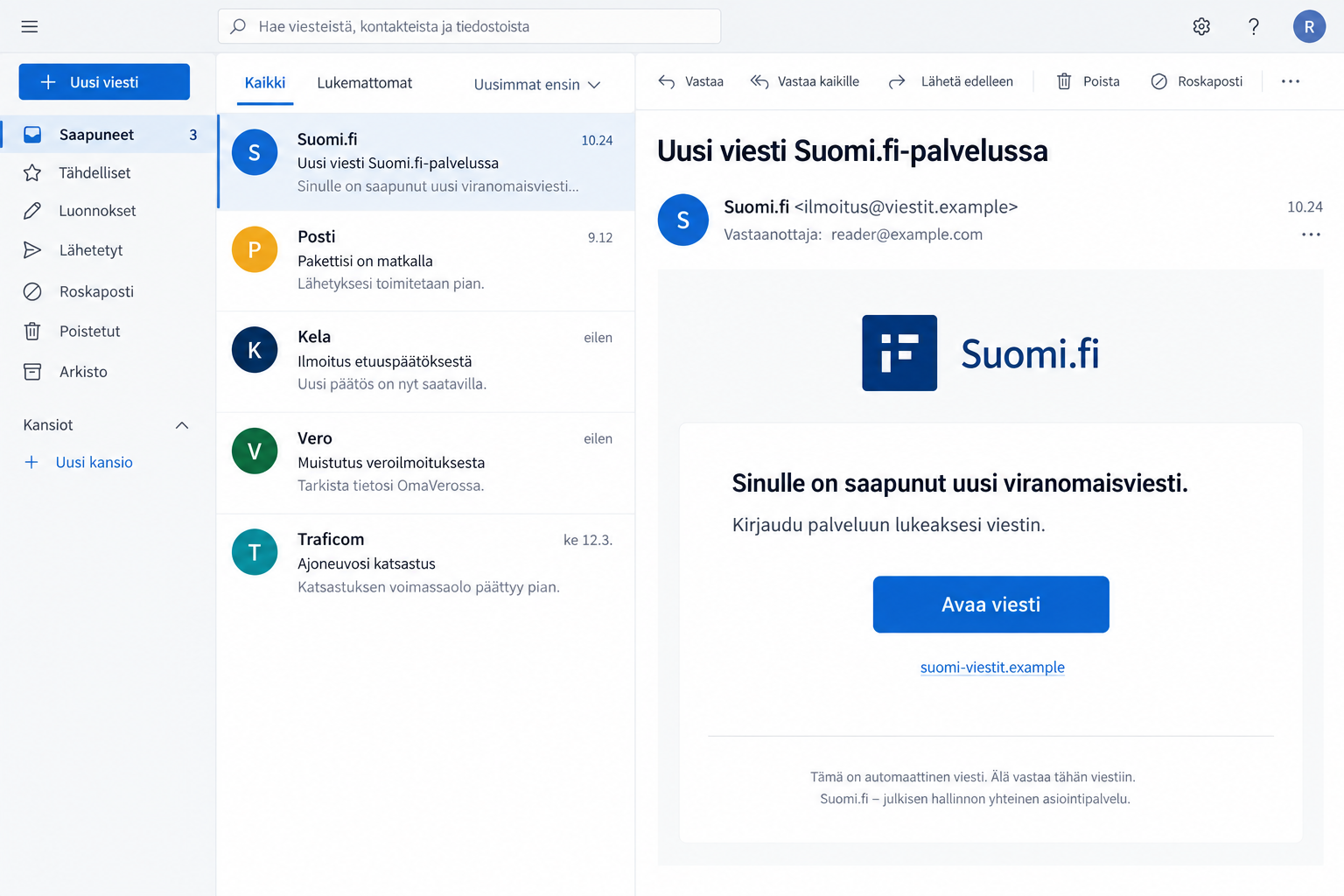
The illustration shows the notification pretext with fictional addresses. It is not a captured email or evidence that one exact subject line defines the entire campaign.
The confirmed mechanism is credential phishing. The warning does not supply a victim count, a universal loss amount, or proof that simply reading the email installs malware.
Why This Message Can Arrive at a Convincing Moment
When an official service changes, people expect unfamiliar prompts. Something that would normally seem unusual can feel like a necessary part of the transition.
Criminals do not need to invent the whole story. They can borrow a real announcement and place a false instruction next to it.
A reader may remember that government correspondence is becoming digital but not remember exactly how activation works. The fake message offers to fill that gap.
This is why broad familiarity is not enough. Knowing that Suomi.fi exists or that digital mail is expanding does not authenticate a particular message about it.
The alleged contents also create pressure. People reasonably want to avoid missing official decisions, requests for information, or deadlines hidden behind a notification.
You do not have to ignore those responsibilities to protect yourself. Checking the real mailbox independently addresses both concerns: the possible official matter and the suspicious email.
How the Suomi.fi Email Scam Works
Step 1: An ordinary-looking notice claims your attention
The approach poses as a service notification rather than a stranger asking for money. That makes it easier to treat the message as part of normal administration.
The display name may look familiar, but a name in an inbox is only a label. It is not a guarantee that the service sent the message.
Do not reply with your personal identity code or ask the sender to confirm your account. An impersonator can answer with another convincing explanation.
Instead, leave the notification in place while you open your own trusted route to the service. There is no need to use its button first.
Step 2: A convenient button chooses the destination for you
The message’s apparent helpfulness is the problem. It asks you to surrender control of where the sign-in begins, even though you can reach the service yourself.
A button can display innocent text while leading somewhere else. The visible phrase “open message” says nothing about who controls the destination.
Hover previews and address checks can expose obvious mismatches, but they are not required to reject the shortcut. The official service does not need that authentication link.
On mobile, avoid opening a link just to reveal it. Use the independent-access rule rather than turning investigation into another visit to the suspicious page.
Step 3: A familiar sign-in setting makes disclosure feel routine
The fraudulent destination seeks information that belongs in protected systems. A copied identity-selection screen can make the request feel like standard Finnish online administration.
Genuine public services can use strong electronic identification. The scam is not proved merely because a bank is involved; it is the deceptive route and unauthorized destination.
That distinction prevents a dangerous misunderstanding. Readers should not abandon legitimate authentication, but they should refuse to start it through an untrusted notification.
Take particular care if a page asks you to repeat credentials after an error. An error displayed by an unknown site is not a safe reason to continue.
Step 4: The information can be used beyond the supposed mailbox
The reason banking credentials matter is that their value extends beyond reading one message. An attacker wants access or authorizations, not your interest in official correspondence.
The exact consequences depend on what you supplied and what protections intervened. Do not assume either that everything is lost or that nothing matters without an immediate debit.
If an approval request appears, read what it actually describes. Your intention to view a document does not determine the operation being authorized.
Stop when the action is unfamiliar. Contact the bank separately if you exposed its credentials or approved something you cannot explain.
What Genuine Suomi.fi Activation Looks Like
The official digital-mail transition information describes activation through a public authority’s online service using strong identification.
The mailbox is not supposed to appear silently in the background without the person’s knowledge. An unexpected email is not a substitute for that informed process.
The transition also does not mean every person must obey every email mentioning it. The official guidance distinguishes people using digital services from those who do not.
Paper correspondence remains an option under the service’s published arrangements. Check current settings through the actual service instead of trusting an unsolicited instruction about your delivery preferences.
If you already use Suomi.fi Messages, a newly received email does not require you to rebuild access from a stranger’s link. Start from your established routine.
If this is your first time, ask the official advisory service for help through contact details you find independently. Avoid paid “activation assistance” offered by unknown senders.
For a specific unresolved case, contact the authority handling that case. A general mailbox notice cannot verify a tax, benefit, or other administrative decision on its own.
Three Checks That Do Not Require Clicking Anything
Check what the email asks you to do
A demand to sign in through its link conflicts with the security rule in the official warning. You can recognize that conflict before inspecting any technical details.
Be especially wary when an email tries to solve your concern by supplying both the warning and the only supposed route to fix it.
Check the actual mailbox through your own route
Type the official address or use a trusted bookmark created from the genuine service. Look for the claimed correspondence after you have established where you are.
If you find a real message, deal with it there. A real pending matter does not retroactively prove that the email’s link was safe.
Check an unexpected approval independently
If your banking app shows an action you did not intend, cancel it rather than treating it as an unavoidable part of reading mail.
When uncertain, contact the bank using a known route. Do not ask the suspicious page’s chat window whether the approval is normal.
What to Do if You Have Fallen Victim to This Scam
-
Separate reading from disclosure. Note whether you only opened the email, visited a website, typed information, or approved an action.
This is not about minimizing what happened. It gives you a useful starting point and prevents unrelated emergency steps from delaying the action that matters.
Write down the approximate time and the service identities shown. Keep private credentials out of your notes and out of messages to informal helpers.
-
Keep notification settings distinct from login security. Changing where you receive alerts does not, by itself, revoke someone else’s access or cancel an approval.
If you change an email address after the incident, verify the new setting inside the authentic service and keep checking for important official correspondence.
-
Contact your bank promptly if its credentials were involved. Use its established app, website, or a telephone number from trusted banking material.
Say you may have entered information through a fake Suomi.fi notification. Explain any codes, approvals, new-device prompts, or transfers separately.
Ask the bank which access should be blocked or replaced and what transactions need review. A simple password change may not address every form of authorization.
-
Check your genuine public-service account after securing sensitive access. Review relevant contact settings and actual correspondence through an independently opened session.
If you find an unfamiliar change, ask the responsible service how to correct it safely. Do not follow instructions sent by the suspected impersonator.
Keep dealing with legitimate deadlines. The goal is to remove the fraudulent route, not to abandon important communications from real authorities.
-
Preserve the original email for reporting. Retain sender details, the subject, time received, and the visible destination without reopening the suspicious site.
If you have screenshots, remove identity codes and account information before sharing them publicly. Give unredacted evidence only through appropriate official reporting channels.
Report financial loss or identity misuse to police and share the phishing attempt with Finland’s official cybersecurity reporting service.
-
Review device changes only where relevant. A counterfeit login screen can steal information without installing an application, so a clean scan is not account clearance.
If the encounter included downloads, unknown software, or persistent browser interference, Malwarebytes can help investigate the device. Use a trusted route to obtain security tools.
AdGuard can reduce some unwanted advertising and malicious browsing exposure. It cannot revoke a banking approval or remove a record already supplied to an impersonator.
-
Warn anyone whose information you entered. If you were helping a relative, explain exactly which person’s details or identification method was used.
Do not assume protecting your own email address protects their banking access. Each affected person may need to speak with the relevant provider.
Keep the conversation practical. Embarrassment makes people delay reporting, while a clear account of the steps taken helps them get useful assistance.
-
Refuse the follow-up rescue offer. Someone claiming to restore your mailbox or reverse a fraud case should not receive money, codes, or remote access.
Check any such claim with the institution they name, using contact information you locate yourself. Familiar details from the first message are not independent proof.
Save the new approach with the original evidence. Repeated contact can help explain the incident, but you do not need to keep engaging to document it.
If You Are Helping Someone Navigate Digital Mail
Show the safe entry point before discussing individual scam messages. A reliable bookmark and a practiced routine can be more useful than a long list of suspicious spellings.
Let the person control their own identification. Do not ask them to send banking codes over chat so you can test whether a message is genuine.
Explain that pausing does not mean refusing official mail. They can still find and answer genuine correspondence after reaching the service safely.
If a message creates anxiety about a deadline, identify the responsible authority and contact it directly. Reassurance is stronger when it comes with a verifiable next action.
Frequently Asked Questions
Is Suomi.fi a legitimate service?
Yes. Criminals are copying its identity. The scam discussed here is a fraudulent notification and login route, not the genuine public-service mailbox.
Does Suomi.fi email a link that requires me to authenticate?
Traficom’s warning says genuine notification emails do not direct users to authenticate through a link. Access the service independently instead of using that shortcut.
Did the April 2026 digital-mail change really happen?
The official transition is real. That fact does not validate a particular email, sender address, activation demand, or website claiming to participate in it.
Does receiving the email mean someone accessed my mailbox?
No. An impersonation message alone does not prove account access. Check the genuine service and respond according to any information or approvals you actually exposed.
What if I find a real message after ignoring the email link?
Read and handle it within the authentic service. Its existence does not authenticate the original link, which you never needed to use.
What should come first after entering banking credentials?
Contact the bank through a trusted channel and describe the exposure. Mailbox checks, screenshots, and device scans should not delay protecting sensitive banking access.
The Bottom Line
The Suomi.fi email scam hides a dangerous sign-in route inside a believable official-mail notification. A real digital transition gives the story context, not permission.
Read government correspondence through the service you open independently. If the shortcut already led you to disclose banking information, involve your bank promptly.








