

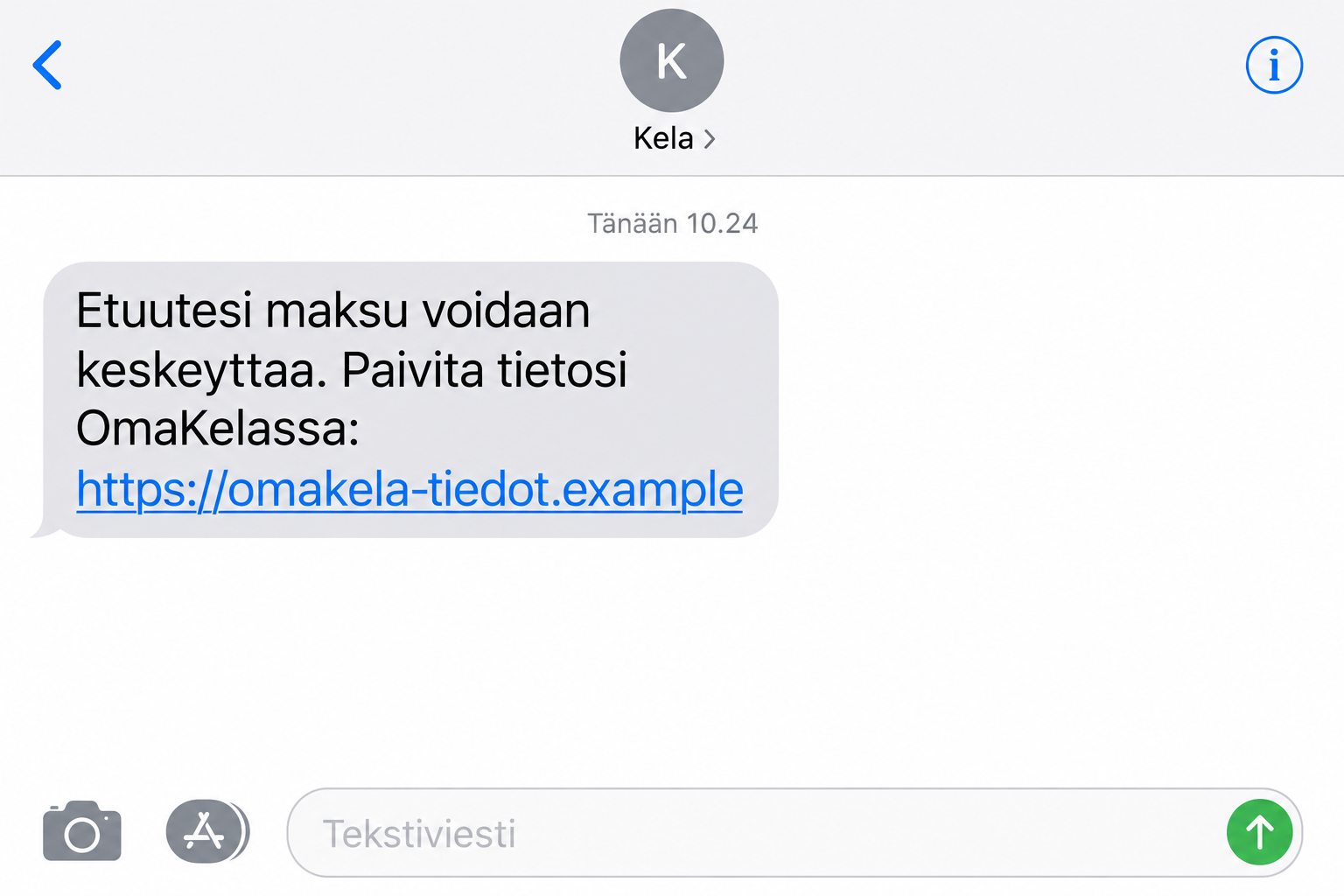
A message warns that your Kela benefit payments could stop unless you update your information. When that money covers everyday bills, waiting feels like a risk.
The link promises a quick visit to OmaKela. The Kela benefit text scam turns that familiar task into something worth checking before you sign in.
Overview
The threat to your payment is a phishing pretext
Kela confirms that criminals misuse its name in messages seeking personal information, banking credentials, and payment card details. Threatened benefit interruption is one of its documented examples.
That makes this a confirmed impersonation scam, not a claim that Kela itself is fraudulent. The genuine institution and OmaKela service are being used as cover.
The safest immediate response is to leave the supplied link alone. Check your real account through kela.fi, which you enter independently in your browser.
If a genuine request is waiting, you can handle it there. You do not need to trust the text to protect a legitimate benefit payment.
Kela identifies a clear boundary for genuine messages
Its official scam warning, updated September 26, 2026, says Kela and OmaKela emails or texts never contain links requiring customers to log in.
The warning also rejects requests for sensitive information through those messages. A copied logo or an authoritative sender label does not cancel that rule.
However, strong identification is part of genuine OmaKela access. Do not confuse the existence of legitimate bank-based authentication with permission to use an unsolicited login link.
Where you start the process matters. The criminal shortcut is trying to borrow trust from a real administrative routine.
Watch for the pressure and the destination together
- The message threatens to interrupt money you rely on.
- It offers an immediate data-update link as the solution.
- The next page requests credentials or sensitive details before you independently verify the issue.
- The sender discourages the pause needed to check your genuine account.
The sample image illustrates this pretext with a fictional, nonfunctional address. It is not an original victim message or a claim about one exact sender number.
Kela describes multiple ways criminals make contact. This article focuses on the benefit-stop message and login trap, not every unrelated fraud mentioning the institution.
Why a Benefit Warning Is Hard to Ignore
The message does not need an extravagant promise. It threatens something you already depend on, which can make a small request feel urgent and reasonable.
Someone waiting for a decision may assume the notice concerns an application. Someone already receiving benefits may worry that a routine detail has become outdated.
Both reactions make sense. The manipulation lies in making an unverified sender’s link seem like the only way to prevent a problem.
Even careful people can be distracted by the practical consequence. They think about rent or groceries before thinking about the address behind a button.
The way out is a routine that does not depend on judging the message’s tone. Open the official service yourself and check whether any action is needed.
That preserves the important part of the warning, your wish to keep records accurate, while removing the sender’s control over the login destination.
How the Kela Benefit Text Scam Works
Step 1: The message puts an ordinary payment at risk
A warning about incomplete or unsafe personal information creates a reason to act. The threat of interrupted benefits makes postponing the task feel costly.
The wording may vary. You should recognize the combination of institutional impersonation, urgency, and a supplied route to enter sensitive information rather than memorize one sentence.
Receiving this message does not prove the sender has accessed your actual benefit file. A broadly relevant threat can reach many people without personalized account knowledge.
Likewise, receiving it near a normal payment date is not authentication. Coincidence can make an unsolicited message feel more informed than it really is.
Step 2: The link replaces your normal OmaKela entry point
The text offers convenience: tap, update, and get on with your day. That shortcut moves you away from a trusted starting point before anything visibly alarming happens.
The page may use familiar colors or terms. Those elements tell you what the operator wants to resemble, not who is operating it.
Do not enter your personal identity code simply to see whether the page recognizes you. Real information is not a safe test of an unknown service.
Close the route supplied by the message and open kela.fi separately. This is faster and more reliable than trying to settle every cosmetic detail.
Step 3: The page asks for information under an administrative excuse
The possible targets include credentials and personal or card information. Not every version needs all of them, and there is no reason to complete extra fields.
A request to update an account should be evaluated in context. Your intention to fix a benefit record does not establish what the website will do with your entry.
Be particularly cautious about repeated prompts after an error. A second attempt can expose another code or password without solving any genuine account issue.
If you already typed information, record what it was and stop. Continuing until the page gives a reassuring result does not protect earlier disclosure.
Step 4: The attacker tries to benefit from the disclosure
Banking credentials and identity information can have uses beyond a benefits account. That is why the response must match the information supplied, not just the message’s branding.
The outcome is not identical for everyone. A bank may stop an attempt, while another person may discover unauthorized activity that requires a formal report.
Do not use the absence of an immediate charge as proof of safety. Equally, do not assume a received text means your accounts have already been taken over.
The right next step follows the exposure: independently verify the benefit issue, then involve the relevant provider if credentials, payments, or identity records were affected.
How to Reach the Real OmaKela Service
Kela’s secure-access instructions start with typing kela.fi into the browser’s address field, not choosing a login result from a search engine.
From the official site, select the login option and OmaKela. The genuine process uses Suomi.fi identification and an appropriate strong authentication method.
This distinction is important for Finnish residents accustomed to identifying through a bank. The bank’s involvement can be normal when the journey begins through the authentic service.
A scammer’s page can imitate part of that journey. Familiarity with a bank logo is therefore not enough to authenticate the route that led to it.
Check what any approval screen says you are doing. If it describes an action you did not intend, stop and contact the relevant provider independently.
According to Kela’s current guidance, OmaKela is a browser service available in Finnish and Swedish. It does not have a mobile application.
That is a verification aid, not evidence of a specific malicious app campaign. We did not establish an app-installation stage in the benefit-stop messages covered here.
If you need language or accessibility assistance, obtain it through official support. Do not let an unknown sender use that need to take over your login.
Not Every OmaKela Problem Comes From a Scam
A real service can have a maintenance break or an identification error. Those events do not prove that an alarming message correctly diagnosed your account.
If the genuine site is temporarily unavailable, check its published service information. Do not switch to an unfamiliar “backup” address supplied by someone contacting you.
Similarly, an actual request for supporting information may exist in your official account. Handle that request there rather than sending records in a reply to the text.
The presence of a real administrative task and the presence of a fake message are not mutually exclusive. Keep the two pieces of evidence separate.
Do not accuse a genuine caseworker or payment office solely because a scam uses similar terminology. The fraudulent sender is borrowing the institution’s context.
A direct question to Kela can resolve uncertainty about a specific case. Use the contact options you find through its official site, not a callback number in the message.
What to Do if You Have Fallen Victim to This Scam
-
If you disclosed bank credentials, start with the bank. Kela’s own advice is to contact your bank when online banking information may have been stolen.
Explain that a supposed benefit update sent you to a suspicious page. Identify which information you entered and whether you approved anything afterward.
Ask about protecting authentication, reviewing recent activity, and disputing unauthorized transactions. Follow the bank’s actual process rather than a supposed rescue instruction in the text.
-
Deal separately with exposed card details. A card number, expiry date, and security code create a different problem from a disclosed benefits reference.
Tell the issuer what happened and ask whether replacement is necessary. Do not wait for a charge described as “Kela” before checking the account.
Keep any suspicious transaction details for the report, but do not post full statements or card images in a public discussion about the scam.
-
Check the real benefits account through kela.fi. Review actual messages and relevant contact or payment information after securing any affected financial access.
If you notice a change you did not make, ask Kela how to correct it. Explain the phishing exposure without sending unnecessary sensitive records by ordinary email.
Continue responding to genuine official requests. Ignoring everything from Kela would create a separate problem and is not the protection this situation calls for.
-
Save the message and report the impersonation. Kela publishes huijausilmoitukset@kela.fi for suspicious messages using its name.
Include the relevant message and address, but never add banking passwords or one-time codes. Keep a private note of what you entered and when.
Where credentials were stolen or fraud occurred, follow Kela’s advice to file a police report. A report documents the incident; it does not guarantee recovery.
-
Review identity exposure without assuming the worst. If you supplied personal records, watch for unfamiliar verification requests, account correspondence, or contracts.
The official Suomi.fi data-leak guidance provides a starting point for handling stolen personal information in Finland.
A later contact that knows your details still needs independent verification. Knowledge from an earlier disclosure is not proof that the new caller represents Kela.
-
Address device risks when something more than data entry occurred. Downloads, installed software, or unexpected browser changes deserve attention beyond changing a password.
Use Malwarebytes to investigate suspicious software when relevant. For browsing protection, AdGuard offers filtering that may reduce exposure to malicious advertising and unwanted sites.
Neither product secures banking credentials already given away. Use those tools where relevant, not as a replacement for bank contact or account review.
-
Help others in the household recognize follow-up pressure. Explain that nobody should provide fresh codes or payments to “restore” the interrupted benefit.
If someone was helping you with the form, clarify whose identification method was used. The owner of that access may need to contact their own provider.
Refuse paid recovery promises from unsolicited contacts. Any genuine correction should be arranged with the actual institution through a verified communication channel.
If You Have Not Entered Anything Yet
You can stop without completing an investigation yourself. Do not use the message’s link, report it if appropriate, and check the real service when needed.
There is no reason to cancel a bank card merely because you received an unsolicited text. The decisive question is whether information or authorization was exposed.
If you opened the page but did nothing further, close it and decline any unexpected permission request. Keep the distinction between visiting and submitting clear.
When helping someone worried about their next payment, offer to find Kela’s official contact information together. Reassurance should come from verification, not guessing that everything is fine.
Frequently Asked Questions
Is Kela really threatening to stop my benefits by text?
The documented scam uses that threat. Check your actual case through the genuine service; an unsolicited message cannot establish your payment status.
Does Kela send SMS links that require an OmaKela login?
Kela says its texts and emails do not contain links requiring customers to log in. Begin at kela.fi instead of using the message’s route.
Is using banking identification for OmaKela always suspicious?
No. Strong identification is part of legitimate access. What matters is reaching that process through the official service rather than an impersonator’s link.
Can I download an OmaKela app to fix this?
Kela’s current warning says OmaKela operates in a browser and has no mobile app. Do not install software offered by the suspicious sender.
What if I only gave my name and phone number?
Record the disclosure and expect possible targeted follow-ups. Do not claim a bank compromise without evidence, but verify any new contact independently.
Where should I report a suspicious Kela message?
Kela lists huijausilmoitukset@kela.fi for scam messages. If banking credentials were exposed, contact your bank first and then report the incident to police.
The Bottom Line
The Kela benefit text scam exploits a real concern: losing money needed for daily life. Its proposed shortcut takes you away from the safe way to check.
Open kela.fi yourself, handle genuine requests there, and act promptly if you supplied financial information. Do not let the threat choose your login destination.

Join the discussion
0 commentsShare your experience or ask a question about this article.
Discussion
Start the conversation
Have a question or something useful to share? Add the first comment.