

A PostNord text arrives while you are waiting for a parcel. It asks you to check the delivery details, and the timing makes the request seem ordinary.
Before following its link, take a moment. A PostNord text scam can look like a small delivery problem while leading somewhere much more consequential.
Overview
The courier is real; the message can still be an impersonation
PostNord confirms that fraudulent texts and emails use its name to obtain sensitive information, including banking details and BankID-related access. This is a documented phishing problem.
The company is being impersonated. A parcel arriving late, a legitimate customs charge, or dissatisfaction with delivery service does not establish that PostNord itself is fraudulent.
For a suspicious message, the practical answer is to check your shipment through a route you trust. Do not let the text decide where you enter information.
If you already supplied card details or approved an unfamiliar banking action, contact your bank promptly. The response should reflect the actual exposure.
There is an important exception for real import charges
PostNord’s Swedish fraud guidance identifies an exception to its usual payment-link rule for genuine non-EU import VAT and customs processing.
It identifies postnord.com and postnord.se as the destinations for those legitimate links. This is not a reason to trust lookalike addresses containing the same words.
Nor does a plausible fee authenticate a message. Confirm the shipment and payment request independently through the official service before supplying anything.
The useful rule is verified context, not “every payment SMS is fake.” Overstating that point would make the warning less accurate and less helpful.
Recognize the request without memorizing one message
- A delivery notification unexpectedly sends you to an unfamiliar website.
- The page asks for sensitive information before you confirm the shipment independently.
- A small parcel issue escalates into banking identification or an unexplained approval.
- The sender pushes you to complete the process instead of checking through official support.
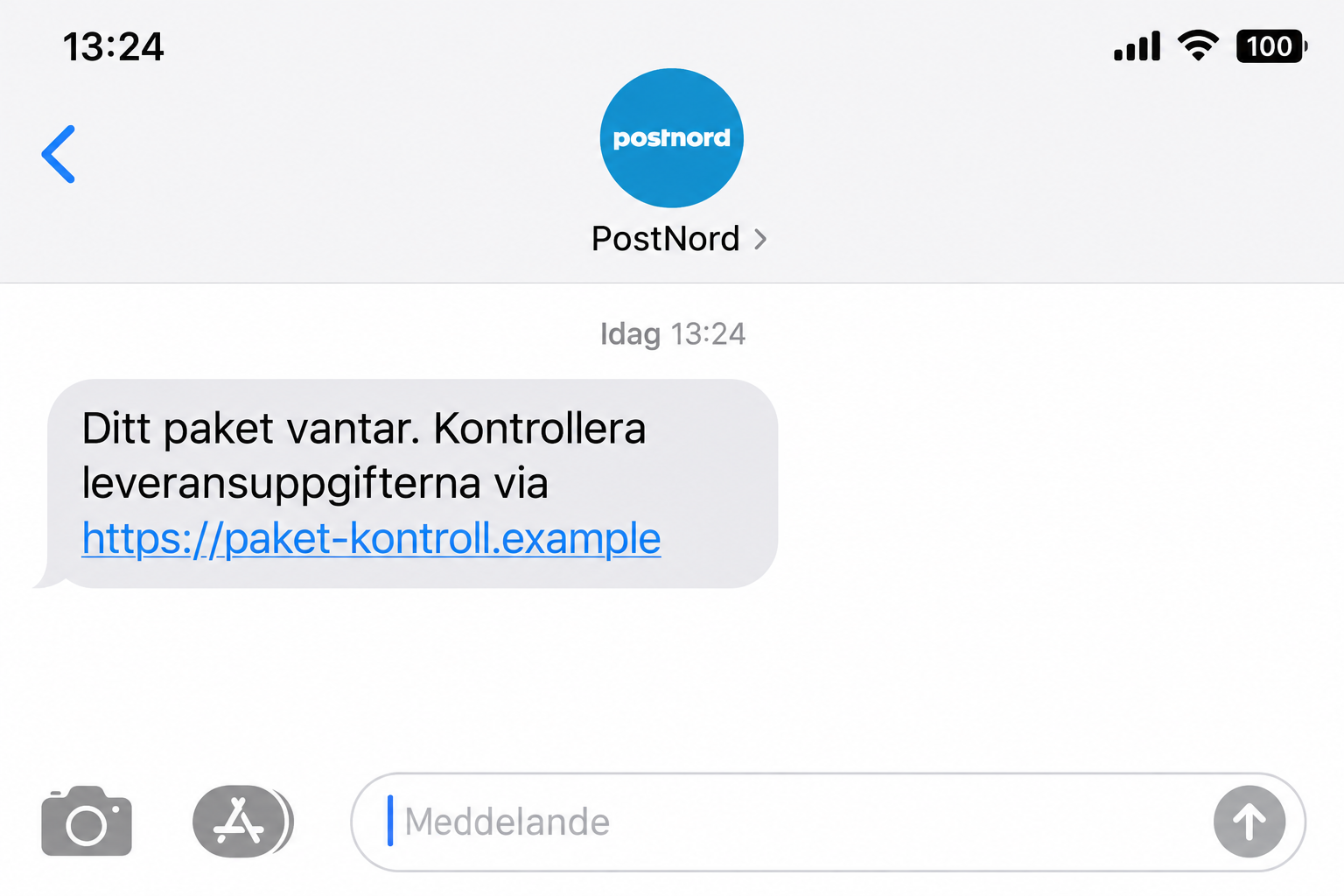
The lead illustration shows a fictional delivery-details text, not a captured message. Its example address is nonfunctional, and it does not establish one universal scam script.
This article uses Sweden-specific PostNord guidance. Do not assume the same reporting numbers or import procedures apply unchanged in every country where the brand operates.
Why Waiting for a Real Parcel Does Not Authenticate a Text
Delivery messages land in a crowded routine. You might have several orders in transit, a family member expecting something, or a shipment with a changing delivery date.
A vague notification can attach itself to any of those expectations. You supply the missing context because you already know a parcel is somewhere in the system.
That does not prove criminals know your shopping history. A message sent broadly can find plenty of recipients who happen to be waiting for deliveries.
Even more specific information should be checked. A tracking reference on a page is only useful when you verify it through the genuine courier or merchant.
The name in your message list also deserves caution. A familiar display label is not a substitute for authenticating the request and its destination.
You do not have to settle the sender’s entire technical history. Open the real tracking service and compare what it says about the shipment.
How the PostNord Text Scam Works
Step 1: A parcel-related message gives you a reason to tap
The approach uses a task that sounds routine: check a delivery or resolve an apparent issue. It does not have to start by requesting a large payment.
Messages vary, so there is no single amount, spelling mistake, or sender number that safely identifies every version. Concentrate on what the next action exposes.
If you are not expecting a parcel, be suspicious, but remember that gifts and household orders can complicate that check. Ask the relevant person independently.
Do not answer the suspicious message with your address or order history. You can clarify a shipment without giving an unknown sender additional information.
Step 2: A copied delivery page makes the link feel official
The browser may show familiar branding, but copying a courier’s appearance does not grant access to its parcel systems. The page could be entirely controlled by an impersonator.
An address can contain “PostNord” in misleading places. A branded-looking path or subdomain does not mean the actual domain belongs to the courier.
Encrypted HTTPS is not proof of that relationship. It can protect the transmission of information to the wrong party just as efficiently as to the right one.
Rather than relying on visual clues, leave the page and check the shipment using the official app or a separately opened website.
Step 3: The delivery task becomes a sensitive-information request
PostNord’s warning identifies banking information and BankID as targets. The dangerous change is from checking a parcel to disclosing or authorizing something valuable.
A small-looking request can still have larger consequences. Card credentials do not become harmless because the surrounding page describes a modest administrative task.
Read any identification or signing screen carefully. What it actually authorizes matters more than the explanation on the delivery-themed page behind it.
If you cannot account for the action, cancel it. You should not approve an unfamiliar operation merely to discover what the supposed delivery process does next.
Step 4: Financial access becomes the problem to contain
Once sensitive information is supplied, the question changes. Finding the parcel is no longer the only priority; the relevant bank may need to secure exposed access.
The exact risk depends on the details entered and approvals made. A visited website, a disclosed card, and a signed banking action are different incidents.
Do not assume a successful-looking final screen means everything is safe. A phishing page can display reassurance without contacting the real courier at all.
Equally, there is no basis to claim every recipient loses money. Act on the evidence from your encounter and the safeguards your bank recommends.
Real Customs Charges Versus a Fake Delivery Payment
The genuine PostNord import information explains that shipments from outside the EU customs union can involve taxes, duties, and declaration charges.
That creates a believable setting for imitation. Someone unfamiliar with import procedures may expect to encounter an extra payment screen without knowing exactly what it should contain.
Start by confirming the order and shipment. Use details from the merchant’s existing confirmation, not just information newly supplied by the questionable text.
Then reach PostNord independently to verify the request. A matching amount is not enough; you want confirmation that the charge belongs to the real shipment.
Be careful with addresses that imitate the official domains. The presence of a brand name somewhere in a long URL does not establish the correct destination.
If the request remains unclear, ask customer service through the genuine site. Do not pay merely to make a warning or countdown disappear.
We are not providing a fixed customs-price test because charges and circumstances vary. A scammer can copy a realistic number just as easily as an unrealistic one.
Likewise, a genuine import charge does not prove the original merchant was honest about its product. Delivery administration and the seller’s promises are separate questions.
Use the Official App Without Following an Unknown Install Link
PostNord recommends its official parcel app as a way to track shipments and view its messages.
If it is already installed from a trusted source, open it directly. Do not first visit a link that claims to update or repair it.
If you need the app, begin with the genuine PostNord website and its official download route. An attachment in an unsolicited text is not that route.
Use the app as an independent check, not another screen opened by the same suspicious sender. Independence is what makes the comparison valuable.
A missing shipment does not automatically settle every case. Contact the merchant or courier through established channels if tracking information is incomplete or inconsistent.
Keep the goal narrow: confirm the parcel, verify any genuine action needed, and avoid turning uncertainty into permission to disclose financial information.
What to Do if You Have Fallen Victim to This Scam
-
Contact the bank if card or BankID information was exposed. PostNord advises prompt bank contact to block affected cards and obtain help with BankID protection.
Describe the exact action: entered a card, supplied credentials, or approved a request. Do not compress everything into “I clicked a text.”
Use a trusted number or your established banking app. An alleged support number on the delivery page should not handle the response.
-
Review what you authorized, not just what you intended. Find any banking notification or transaction record associated with the encounter.
Tell the bank if the action described there differs from checking delivery details. Ask what needs blocking, replacing, or disputing.
Do not approve a second operation to reverse the first at an unknown caller’s direction. A correction should follow the bank’s verified instructions.
-
Keep enough evidence to explain the sequence. Save the text, visible link, time, and relevant screenshots you already have.
Record which details you submitted before closing the page. Avoid storing full security codes in notes or forwarding sensitive banking screens to informal helpers.
If money moved, retain transaction references privately for the bank and police. A public warning can describe the mechanism without exposing your account information.
-
Report the fraudulent text in Sweden. PostNord identifies 7726 as the operator-independent reporting number for suspicious SMS messages.
Its guidance also points to police reporting online or through 114 14. Use the relevant official channels for your location if you are outside Sweden.
After keeping necessary evidence and reporting, block the sender and remove the message. That reduces accidental return visits, although related attempts may use another sender.
-
Check the real delivery separately. Open the official app or website and compare the shipment with your original purchase records.
If someone else ordered the item, ask them directly. Do not use contact details supplied by a supposed courier to establish what your household purchased.
Pay only a request independently confirmed through the legitimate process. Reporting a fake text does not resolve an unrelated real customs requirement.
-
Investigate software exposure if it happened. An ordinary phishing form can work without infecting a device, so avoid assuming a virus caused every problem.
If you installed an unfamiliar app or downloaded suspicious material, Malwarebytes can help check for unwanted software. Consider trusted technical help for unresolved device behavior.
AdGuard may reduce exposure to some malicious ads and unwanted websites. It cannot undo a transfer, replace a card, or cancel a BankID authorization.
-
Watch for the next message claiming to fix the first. A supposed bank agent may refer to the delivery incident to sound credible.
Verify independently before sharing codes or accepting instructions. Someone who repeats your submitted details has demonstrated knowledge, not legitimate authority.
Refuse payment demands for guaranteed recovery. Keep the new contact as evidence and follow the response plan agreed with your actual bank.
How to Assess Your Exposure Without Panicking
If you only received the text, you have not thereby supplied banking information. You can report it and verify any real shipment without starting account-recovery procedures.
If you opened the page but submitted nothing, close it. Note any downloads or permission changes, but do not assume every possible consequence occurred.
If you entered contact details, expect more targeted approaches. They can be concerning without automatically meaning that your bank account is accessible.
If financial information or an approval was involved, escalate promptly to the bank. That distinction keeps attention on the risk that requires immediate action.
Keep the Order Record Separate From the Suspicious Message
For several deliveries, make a small list of the merchant, order date, and tracking reference from each original confirmation. Compare the questionable notice with that list.
This prevents one vague alert from being mentally attached to whichever parcel you most want to receive. It also makes a genuine support inquiry easier.
Do not paste full addresses or order confirmations into public scam discussions. You can ask about the general pattern without giving strangers a detailed picture of your purchases.
Frequently Asked Questions
Is every PostNord text asking for payment fraudulent?
No. Swedish guidance allows for genuine non-EU import VAT and customs requests. Verify the shipment and destination independently instead of trusting the text automatically.
Does expecting a PostNord parcel make the message safe?
No. Mass delivery phishing can coincide with real orders. Check your existing shipment through the authentic app or website before providing information.
Why would a delivery scam be interested in BankID?
BankID-related deception can expose sensitive access or approvals. Read the actual operation carefully and never approve an unfamiliar action just to resolve a parcel message.
What if the link contains the word PostNord?
The word can appear in a misleading address without the domain belonging to PostNord. Use an independently opened official service to verify the request.
Where can I report a fake PostNord SMS in Sweden?
PostNord directs recipients to forward suspicious texts to 7726. Police reporting is available online or through 114 14; bank exposure still needs immediate bank contact.
Can a security scan fix an exposed card or approval?
No. A scan addresses possible device problems. Your bank handles card protection, affected authentication, transaction review, and the appropriate response to unauthorized activity.
The Bottom Line
A PostNord text scam uses delivery expectations to make an unfamiliar link feel routine. The real courier’s name does not authenticate the person sending it.
Check the parcel independently, allow for genuine customs procedures, and protect exposed banking access promptly. A small delivery question should never bypass those checks.








