

An urgent email says an unfamiliar device tried to reach your cryptocurrency. Even if you rarely check your wallet, that warning can demand your attention immediately.
The message offers someone to contact and a way to protect your holdings. Before starting that conversation, take a moment to examine who is offering help.
Overview
The security warning is a route into fake support
The Device Attempting to Access Your Crypto email scam impersonates a support team and uses an alleged intrusion to persuade recipients to contact strangers.
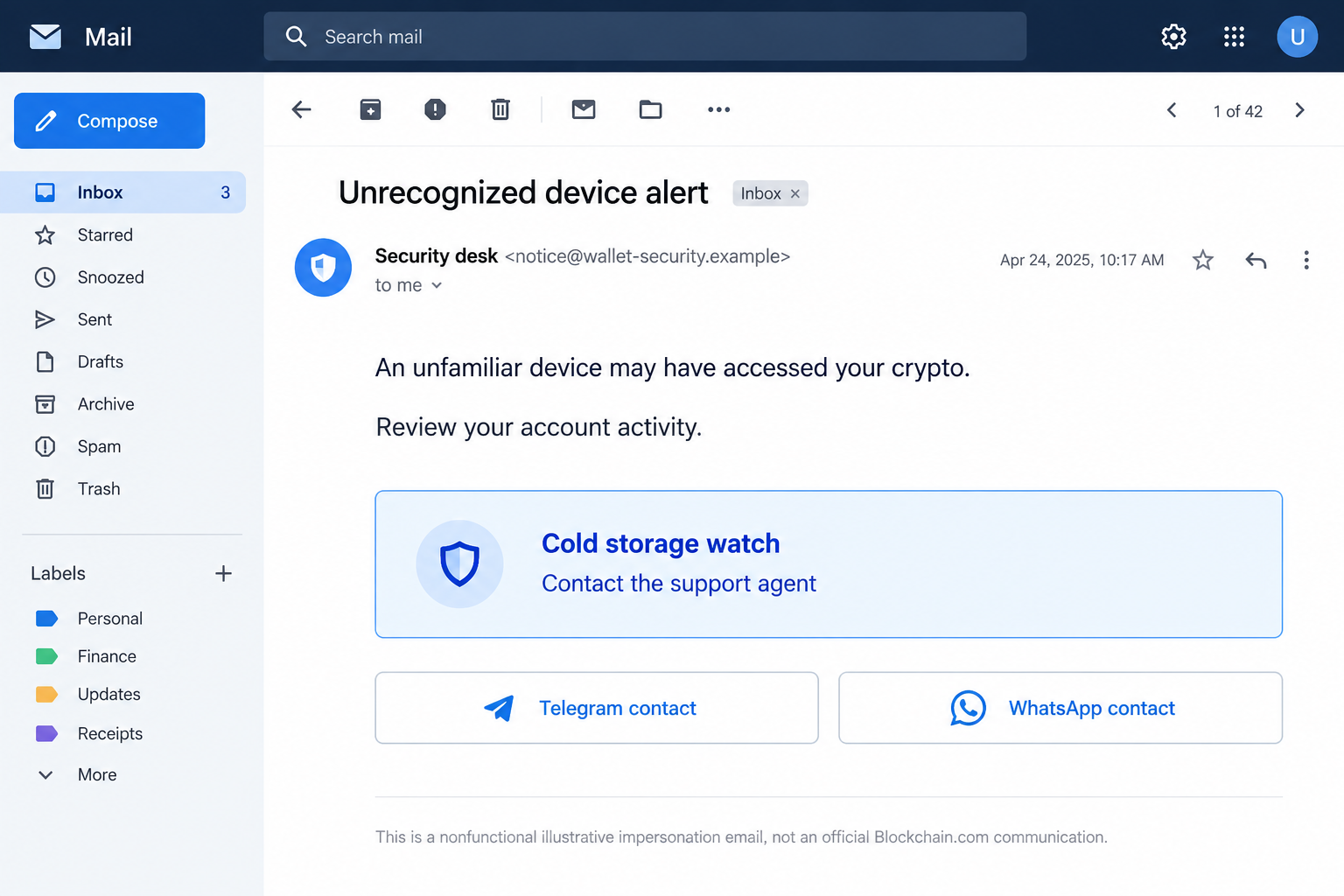
A specimen documented on October 8, 2026 invokes Blockchain branding, an unauthorized device, and a supposed cold-storage protection process.
Its immediate objective is conversation. Instead of requiring a password on the first screen, it supplies messaging contacts that can take over the explanation.
The message does not establish an actual account intrusion
A claim that somebody accessed your crypto is not a security log. Verify account activity independently before accepting the email’s version of events.
The reported contacts included Telegram and WhatsApp. We have not contacted those accounts, identified their operators, or independently observed a victim conversation.
The lead image is an original illustration using fictional contact details. It is not a screenshot of a customer’s account or an authenticated provider notice.
Stop the conversation before it becomes a transfer
The important boundary is control. A stranger offering protection must not receive your recovery words, account codes, remote access, or a transfer to their chosen wallet.
- Check the alleged incident through the service you already use.
- Find support inside that service, not inside the alarming email.
- Keep recovery words and private keys outside every support conversation.
- Reject a supposed safety move to an address supplied by a stranger.
The real Blockchain.com service is not the scam described here. This warning concerns people borrowing its identity to create a false security emergency.
Why a Helpful Conversation Can Be More Dangerous Than a Link
People are often taught to watch for suspicious buttons. An email that asks for a chat can feel different because there is no obvious login form.
But the absence of a form does not authenticate the person waiting on the other end. Conversation can be the next stage of phishing.
A human operator can answer objections, change the explanation, and react to what a recipient reveals. The instructions need not be fully visible in the original email.
For example, someone who mentions an exchange account might receive different instructions from someone who describes a self-custody wallet. That is an illustrative risk, not a verified transcript.
The apparent personalization can be convincing. A reply about your exact concern feels more attentive than an automated page, even when the concern came from you.
Remember who established the emergency. If the same unknown sender reports the danger and selects the person who can fix it, there is no independent check.
You can break that loop without arguing. End the interaction and open your existing account or wallet application through its usual route.
A legitimate investigation can survive that pause. A demand that you remain in one private chat should make you more cautious, not more cooperative.
How the Device Attempting to Access Your Crypto Scam Works
Step 1: A device warning makes the situation feel personal
The opening allegation concerns unauthorized activity rather than an investment opportunity. It appeals to the wish to preserve money you already own.
A reader may imagine that the sender has observed something hidden from them. Yet an email can make this assertion without knowing any wallet balance.
Ask what account is supposedly affected and where its verified activity appears. Do not supply missing account information so the sender can complete the story.
If you have no relationship with the named provider, that mismatch matters. You do not need to create an account to investigate someone else’s unsolicited warning.
If you do use the provider, verify through your established account. A coincidental match between a brand and your habits is not proof of sender access.
Step 2: Security language makes cooperation sound protective
The specimen mixes danger with advice about keeping sensitive information private. Familiar safety language can lower resistance to the rest of the message.
Evaluate the requested action separately from the reassuring sentences around it. Someone can repeat good advice while guiding you toward a harmful next step.
The phrase “cold storage watch” deserves particular scrutiny. In this message, it functions as an unexplained protection instruction rather than a verified service feature.
Do not invent a technical meaning that makes an unclear request sound reasonable. Ask your real provider whether a relevant feature exists through an independent channel.
An unfamiliar label is not automatically fraud by itself. Here it appears within an unsolicited impersonation message that directs the recipient to unverified helpers.
Step 3: Messaging contacts move the discussion away from the account
Once the recipient opens a separate chat, the impersonator can become the main source of information about the supposed incident.
The conversation’s display name or profile image may repeat the same branding. Those visual details are not a continuation of your authenticated customer session.
Blockchain.com’s official social-media guidance says it does not initiate contact with retail users through social platforms or WhatsApp.
Its guidance distinguishes established, verified institutional or VIP relationships. That exception does not authenticate a new contact introduced by an unsolicited alert.
Use the support route independently published by your provider. Do not ask the questionable contact to supply the evidence that proves their own identity.
Step 4: The proposed protection can surrender account or wallet control
In fake-support fraud, the damaging instruction may involve a recovery phrase, an account login, a verification code, or sending assets to an alleged secure destination.
These are possible paths, not claims that every recipient of this specimen received the same follow-up. No independently observed chat is available here.
A phrase disclosure can recreate wallet access. An account code can assist an unauthorized login. A voluntary transfer can move funds without either secret being stolen.
That last distinction is important. Keeping your password private does not protect a payment you willingly authorize to an address controlled by the impersonator.
Read the actual effect of each instruction. The words safeguard, verification, or migration do not change who will control the money afterward.
Step 5: Further instructions can prolong the exposure
After someone has acted, uncertainty can keep them listening. They may want reassurance that the transfer arrived safely or that the security process is nearly finished.
Stop if a supposed helper introduces additional deposits, another wallet, or a fee to correct the previous step. Investigate those requests independently.
We have not established a specific escalating-fee sequence for this email. It is a follow-up risk readers should recognize, not an invented ending to the specimen.
Preserve the conversation rather than trying to persuade the operator to return money. Promises made by the same unverified contact should not dictate your recovery plan.
The sooner you separate from their instructions, the easier it becomes to identify what actually happened and protect anything that remains within your control.
Cold Storage Is About Keys, Not a Support Agent’s Promise
A new address does not automatically mean safer custody
A wallet address tells you where a transfer is going. It does not tell you whether the recipient holds keys offline or belongs to your provider.
If an unfamiliar person creates the destination, they may control it. Calling it a protective address does not give you independent signing authority.
Even a small successful test establishes only that a transfer arrived. It cannot prove the recipient’s identity or guarantee that a larger transfer will be returned.
A recovery phrase is not a support reference number
Your recovery words are fundamentally different from a transaction hash or a public receiving address. They can recreate control rather than merely identify an event.
Blockchain.com’s security guidance warns against giving out backup phrases, pairing codes, or wallet access. A private support conversation does not remove that boundary.
Do not photograph a backup card to make troubleshooting easier. The image contains the same secret as the written words.
An exchange login and a self-custody wallet require different responses
A provider account may have sessions, passwords, withdrawal controls, and support-assisted recovery. A self-custody secret creates a different kind of exposure.
Determine which system was affected before changing settings. Resetting an exchange password does not invalidate a separately exposed wallet phrase.
Likewise, a suspicious email alone does not require replacing every wallet. The response should follow the actual disclosure or authorization, not the sender’s frightening description.
What to Do if You Have Fallen Victim to This Scam
-
End contact and preserve the record. Stop replying to the email and messaging accounts. Save the messages, profile identifiers, dates, and any addresses they supplied.
Do not send another payment to test the contact. Avoid publishing private account details when asking others for help.
-
Write down what you shared or approved. Separate a conversation from a password disclosure, recovery-phrase exposure, signed request, installed program, and completed transfer.
This short timeline helps legitimate support respond to the real incident. Include approximate times and the account or network involved.
-
Secure affected provider accounts independently. If you disclosed a password or login code, open the real service and review security activity, sessions, and withdrawal settings.
Change the exposed password, remove unfamiliar access, and contact verified support. Secure the associated email account if it was also exposed or shares the same password.
-
Replace wallet secrets that were revealed. Create a separately generated wallet using trusted software and a clean device. Do not restore the compromised phrase as your replacement.
Plan how to protect remaining assets across affected accounts and networks. If deposits immediately disappear, seek verified specialist guidance before adding more funds.
-
Review signatures and transfers. Check the wallet’s history and a suitable blockchain explorer. Record destination addresses, transaction hashes, assets, amounts, and network names.
For unsafe spending permissions, follow verified wallet guidance on revocation. Disconnecting a website does not necessarily cancel an existing authorization.
-
Report financial losses promptly. Contact any involved exchange through its official support route. Provide public transaction evidence and explain that impersonation was involved.
File a report with IC3 or your local law-enforcement reporting service. Some transactions can be traced, but recovery is uncertain.
-
Inspect software exposure separately. If the contact persuaded you to install remote-access software or an extension, stop using that setup for sensitive activity until assessed.
Malwarebytes can help inspect unwanted software. AdGuard may reduce deceptive advertising, but neither tool revokes wallet permissions or retrieves money sent to another address.
-
Block follow-up recovery pitches. Be wary of new contacts claiming they can retrieve everything after seeing your complaint. A confident promise does not establish capability.
Never provide a recovery phrase or advance payment to unlock a refund. Keep subsequent communication within independently verified support and reporting channels.
If You Only Read the Alert
You do not need to start a security conversation with its sender. Report the message as phishing and check your account through the application you normally use.
Receiving an email is not evidence that its author controls your wallet. Do not let a fabricated emergency persuade you to move assets unnecessarily.
If genuine unfamiliar activity appears in your account, investigate that evidence on its own merits. The suspicious email still should not choose your support contact.
For a family member who is worried, help them pause and locate the real service. Calm, specific assistance is more useful than criticizing their initial reaction.
Ask what they actually did before assuming the worst. Someone who replied with a question needs different help from someone who photographed a recovery phrase.
Keep useful records without circulating the scam’s live contact details. A warning can describe the method without sending the next reader directly to its operator.
Frequently Asked Questions
Does this email prove someone accessed my crypto?
No. The claim is part of the lure. Verify activity through your real account or wallet without following the email’s contact instructions.
Is Blockchain.com behind the warning?
The documented message impersonates support. Do not confuse that abuse with a finding that the real provider operates the scam.
Is every Telegram or WhatsApp conversation fraudulent?
No. The issue is an unsolicited, unverified support route. Confirm any claimed relationship through contact information you obtained independently from the actual provider.
Should I send crypto to a safe wallet supplied by support?
Do not trust an address supplied by a stranger promising protection. Establish who controls the destination before authorizing any transfer.
What if I shared recovery words but nothing disappeared?
Treat those words as exposed. Another person can retain them for later use, so unchanged balances do not restore their secrecy.
Can antivirus software undo the damage?
It can help address malicious software, not reverse a blockchain transfer or make a disclosed phrase private. Account and wallet recovery require separate action.
The Bottom Line
The Device Attempting to Access Your Crypto scam turns a frightening alert into an invitation to fake support. The conversation, not just a link, is the trap.
Verify the incident independently and keep control of your secrets and transfers. If you already acted, document the precise exposure and use established recovery channels.

Reviews & discussion
0 commentsShare a firsthand experience, or ask a question.
Community reviews
Device Attempting to Access Your
Moderated reader experiences, not an editorial verdict.
Start the conversation
Have a question or something useful to share? Add the first comment.