

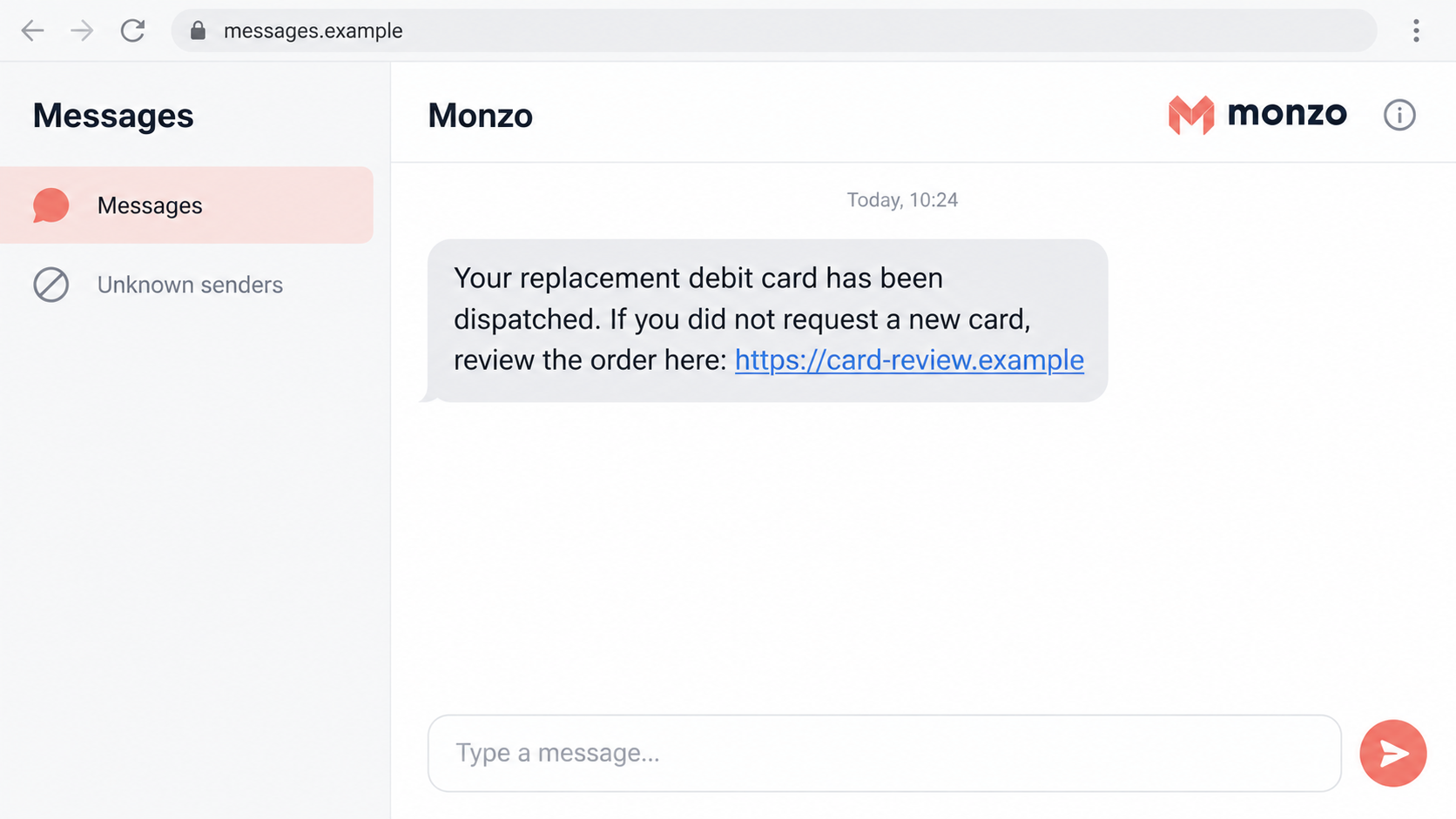
A text says a replacement Monzo card has already been dispatched. You did not order one, but the message offers a quick way to review it.
The Monzo replacement card scam makes checking your own account feel urgent. The next few taps should happen somewhere the sender does not control.
Overview
A supposed card order becomes the reason to visit a fake site
The fraudulent text claims a new debit card is on its way and directs the recipient to a lookalike website if the order was not requested.
That page is a phishing destination, not a safe way to cancel a genuine bank action. The threat is the information or permissions requested there.
The familiar cancel-if-this-was-not-you wording makes the link feel protective. You are encouraged to act against a possible fraud while following the fraudster’s instructions.
This warning concerns the impersonating message. Monzo is a legitimate bank, and a real card renewal needs checking through its actual service.
An unexpected replacement can also have a genuine explanation
Monzo explains that it contacts customers before a card expires. If there is no response, it may automatically send a replacement to the recorded address.
Its guidance about an unrequested new card makes that distinction important. Unexpected dispatch alone does not prove a scam.
The safest response is checking the card section and speaking with Monzo through the genuine app, not trusting a cancellation link in a surprise text.
Monzo login links need different protection from a password
Monzo’s account access uses emailed magic links rather than an ordinary Monzo password. Your email account is therefore an important part of banking security.
A fraudulent page or caller may try to obtain a login link, a code, card details, or a misleading approval. Watch for:
- A cancellation page on a domain unrelated to the real bank.
- A request to forward a banking login email or reveal its code.
- Questions about your email password or complete card information.
- An instruction to approve a payment to supposedly reverse an order.
- A stranger asking for your PIN or control of your device.
The message image uses a fictional address to illustrate the hook. It is not an authenticated Monzo notification or a captured current phishing page.
Why Canceling an Order Can Feel Safer Than Ignoring It
The message makes inaction sound dangerous
An unexpected card replacement suggests somebody may be changing your account. Ignoring the text can feel irresponsible when your money might be involved.
That concern is reasonable. The unsafe part is letting the unknown sender choose how you investigate it.
Opening the bank app directly is still taking action. You do not have to click the supplied link to demonstrate that you are protecting the account.
A dispatch notice sounds like a finished bank process
The wording presents the replacement as already approved and moving through delivery. That can make a fabricated event feel more concrete than a vague security warning.
Names, timestamps, or order references can reinforce the impression. Those details should be matched against your own account, not accepted because they look specific.
A notification can also coincide with a real renewal. Check both the account event and the sender’s requested action rather than assuming they belong together.
The phrase about an unauthorized request supplies the excuse
The text offers to undo the very event it introduced. That closes the loop before you ask whether the supposed event exists.
A cancellation or fraud-review label does not change the sensitivity of the information requested. A PIN remains sensitive even when the form calls it verification.
How the Monzo Replacement Card Scam Works
Step 1: A text announces a card you did not knowingly order
The message is brief: a replacement debit card has been dispatched, and anyone who did not request it should follow the stated review route.
The recipient may immediately think about a stolen account, an incorrect address, or a card arriving somewhere unsafe. Those concerns make the link seem useful.
Do not resolve that uncertainty by replying with account information. The genuine app can show card information without involving the text’s sender.
If your card is nearing expiry, automatic renewal may explain the real account event. That still does not authenticate an unrelated link.
Step 2: The cancellation link opens an imitation bank page
The destination borrows the bank’s identity and presents a review or verification task. Familiar colors and a recognizable name can make the new page feel expected.
A spelling variation or bank-related word in the address is not proof of ownership. The precise website matters more than the label on the button.
A secure-connection indicator only describes encryption to that destination. It cannot establish that the bank controls the page.
Before entering anything, leave the page and use your installed app. You do not need to complete the form to discover whether it is safe.
Step 3: The form turns a card query into sensitive disclosures
The operator asks for information supposedly needed to identify the order or customer. Card details, personal information, or account-access information may be requested.
The questions can seem relevant to canceling a card. Their relevance to the story does not make the recipient authorized to collect them.
A form asking for your email password is especially dangerous. It attempts to reach an account that can contain financial messages and recovery links for other services.
Do not submit a second card or different credentials after an error. The page may be collecting information rather than performing a genuine cancellation.
Step 4: A code or login link can extend the exposure
A phishing conversation can progress to a request for an emailed login link, a code, or an approval. These are possible escalations, not one fixed form.
Monzo’s security explanation describes passwordless access and app-based authorization. A genuine bank message can be triggered by someone else’s attempted action.
Never forward the login email to a stranger who says it proves you own the account. They are asking for an access mechanism, not harmless confirmation.
Read any app approval yourself. If it describes a payment, approving it is not a neutral step for canceling an unexpected card.
Entering a PIN inside the genuine app for an action you chose differs from giving that PIN to an incoming caller or unverified website.
Step 5: The original concern can become a follow-up fraud story
A later caller may say the replacement exposed a security problem and offer help. Information entered earlier can make that conversation sound personally informed.
The caller may claim you need to move money, install assistance software, or share another code. End the incoming contact instead of following the revised story.
Explain the whole sequence to Monzo through a trusted channel. The bank needs to know whether card data, email access, links, codes, or payment approvals were involved.
Receiving this text does not mean your Monzo account was accessed. Look for actual changes in the app and describe any information you gave away.
Check the Replacement in the Real Monzo App
Look at the card record rather than the text’s order page
Open Monzo from the app you already use. Inspect the relevant account’s card section for replacement information or other changes you do not recognize.
If the status is unclear, use in-app help. Ask whether a replacement exists, why it was issued, and which address is associated with it.
Do not send your address or account details back to the suspicious text to fix a mismatch. Let verified support handle that question.
Separate ordinary expiry from an unauthorized change
A renewal near expiry can happen automatically. A replacement unrelated to expiry, a changed delivery address, or unfamiliar activity deserves a different discussion with the bank.
Monzo describes sending a renewal notification and email about 8-11 weeks before expiry. After two weeks without a response, it may dispatch the replacement automatically.
That timing gives you a useful account check: compare the current card’s expiry with genuine renewal messages you received, rather than the suspicious text’s claim.
Tell support which event you saw in the real app and which event was mentioned only in the text. That prevents the two records being confused.
Ask whether freezing or replacing the card is appropriate. Card restrictions and account-access containment are different measures, so explain all the information exposed.
Protect the email account that receives banking access
If a login email was forwarded or an email password disclosed, treat that as more than a card-order question.
Review the mailbox’s sign-in history, recovery options, forwarding settings, and active sessions. Secure it through the email provider’s actual account controls.
An email address and access to the mailbox are different things. Tell support whether you merely supplied the address or also disclosed its password or login information.
Enable the email provider’s additional sign-in protection if available. Review unfamiliar approvals without using a security link introduced by the card-order sender.
Monzo’s login help explains legitimate login-link requests. Generate a fresh request yourself rather than using instructions from the impersonator.
What to Do if You Have Fallen Victim to This Scam
-
Stop using the cancellation page.
Close it without submitting more information, replying to the sender, or accepting new verification instructions. Save the original message for reporting.
Make a short note of what you entered. A clicked link, disclosed card, forwarded login email, and approved transfer are different incidents.
-
Contact Monzo through its genuine support channel.
Use the established app or independently accessed official help. Explain the replacement-card lure and identify all codes, links, credentials, or approvals provided.
Ask the bank to review account access and relevant card or payment activity. Freezing one card may not address every type of exposure.
-
Secure your email if access information was shared.
Change an exposed email password and replace any reuse on other services. Remove unfamiliar sessions and review recovery addresses and forwarding rules.
A new password does not necessarily end every existing session. Use the provider’s sign-out controls and tell Monzo that its login channel may have been exposed.
-
Report card details and payment approvals accurately.
Ask whether an exposed card needs replacement and whether unfamiliar pending transactions can be stopped. Retain the wording of genuine authorization prompts.
Still having the physical card does not make submitted card details private again. Mention the disclosure even if no purchase has appeared yet.
If you approved a transaction while being misled, say so. The bank can assess the case more effectively than if every event is described simply as hacking.
-
Check software only if the interaction included a download or suspicious permission.
Do not install a supposed cancellation application. If anything was installed, use trusted support to assess the device before doing sensitive banking on it.
Malwarebytes can help examine suspected malware on supported systems. AdGuard may reduce risky ads and unwanted destinations, but neither replaces the bank’s account-security response.
-
Keep a record without reopening the phishing site.
Save the SMS, sender label or number, visible address, approximate time, and subsequent bank notifications. Add support references and payment records when relevant.
Do not post card numbers, login links, codes, or private identity images in a public warning. A login link should be protected like other access information.
-
Report the text and any resulting loss.
Forward suspicious SMS to 7726. The U.K. reporting guidance explains additional routes for suspicious messages and financial loss.
Keep the fraud-report reference alongside Monzo’s case record. Message reporting does not itself replace a payment dispute or account review.
-
Reject callers offering another urgent fix.
A caller who knows about the replacement text may be using exposed details. Do not assume that knowledge establishes a genuine fraud department.
Return to the support case you opened independently. Involve someone you trust if the repeated requests are becoming difficult to assess calmly.
Frequently Asked Questions
Can Monzo send a replacement I did not recently order?
Yes. Its official help describes automatic renewal before expiry when a customer has not responded. Confirm the actual card status inside the app.
Does an unrequested card text mean someone accessed my account?
No. A fraudulent sender can invent the order, and a genuine renewal may happen automatically. Review real account activity before deciding what occurred.
Should I change my Monzo password after this text?
Monzo describes passwordless access through emailed magic links. Contact the bank about access exposure and secure the email account rather than looking for a nonexistent ordinary Monzo password.
Is an emailed login link safe to forward to support?
Do not forward it to an unverified caller or address. The link is an access mechanism. Use a support conversation you initiated through the genuine bank service.
What if the text contains my correct name?
A name can make the approach persuasive without authenticating the sender. The important checks are the genuine card record, destination, and information requested.
What if I opened the link but entered nothing?
Close it and inspect the real account. Do not assume financial loss or device infection occurred. Tell Monzo if you also disclosed information, approved something, or installed software.
The Bottom Line
Do not cancel a supposed card order through the link in an unverified Monzo text. Check the replacement directly in the bank’s genuine app.
If you shared card information, a login link, a code, or an approval, contact Monzo promptly. Secure exposed email access as well as the card.








