

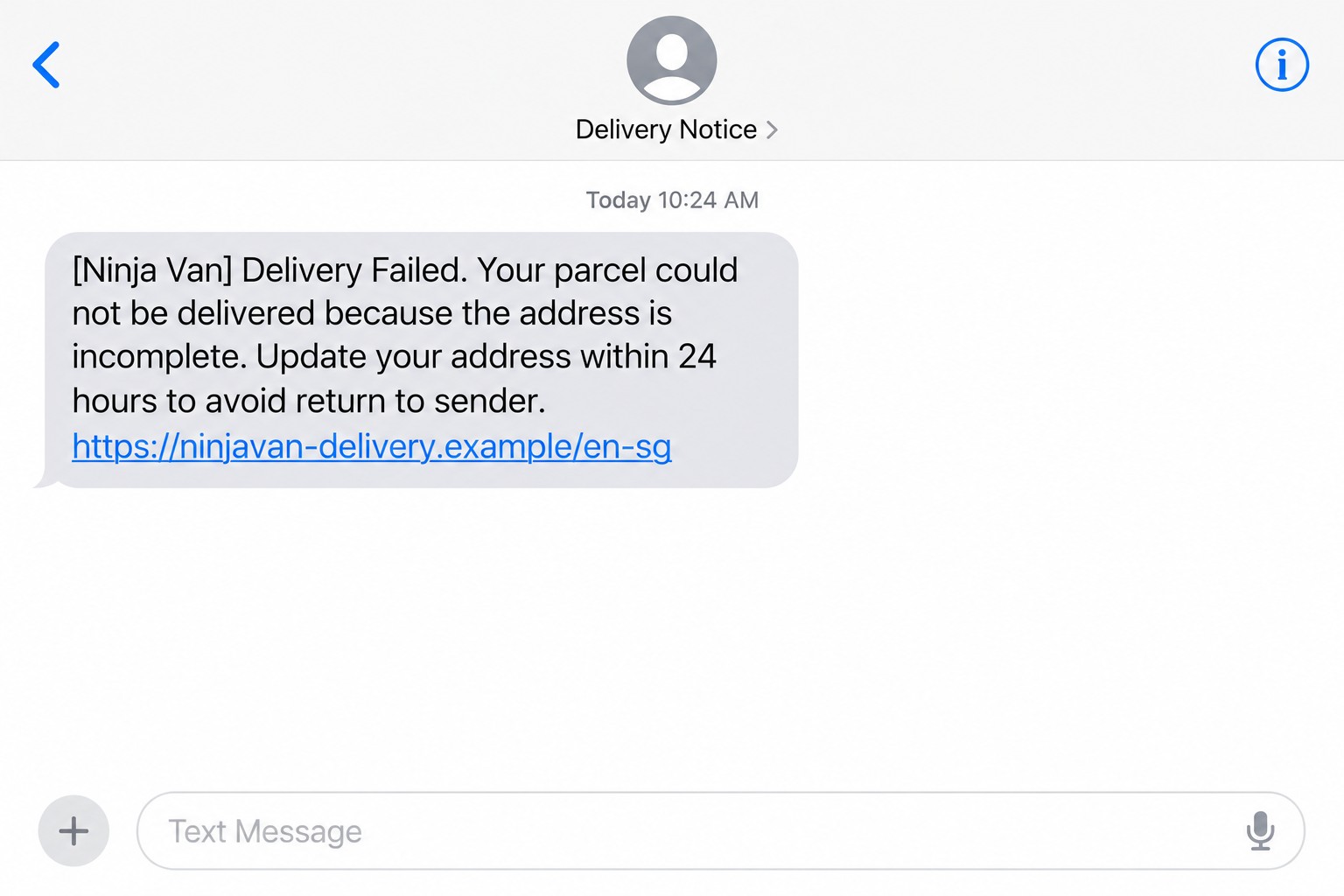
A delivery message says your Ninja Van parcel has an incomplete address. Correct it within 24 hours, it warns, or the package will be returned.
The Ninja Van redelivery scam makes a small delivery problem look easy to fix. The payment screen deserves a closer look before you approve anything.
Overview
A real courier’s name, an invented delivery problem
Ninja Van is a legitimate delivery company. Criminals use its name in messages that claim a parcel cannot move because an address needs correction.
The warning sounds plausible when you’re waiting for an order. A building name, floor number, or apartment detail could genuinely affect a delivery.
But this specific lure is confirmed phishing. Singapore’s ScamShield advisory describes Ninja Van and J&T impersonation leading to tiny fees and unauthorized card use.
The official figures cover the combined courier variant: at least 43 cases and losses exceeding S$259,000 since June 24, 2026, recorded in the July warning.
Those figures aren’t all attributed to Ninja Van messages. They show why this is more than one unhappy customer’s delivery complaint.
The nominal fee hides a different financial risk
The copied site requests a redelivery charge, typically S$0.06 to S$1.64 in the reported cases. The amount looks too small to worry about.
After collecting card details, the site seeks digital-token authorization. ScamShield says cards may then be added to Google Pay or Apple Pay without the victim’s knowledge.
You may believe you approved a tiny delivery fee while the attacker is arranging another way to use your card. The approval’s actual purpose matters.
The lead illustration shows the initial message using a fictional address. It isn’t correspondence from Ninja Van or a capture of a current payment form.
What to watch for in the message and approval
- An unexpected address problem comes with a short deadline.
- A courier-looking link leads to a separate payment page.
- The text may ask you to reply Y or reopen a message to access the link.
- A tiny fee still requires a complete card number and security information.
- A bank approval concerns a wallet, device, or operation you didn’t initiate.
The safe response is to check the actual parcel through the courier’s verified service. Don’t pay through the message to find out whether delivery is real.
If you entered your card, tell the issuer about the possible wallet enrollment. Checking only for the small redelivery charge may miss the important exposure.
Why the Tiny Amount Is Such Effective Bait
Most people would hesitate before sending a large payment to an unknown recipient. A fee smaller than a snack can slip past that hesitation.
The message also frames the decision as protecting a purchase you already made. Losing a parcel feels more costly than paying the requested amount.
You may be weighing a few cents against a lost parcel. Meanwhile, the page is asking for the details of a card you use for much bigger purchases.
A full card number and security code retain their value regardless of the amount displayed beside the button. A bank approval can create additional exposure.
Don’t judge a financial request solely by whether you can afford the advertised fee. Check the recipient and the exact operation being authorized.
A parcel number can also make the request feel specific. It should match an order in your own records and be checked outside the message.
If you aren’t expecting a delivery, you don’t need to investigate by clicking. If you are expecting one, the merchant’s order history gives you a safer starting point.
The scam can catch either person. An unsolicited message doesn’t establish that its sender knows what you ordered or where the real parcel is.
How the Ninja Van Redelivery Scam Works
Step 1: A text or email claims the delivery has failed
The notice describes an invalid or incomplete address and demands a correction within 24 hours. It presents the problem as something only you can resolve.
ScamShield observed messages from numbers using +212 and emails with random-looking addresses. That calling code isn’t proof of where the criminals are located.
A different sender number wouldn’t make the same demand safe. Criminals can change contact details while keeping the address problem and payment request.
The courier name gets your attention; the deadline discourages checking. Slow down before turning an unverified message into a payment task.
Step 2: The message tries to make its link easy to follow
Some messages ask for a Y reply or direct you to reopen the conversation. Others provide a separate message containing the link.
Don’t follow those instructions to activate the destination. They don’t establish a real delivery issue, and replying keeps you engaged with the sender.
The destination may include the courier’s name near the beginning. That familiar word can distract from the separate domain that actually controls the website.
Instead, leave the conversation and open the merchant’s order page or courier service yourself. Use the tracking details you already had before the message.
Step 3: A lookalike page turns correction into payment
The site resembles a courier’s service and requests a modest redelivery fee. The reader now expects a routine checkout rather than an investigation of the sender.
Entering an address first can make later payment fields feel like the natural next step. It doesn’t authenticate the page taking those details.
Check the requested action against the actual courier’s guidance. ScamShield warns that these carriers don’t collect redelivery fees through this SMS or email-link process.
If the real order needs a correction, handle it through the verified carrier or merchant. A copied payment screen isn’t necessary to establish that need.
Step 4: The card and digital-token approval enable further misuse
In the documented flow, the card details are followed by digital-token authorization. This can be used to enroll the card in an unauthorized digital wallet.
Read the bank’s own notification completely. If it mentions adding a card or a device you don’t recognize, stop rather than treating it as delivery verification.
A legitimate bank authentication message can be part of a fraudulent request. The bank may be confirming an operation the attacker initiated with your information.
Approving it doesn’t verify the courier. It authorizes the operation described by the bank, which may be different from the fee advertised on the page.
Step 5: Unauthorized transactions reveal what happened
Victims may only discover the scam when unfamiliar transactions appear. By then, the original text has served its purpose and may no longer matter to the attacker.
A replacement for the physical card may be part of the response, but tell the issuer specifically about suspected wallet provisioning as well.
Ask it to check devices, wallet tokens, and other access connected with the compromised details. Let the bank determine the containment needed for your account.
Don’t wait for the fake courier to explain the charge. The bank needs the details of what you entered and what you approved.
The Genuine Courier Versus the Impersonator
Ninja Van’s recipient scam guidance warns about fraudulent delivery-address verification messages. Use its verified support channels to resolve an actual parcel issue.
The company can communicate with recipients. This warning doesn’t mean every delivery notification, address question, or courier support conversation is fake.
The distinction is the unverified message’s destination and payment demand. A person displaying the right company name isn’t automatically a company representative.
If you ordered through a marketplace, begin in the order details there. Confirm which carrier has the parcel and whether that order shows a problem.
A merchant can help establish the tracking number and delivery status. Don’t let a number in the suspicious text replace the one attached to your purchase.
When contacting support, describe the message without clicking its payment link. Ask how the genuine service handles the particular delivery issue.
Don’t copy financial details into a general support chat. The courier doesn’t need your bank password to tell you where a parcel is.
Likewise, Apple Pay and Google Pay are legitimate services. The scam concerns unauthorized use of your card, not a claim that the wallet providers sent the fake notice.
What to Do if You Have Fallen Victim to This Scam
-
Stop the redelivery process. Don’t reply again, submit another card, or approve a second token request. Check any real delivery separately through your existing order.
If you merely read the message, use your messaging app’s spam-reporting options. You haven’t exposed a card just by seeing a courier name.
-
Call the issuer about phishing and wallet enrollment. Use a number from the physical card or independently opened banking app. Explain the tiny fee and token approval.
Ask the bank to check whether your card was added to an unfamiliar Apple Pay or Google Pay wallet and to revoke unauthorized access where appropriate.
Tell it if you never completed the final screen. Information typed into a phishing page may still have been exposed before an apparent submission confirmation.
-
Examine transactions and alerts. Review recent pending and posted activity, new-device notices, and wallet-related messages. Keep a record of what you don’t recognize.
Report unfamiliar charges promptly through the bank’s dispute process. Ask what evidence and deadlines apply, without assuming a particular reimbursement result.
-
Protect any banking login you supplied. If the page also requested account credentials, change them using a trusted device and the bank’s real service.
Explain any codes or approvals you shared. Don’t approve a caller’s new request to “cancel” the earlier one; speak directly with your bank instead.
-
Preserve the scam trail. Save the message, link, sender details, time, fee shown, and relevant bank notifications. Keep security codes out of public screenshots.
Report the impersonation to the courier through verified support. In Singapore, report financial loss to police and use ScamShield’s 1799 helpline for guidance.
-
Investigate downloads only if they occurred. If the link also persuaded you to install software or grant permissions, treat that as a separate device-security problem.
A Malwarebytes scan can help investigate malicious software on an affected device. It won’t revoke a wallet token or reverse a fraudulent transaction.
AdGuard can provide additional web filtering for future browsing. It doesn’t make an address-update message genuine or replace the issuer’s response.
-
Reject anyone offering a paid rescue. A supposed agent may promise to recover money or deliver the parcel if you pay again.
Keep recovery with the real issuer and verified courier. The original sender doesn’t become trustworthy by acknowledging that something went wrong.
A Better Way to Help Someone Who Already Approved the Fee
Start by explaining the wallet issue calmly. Someone who thought they paid cents may not understand why a bank call is urgent.
Ask what the bank notification said, not just how much the website charged. A screenshot can help, provided it doesn’t reveal codes or card data publicly.
Help them find the genuine issuer contact. Don’t search the suspicious page for support or call a number supplied by the person who sent the text.
Work through the actual order afterward. Securing the card comes first; confirming a delivery shouldn’t delay reporting the financial exposure.
If they worry they’ve missed a legitimate parcel, open the retailer account together. The real tracking record can answer that without another payment attempt.
For shared family cards, tell the account holder promptly. They may receive the transaction alerts even though someone else entered the details.
Don’t delete all evidence while trying to clean up the phone. Preserve the relevant message and bank record, then use reporting and blocking tools.
Explain the lesson as a specific boundary: parcel tracking shouldn’t lead you into approving an unfamiliar wallet. That’s easier to remember than a list of changing domains.
Keep delivery problems and bank problems in separate conversations. The carrier can investigate a real shipment, while the issuer handles unauthorized card access.
Following that order also reduces embarrassment. The recipient doesn’t need to prove the entire scam before asking the bank to protect an exposed card.
Frequently Asked Questions
Is Ninja Van itself running this scam?
No. The warning concerns criminals impersonating the legitimate courier. Verify genuine deliveries through the company’s established service rather than the unexpected payment link.
Why would a S$0.06 fee lead to serious losses?
The nominal amount can distract from card collection and a digital-token approval. The reported variant can enable unauthorized wallet enrollment and later transactions.
Should I reply Y to open the redelivery link?
Don’t activate an unsolicited payment link. Leave the message and check the actual order through the merchant or carrier you independently verify.
Does a bank-sent approval mean the courier page is genuine?
No. A real bank can authenticate an operation initiated with stolen details. Read the operation and refuse unfamiliar device, wallet, or payment approvals.
What should I tell the bank after entering my card?
Describe the phishing page, the fee, and any digital-token approval. Specifically mention possible Apple Pay or Google Pay enrollment and ask it to check unauthorized access.
Do the reported losses apply only to Ninja Van messages?
No. The official figures cover a courier-impersonation variant including Ninja Van and J&T. They aren’t a total attributed solely to one brand.
The Bottom Line
Don’t pay a redelivery fee through an unverified Ninja Van message. In this confirmed scheme, a tiny payment lure can expose a card and its wallet authorization.
Check the parcel through your actual order. If you supplied details or approved a token, contact the issuer now and specifically request a wallet-enrollment check.








