

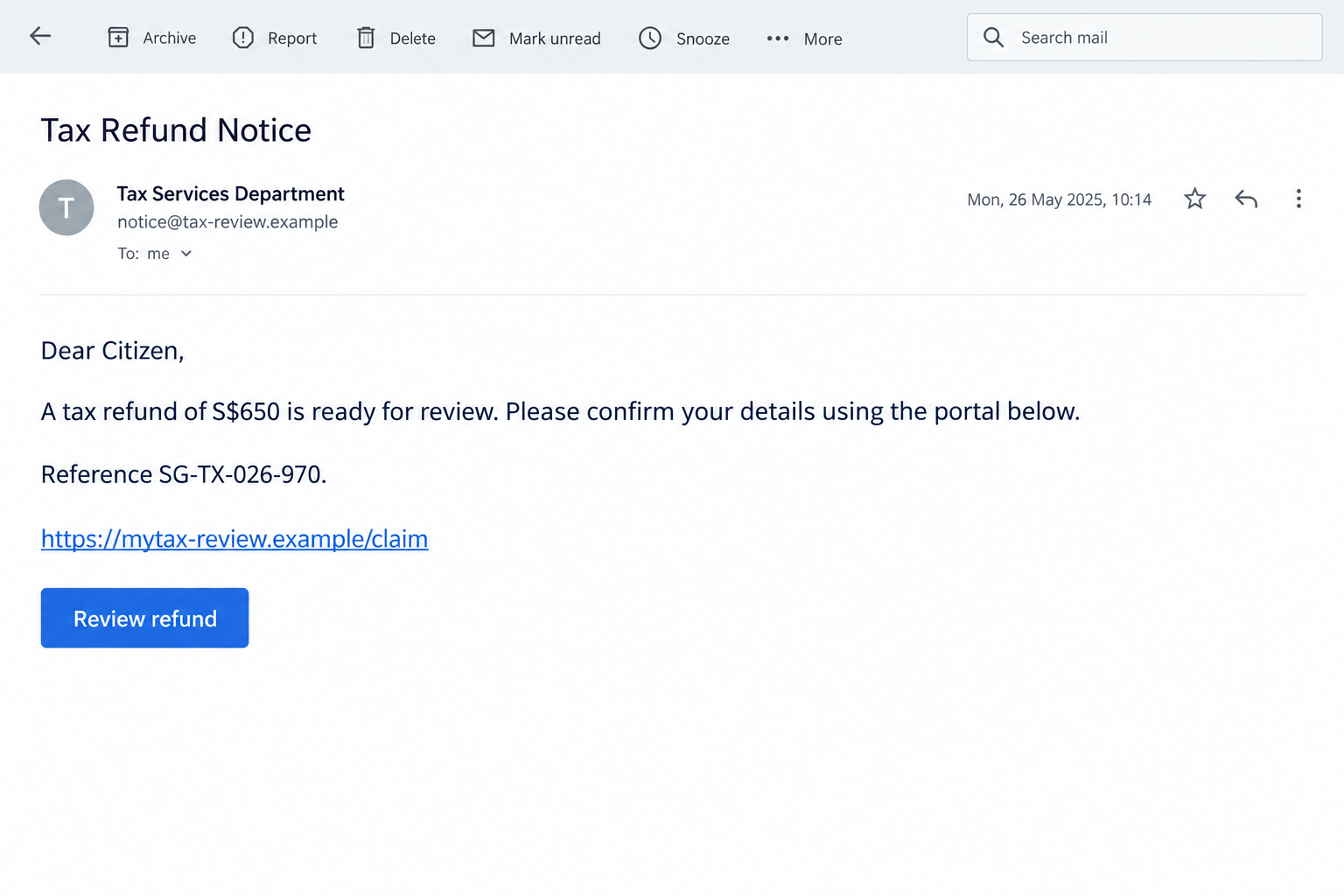
An email says IRAS has found an overcharge and your refund is ready. A reference number and a portal link make it look like routine tax correspondence.
If an IRAS tax refund scam has reached your inbox, there’s a safer way to check the promised payout before following its instructions.
Overview
A refund promise that borrows IRAS’s identity
These messages impersonate Singapore’s Inland Revenue Authority. IRAS is the real tax agency; the fraudulent refund emails are not an offer from that agency.
The hook is an apparent windfall from a previous overcharge. Instead of demanding an alarming tax payment, the sender gives you a reason to expect money.
IRAS’s official refund and payout scam advisory confirms this impersonation. Its examples include a message promising S$650 and other amounts that change between variants.
A precise amount can make the email feel personal. It still doesn’t establish that the sender accessed your tax account or that the refund exists.
The illustration above recreates the general refund lure with fictional contact details. It isn’t a genuine IRAS notice or evidence of your entitlement.
The card payout request exposes the deception
The fraudulent link leads to a copied tax website. There, the recipient is asked to choose a debit or credit card as the refund method.
IRAS doesn’t pay tax refunds to cards. A form asking for that payout method is taking you outside the agency’s genuine process.
Genuine refunds are automatically credited through registered bank or PayNow accounts. You can review your own refund position through myTax Portal.
This isn’t just an inconvenient billing policy or a slow refund. It is a confirmed attempt to collect information by pretending to be the tax authority.
The signs that matter more than the email’s appearance
- The message announces a refund amount and tells you to claim it through an unsolicited link.
- The destination asks for a card as the way to receive your tax payout.
- Official-looking link text doesn’t match where the link actually leads.
- The form asks for banking secrets or verification codes to complete the supposed refund.
- The promised credit can’t be confirmed independently inside your real tax account.
Don’t try to settle the question by comparing logos. Go to the agency’s genuine website yourself and check the account information you can actually verify.
A real refund and a fraudulent email can coexist. Having money owed to you doesn’t make a particular claim link trustworthy.
How a Genuine IRAS Refund Differs
The strongest check is the refund process, not a tiny spelling mistake. A page can have polished English and still ask for the wrong kind of information.
IRAS directs taxpayers to their secure portal for confidential tax information. The agency says it doesn’t send emails announcing your tax refund amount.
Navigate independently to myTax Portal. Don’t use a portal address copied from the suspicious email as your starting point.
If your genuine account shows a refund, follow the instructions within that verified service. An unrelated card form isn’t required just because the email says otherwise.
You might legitimately need to maintain account details for payments. Make those changes through the authenticated agency process, not through a surprise message.
Also distinguish receiving money from authorizing money to leave. A bank notification describing a purchase, transfer, or new device isn’t merely confirming a tax credit.
Read what an approval actually says before acting. The amount printed on the refund page isn’t a reliable description of the operation your bank is approving.
If the portal and the message disagree, ask IRAS through contact details reached from its official website. Don’t ask the sender to validate its own claim.
How the IRAS Tax Refund Scam Works
Step 1: The email creates a believable reason to claim money
The message says a review found an overcharge, a refund has been approved, or a payout needs confirmation. Its tone resembles ordinary administrative correspondence.
A tax reference gives the reader something concrete to focus on. The invitation to review details seems less risky than an obvious request to send money.
You may think you are correcting a record rather than making a purchase. That expectation makes a linked form feel like part of the refund process.
The scam doesn’t need an authentic tax calculation. It needs the recipient to accept the story long enough to move from the inbox to its page.
Step 2: A convincing link moves you away from the genuine portal
The visible link may contain an official-looking tax address. The underlying destination can be something entirely different, including an intermediary that redirects again.
In the agency’s S$650 example, the displayed portal-style text conceals a different destination. The appearance of the text isn’t proof of who controls the page.
On a computer, inspecting a link without clicking can help reveal a mismatch. On a phone, preview behavior varies, so independent navigation is usually simpler.
Don’t open the link merely to inspect it more closely. You already have a safer route to check the claim through the real agency.
Step 3: The copied page asks how you want the refund paid
The page presents debit or credit card choices as a convenience. This is the point where a reassuring refund story becomes a request for valuable financial data.
A card number, expiration date, and security code aren’t harmless administrative details. Entering them into an impostor’s form exposes a payment instrument.
A copied heading or tax logo doesn’t change that. The fake page is asking you to use a payout method that IRAS specifically rules out.
Leave the form without completing it. If you already typed information, don’t assume it remained private because you stopped before the last screen.
Step 4: Further verification can increase the exposure
Some versions request banking information or codes. What matters is the operation behind the request, not the label “verification” placed beside it.
Never send a banking code to an email contact or enter it into an unverified tax form. Contact your bank if you’ve already done that.
A follow-up request to correct an error can be another attempt to keep you engaged. Don’t provide a second card to make the promised credit appear.
IRAS also warns that some links can deliver malicious software. That possibility calls for checking downloads and installations, not assuming every clicked email infected the device.
Step 5: The victim waits for a credit while the account needs attention
The refund promise can keep someone waiting after submitting details. They may check for the incoming amount while overlooking small or unfamiliar outgoing transactions.
If card or banking information was shared, review both pending and posted activity. Tell the bank about the phishing exposure even if no charge appears yet.
Don’t rely on the fake page’s confirmation screen. A successful-looking submission can be displayed without any connection to IRAS or an actual refund.
The useful next step is containment, not chasing the promised money. Save the evidence, secure the affected accounts, and verify any real tax credit separately.
Sender Names, Domains, and Reference Numbers
A sender display name is just the name your email app shows. Seeing IRAS there doesn’t establish that the agency sent the message.
The actual address may reveal an unrelated domain. Even a plausible address should be considered alongside the requested action and the independent portal check.
IRAS says legitimate email addresses use its iras.gov.sg domain. Don’t treat a copied visible sender string as the only authentication test.
Official words can appear anywhere in a deceptive web address. The presence of “tax” or “IRAS” doesn’t make a separate domain part of the agency.
HTTPS protects a connection to the site you opened. It doesn’t prove that the operator is the tax authority or that a refund form is legitimate.
A reference number can be invented just as easily as a heading. Compare it with information obtained through the genuine service, not another page linked in the email.
Keep screenshots of these details if you report the attempt. Don’t post your genuine tax identifier, financial records, or security codes in a public warning.
When discussing the scam with family, focus on the card-payout mismatch. It’s a more useful test than asking them to memorize every possible fake domain.
What to Do if You Have Fallen Victim to This Scam
-
Leave the refund conversation. Stop filling out the page and don’t answer follow-up requests. Use the genuine IRAS portal to check whether any refund is due.
If you only read the email, preserve enough information to report it and then remove it. Reading a refund promise doesn’t mean your card was exposed.
-
Tell the card issuer exactly what you entered. Use the bank’s official app or the contact printed on your card, not a number supplied by the email.
Explain whether you gave the full card details, banking credentials, a code, or an approval. Ask which protections, card replacement, or transaction checks are needed.
-
Review activity without waiting for the refund. Check pending charges, transfers, and unfamiliar account changes. Record amounts and times rather than relying only on merchant names.
Ask your bank how to dispute unauthorized activity and whether anything can still be stopped. A refund decision depends on the circumstances, so don’t assume reimbursement.
-
Secure any exposed login. Change a shared password through the real service on a trusted device. If you reused it elsewhere, protect those accounts too.
Review available session and security settings. If Singpass information or approvals were involved, contact Singpass through its genuine service and inspect suspicious login alerts.
-
Check what the link left behind. Look for unexpected downloads, installed applications, browser extensions, or notification permissions. Don’t open a downloaded file to determine whether it’s suspicious.
If you installed or ran something, use a safe device for banking while the affected one is assessed. A qualified technician can help contain a suspected compromise.
Malwarebytes is a useful option for checking a device after risky software exposure. It can’t withdraw information from a phishing form or undo a bank approval.
-
Keep a concise record and report. Save the email, destination, screenshots, and bank reference numbers. Report the impersonation through IRAS’s official contacts and your email provider.
In Singapore, the ScamShield helpline is 1799. If money was taken, make a police report and provide the bank with the corresponding reference.
-
Expect another attempt to recover your trust. A caller may repeat the refund amount or your personal details. Knowing them doesn’t authenticate the caller.
Don’t pay an agent to unlock the refund or recover stolen money. Keep discussions with the actual agency and bank on independently verified channels.
AdGuard can supplement browser filtering against some malicious destinations. It doesn’t decide your tax entitlement or authenticate every email that claims a payout.
Protecting Future Tax Correspondence Without Ignoring Real Notices
You don’t need to stop using online tax services. The goal is to avoid letting an unsolicited message choose where you log in or provide financial information.
Keep a bookmark for the genuine tax portal after verifying it independently. Use it when an email claims that your account needs attention.
Maintain your contact details within the real services you use. Security alerts can help you spot access that you didn’t initiate.
For households, agree that refund emails won’t be completed while multitasking. Taking a minute to open the genuine portal is easier than repairing several compromised accounts.
A family member helping with taxes should receive relevant documents through an agreed channel. Forwarding a claim link without context can make it appear preapproved.
Email spam and phishing filters add another barrier. Keep them enabled, but don’t assume a message is safe simply because it reached your inbox.
When a real notice needs attention, act through the real agency. Rejecting the fake card form doesn’t mean ignoring an actual tax obligation or missing legitimate support.
The same distinction helps when someone insists the link is necessary. Ask for information you can verify inside your account rather than agreeing to another untrusted form.
If you manage company tax correspondence, tell colleagues about the refund route. A convincing administrative email should not bypass your existing financial-information controls.
Record who is allowed to update payout details and how changes are confirmed. That keeps a believable email from becoming an unofficial way to alter financial instructions.
After a reported incident, review the process without blaming the recipient. A clear response route makes the next employee more likely to ask for help promptly.
Frequently Asked Questions
Is an email promising an IRAS card refund genuine?
No. IRAS explicitly says it doesn’t process tax refunds to debit or credit cards. Check the refund through your actual tax account instead.
What if I’m genuinely expecting a tax refund?
You can still receive a scam email. Confirm the amount and status within myTax Portal; don’t let your expectation authenticate a separate claim link.
Does the S$650 amount identify every version?
No. It’s one published example. Amounts, references, subjects, and destinations can change while the false payout and information request remain the same.
Is a portal-looking link enough to trust the email?
No. Visible link text can conceal another destination. Open the genuine agency website independently rather than using an unsolicited refund button.
Should I cancel my card after merely reading the message?
Reading alone doesn’t expose card details. If you entered financial data or authorized anything, contact the issuer and let it assess the needed protections.
What if the page says my refund is being processed?
That confirmation doesn’t establish a real payout. Stop interacting, check the genuine portal, and protect any card or account information already supplied.
The Bottom Line
Don’t enter card details to claim an IRAS refund from an unsolicited email. The request contradicts the agency’s genuine payout process.
Check myTax Portal through an independently opened address. If you’ve already shared information or approved an operation, contact your bank immediately and secure the affected accounts.

Join the discussion
0 commentsShare your experience or ask a question about this article.
Discussion
Start the conversation
Have a question or something useful to share? Add the first comment.