

A Facebook ad or WhatsApp caller appears to represent a familiar community center. The conversation feels helpful, and a group invitation seems like a convenient next step.
The fake PAAC staff scam exploits that everyday trust. Before following the group’s instructions, check who is really arranging the activity.
Overview
Criminals impersonate a genuine community service
Precious Active Ageing Centre, commonly called PAAC, is a real organization in Singapore. Its community programs are not the scam described here.
ScamShield’s October 8 alert identifies criminals posing as PAAC staff through Facebook advertisements or WhatsApp calls.
The victim is led to believe they’re speaking with center personnel. The next stage moves the conversation into a WhatsApp group controlled by the impostors.
This is confirmed impersonation with a malicious-app lure, not a complaint about a real center’s service or a disputed activity fee.
The group collects information and pushes dangerous software
Inside the groups, scammers seek personal details and urge people to download a malicious application. ScamShield warns that the app could hijack banking apps on the phone.
The risk is therefore different from simply receiving an unwanted invitation. Following the download and installation instructions can expose the device used for financial activity.
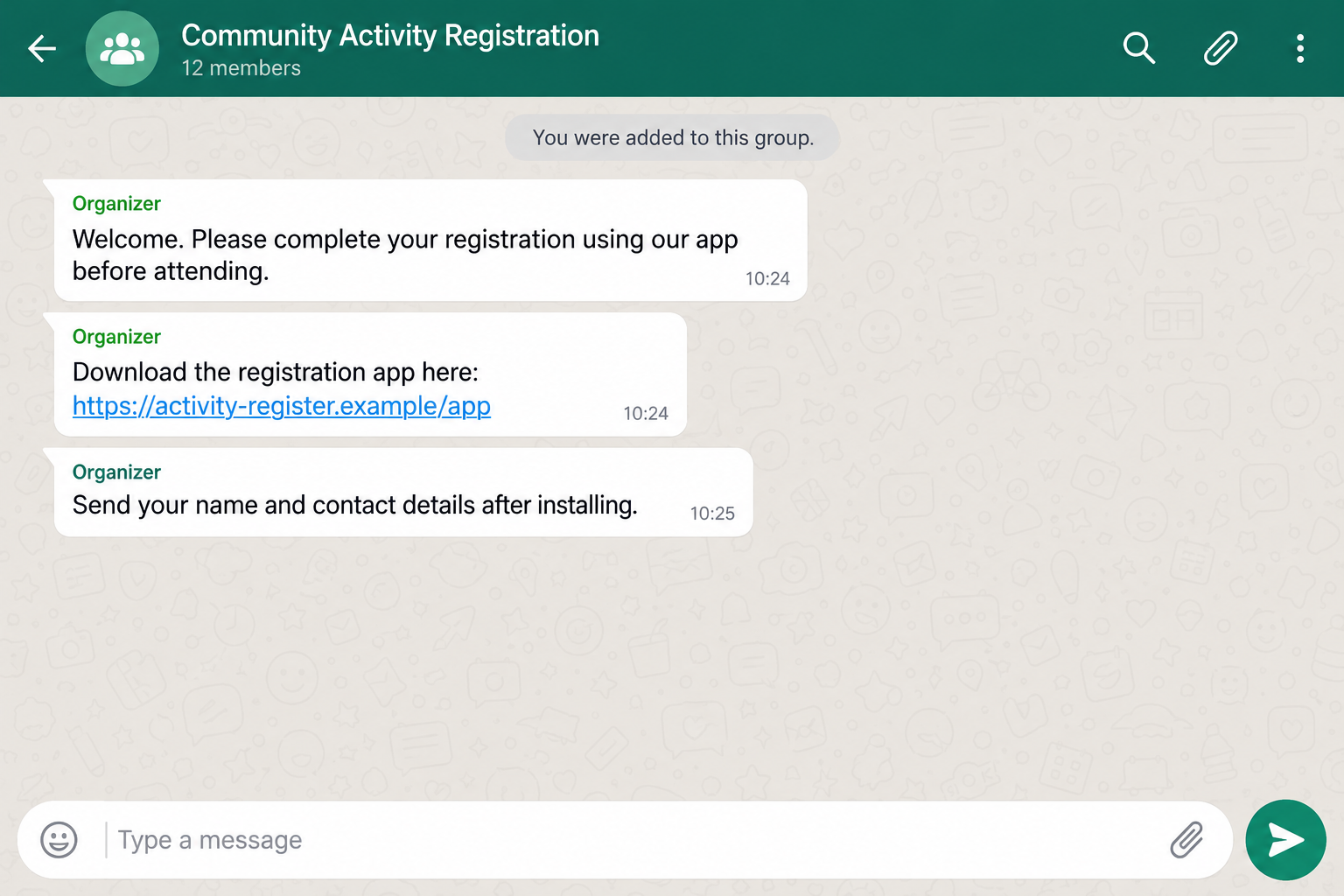
The image illustrates an app request in a fictional group. Its registration wording isn’t a transcript of a PAAC conversation or an identified campaign message.
The official warning doesn’t name the malicious app or a particular malware family. Don’t depend on recognizing one filename to avoid the scam.
The points where you should stop and verify
- A new contact claims to be staff without an independently confirmed connection to the center.
- A Facebook promotion or call moves you into an unsolicited messaging group.
- The group asks for personal details before you’ve established who runs it.
- An organizer supplies an unknown application download.
A staff title shouldn’t decide what gets installed on your phone. Confirm the person and the software with the actual center first.
Check with the genuine organization through a contact obtained independently. Don’t let the group administrator choose the person who “confirms” their identity.
Why a Community-Center Identity Can Be So Convincing
A neighborhood service feels different from a stranger offering an investment. People may already associate the center with activities, practical help, and familiar faces.
The genuine PAAC website describes programs and community spaces for older adults. That real work is what the impersonation borrows, not evidence of wrongdoing by PAAC.
A person interested in an activity may expect a registration conversation. Moving to a messaging group can seem like a helpful way to receive updates.
The impostor doesn’t need to convince someone that the entire organization is new. They need to pass as one person connected with an organization the recipient already trusts.
Once that assumption is accepted, later requests may be treated as administrative chores. A software download can feel like another instruction from the organizer.
That’s where independent verification matters. Familiarity with a real center shouldn’t become automatic permission for an unfamiliar caller to direct your phone.
You can remain interested in the genuine activity while refusing the download. Contacting the actual center doesn’t mean giving up access to its programs.
For family members helping a parent, avoid turning the warning into a ban on community participation. The problem is the impostor’s route, not the person’s wish to join.
How the Fake PAAC Staff Scam Works
Step 1: An advertisement or caller claims a trusted role
The approach uses Facebook ads or WhatsApp calls presenting someone as PAAC staff. The claim supplies a reason for the recipient to listen.
A logo, profile picture, or familiar organization name can create that impression without proving the caller’s employment. Those visible details can be copied.
You don’t have to establish the operator’s real identity to decline. An unconfirmed staff claim isn’t enough to justify sharing information or installing software.
Ask to verify the contact through the center’s independently obtained channels. Don’t use a second number supplied by the same caller as the only check.
Step 2: The conversation moves into a WhatsApp group
ScamShield says victims are subsequently added to WhatsApp groups. This creates a place where the impostors can continue the conversation and issue instructions.
A group name can sound official even when the organization doesn’t run it. Membership numbers and messages don’t authenticate its administrator.
Don’t assume the other accounts confirm the group’s legitimacy. You don’t know whether participants are genuine recipients, impostors, or simply names you’ve never verified.
If the invitation is unsolicited, stop interacting until the actual center confirms the group. You don’t need to finish its form to make that inquiry.
Step 3: Personal details make the interaction feel administrative
The groups phish for personal information. Requests may feel like registration when the recipient believes the administrator is a community-service representative.
Share only what a verified service genuinely needs through its verified process. Don’t send additional documents to an unknown group because its members appear helpful.
Information already supplied can make later contact more convincing. A caller who repeats your name or activity interest may be using details from the earlier exchange.
Recognize that familiarity without treating it as proof of authority. Establish a new conversation with the real organization instead of continuing the unverified one.
Step 4: The supposed staff member pushes an application
The confirmed campaign urges victims to download a malicious app. The staff identity makes a dangerous software request look like part of the organization’s process.
A link from a group administrator isn’t an official app-store listing. Don’t install software through it simply because the surrounding conversation mentions a real center.
If your phone warns about the file, don’t work around the warning. Call the genuine organization using a trusted contact and ask whether the software is required.
An installer that doesn’t resemble a suspicious file can still be unsafe. The source and purpose need verification before you give it a place on your phone.
Step 5: A community conversation becomes a banking-security incident
The malicious app could hijack banking applications already installed on the device. That is the specific financial danger identified in the official alert.
You don’t need to type bank details into the group for installation to deserve urgent attention. The concern is the phone used for banking afterward.
Don’t use that potentially affected phone to investigate account balances or change sensitive passwords. Use another trusted device or visit a bank branch.
Then get help assessing the installation. Leaving the group can stop further messages, but it doesn’t remove software that is already on the device.
How to Check a Real PAAC Contact
Start with a route that didn’t come from the questionable ad or caller. The provider’s genuine website lists its centers and contact options.
The Agency for Integrated Care’s active-ageing information is another independent starting point for understanding real community services.
Ask the center whether the contact is staff, whether the group is operated by it, and whether the proposed application belongs to its process.
Describe the claim rather than forwarding a live download to someone else to try. No one needs to install the suspected app to validate your concern.
If you already know center personnel, speak to them through the contact you used before this message. A newly supplied contact shouldn’t replace that relationship.
Be specific about the group and requested action. Asking only “Do you use WhatsApp?” may not establish whether this particular administrator or download is authorized.
A real organization might use digital communication. That possibility doesn’t authenticate every caller who invokes its name or every group created with a similar title.
You can ask for an alternative way to complete a genuine task. Verification should happen before software installation, not after the phone starts behaving unexpectedly.
What Is Known About the App, and What Isn’t
The official alert establishes a malicious application capable of threatening installed banking apps. It does not provide a malware name, public sample, or complete technical breakdown.
That limits what can responsibly be said about its inner workings. Don’t assume a particular permission, operating system, or infection symptom applies to every recipient.
Nor does the warning establish that PAAC’s own systems were breached. The documented deception is criminals impersonating staff and directing victims into their process.
For the reader, those limits don’t weaken the decision. An app supplied by an unverified caller should not be installed on the phone holding financial accounts.
Unusual behavior after installation warrants assessment, but a normal-looking screen isn’t a clean bill of health. Some security problems aren’t obvious to the person using the device.
If you only saw the ad, you shouldn’t assume your banking app was hijacked. Distinguish exposure to a message from downloading, installing, and using the software.
What to Do if You Have Fallen Victim to This Scam
-
Stop following the group’s instructions. Don’t share more information or download another file. Preserve the relevant messages, account names, links, and call details.
If you never installed anything, you can report and leave the group after saving evidence. Tell the genuine center about the impersonation through its established contact.
-
Isolate the phone if a suspicious app was installed. Follow ScamShield’s malicious-app response guidance: enable flight mode and ensure Wi-Fi stays off.
Don’t reconnect it just to answer the supposed organizer or check your bank. Use an unaffected device to coordinate help and protect financial access.
-
Contact the bank from somewhere safe. Use another trusted phone or visit a branch. Explain that an impostor’s group persuaded you to install an unknown application.
Ask the bank to inspect unauthorized transactions and protect the affected access. Mention any approvals, passwords, or personal information supplied during the conversation.
-
Get the phone assessed before trusting it again. A reputable technician or security support service can help identify the application and check what it may have changed.
Malwarebytes may assist with malware detection on supported devices. Use genuine software sources and follow professional containment advice rather than the group’s cleanup instructions.
A clean scan alone doesn’t restore stolen information or settle bank losses. Device assessment and account protection need their own follow-through.
-
Recover account security and consider rebuilding. Change important exposed passwords from a clean device. Follow provider instructions for sessions, recovery details, and unauthorized changes.
If the device remains suspect, professional advice may include a factory reset. Preserve necessary evidence and understand what will be erased before taking that step.
Don’t automatically reinstall the same unknown app from a backup. A rebuilt phone should return to verified applications, not the impostor’s original installation path.
-
Report the incident with useful details. In Singapore, call ScamShield at 1799 if you need guidance. Report financial loss to police and provide the bank’s case reference.
Report the ad or account to Facebook and the abusive contact or group through WhatsApp’s available tools. Keep personal identifiers out of public posts.
-
Warn others without spreading the app. Tell anyone you referred to the group what happened. Send a safe description, not an active download they might open.
Reject recovery agents asking for fees, remote access, or another installation. Continue with the real bank, center, and device-security support.
For future browsing, AdGuard can add protection against some malicious advertising and web destinations. It doesn’t verify a caller’s employment or remove an installed banking threat.
Helping a Parent Without Making Them Afraid to Ask
Begin with the practical problem: an unverified organizer supplied software. Avoid starting with an accusation that your parent should have known better.
Ask whether they downloaded a file, completed installation, or gave approvals. Those actions matter more than whether they remember the application’s exact name.
If they installed it, help obtain a separate safe phone for the bank call. Don’t ask them to demonstrate the suspicious app on the affected device.
Keep the real community connection intact. Offer to contact the genuine center together so they can still participate in legitimate programs.
Agree on a simple rule for next time: a new organizer’s app request gets checked with the actual center before installation.
Make that check easy. Save the genuine center contact after verifying it, and tell them who can help if a message arrives outside office hours.
Keep ordinary device protections enabled and obtain apps from verified sources. A stranger’s insistence that a warning is inconvenient isn’t a reason to disable those protections.
Revisit the incident calmly after containment. Understanding how the trusted role was borrowed is more useful than asking someone to recognize every changing scam account.
Fast reporting should feel welcome. The sooner someone admits an installation, the sooner the bank and technical support can respond to the actual exposure.
Frequently Asked Questions
Is Precious Active Ageing Centre a scam organization?
No. PAAC is the legitimate organization being impersonated. The warning concerns fraudulent ads, callers, groups, and applications pretending to be connected with its staff.
What makes this more than an unwanted WhatsApp group?
ScamShield confirms personal-information phishing and a malicious-app request that can threaten banking applications. That documented mechanism makes it a real scam warning.
Does the alert identify one app name to avoid?
No specific app name is published in the alert. Verify the source and purpose of any installation rather than relying on a blacklist of filenames.
Is leaving the group enough after installing the app?
No. Leaving stops that conversation but doesn’t remove installed software. Isolate the phone, contact the bank safely, and have the device assessed.
Am I infected if I only viewed the advertisement?
Viewing alone doesn’t establish infection. The key questions concern downloads, installation, permissions, information shared, and approvals you actually made.
How can I verify a caller claiming to be PAAC staff?
Contact the genuine center using details obtained independently. Ask about the particular person, group, and application, not merely whether the organization uses messaging.
The Bottom Line
Don’t install an app from an unverified PAAC caller or WhatsApp group. This confirmed impersonation campaign uses a community-service identity to push software that threatens banking access.
Verify the activity with the genuine center. If you already installed the app, isolate the phone and contact your bank from a separate safe device or branch.

Join the discussion
0 commentsShare your experience or ask a question about this article.
Discussion
Start the conversation
Have a question or something useful to share? Add the first comment.