

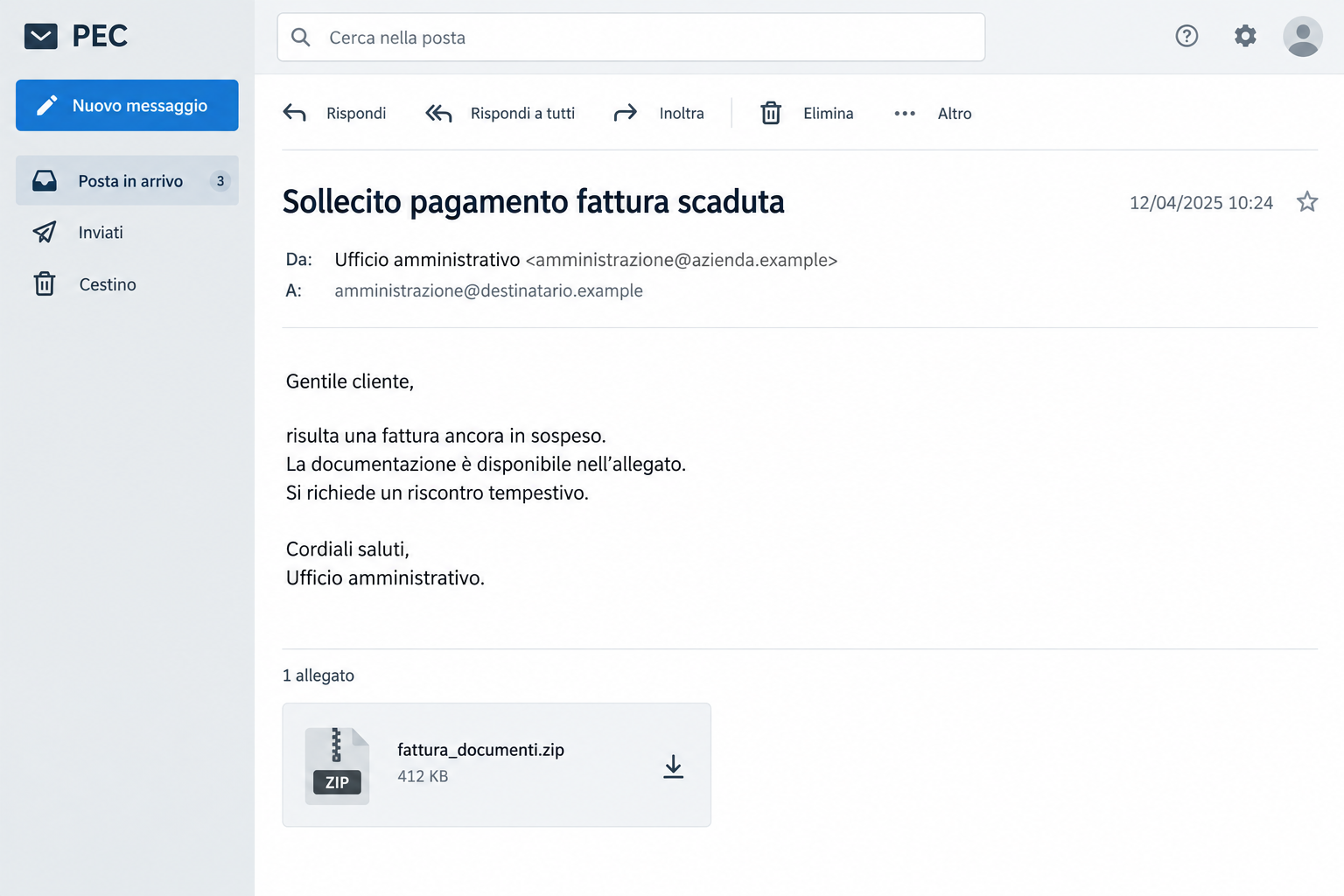
A certified email says an invoice is overdue. The subject sounds urgent, the sender looks like a business, and a ZIP attachment supposedly holds the paperwork.
Before opening it to find out what you owe, check how this PEC invoice scam turns an ordinary accounting task into something much more serious.
Overview
A payment reminder sent through a trusted channel
PEC is Italy’s certified email system. Businesses use it for important correspondence, which gives an unexpected invoice reminder more weight than ordinary junk mail.
In this campaign, criminals abuse real, compromised PEC accounts. The message isn’t made trustworthy simply because it traveled through a genuine certified mailbox.
The Italian government’s CERT-AGID warning identifies false unpaid-invoice demands with malicious ZIP attachments. This is a documented malware campaign, not an unresolved billing complaint.
You may recognize the language of a supplier chasing payment. That familiarity is the lure: opening the attached documentation feels like the responsible thing to do.
The lead image illustrates that kind of inbox message. It isn’t a copy of a victim’s correspondence, and its addresses are fictional.
The attachment is not the invoice you expect
The ZIP contains an HTML file rather than the expected invoice. That file starts a download chain involving JavaScript, Windows components, PowerShell, and MintsLoader.
MintsLoader is used to fetch and start further malicious software. The eventual risk can include remote access or information theft, depending on what follows.
For the reader, the important difference is simple. You’re being asked to open paperwork, but the attachment leads toward running software on your computer.
Receiving the message isn’t the same as executing that chain. What you opened, downloaded, or ran determines the response you need.
The details worth checking before touching the ZIP
- An unexpected demand refers to overdue payment or an irregular accounting position.
- The attachment is an archive, even though you’re expecting a readable invoice.
- A familiar-looking sender is being used to make the request feel official.
- The message encourages a quick response before you confirm the underlying bill.
- The contents lead away from ordinary paperwork toward scripts or software execution.
Those clues are useful together. A ZIP can have legitimate uses, but an unexpected invoice archive needs independent verification before anyone opens its contents.
The safe check happens outside the message. Ask your accounting team or known supplier contact whether the invoice exists and how its documents should arrive.
Why Certified Email Can Still Carry a Dangerous Attachment
It’s understandable to trust PEC more than a random email. The problem starts when trust in the delivery system becomes trust in everything inside the envelope.
Certification concerns the transmission and delivery process. It doesn’t guarantee that the sender’s account remains under its owner’s control or that a file is harmless.
A compromised mailbox can send a message that looks like normal correspondence from that account. The business whose identity appears may also be a victim.
The address can be real while the document is dangerous. Ask the supplier whether they sent this particular invoice, not just whether the mailbox belongs to them.
If you already work with the apparent sender, use a contact from your existing records. Don’t treat a new number inside the demand as independent confirmation.
Look at the commercial context, too. Does the invoice match a purchase order, an agreed service, and the normal billing schedule?
Even a recognizable amount needs checking. It may resemble a routine expense without corresponding to a bill your organization actually approved.
For a small business, the person reading PEC may also handle payments. Separating document review from payment approval helps prevent one hurried decision from doing both.
Keep genuine obligations separate from this suspicious attachment. If a real invoice is overdue, settle it through the supplier’s verified process, not through untrusted files.
How the PEC Invoice Scam Works
Step 1: The message creates an urgent accounting problem
The email begins with an unpaid-invoice claim. It may describe a pending payment, an expired invoice, or an accounting position that needs immediate attention.
The wording pushes a practical worry rather than an extravagant prize. A recipient wants to avoid late fees, interrupted service, or embarrassment with a supplier.
That makes the request easy to pass along internally. Someone may forward it to accounting without first asking whether the sender authorized it.
If you forward it for investigation, identify it as suspicious. Otherwise, the next person can mistake your forwarding message for approval to open the archive.
Step 2: The ZIP makes the dangerous content look like documentation
The attachment’s name suggests an invoice or an administrative document. The archive itself doesn’t reveal the full risk until its contents are examined safely.
A reader may assume the sender compressed several pages together. That assumption gives the inner file an opportunity to be opened without much thought.
Don’t rely on the familiar beginning of a filename. The actual file type matters, especially when an invoice turns out to be HTML rather than expected paperwork.
You don’t need to extract it to investigate the bill. Request confirmation and a safe replacement through the contact you already know.
Step 3: The HTML file reaches out for another component
HTML normally belongs to web content. In the identified attack, opening the inner HTML contacts attacker infrastructure and retrieves a JavaScript file.
At this point, the document is no longer simply showing an invoice. It is bringing another file into a process the recipient didn’t intend to start.
An unfamiliar download after opening supposed paperwork is a reason to stop. Don’t open the new file because the invoice hasn’t appeared yet.
Record what happened and tell your IT contact. Avoid reopening the HTML to see whether the second attempt produces a more useful result.
Step 4: Windows scripting components continue the infection
The documented chain uses components already present in Windows, followed by stages involving PowerShell. Familiar software names therefore don’t make the activity benign.
The danger is what those components are instructed to do. A legitimate scripting tool can also be used to start an attack.
This isn’t a request to repair your computer or update invoice-reading software. Don’t follow additional instructions that demand execution, security exceptions, or disabled protections.
If you ran anything, explain that clearly when seeking help. Saying only “I opened an email” can hide the part that requires a device investigation.
Step 5: MintsLoader opens the door to further malware
The loader can obtain additional malware after the initial attachment stage. That is why deleting the original email doesn’t resolve a computer that has been compromised.
The first file may only be the beginning. A responder needs to check the device and any accounts used during the possible compromise.
Don’t assume a specific stealer or remote-access program infected every recipient. The campaign establishes the loader chain, not an identical outcome on every machine.
Take the exposure seriously without guessing. Isolation, professional assessment, and account protection from a clean device give you a useful starting point.
A Blank Page Doesn’t Make the Attachment Safe
Sometimes the expected invoice never appears. A reader sees an error, an empty window, or a failed download and assumes the attachment simply doesn’t work.
That isn’t a reliable safety test. CERT-AGID found infrastructure in this campaign that was initially inactive and became operational later.
Repeatedly opening a suspicious attachment can therefore create another opportunity for the attack. A failed first attempt isn’t an invitation to try again.
Don’t switch browsers, turn off filtering, or use another computer merely to make the invoice open. You’re moving the unverified file to another environment.
Instead, write down whether anything downloaded and whether you launched it. Those details are more useful than reproducing the behavior for yourself.
An error also doesn’t prove that malware ran. Keep the distinction: uncertainty calls for an exposure check, not a confident claim that every device is infected.
Checking the Invoice Without Following the Attacker’s Instructions
Start with your own records. Match the alleged supplier, invoice number, and service against documents that existed before this email arrived.
If you can’t find a match, ask the business through its established contact. A reply to the same compromised mailbox may go straight back to the attacker.
When you speak to a known contact, describe the subject and attachment type without sending them an executable file to open.
Ask whether they sent the notice, whether that invoice is outstanding, and whether they can provide the document through their ordinary secure channel.
For employees, follow the organization’s suspicious-email process. An IT team can preserve the message and inspect it without putting another employee’s computer at risk.
Keep original headers and delivery information where possible. Screenshots help explain the lure, but the original message can contain useful technical evidence.
Don’t upload company invoices or suspicious attachments to random online tools. They can include confidential financial information, customer details, or dangerous content.
Once the sender confirms a compromise, other recipients may need warning. Coordinate that with the mailbox owner and your IT team rather than forwarding the live attachment.
What to Do if You Have Fallen Victim to This Scam
-
Stop using the attachment. Close its window and don’t run any associated download. Note whether you extracted the ZIP, opened HTML, or launched a script.
If the email is all you saw, report it through your mailbox’s security process. You don’t need to wipe a computer merely for receiving it.
-
Contain a possible execution. If you ran a file or noticed unexpected software activity, disconnect the affected computer from network connections and notify IT immediately.
Use a different, trusted device for urgent communications. Avoid banking, password changes, and sensitive company logins on the machine being investigated.
-
Keep evidence for the responder. Preserve the email, sender address, attachment name, arrival time, and any visible warnings. Don’t reopen a file to obtain a better screenshot.
Give your IT team the original message using its approved method. Explain any security prompt you accepted and any program you remember launching.
-
Check and clean the device. Follow your IT team’s instructions. On a personal Windows computer, update protection tools and investigate downloads before resuming sensitive work.
Malwarebytes can help check for malicious software. Its scan is a cleanup aid, not proof that accounts or payments are now safe.
Microsoft’s Windows Security guidance explains available scans, including offline scanning. A serious compromise may require rebuilding the system rather than trusting one clean result.
-
Secure accounts from an unaffected device. Start with your email and important work accounts. Change exposed passwords, review sessions, and enable appropriate multifactor protection.
If the computer stored business or banking credentials, tell the relevant administrators or bank what happened. They can help decide what access should be revoked.
-
Address any payment separately. If you sent money after the demand, contact your bank promptly with the recipient, amount, time, and invoice claim.
Ask whether the transfer can be stopped or investigated. Malware removal alone won’t retrieve a payment, and no outcome should be promised before the bank reviews it.
-
Report and reduce repeat exposure. Notify the impersonated supplier and your PEC provider through trusted contacts. Share safe warning details with colleagues who may receive similar demands.
For future browsing, AdGuard can add filtering against some risky destinations. It doesn’t authenticate invoices or make running a suspicious attachment safe.
Helping an Accounting Team Avoid the Same Trap
A useful rule is more specific than “be careful with email.” Unexpected invoice archives should be verified with the supplier before their contents are opened.
Give staff an easy route for that check. If reporting an attachment takes longer than paying a routine bill, hurried employees may choose the wrong shortcut.
Keep supplier contacts in an established system. Contact information copied from a new payment demand shouldn’t silently replace the details already on file.
For shared inboxes, record who investigated a notice and what was confirmed. Otherwise, one person may clear the message while another opens its archive later.
Make it safe to report a mistake quickly. An employee who fears blame may delay mentioning that they ran the downloaded file.
The best response isn’t an interrogation about why they clicked. Ask what opened, when it happened, and which accounts were used afterward.
If suspicious PEC mail came from your own account, involve your provider and IT team. Protect the mailbox and warn contacts without assuming every outgoing message was legitimate.
Review any recent payment-detail changes associated with that account. An attachment campaign and a fraudulent payment request require separate checks, even if they appear in one conversation.
Frequently Asked Questions
Is every PEC invoice email a scam?
No. PEC is a legitimate system. This warning concerns a confirmed campaign using compromised mailboxes and dangerous attachments, not ordinary certified business correspondence.
Does a real sender address prove the attachment is safe?
No. An account can be compromised. Confirm the actual invoice with an established contact before trusting an unexpected archive, even when the address looks familiar.
Did I get infected just by receiving the email?
Receiving it doesn’t establish infection. The important details are whether you opened the inner file, downloaded another component, or ran software associated with it.
Why is an HTML file inside an invoice ZIP suspicious?
In this attack, HTML initiates another download instead of providing the expected invoice. Stop and verify the document rather than launching anything that arrives afterward.
Can I retry if the invoice page was blank?
Don’t retry a suspicious attachment. Infrastructure may change. Ask the sender for independently verified documentation and let a qualified responder assess any possible execution.
Will deleting the email remove MintsLoader?
Deleting a message doesn’t remove malware already running on a computer. Investigate the device and protect exposed accounts before returning to sensitive activity.
The Bottom Line
Don’t open an unexpected PEC invoice ZIP to settle an unverified debt. This documented campaign replaces ordinary paperwork with a malware-delivery chain.
Confirm the bill through an existing supplier contact. If you already ran a file, isolate the computer and get security help before using it again.
If money or credentials were also shared, contact the bank or account administrator from a clean device. Treat payment recovery and device cleanup as separate urgent tasks.

Join the discussion
0 commentsShare your experience or ask a question about this article.
Discussion
Start the conversation
Have a question or something useful to share? Add the first comment.