

A Music Membership Renewal email lands while you’re sorting through receipts. You recognize the idea of a streaming subscription, but the notice doesn’t quite match your memory.
Before following its billing instructions, take a closer look at what account it actually concerns. A familiar subscription label can hide a very different destination.
Overview
The renewal notice can lead to a phishing form
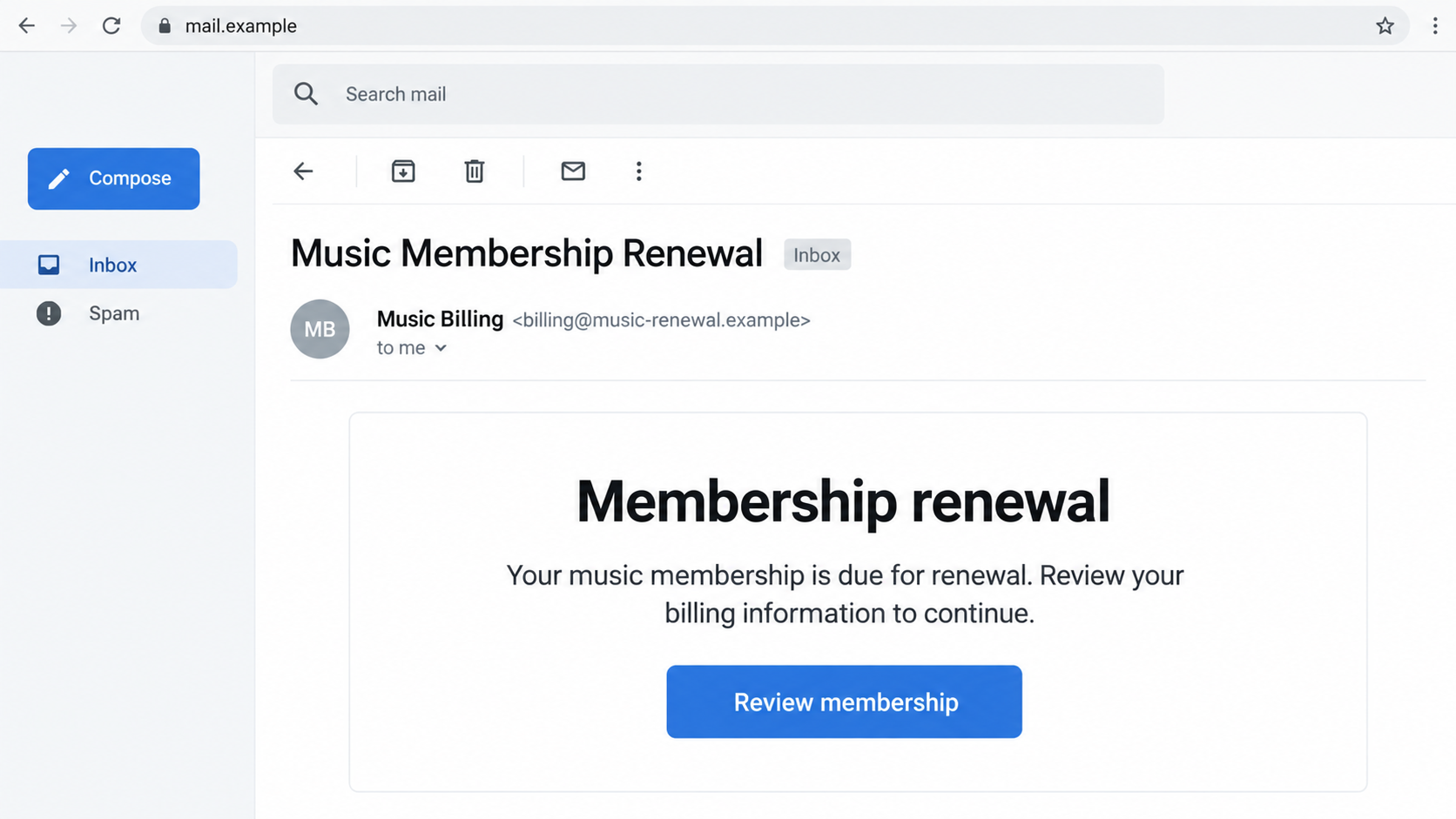
The Music Membership renewal scam uses a subscription-related email to draw readers toward a fake website. Its purpose is collecting credentials or personal and payment information.
The reassuring billing language does the work. Instead of considering a stranger’s request for account details, the reader feels they are handling an ordinary membership task.
A message may invite a review, payment update, or account sign-in. What matters is whether the destination belongs to the service you actually use.
The label Music Membership does not identify one particular provider. Do not assume an email belongs to Apple Music, Spotify, or another service merely because you subscribe.
A renewal claim is not the same as a bank charge
An email can announce a payment that never happened. It can also arrive near a genuine renewal date by coincidence, making the invented notice harder to dismiss.
Check the subscription and payment separately. A notice, an active membership, and a transaction on your card statement answer different questions.
Useful details to compare include:
- The provider’s actual name, rather than a generic music-billing label.
- The account email that manages your membership.
- Whether the subscription was purchased directly or through another billing platform.
- The plan, renewal date, and currency shown in the real account.
- Any matching completed or pending payment with the actual card issuer.
- The support route available inside the provider’s genuine account.
You can investigate without using the email’s button
Open the music service independently through its installed app or a trusted address. Review billing there, then contact its actual support if something remains unexplained.
If a message claims to concern Apple purchases, Apple’s receipt guidance explains safe checks and warns about fake purchase emails and account-update links.
Apple can help with an Apple-billed membership. If another company bills yours, check with that company instead of letting the email choose the support route.
You do not need to enter a password on an unfamiliar page to see whether the bill is real. The independent account check comes first.
Why a Music Subscription Makes an Effective Hook
Streaming memberships are easy to forget because they run quietly in the background. A small regular payment rarely receives the same attention as a major purchase.
Family plans, free trials, carrier bundles, and old account emails complicate matters further. A vague renewal notice can sound plausible even when you cannot place it.
The scam takes advantage of that uncertainty. It supplies an easy next step before you have established the service, account, or charge involved.
You might want to preserve access, fix a payment problem, or stop an unwanted membership. Each motivation can make a billing button feel like the sensible response.
There is no need to decide from memory alone. Real account records can clarify a forgotten subscription without handing an unknown sender the keys to it.
If someone else manages the family plan, ask them directly. A message describing a shared membership is not evidence that they approved the email’s requested action.
How the Music Membership Renewal Scam Works
Step 1: The email puts a membership task in front of you
The message presents itself as billing administration. A renewal subject, familiar subscription terminology, and a prominent review button encourage you to deal with it quickly.
Some versions of subscription phishing claim a payment failed; others imply a renewal needs attention. Treat those as possible variations, not proof of one fixed invoice.
The sender does not need access to your music library to make the story convincing. A broadly distributed notice may simply reach people with streaming subscriptions.
An invoice-looking layout can reinforce that impression. Reference numbers, a footer, or a support label are easy to print and do not confirm a real account relationship.
Step 2: The billing route moves outside the service
The button or link directs you toward a website chosen by the sender. That destination may use music, membership, renewal, or billing words to appear relevant.
Those words do not establish ownership. A provider’s name placed in a path or subdomain can sit on a registered domain controlled by someone else.
A secure-connection padlock is not a receipt check, either. It means the connection to that site is encrypted, not that your subscription belongs there.
If the address is unfamiliar, stop before using the form. You can still investigate the supposed renewal through your normal account without continuing down this route.
Step 3: The page collects information under a billing explanation
A copied login form may collect the account email and password. A payment-update page can ask for card details, billing address, and other personal information.
The site may combine those requests, describing each as another part of verifying the membership. A reasonable-sounding label does not make the destination trustworthy.
Providing information can expose more than the music account. A reused password may also protect email or shopping services, while card details create a separate financial risk.
A code or approval request can introduce another stage. Read what the real notification authorizes instead of accepting the fake page’s description of it.
Apple’s social-engineering guidance explains how impostors use copied sign-in pages and security-code requests. Other providers have their own account-protection processes.
Step 4: A confirmation screen delays the real account check
The fake page may show a completion message, reject the details, or send you elsewhere. None of those endings confirms that a subscription was changed.
A reassuring result can make you close the browser and move on. Meanwhile, information supplied to the wrong website may be available for attempted misuse.
If you already interacted, check what you disclosed and where. Do not return to the page for a cancellation certificate or another round of verification.
The real provider and card issuer need the facts of your exposure. They do not need you to finish the questionable workflow before asking for help.
Find the Real Subscription Before Changing Anything
Start with the account you normally use
Open the service’s genuine account and inspect its membership status. Look for the plan, next billing date, account email, and the organization handling payment.
If the notice concerns Apple media purchases, Apple’s purchase-history instructions provide an independent route for reviewing recorded transactions.
An absent item can have several explanations, including a different account or billing arrangement. It is a reason to investigate, not pay an unfamiliar site.
Check a family organizer or account holder before assuming a membership was created in your name. Keep their real contact route separate from the email.
Identify the company that actually bills you
A subscription may be billed directly, through an app store, or through a carrier or bundle. The music brand and the billing provider can differ.
Review a known genuine receipt and your payment statement. Use those records to locate the relevant support process instead of guessing from the latest message.
For Apple-billed subscriptions, Apple’s cancellation guidance also explains what to check when another provider or account controls the membership.
Canceling through the wrong organization may leave a real subscription active. Conversely, stopping a legitimate membership is unnecessary if the email invented the renewal entirely.
Separate cancellation from payment recovery
Cancellation concerns future service or renewals. A refund or dispute concerns money already charged. Neither should be assumed from a button saying the request succeeded.
If you truly want to end a membership, use the verified provider’s cancellation process and retain its confirmation. Check when access ends and whether another charge is scheduled.
If an unfamiliar payment appears, contact the actual issuer or billing provider about that transaction. Do not pay a supposed handling fee to make a cancellation happen.
Sender and Form Details That Deserve Attention
The sender name is only the visible label
Expand the sender details if your mail app allows it. An address unrelated to the claimed provider is useful evidence, but a familiar display name proves little.
Forwarding, spoofing, or abused notification features can complicate appearances. Independent account records remain more useful than trying to authenticate the notice from one header field.
Do not send a test reply containing account details. Confirming membership should not require starting a private conversation with a sender you have not identified.
The requested information should fit the operation
A subscription record check does not explain why an unknown form needs your complete card data. A cancellation claim does not explain a request for a banking code.
If the page asks for information unrelated to the music account, stop. Photographing an identity document or installing support software would create entirely different risks.
Do not assume autofill is harmless. If a password manager filled credentials and the form transmitted them, include that in your report even without manual typing.
A good-looking bill still needs an independent match
Logos, polished grammar, and a correct address can make a notice look familiar. They cannot establish that the payment shown belongs to your real membership.
A genuine payment also does not authenticate a second email discussing it. Handle the real transaction through the legitimate provider, not an unrelated follow-up route.
What to Do if You Have Fallen Victim to This Scam
-
Stop using the renewal page and preserve the message.
Close the unfamiliar website. Save the subject, sender details, destination, and what the page requested. Do not provide more information to recover access or erase a charge.
Keep sensitive screenshots private. A public post containing passwords, card numbers, or working verification codes can create another exposure.
-
Tell the real account provider which credentials were exposed.
Open its official app or support route. Change a disclosed password and ask how to review other sessions, recovery information, and connected devices.
If you are locked out, follow that provider’s recovery process. A login problem should not send you back to the suspicious email’s support address.
-
Protect any reused password and the connected email account.
List other services using the same exposed credential and replace it there. Prioritize the mailbox receiving reset messages and financial-account notifications.
Check for forwarding rules or unfamiliar recovery contacts. Password replacement and removing persistent account access are related but distinct tasks.
-
Contact the card issuer if payment information was submitted.
Explain that the details went to a possible phishing form. Ask whether replacement, transaction monitoring, or a dispute is appropriate for the actual exposure.
Give any matching transaction’s date, amount, currency, and merchant descriptor. An invented email total is not the same as an amount the issuer recorded.
-
Report codes or account approvals you supplied.
Tell support what the genuine notification said and when you responded. It may have concerned login, payment, or another operation rather than membership renewal.
Ask the relevant provider to inspect recent changes. A code expiring later does not cancel an action that already succeeded.
-
Handle a real unwanted subscription through its actual billing channel.
Once the account is secure, cancel any genuine membership you do not want. Keep the official result and check the next billing date.
Request any refund separately through the appropriate provider. Cancellation is not a guarantee that earlier charges will be returned.
-
Check the device if the page introduced software or permissions.
Remove an unexpected download or extension and run a trusted security check. Malwarebytes can help inspect supported devices for malicious or unwanted software.
AdGuard can reduce exposure to known malicious destinations and advertising, depending on its product and configuration. Neither reverses submitted credentials, approvals, or subscription payments.
-
Report the impersonation and watch for another billing approach.
If Apple was impersonated, its guidance lists reportphishing@apple.com. Otherwise use the provider actually named, and your national fraud-reporting channel where relevant.
U.S. readers can report through ReportFraud.ftc.gov. Be wary of unsolicited refund helpers who use details from this incident to win your trust.
Frequently Asked Questions
Does Music Membership identify a particular streaming company?
No. The generic wording does not establish a provider. Check the actual subscription and billing company rather than assigning the email to a familiar music app.
What if I have a subscription that really renews soon?
Review it through the genuine account. A matching renewal date does not authenticate an unfamiliar email link or the information requested on its page.
Should I cancel my music account just because the email arrived?
Not automatically. First establish whether the membership and charge exist. You can keep a legitimate service while reporting the fake message that imitates billing.
Can clicking without entering anything expose the account?
The risk depends on what occurred, including autofill, permissions, or downloads. Merely receiving the notice does not prove account takeover or a device infection.
Why does the subscription appear under a different billing company?
An app store, carrier, or another provider may handle payment. Verify that arrangement with genuine records before assuming a mismatch is itself fraudulent.
Does a cancellation confirmation on the unfamiliar page stop payments?
No reliable account change is established by that screen. Confirm subscription status with the real billing provider and address any recorded charges separately.
The Bottom Line
Do not use an unverified Music Membership renewal email to sign in or update payment information. Check the membership through the service and company actually billing you.
If you supplied credentials, codes, or card details, secure those accounts and notify the relevant provider promptly. Resolve any real subscription separately from the phishing message.








