

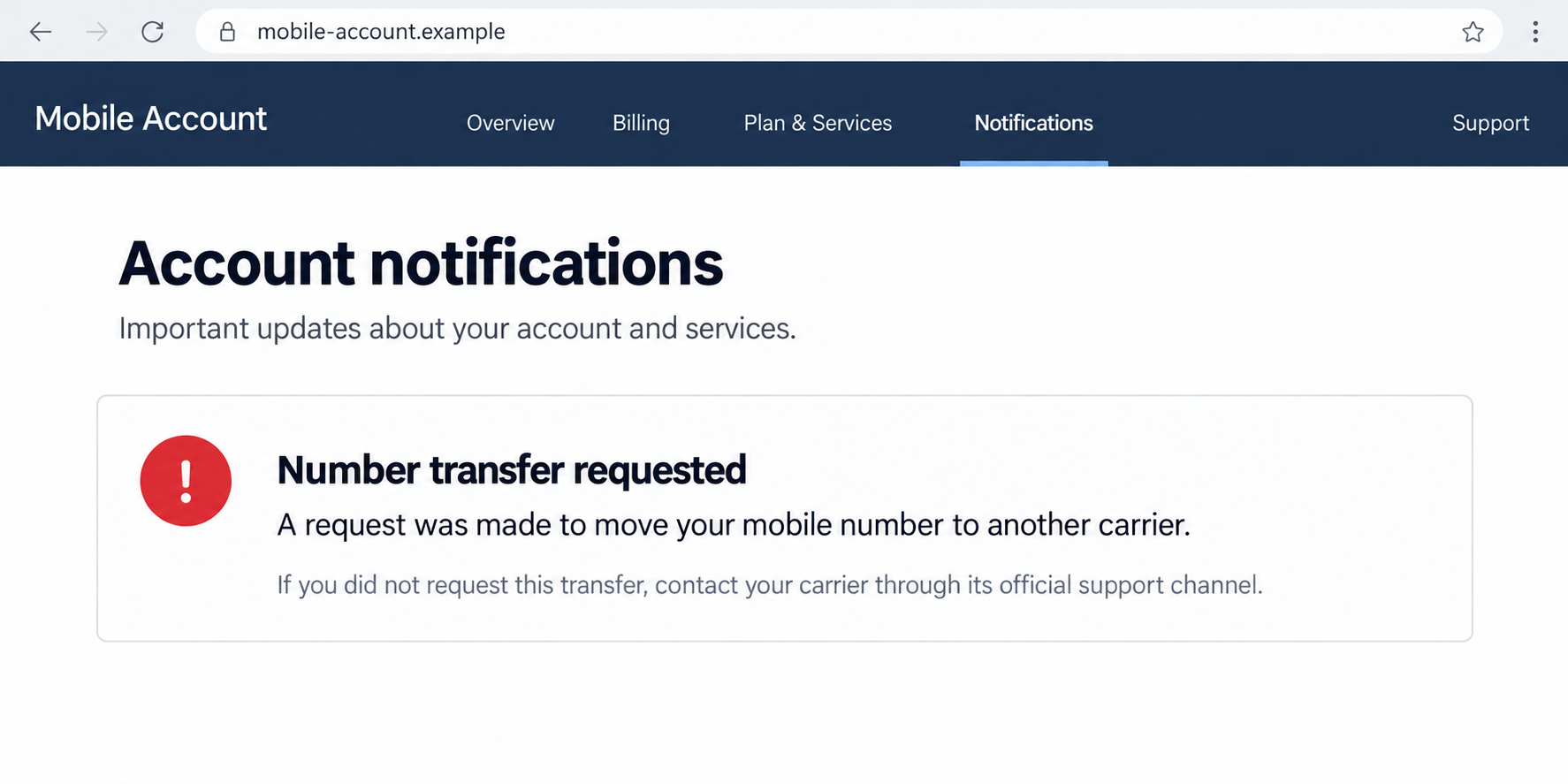
Your calls stop connecting, then a message arrives about moving your number. You haven’t changed providers, ordered a new plan, or asked anyone to handle it.
A port-out scam can start with that ordinary-looking service notice. Before spending the morning troubleshooting signal bars, check what happened to the number.
Overview
The attacker moves your number between providers
A port-out scam is an unauthorized transfer of your telephone number to another mobile carrier. Someone impersonates you or abuses account access to request the move.
The number stays the same, but its service ends up under the attacker’s control. New calls and ordinary text messages can then reach the wrong person.
This is different from simply stealing a handset. You may still have your device, your photos, and your usual apps while the cellular number no longer works.
It also differs from a replacement SIM within the same provider. Both can redirect communications, but a fraudulent port crosses into another carrier’s service.
Other accounts may trust the stolen number
A telephone number often receives password-reset messages, verification codes, and calls from support teams. That makes its transfer more serious than losing mobile reception.
An attacker may try accounts that use the number for recovery. Whether those attempts succeed depends on the service’s other safeguards and information already held.
The port itself does not automatically reveal every password or approve every bank transfer. Still, waiting for a visible loss gives the attacker unnecessary time.
Warning signs worth checking together include:
- A transfer notification for a provider change you never requested.
- An unexpected Number Transfer PIN or account-lock change.
- Loss of cellular service while nearby customers remain connected.
- Email notices about unfamiliar password resets or recovery changes.
- A carrier account showing a missing line or unexplained closure.
- Someone asking you to approve a move supposedly needed to stop fraud.
The original carrier needs to check the transfer
A network outage, billing suspension, or damaged SIM can also cause service loss. The practical question is whether your provider received or completed an unauthorized port.
Verizon’s port-out guidance distinguishes legitimate switching from an unauthorized move and tells customers to contact it promptly about unrequested transfer notices.
Use a trusted support route from your account or provider’s official site. A number printed inside an alarming message should not decide whom you call.
Ask about the transfer status, the receiving carrier, and the process for restoring your original number. Keep the resulting case reference somewhere outside the affected line.
Why Porting Is Normal, but This Request Is Not
Keeping a number when changing providers is a useful service. A successful move means family, customers, and account alerts can continue using your existing contact details.
The criminal abuses that convenience by presenting a move you did not authorize as an ordinary customer request. The receiving service becomes their route to your communications.
You do not need to avoid legitimate switching forever. You need to keep the transfer controls private and make sure each requested change belongs to you.
That matters especially on shared plans. Someone else may legitimately manage billing, while only certain account roles can create transfer credentials or disable protective features.
If a household member arranged a genuine move, confirm it directly with them. Do not infer permission from a message that merely names your family account.
For work lines, involve the person responsible for the mobile contract. Personal and business accounts may use different permissions, support teams, and recovery documentation.
How the Port-Out Scam Works
Step 1: The criminal gathers carrier-account information
The attacker needs a route into the transfer process. Stolen account credentials, exposed personal details, or information collected through earlier phishing can help create that route.
A fake carrier contact may ask you to confirm account details during a supposed service check. Another approach starts with a compromised email receiving carrier notifications.
The information required varies by provider. This is not a universal recipe that works against every carrier, and possessing a public phone number is not enough by itself.
Pay attention when an unexpected conversation moves from a service complaint to transfer credentials. Those details concern moving a line, not simply diagnosing weak reception.
Step 2: A transfer credential or protective setting is targeted
Some providers use a dedicated transfer PIN. Others combine account authentication, ownership checks, and transfer locks. The attacker tries to satisfy or undermine the applicable safeguards.
A caller might describe a generated PIN as a cancellation code. Reading it aloud could provide information for the move rather than prevent the problem described.
A request to turn off Number Lock or port protection deserves the same scrutiny. That setting may be the barrier keeping the number with your current provider.
Never change it during an unsolicited rescue call. If a genuine transfer needs the setting disabled, handle that through independently opened carrier accounts and your chosen provider.
Step 3: The number is requested at another carrier
The fraudulent request attempts to move your existing number into a service the attacker controls. Your current provider and the receiving provider become part of the transfer.
You may receive a warning while the request is pending. That is a reason to contact the original carrier immediately, not wait to see whether reception disappears.
Give support the actual notice and state clearly that you did not authorize a provider change. Ask whether the request can be stopped before completion.
If the move already happened, support needs a recovery case rather than a routine plan cancellation. Ask which team handles unauthorized ports and what information it requires.
Step 4: Fresh calls and codes reach the attacker’s service
Once the number moves, ordinary cellular calls and SMS can reach the new service. Account-recovery attempts may follow while you are still trying to reconnect.
A service that accepts a text code may offer an opening. Another service could demand additional authentication and reject the attempt. Treat exposure as account-specific.
Check email and financial accounts through a trusted device and connection. Do not wait for an SMS warning on a line whose routing is in question.
Some apps may continue working over Wi-Fi, which can be useful for contacting support. That does not mean your cellular number is still safely controlled.
Step 5: Restoring the line leaves other changes to investigate
Getting the number back is the first major containment step. It does not undo a changed email recovery address, new financial payee, or stolen account session.
Review affected accounts separately after the carrier restores service. Tell each provider that the recovery number was outside your control during a specific period.
If an attacker changed the carrier login or account permissions, those need attention too. Otherwise the person may retain a route for trying another transfer.
A follow-up caller claiming to restore everything should be verified independently. Recovery should not require sending a payment or supplying codes to another unexpected contact.
Which PIN or Lock Actually Protects the Number?
Your screen passcode protects the device
A screen passcode helps prevent someone using the handset in their possession. It is not the same as a restriction on a carrier transferring your number.
Likewise, a physical SIM PIN addresses access to that SIM. It should not be treated as proof that a different-carrier transfer has been blocked.
Carrier access and transfer credentials have separate jobs
The account password or account PIN may help authenticate ordinary support requests. A transfer PIN is specifically associated with moving a number to another provider.
Ask which credentials your carrier uses for your plan. Protect the account with unique credentials and disclose a transfer PIN only for a switch you personally arranged.
Store recovery information securely rather than inside a screenshot shared with a salesperson or unsolicited helper. A picture of account details can disclose more than intended.
Port protection may be a different setting from SIM protection
Verizon separates Number Lock from SIM Protection. Its Number Lock prevents number-transfer PIN generation while enabled; SIM protection covers different device changes.
Do not assume turning on one setting automatically covers both operations. Ask about unauthorized provider transfers and same-carrier SIM changes by name.
What the Major Carrier Controls Mean
AT&T uses an account-wide lock for specified changes
AT&T Wireless Account Lock blocks specified account and line changes, including transfers to or from another carrier, when enabled.
For its described wireless-account setup, users with primary or secondary access can manage the lock. Review those roles, particularly if an unfamiliar person was added.
Its prepaid instructions differ. Use the information matching your service instead of following a screenshot written for another type of account.
T-Mobile’s port protection needs attention on each line
T-Mobile documents Port Out Protection separately from SIM protection and says it must be added to each line individually.
Check every relevant household or work number. Protecting one line should not be treated as confirmation that the others have the same setting.
Account-owner and prepaid rules differ, too. Follow the current instructions for your plan and keep whoever controls those settings aware of suspicious requests.
Use your provider’s exact feature and recovery route
Smaller carriers, resellers, and business plans may use other names. Ask specifically whether a lock blocks moving the number to a different network.
Check how the lock is removed and which account roles can remove it. A useful safeguard still depends on protecting the people and accounts allowed to manage it.
What to Do if You Have Fallen Victim to This Scam
-
Contact the original carrier’s fraud team immediately.
Use another telephone, trusted online support, or an official store. Say your number was transferred, or a transfer was requested, without your permission.
Ask for a pending-request stop or completed-port recovery. Do not cancel the original line as a first troubleshooting step; discuss restoration with the fraud team.
-
Write down the transfer and recovery details.
Record when service stopped, when notices arrived, the receiving provider if known, and the case reference. Ask what proof or documentation the carrier can provide.
Confirm how support will contact you while the number is unavailable. A recovery update sent only to the affected line may not reach you.
-
Alert banks and other high-value account providers.
Explain the period during which your number was outside your control. Ask about attempted resets, new recipients, contact changes, and pending transactions.
Report actual unfamiliar activity precisely. Account access and payment recovery have different processes, so request both reviews when the facts warrant them.
-
Secure the email used for carrier and financial recovery.
From a trusted session, inspect recovery contacts, forwarding rules, and connected devices. Change an exposed password and remove access you do not recognize.
Save recovery codes privately. Stronger protection is less useful if an old backup mailbox or telephone number still gives someone an easier entry.
-
Review carrier ownership and transfer protection after restoration.
Replace compromised carrier credentials, remove unknown authorized users, and verify each line’s port protection. Check SIM protection separately where available.
Confirm that legitimate account holders can still reach support. Recovery should close unauthorized access without accidentally excluding the person who manages the contract.
-
Move important authentication away from SMS-only dependence.
Use a supported authenticator, passkey, or security key for sensitive accounts. The FTC explains why SMS can fail after number takeover.
Complete each service’s setup and preserve backup access. Do not remove the only working recovery method before confirming its replacement.
-
Preserve evidence and report unresolved carrier problems.
Keep notices, case records, account changes, and transaction information. U.S. customers can use the FCC Consumer Complaint Center for relevant carrier issues.
A complaint does not replace urgent carrier contact or guarantee reimbursement. Financial providers still need their own reports about affected accounts or payments.
-
Check that the recovered number stays under your control.
Test ordinary calls and texts, review subsequent carrier notices, and warn contacts about unusual requests sent during the interruption. Monitor for another transfer attempt.
A device scan cannot reverse a port. If separate phishing or software exposure occurred, handle that incident too, but keep carrier recovery moving.
Frequently Asked Questions
Is a port-out scam the same as a SIM swap?
They have similar consequences but different operations. Port-out fraud moves the number to another carrier; a SIM swap typically replaces its SIM or eSIM within a provider.
Can the attacker read my old messages?
Moving the number redirects new communications. It does not itself copy old messages stored on your device. Separate cloud or account compromise could expose more information.
Does no service always mean my number was stolen?
No. Outages and account issues also happen. An unrequested transfer notice or concurrent account-reset activity makes contacting carrier fraud support especially urgent.
Does Number Lock protect every account connected to my number?
A carrier lock protects the specified carrier operation. It does not review email sessions, banking credentials, or recovery settings at unrelated services.
Can I still use Wi-Fi while recovering the line?
Often, yes. Wi-Fi may help you reach trusted support or existing account sessions. It does not restore normal cellular calls or SMS routing.
Should I switch providers immediately after a fraudulent port?
First work with the original provider on restoring and securing the number. Discuss a later legitimate move once ownership, transfer controls, and account access are settled.
The Bottom Line
Do not approve an unrequested number transfer or disclose its PIN to an unexpected caller. Contact your original carrier immediately to stop or reverse the port-out scam.
If the number already moved, protect affected email and financial accounts alongside carrier recovery. Restoring reception alone does not remove changes an attacker made elsewhere.

Join the discussion
0 commentsShare your experience or ask a question about this article.
Discussion
Start the conversation
Have a question or something useful to share? Add the first comment.