

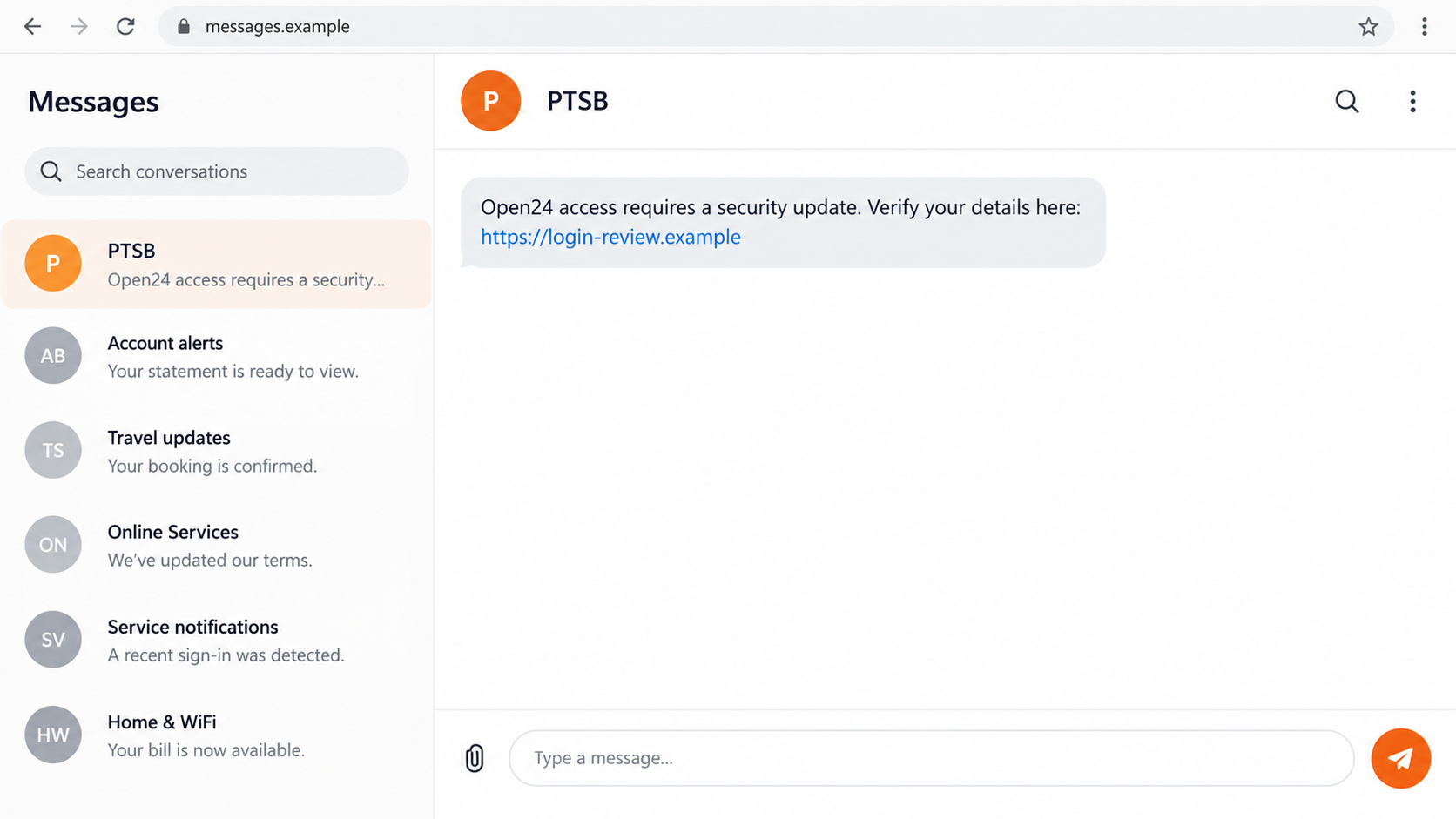
A PTSB text arrives with an Open24 warning, just as you’re getting on with your day. The message makes a small banking task sound suddenly urgent.
Before opening its link, check what it wants you to do. The next screen can matter much more than the name above the message.
Overview
The message imitates Irish PTSB banking support
PTSB scam texts use the bank’s name, or its older Permanent TSB branding, to send customers toward fake Open24 pages requesting sensitive information.
PTSB is a legitimate Irish bank. It should not be confused with the separate U.K. TSB institution, which has different support and reporting routes.
The imitation may describe an update, restriction, or account check. Familiar banking terms help the link feel like a shortcut to resolving that supposed problem.
PTSB’s current security guidance warns against unsolicited requests for Open24 details, card security information, and one-time passcodes.
The requested secrets reveal the important boundary
An Open24 number, Internet Password, Personal Access Number, or card security detail has a purpose inside genuine banking. An unsolicited text does not establish that context.
A copied page can label those fields as routine verification. The form’s explanation cannot tell you who actually receives the information.
Be especially concerned if the message or follow-up asks for:
- A banking sign-in through a destination you did not obtain independently.
- Your Open24 number, Internet Password, or Personal Access Number.
- A card security code or complete payment-card information.
- A one-time passcode supposedly needed to cancel an unfamiliar operation.
- An account approval without reading its actual purpose.
- A transfer, installed app, or remote-access session presented as protection.
Independent bank contact can stop the guessing
Use the installed genuine app or a trusted banking address to inspect the account. For an uncertain message, contact the bank through its published fraud route.
Do not continue because the message appears beside earlier bank texts. A familiar thread or sender label does not make its particular link trustworthy.
If you already gave information away, identify which details and approvals were involved. That lets the bank respond to the actual exposure instead of a vague suspicion.
What Open24 Information Means to an Impostor
Login information can open a route into the real account
A false sign-in asks you to behave as though you reached your normal bank. The attacker wants information that can be used against the real banking service.
Online banking may legitimately require security information during a session you initiate. The issue is entering it into a website selected by an unverified contact.
The copied page may request more than your usual login needs. Do not complete unfamiliar extra fields just because the first part resembles a genuine screen.
The bank’s Personal Access Number and a card’s security code are different credentials. Tell support which kind of information the page collected rather than calling everything a PIN.
If you cannot remember a field’s name, describe its label, the number of characters requested, and where it appeared. Do not reopen the form to check.
You can explain an exposure without sending the actual secret again. Use the bank’s verified support process and let its team decide what needs replacing.
Card information introduces a separate exposure
A banking update does not automatically explain a request for card details. If the page collected them, tell support separately from any online-login disclosure.
Your card can remain in your possession while its details are exposed. Changing an Internet Password alone does not address that separate problem.
A genuine authorization code can serve the wrong action
PTSB warns that criminals may request a bank authorization code while validating a payment in the background. The code itself may be genuine.
Read the actual notification’s amount, recipient, and purpose where shown. A stranger calling it a cancellation does not change the operation the bank describes.
If those details do not match something you initiated, stop. Do not rely on an unfamiliar page’s promise that approving now will make the account safer.
How the PTSB Scam Text Works
Step 1: A banking notice interrupts the recipient
The text announces a reason to act, such as a security update or restricted access. It connects the requested action with something the customer wants to preserve.
A brief SMS leaves little room for explanation. That makes a simple link attractive, particularly when the recipient is busy or worried about losing account access.
The recipient may know the Permanent TSB or Open24 name from years of banking. Familiarity helps the message borrow credibility without proving who sent it.
Step 2: The link sends the reader outside the trusted route
The destination may contain bank-related words or a close-looking name. Those details can conceal that the form is on a different registered domain.
Reading the entire address matters, but it is not the only safeguard. Opening the genuine app independently avoids needing to trust this message’s chosen route.
Do not decide authenticity from a domain ending alone. A familiar country code, a padlock, or the word Open24 does not establish bank ownership.
Step 3: The fake page requests the banking credentials
The page presents a sign-in or update form that appears to be part of the account. Credentials entered there can be captured by the operator.
Even an unsuccessful-looking submission may expose information. A rejection message can encourage another attempt with a different password or more complete security details.
Stop if the form does not fit your normal banking route. Do not test its legitimacy by entering partial secrets, old passwords, or another account’s credentials.
Step 4: Extra fields make the supposed update larger
The request may expand to personal or card information. More fields can be framed as necessary to restore access or make the security update complete.
That creates different risks depending on what you provide. Banking credentials, card data, and identity documents should not be collapsed into one generic recovery action.
If the page introduces software installation or unusual permissions, the situation changes again. A message about banking does not give its sender authority over your device.
Step 5: A code or follow-up contact can authorize something else
Some attacks move from the copied form to a call, message, or additional code request. The next action may be described as undoing the first problem.
It can instead help approve access or a payment. This is a possible escalation, not a claim that every false PTSB text contains the same screens.
Tell the real bank about any code or approval supplied. Its meaning matters more than the label the caller used while asking for it.
Step 6: A completion message leaves the recipient waiting
The site may claim the account will update shortly or send you to another page. That result is not confirmation that your banking access is safe.
Use genuine support promptly if information was exposed. Do not wait for a promised follow-up from the sender before reporting the incident.
When the bank helps restore access, also review affected transactions and contact settings. Removing one stolen credential does not automatically undo other changes.
Check the Sender Without Relying on Old Domain Lists
Obtain the current bank route independently
Use the current official PTSB fraud guidance and your established app. Old screenshots may contain historical branding or addresses.
A remembered list of websites is less useful if you misread the actual registered domain. A bank name inside an unrelated website address remains unrelated.
If a bookmark or account link needs updating, confirm the replacement through official bank information. Do not let an unexpected SMS supply the new destination.
Keep genuine bank notifications distinct from this request
A real banking challenge can arrive after an action you initiated. That does not authorize a stranger to ask you to disclose it elsewhere.
Likewise, a real account problem should still be handled through genuine support. An attacker can exploit an existing concern without being the person qualified to resolve it.
Save both legitimate account notices and the suspicious message when reporting. Their timing may help the bank identify which actions were attempted.
Caller ID does not settle a follow-up conversation
If a person calls about the text, do not treat that as independent confirmation. They may be continuing the same story from another channel.
Ask for a case reference if useful, end the call, and obtain support through a trusted route. Do not accept instructions to avoid contacting the actual bank.
PTSB Protect Adds a Layer, Not a Guarantee
The bank offers PTSB Protect, an opt-in feature in its banking app for identifying known fraudulent links and related warning signs.
Its operation differs between Android and iOS. Follow the current bank instructions for your platform and keep the genuine banking app updated.
A known-fraud list cannot make every new destination safe. If no warning appears, you still need to verify an unexpected request for banking information.
Enable protection through the actual bank app, not an installer supplied by the suspicious text. A supposed security upgrade can otherwise become another part of the deception.
Turning on a filter cannot take back information you already sent. Contact PTSB about exposed credentials or approvals even if a warning appears afterward.
What to Do if You Have Fallen Victim to This Scam
-
Contact PTSB’s real fraud team immediately.
The bank’s current security page lists +353 1 669 5851 as a 24-hour fraud contact. Obtain it independently, not from the alarming message.
Explain whether you clicked, entered Open24 details, disclosed card information, provided a code, or approved a payment. That distinction directs the response.
-
Ask the bank to secure exposed Open24 access.
PTSB’s emergency guidance includes blocking Open24 access. Ask genuine support how to secure exposed credentials and restore access through the bank’s current process.
If you cannot sign in, report that too. Do not return to the false update form to recover access or submit another set of details.
-
Give support the details of any authorization you completed.
Describe the genuine code or approval notification, its timing, and the operation it named. Include any recipient or amount shown, without publishing the code.
Ask whether an attempted payment or account change needs containment. Do not assume a completed approval disappears when its original code expires.
-
Review transactions and exposed card information separately.
Check actual account activity with the bank and report unfamiliar items. If full card details were supplied, ask about restrictions, replacement, and any necessary PIN action.
Keep the bank’s case references and written instructions. A scammer’s claim that a charge was reversed is not a substitute for the bank’s record.
-
Protect any other account using exposed credentials.
Replace reused passwords through each real service. Inspect the email receiving recovery notices for unknown access or changed settings when that account may be affected.
Use a trusted device and connection for recovery. Avoid making security changes while an unverified caller is watching or directing your screen.
-
Investigate software or permissions introduced by the contact.
If you installed an app, extension, or remote-access tool, get trusted help removing it. Malwarebytes can assist with supported-device checks for malicious or unwanted software.
AdGuard may reduce known phishing and malicious-ad exposure. Its filtering cannot replace PTSB account containment or reverse a payment authorization.
-
Preserve the message and report relevant fraud in Ireland.
Save sender details, the URL, communications, bank references, and transaction records. Avoid including private banking secrets in a public warning.
Garda fraud guidance recommends immediate bank contact about unusual activity and reporting established fraud to your local Garda station.
-
Confirm recovery through genuine account records.
Review restored access, contact information, and relevant payments with PTSB. Keep monitoring for new notifications that do not match your actions.
Reject another unsolicited caller offering a refund, new Open24 credentials, or paid recovery. Follow up through the verified case you already opened.
Frequently Asked Questions
Are PTSB and U.K. TSB the same bank?
No. This guide concerns Irish PTSB, formerly branded Permanent TSB. Use its Irish account and support information rather than another institution’s fraud process.
Why does the text mention Open24?
Open24 is familiar banking terminology for PTSB customers. An impostor can borrow that name without controlling a legitimate bank website or notification.
Does a link ending in .ie prove it belongs to the bank?
No. A country-code ending does not establish ownership. Use the current bank route independently instead of relying on one part of the address.
What if a genuine code arrived after I used the link?
Check the operation described and contact PTSB if it was not yours. A real code can be requested during an attack involving a fake page.
Will PTSB Protect block every fraudulent text or website?
No universal protection is promised. The feature identifies known threats and works differently by platform. Unexpected security-information requests still need independent verification.
Should I wait for money to disappear before calling?
No. Disclosed credentials or an unrequested approval justify prompt bank contact. Support can assess exposure even before an unfamiliar transaction becomes visible.
The Bottom Line
Do not update Open24 access through an unverified PTSB text. A copied security form can collect credentials or help authorize an operation you never intended.
If you already responded, call PTSB through its published fraud route and explain the details provided. Secure account access and address relevant payment or card exposure separately.

Join the discussion
0 commentsShare your experience or ask a question about this article.
Discussion
Start the conversation
Have a question or something useful to share? Add the first comment.