

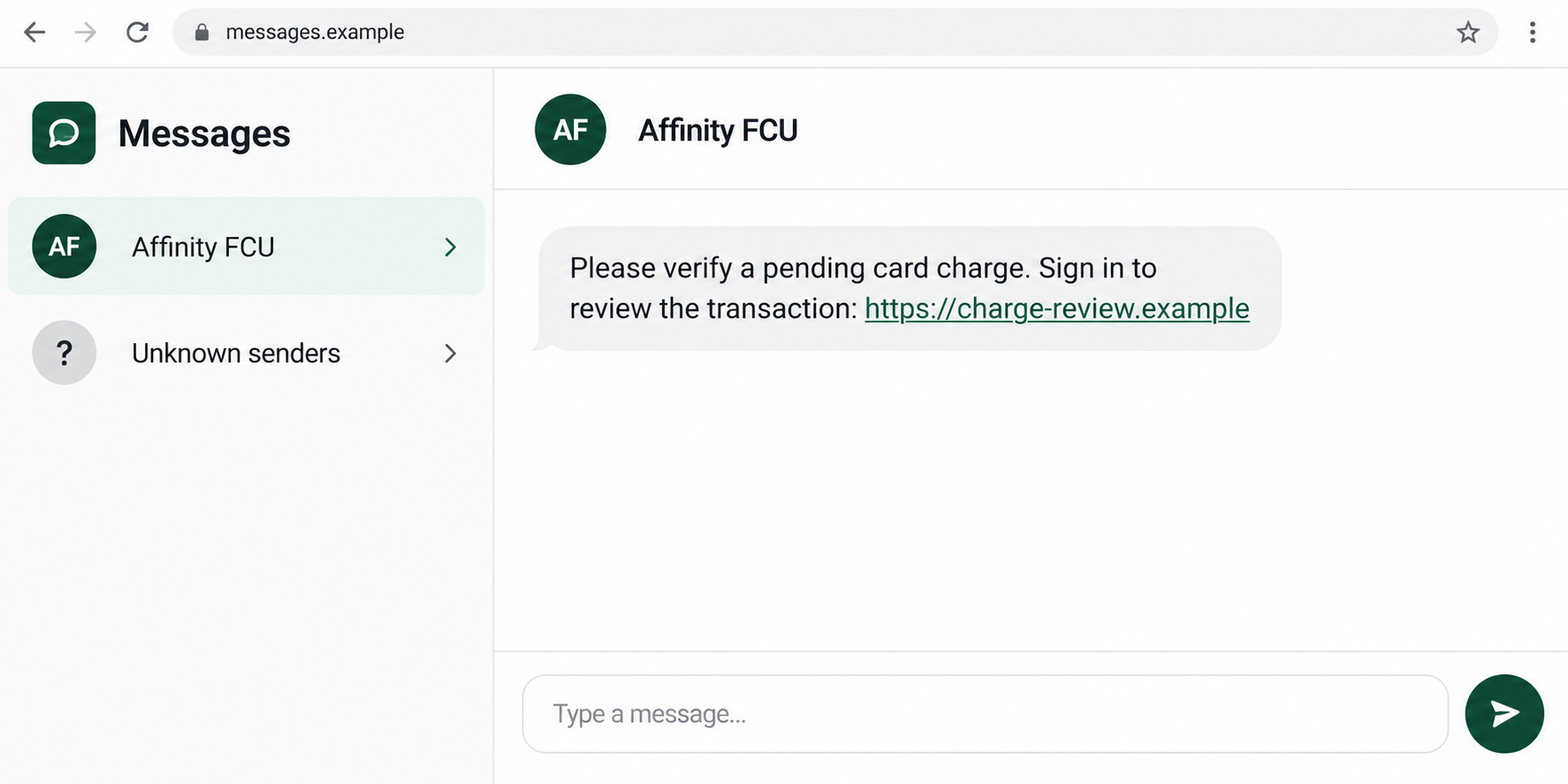
An Affinity FCU text says a card charge needs your attention. You pause over the message, trying to remember whether you bought anything that could explain it.
That moment deserves a better check than the link offers. Before responding, separate what the alert says from what your account actually shows.
Overview
A charge-review message can become a false login request
The Affinity FCU text scam impersonates Affinity Federal Credit Union and uses a pending-charge or information-update pretext to direct readers toward an unsafe website.
The link makes a sign-in feel like the natural next step. On a copied banking page, information entered for the supposed review goes to the impostor.
The credit union is a real institution. The fraudulent contact is the problem, not evidence that Affinity created the message or that its banking system was breached.
Affinity’s text-fraud guidance describes smishing requests for sensitive details and recommends contacting the institution independently to verify suspicious communications.
Real card-fraud alerts also exist
Do not turn this warning into a rule that every Affinity notification is fake. The institution operates an automated fraud-alert program for suspicious card activity.
That distinction matters. Ignoring a genuinely unfamiliar transaction is not the goal; handling it through a trusted banking channel is.
A notification becomes especially concerning when it demands secrets or changes the route to an unfamiliar site. Affinity warns against unsolicited password and verification-code requests.
Stop and verify if the contact asks you to:
- Sign in through a link you cannot associate with the real credit union.
- Provide a password, card PIN, or one-time verification code.
- Enter complete card details to deny a supposed charge.
- Approve another operation described as canceling the transaction.
- Move funds to an account selected by the caller.
- Install software or keep a conversation secret from bank support.
The actual transaction decides the banking response
Open Affinity’s app or website independently and review activity. If an unfamiliar transaction is present, ask real support to investigate it through the appropriate process.
If no matching charge appears, do not keep working with the text’s sender to make it appear. Report the suspicious route and preserve the message.
A fabricated alert and a genuine unauthorized payment can coexist. Neither scenario requires using a stranger’s login page, callback number, or cancellation instructions.
Why the Pending-Charge Story Feels Urgent
A pending-charge warning suggests there is still time to prevent a loss. The person receiving it may feel that even a brief delay could be costly.
The scammer turns that protective instinct into cooperation. A request to verify a charge can quietly become a request to verify the account holder.
Those are different operations. You can tell the real institution you do not recognize a transaction without supplying your banking secrets to an unknown form.
Knowing your name or a partial account detail does not resolve the question. Personal information can be available outside the banking system.
A follow-up caller may seem convincing because the text already established the story. Treat the caller as another contact to verify, not confirmation of the first one.
Affinity’s account-takeover warning describes that combination of suspicious-activity texts, convincing phone calls, and requests for security information.
How the Affinity FCU Text Scam Works
Step 1: An unexpected message asks you to review activity
The text borrows the institution’s name and presents a task connected to your money. A pending transaction or account-update request gives it an immediate purpose.
It does not need to describe a payment that exists. The recipient’s uncertainty can be enough to make the review link appear worth opening.
Some readers are members; others may receive the same approach by chance. Having no Affinity account is an obvious mismatch, not a reason to investigate the form.
A message grouped beside earlier genuine texts should still be checked. A conversation label cannot authorize an unfamiliar destination or a new request for confidential details.
Step 2: The review link replaces the normal banking route
The destination can copy the colors, wording, and layout of a financial website. Its purpose is making the external form feel like part of Affinity’s service.
The registered domain matters more than a credit-union name printed on the page. A banking word in an unrelated address does not make the institution its owner.
Shortened links can hide that distinction until they are opened. There is no need to follow them for verification when you already have a trusted account route.
Nor does a padlock settle the issue. Encryption can protect your connection to the wrong site while the site’s operator receives exactly what you enter.
Step 3: Banking details are requested as identification
The copied page may request login credentials and additional personal or card information. Each field can be presented as necessary to examine or deny the charge.
That explanation is the trap. A password entered to protect an account can instead give an attacker something to test against the genuine login.
A security code may be requested next in some versions. Its real purpose could be authorizing access or a transaction rather than confirming a denial.
Read the actual bank notification. If you did not initiate the operation it describes, do not approve it because the unfamiliar page says it will help.
Step 4: A caller may try to finish the takeover
After collecting a phone number or provoking a response, an impostor may call as fraud support. The conversation can make a digital form feel professionally supervised.
Caller ID is not dependable authentication. Affinity’s warning explains that scammers can spoof legitimate-looking numbers and pressure members to provide sensitive information.
The caller might ask for another code or tell you to transfer money. Treat those as separate attempted actions, not routine parts of verifying the original alert.
End the contact and reach Affinity independently. A genuine account problem can be discussed there without relying on the person who created the alarming story.
Step 5: The outcome depends on what was disclosed or approved
A fake text alone does not move funds. Risk increases when credentials, complete card data, authorization codes, payments, or device access are actually supplied.
That is why the recovery report needs specifics. Reading a message, opening a page, entering a password, and approving a transaction are not interchangeable descriptions.
An attacker may act quickly or retain information for another approach. Contact the real institution when details were exposed, even if no unfamiliar payment appears yet.
Do not let an apparent error or completion screen reassure you into silence. It says nothing reliable about whether the data was collected.
Check the Charge Without Helping the Impostor
Use the account’s own transaction information
Look for the amount, merchant description, date, currency, and transaction status. Compare those with the claim without clicking its review button.
A familiar business may appear under a descriptor you do not recognize immediately. Ask Affinity about the recorded transaction rather than asking the sender to explain it.
If another authorized cardholder uses the account, confirm their activity through a known contact. Do not share passwords or codes just to compare a purchase.
Ask the bank to distinguish pending and completed activity
The status affects which options the institution can offer. Explain whether you see a pending item, a completed charge, or only an amount inside a text.
Support may need more information before deciding the correct response. That does not make an external cancellation form necessary or establish that its proposed solution works.
If you carry both Affinity credit and debit cards, identify which card the actual account record concerns. Give support that distinction when reporting the suspicious alert.
Do not assume a restriction on one card addresses every payment method. Ask which exposed details or account permissions require separate action.
For a shared account, tell the other authorized cardholder what support recommends. They may otherwise continue using a card the institution asked you to restrict.
Keep track of the case and any advice about card use. If the institution recommends replacement or restrictions, follow its genuine instructions.
Do not mistake a code for a protective statement
A real code can arrive for an action you never requested. Read what it authorizes before trusting the caller’s explanation of why they need it.
If you already supplied one, describe the notification’s wording and timing privately to support. Never post a current code online as part of warning others.
Preserve Useful Alerts Instead of Disabling Everything
Real transaction notifications can help you spot unauthorized activity early. A scam should not persuade you to turn off all banking alerts out of frustration.
Affinity’s fraud-alert disclosure explains its messaging program and support route. A familiar short code still should not override a suspicious information request.
Check alert preferences inside the trusted account and confirm where notices are sent. An unfamiliar email address or phone number in the settings needs investigation.
Keep security notifications accessible while recovery is underway. If an attacker changes a contact method, you may otherwise miss the warning about the next action.
Blocking the specific suspicious sender and maintaining real account alerts are different choices. Ask support for help if your device groups contacts in a confusing way.
What to Do if You Have Fallen Victim to This Scam
-
Reach Affinity through its verified support channel.
Its Fraud Prevention Hub lists 800-325-0808. Use that independent route or verified contact information already on your card.
Describe the fake text and the information or approvals supplied. Ask what account, card, and transaction containment is needed for those facts.
-
Secure online banking rather than testing the fake page again.
Replace a disclosed password through the real service. If access fails, tell support; do not repeatedly submit alternative passwords to the unfamiliar website.
Ask about recovery contacts, trusted devices, and other access changes. A new password is important, but it may not answer every account-persistence question.
-
Report any actual unfamiliar payment.
Give the transaction’s recorded amount, date, merchant or recipient, and status. Explain whether you approved anything under the caller’s instructions.
Ask about the appropriate dispute or recovery process and retain the case reference. Do not rely on a supposed cancellation receipt from the scammer.
-
Tell the issuer if full card details or a PIN were exposed.
List the details you entered without sending them through another unknown message. Ask whether a card restriction, replacement, or PIN change is required.
Physical possession of the card does not settle this exposure. A copied card number presents a different issue from someone having stolen the card itself.
-
Protect related passwords and the recovery mailbox.
If the banking password was reused, replace it elsewhere. Inspect the email account for unfamiliar sessions, changed recovery information, or forwarding settings.
Use separate strong credentials going forward. Tell the provider if a reset message was diverted or if access disappeared during the incident.
-
Explain every code, approval, or remote-access action.
Support needs to know whether the contact involved a login challenge, payment authorization, software installation, or screen-sharing session. Write a short timeline while the details are fresh.
Do not download another tool from the caller to undo the first one. Device recovery should use a trusted technician or legitimate security route.
-
Check suspicious software and browser changes if relevant.
If a file, extension, or app was installed, a Malwarebytes scan can help investigate supported devices. Review permissions introduced by the suspicious page too.
AdGuard can add protection against known unsafe destinations and malicious advertising. It cannot invalidate stolen banking credentials or recover a payment already sent.
-
Keep evidence and monitor the account’s recovery.
Save the text, destination, caller details, support references, and relevant transaction records privately. U.S. scam reports can be filed at ReportFraud.ftc.gov.
Continue checking the real account and its alert settings. Reject unexpected contacts offering refunds or claiming you must perform another transaction to finish recovery.
Frequently Asked Questions
Does Affinity send legitimate card-fraud texts?
Yes. It documents an automated fraud-alert program. An alert’s existence does not authenticate an unfamiliar login link or a request for confidential banking information.
What if the amount matches a purchase I made?
Confirm the actual transaction through your account. A correct amount does not make an external form or caller entitled to your password or security code.
Can a familiar caller-ID number still be fraudulent?
Yes. Numbers can be spoofed. End a suspicious incoming conversation and contact the institution through a trusted route you obtain independently.
Should I reply STOP to every suspicious banking text?
Do not engage with the scammer. Check genuine alert preferences through Affinity, so you do not accidentally disable useful notifications while trying to block one suspicious contact.
Is it enough to change the password after sharing a code?
Not necessarily. Tell Affinity what the code concerned and ask it to review relevant account or payment actions. Password replacement does not reverse an approved transaction.
What should I do if I only opened the link?
Close it and check whether anything was submitted, downloaded, or permitted. Review account activity independently; do not assume clicking alone proves a successful takeover.
The Bottom Line
Do not review an Affinity FCU charge through an unverified text link or give security codes to its caller. Use the credit union’s genuine account and support routes.
If you disclosed details or approved an action, contact Affinity promptly and describe exactly what happened. Keep real fraud alerts active while securing the affected access.








