

A page promises a $USCR airdrop under the name “United States Crypto Reserve.” The patriotic design makes an ordinary token claim feel unusually important.
Before you connect a wallet, ask what the name actually means, who runs the page, and why a supposed reserve would offer you free tokens.
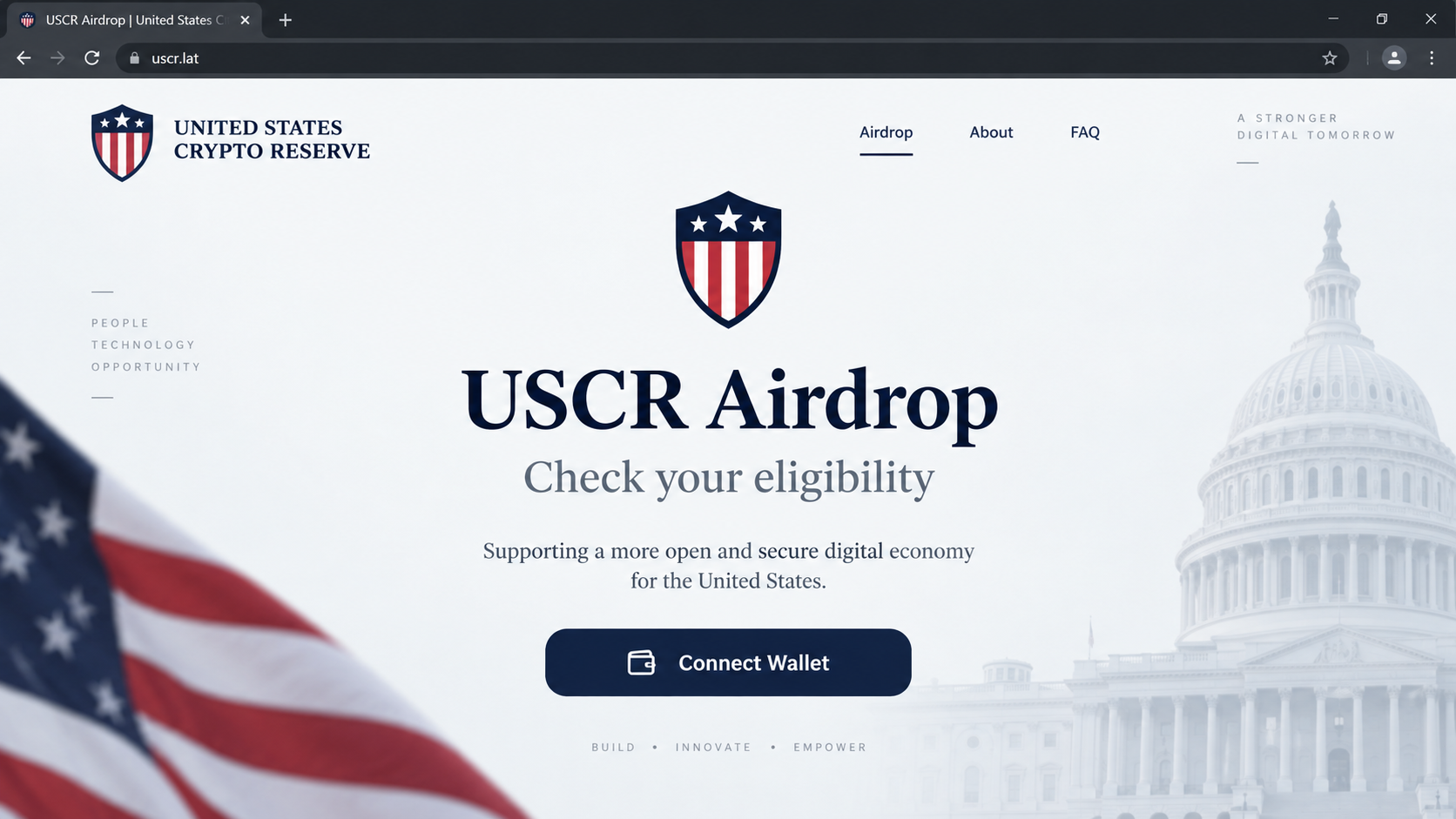
Overview
The claim and the borrowed authority
The United States Crypto Reserve airdrop scam promises visitors $USCR tokens if they connect a cryptocurrency wallet to a claim page.
Reported domains include uscr.lat, register-uscr.xyz, uscrgov.trade, and uscr-gov.com. Their government-sounding names are part of the appeal, not proof of federal authority.
Official-looking seals, flags, and government language can turn an ordinary token offer into something that feels backed by federal authority.
Those reported domains were unavailable during this review. That limits what can be said about their current pages, not the risk of the impersonating claim.
What the official reserve actually concerns
The U.S. government has discussed a Strategic Bitcoin Reserve and Digital Asset Stockpile. That policy is about government-held assets, not a public $USCR giveaway.
A White House digital-assets report describes the reserve as government-owned bitcoin held for governmental purposes.
That document does not direct citizens to connect personal wallets to a token claim page. A private page cannot turn itself into a federal program through branding.
The safe answer for a reader
Do not connect a wallet to the reported claim domains or pay a fee to receive an allocation. Verify any government announcement on an actual .gov site.
The core distinctions are simple:
- A policy about federal crypto holdings is not a retail token airdrop.
- A private project’s name can sound official without government affiliation.
- A wallet connection can lead to dangerous transaction or approval prompts.
- An HTTPS padlock does not certify a claim as genuine.
If you already interacted with the site, record exactly what happened. Visiting, connecting, signing, and sharing a seed phrase require different responses.
Why the “United States Crypto Reserve” Name Carries Weight
Most crypto airdrops lean on a token symbol or influencer. This one uses a name that sounds like a public institution.
That wording can blur two separate ideas: a private crypto project using patriotic language and an actual U.S. government reserve policy.
The difference matters more than the artwork. A site can display a flag, capital building, or official-looking seal without any government relationship.
Government domains in the United States typically end in .gov. A .lat, .xyz, .trade, or ordinary .com domain is not made official by including “uscr” or “gov” in its name.
Even a real .gov page should not be reached through an unsolicited social post if you can navigate to it independently.
The reported claim sites were not a federal distribution portal. Their request for wallet access serves the mechanics of a token-draining scheme.
The word “reserve” also implies backing or stewardship. The page’s claim does not establish that any tokens are backed by U.S. assets.
A real policy is not a personal allocation
The White House report discusses government custody of bitcoin obtained through forfeiture and other lawful means. It does not invite visitors to claim $USCR.
Someone can read a genuine headline about a national crypto reserve and then encounter a completely unrelated airdrop pitch.
That is why verifying only the headline is not enough. You must verify the claim mechanism and the site asking for your wallet.
If the pitch says every citizen qualifies, look for a published federal agency, statutory authority, and official enrollment route. An anonymous wallet button supplies none.
The FTC warns about government impersonators using official-sounding names and urgent requests for money or information.
Crypto adds another layer: a transfer confirmed on a blockchain is usually not reversible by a bank or card issuer.
The token name is not the same as the scam page
A token or private project could use the letters USCR. The deception here concerns sites that promise an allocation and steer visitors into wallet approvals.
Do not assume every mention of the token shares one operator. Equally, do not assume a project page endorses every airdrop site using its name.
Judge the exact URL, the claim, and the wallet request. That keeps the warning focused on what a reader can verify.
How the United States Crypto Reserve Airdrop Scam Works
Step 1: A government-flavored offer reaches the user
The lure may appear in a social post, ad, search result, or direct message. It offers a limited opportunity to receive $USCR tokens.
The wording pairs a “reserve” with a countdown or exclusive eligibility. The effect is to make a speculative offer feel like a public announcement.
A reader may already know about the U.S. Strategic Bitcoin Reserve. The scam takes advantage of that familiarity without supplying an official connection.
Pause at the first link. A familiar policy phrase does not tell you who owns the destination domain.
Step 2: The landing page dresses the claim as official
Reported domains used variations of USCR and government-like wording. That cluster gives the operator several chances to catch searches and rotate pages.
The page can display patriotic graphics, apparent token details, and a prominent claim button. Those elements are easy to create and do not verify the organization.
On a small mobile screen, the full address can be hidden. Expand the browser bar and read the entire hostname before taking action.
Notice that uscr-gov.com is still a .com domain. Putting “gov” before the final dot does not make it a government address.
Step 3: Eligibility is tied to wallet access
Instead of publishing eligibility rules, the page makes wallet access the first task for anyone seeking its promised allocation.
A basic connection often shares a public address. The site may then ask the wallet to approve spending or sign another request.
The second prompt is where the risk changes. A transaction can authorize movement of assets, even when the webpage describes it as verification.
Do not let a claim page interpret the wallet prompt for you. Read the permission, chain, and destination in the wallet itself.
Step 4: The drainer seeks an approval
The reported campaign used a drainer flow intended to move cryptocurrency to wallets controlled by the operator after the victim approved the necessary request.
Different variants may use different contracts and prompts. A token allowance, direct transfer, and seed-phrase request are not technically identical.
All three can put assets at risk. If you cannot explain the exact action, reject it and verify the program independently.
A legitimate U.S. reserve policy provides no reason for a private website to spend the funds already in your wallet.
Step 5: A failed-looking claim can conceal a real loss
The page may show a pending animation, error, or instruction to retry. Meanwhile, a transaction you signed can be recorded on-chain.
Do not approve additional prompts to “finish” the claim. Check wallet history through a trusted explorer before interacting again.
If funds have moved, preserve the transaction hash and destination address. Those details help an exchange or investigator understand what happened.
A stranger who offers to reverse the blockchain transfer for a fee is not part of a government claims office.
How to Check a Crypto Claim That Sounds Official
Type the supposed agency’s name into a browser yourself and look for a real .gov page describing the exact program.
Read the action the official page actually requires. A government report about reserve management is not instructions for private wallet registration.
Search the complete claim domain separately. Do not treat a search snippet or a blocklist result as the only evidence.
Look for a named administering agency, eligibility terms, legal authority, and a contact path you can find independently. Vague “exclusive access” language is not enough.
Be wary when the page says you must act immediately. Time pressure is particularly harmful when a wallet prompt needs careful reading.
Never enter a recovery phrase into a website. A public eligibility checker can use a wallet address without learning the secret that controls the wallet.
If a claim demands a “gas top-up,” “processing fee,” or “unlock payment,” stop. Sending more crypto can increase a loss without making the allocation real.
Use the full domain, not a logo
Logos, badges, and page titles can be copied. The registered hostname is harder to disguise when you deliberately read it.
Compare the address with the institution’s official site reached independently. A hyphen, extra word, or unfamiliar top-level domain can change the owner completely.
A secure connection does not fix a dishonest claim. Fraudulent sites can obtain ordinary HTTPS certificates just like legitimate sites.
If a social profile appears to endorse the airdrop, verify it on the organization’s own site. Accounts can be spoofed or temporarily compromised.
Know what a wallet connection can and cannot prove
A wallet will not certify that a webpage is run by the U.S. government. It only mediates a connection or transaction request.
The amount of danger depends on what you approve. Opening the page does not, by itself, empty the wallet.
That distinction helps you respond calmly. Check the transaction history before moving funds, and act urgently if you revealed a seed phrase.
If you installed a browser extension or desktop app from the site, treat that separately as a possible device compromise.
Why the domain can change while the pitch survives
Several reported addresses used the same USCR theme. Losing one domain does not prevent an operator from sending visitors to another.
That is why memorizing a blacklist is less useful than recognizing the underlying claim: free reserve tokens after an unsolicited wallet connection.
An old article or warning may name a domain that no longer loads. Treat that as a clue about the campaign, not a guarantee that every copy disappeared.
A newly registered variant may use different colors, a different countdown, or a slightly altered token label. The wallet request remains the decisive moment.
If you see a new address, record it without visiting repeatedly. Submit it to your browser’s phishing-reporting tool or the platform that carried the link.
Do not send the live URL to friends as a warning without context. A forwarded link can reach someone who clicks it out of curiosity.
Instead, share a screenshot with the domain visible and explain that the official reserve policy does not offer a public token claim.
What to Do if You Have Fallen Victim to This Scam
Start with what the wallet recorded. A screenshot of the offer cannot tell you whether a transfer was approved, but the chain history can.
- Leave the claim site. Reject pending wallet prompts and stop sending funds. Do not follow a support link supplied by the same page.
- Check transactions. Open your wallet through its trusted app and inspect recent activity on the correct network. Save transaction hashes and recipient addresses.
- Review approvals. Revoke unfamiliar token allowances through a trusted tool for that chain. Revocation may stop future spending, not restore tokens already transferred.
- Replace a compromised wallet. Anyone who revealed recovery words or a private key should generate fresh credentials elsewhere, then transfer assets before an intruder acts.
- Secure related accounts. Change exchange and email passwords if you entered them on the page. End unknown sessions and enable strong multi-factor authentication.
- Report the impersonation. Preserve the URL, message, screenshots, and on-chain records. Report the site to the platform where you found it and to fraud authorities.
- Do not pay a recovery broker. A guaranteed refund from a stranger can become a second scam aimed at the same loss.
If you only viewed the page, there is no need to assume your wallet was drained. Still, ignore follow-up messages that urge you to return.
Run Malwarebytes if you downloaded software or installed an extension. A malicious claim webpage alone does not prove that Windows or macOS is infected.
AdGuard may help reduce malicious ads that lead to claim pages. It cannot reverse a signed transaction or replace wallet-permission review.
Frequently Asked Questions
Is the United States Crypto Reserve a federal airdrop?
No official reserve document reviewed here announces a public $USCR token claim. Do not confuse federal asset holdings with a private giveaway page.
Does “gov” in uscr-gov.com make it official?
No. That address ends in .com. A government-like word before the final dot does not establish federal ownership.
Can I lose funds just by opening the site?
Opening a page is different from approving a transfer or sharing a seed phrase. Inspect your wallet activity if you interacted with prompts.
What if I connected but rejected every transaction?
Review the wallet history and permissions to confirm no approval occurred. Then disconnect the site in your wallet’s connected-app settings.
Can an exchange reverse a drainer transfer?
Usually not. Still report the transaction promptly. An exchange may be able to investigate funds that reach its platform, without promising recovery.
Should I install antivirus after seeing the airdrop?
A scan is sensible if you downloaded or ran software. A wallet-drainer page does not automatically mean malware was installed on your device.
The Bottom Line
Do not claim $USCR from the reported United States Crypto Reserve airdrop domains. The federal reserve policy is not a public wallet-connect token giveaway.
If you already approved a request, inspect on-chain activity and revoke dangerous permissions. Move remaining assets if your recovery phrase was exposed, and report the impersonation.








