

An FLR airdrop page promises a chance to claim tokens. Its colors and network language feel familiar to anyone who has followed Flare.
But Flare has had real distributions before, and that history can make a new claim button seem routine. The timing and destination deserve a closer look.
Overview
The offer readers are seeing
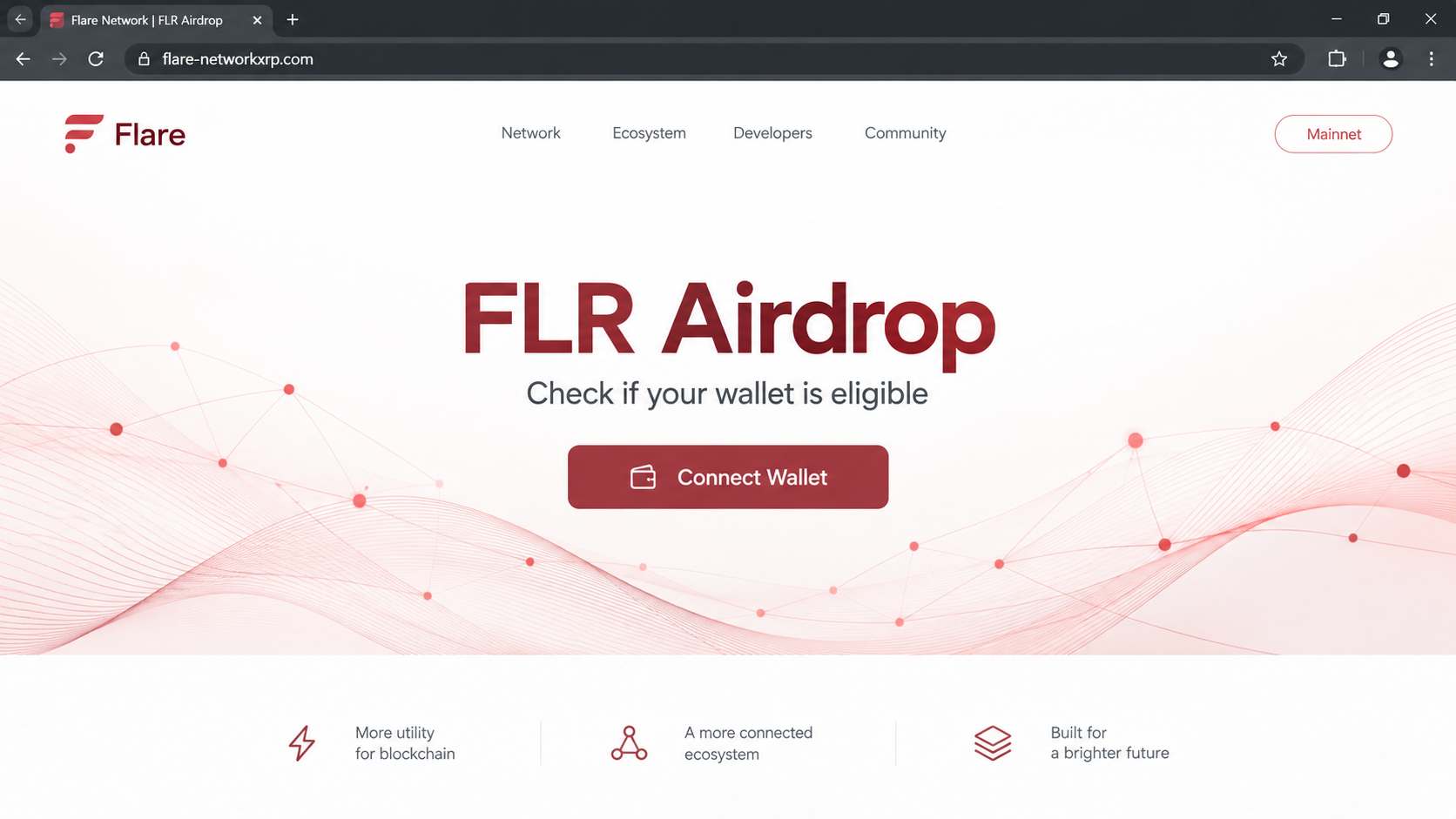
The Flare airdrop scam presents an unofficial page as a place to collect FLR tokens. The visitor is asked to connect a wallet to check eligibility.
Reported addresses include flare-networkxrp.com, flrtrustline-airdrop.net, flarenetwork-xrpconnect.org, and x-eligibility-portal.pages.dev.
Those names blend Flare, XRP, and airdrop terms to look relevant. Their wording does not make them part of the Flare organization.
The wallet prompt is the decisive moment. At that point, the visitor is being asked to trust the page with on-chain permissions, not merely read an announcement.
The timing changes the answer
Flare’s real FlareDrops were a defined series of monthly distributions. Flare says that series concluded on January 30, 2026.
Other protocol rewards can still exist. That is different from an unexpected third-party page promising a new FLR airdrop in exchange for a wallet connection.
Flare’s official community page explicitly warns users about airdrop or reward-claim sites and directs them to verified channels.
What to do with the claim link
Do not connect a wallet to the reported impersonator domains. Begin at flare.network and follow its own links to any genuine portal or reward information.
A quick decision guide:
- Do not treat a red logo or FLR symbol as verification.
- Check the exact hostname, not just the first familiar word.
- Read every wallet prompt before approving anything.
- Never provide a seed phrase to “unlock” a claim.
If you already responded, the important question is whether you merely viewed the page, connected a wallet, or authorized a transaction.
FlareDrops Were Real, but This Claim Is a Different Story
Flare did have a genuine token distribution. The initial FLR distribution and subsequent monthly FlareDrops are documented on official Flare properties.
That history gives impostors a credible foundation. A user who remembers a real distribution may not immediately question a new “eligibility” page.
The official FlareDrop schedule matters because it sets a boundary. The 36-month monthly series ended, while other network rewards have their own processes.
A scam page can blur those categories. It may use the word “airdrop” for an offer that has no connection to a current Flare reward program.
Flare’s community guidance says any airdrop or reward-claim site is a warning sign. That is much more specific than simply advising users to be careful.
The safest verification route is the project’s own website and its links. A search result, social reply, or direct message is not an equivalent starting point.
The official portal is not a lookalike domain
Flare operates named official resources, including its portal and documentation. You can reach those through flare.network rather than typing a domain from an unsolicited claim.
A fraudulent hostname may contain “flare,” “network,” or “xrp” and still belong to someone else. The final registered domain determines where your browser actually goes.
For example, flare-networkxrp.com is not the same hostname as flare.network. Similar words do not create a technical relationship.
A padlock beside either address only means the connection is encrypted. It does not certify that the operator is Flare.
Another Flare-themed lure is not the same campaign
MalwareTips has also covered a fake Flare voting-rewards page. That lure used a governance story rather than a simple airdrop claim.
Both borrow Flare’s identity, but the stories and reported domains differ. Treat each new link on its own merits instead of relying on one blacklist.
Scammers can replace “vote” with “claim,” “stake,” or “eligibility” while keeping the same dangerous wallet-permission step.
The fact that Flare is real should make you protect its name from misuse, not trust every page that repeats it.
How the Fake Flare Airdrop Scam Works
Step 1: A familiar token meets a fresh claim
The link may be shared in a social post, direct message, ad, or search result. It claims FLR holders can collect a new allocation.
The message works best when it reaches someone who already owns FLR or remembers older FlareDrops. That personal relevance lowers skepticism.
It may imply that the claim is time-limited. Deadlines can keep a reader from checking whether the distribution exists at all.
Before opening the link, ask where the announcement first appeared. A reward introduced only by an unknown account lacks the official trail a genuine event should have.
Step 2: A lookalike page supplies the visual proof
The reported domains used Flare-related terms and a claim layout. The page tries to make the name, colors, and wallet button do the work of verification.
On a phone, much of the address bar may be hidden. Expand it to see the entire hostname before you interact.
Even if one known address disappears, another can take its place. The exact logo may change while the airdrop story remains.
Do not rely on an image search to authenticate the page. Logos and token art are easy to copy from public websites.
Step 3: The page asks to inspect your wallet
A “Check eligibility” or “Connect Wallet” button starts the transition from reading a claim to granting the site access to wallet interactions.
Connection usually exposes a public address. It does not automatically surrender your private key or move every token.
The next prompt is the consequential one. The site may ask for a signature, token approval, or transfer presented as a harmless claim step.
A genuine wallet app displays the request, but it cannot know whether the webpage’s promise is honest. You must evaluate both separately.
Step 4: An approval opens a path to assets
The reported Flare airdrop pages were designed to activate a wallet-draining flow after a visitor approved the necessary interaction.
The mechanism can differ by chain and asset. A spending allowance may permit later transfers, while a direct transaction can move funds immediately.
If the page asks to spend existing tokens to receive supposedly free FLR, stop. That permission contradicts the story you were told.
Inspect the contract, spender, and amount shown in your wallet. Decline any request you cannot explain in plain language.
Step 5: The webpage’s status can hide the blockchain result
After approval, the site may show a loading wheel or claim error. That display is controlled by the page, not by the blockchain.
Check a trustworthy explorer for confirmed transactions and token allowances. Do not keep clicking “retry” while the first request remains unclear.
If assets have moved, closing the browser does not reverse them. Immediate containment means reviewing permissions and protecting what remains.
Beware of someone offering to recover the loss for a fee. That promise can be another fraud aimed at the same wallet owner.
How to Verify Flare Rewards Without Using the Claim Link
Navigate to flare.network independently. From there, use the official community resources or portal links rather than a URL copied from an ad.
Read the event’s name and timeframe. A monthly FlareDrop from the concluded series is not a newly opened public giveaway.
For ongoing rewards, consult Flare’s current documentation. Different reward types have different eligibility and claim mechanics.
Do not assume an old tutorial applies forever. Token distribution programs change, and scammers reuse screenshots long after legitimate events close.
Check whether the official site links to the exact claim domain. A social account’s bio link can be changed after an account takeover.
Flare’s community page provides scam-reporting routes. Use those official channels when you encounter a suspicious page, rather than replying to its support chat.
Look for the permission, not just the token
A wallet prompt may show FLR-related language while also authorizing another asset or contract. Read all visible details, including the network.
If the wallet says “unlimited,” find out what token and spender are involved. An unrestricted allowance can be much broader than a single claim.
Consider using a separate, low-balance wallet for unfamiliar decentralized applications. Do not experiment with a wallet that holds important savings.
If you cannot interpret a request, rejecting it is a reasonable decision. A genuine program will remain verifiable through official instructions.
Recognize the difference between website and device risk
A web drainer seeks wallet authorization. It does not require a Windows trojan to take advantage of a signed transaction.
Device malware becomes a separate concern if you downloaded an installer, added an extension, or followed a command from the page.
That distinction prevents unnecessary panic and focuses your response. Review wallet activity first when the only action was a wallet prompt.
If software was installed, use a trusted security scan and remove it before logging into sensitive accounts again.
Why XRP and FLR Together Make the Link Feel Familiar
Flare’s early distribution had a connection to XRP holders. A scam domain that combines “Flare” and “XRP” can exploit that real history.
The historical connection does not give an unofficial site control over an old allocation. Eligibility was defined by actual distribution rules, not a new popup.
People sometimes discover forgotten token news years later and wonder whether a claim remains open. That uncertainty creates room for false “last chance” pages.
Check official Flare documentation for the relevant event date and chain. A page promising a universal claim should not replace those facts.
A scammer may also describe a “trustline,” a “bridge fix,” or an “XRP synchronization” step. Technical vocabulary can disguise a simple request for wallet permission.
If the instruction involves moving your existing assets to an unfamiliar address, stop. A reward claim should not require you to surrender control of current holdings.
If the instruction involves a seed phrase, stop immediately. No legitimate portal needs that secret to inspect a public wallet address.
Check the wallet prompt against the promised action
The webpage says you are claiming FLR. The wallet may instead display a contract interaction with permissions affecting tokens you already own.
That mismatch is more informative than the webpage’s graphics. Read the request in the wallet and compare the contract with official Flare resources.
Approval prompts can be hard to read on mobile. Take time to expand the details or review the request on a larger trusted screen.
Do not rely on a screenshot from a stranger that claims the transaction is safe. Their screenshot may show a different contract or network.
Keep the response proportionate to the exposure
If you never signed, there may be nothing to revoke. Still disconnect the unfamiliar site and avoid its future messages.
If you approved a spender, inspect allowances before using that wallet again. An unused-looking token permission can remain active long after the webpage disappears.
If a transaction moved funds, save its hash before switching wallets. The record can help trace the movement, even though recovery is not guaranteed.
If your seed phrase was disclosed, revoking one allowance is insufficient. The attacker may control the entire wallet, so migrate remaining assets.
What to Do if You Have Fallen Victim to This Scam
Work from the most serious action you took. A page visit, a connection, an approval, and a disclosed seed phrase are not the same event.
- Stop using the claim page. Reject open wallet prompts. Do not send a “gas fee” or follow instructions from an on-page support agent.
- Inspect wallet records. Check transactions and token approvals on the correct chain using a trusted explorer. Save hashes and contract addresses.
- Revoke suspicious permissions. Use a reputable allowance tool. A revocation can prevent future spending, but it cannot cancel a confirmed transfer.
- Move remaining assets if secrets leaked. A shared recovery phrase or private key requires a new wallet created on a clean device.
- Check related accounts. If you entered exchange credentials or installed a browser extension, change passwords elsewhere and review active sessions.
- Report the page. Send the domain, screenshots, and transaction hashes to Flare’s official scam-reporting channel and your local fraud authority.
- Decline recovery offers. Anyone demanding an upfront fee to reverse an on-chain transfer can deepen the loss.
If you only viewed the page, you do not need to assume your wallet was emptied. Still, ignore later messages that ask you to return.
Malwarebytes is relevant if the page led you to install software. AdGuard can reduce exposure to some malicious ads, but neither undoes a signed wallet approval.
Frequently Asked Questions
Were FlareDrops ever real?
Yes. Flare ran a documented monthly distribution series. Its official guidance says that series ended on January 30, 2026.
Does Flare still offer other rewards?
Some protocol rewards continue under different rules. Verify the specific reward through Flare’s current official documentation, not an unsolicited claim page.
Is flare-networkxrp.com the same as flare.network?
No. Similar words do not make two domains equivalent. Use links from flare.network to reach official services.
Can simply connecting a wallet drain FLR?
A basic connection normally reveals a public address. The serious risk arises when you approve a harmful transaction, allowance, or signature.
Will revoking permissions bring back stolen tokens?
No. Revocation can stop future spending under an allowance. It cannot reverse a transfer already confirmed on the blockchain.
Is the real Flare network responsible for this page?
No evidence connects the reported impersonator domains to Flare. The warning concerns outsiders misusing its name, not the network itself.
The Bottom Line
Do not use the reported FLR airdrop claim domains. Flare’s monthly FlareDrop series has ended, and its official community guidance warns about claim-site impersonators.
If you already approved a prompt, inspect transactions and revoke risky allowances immediately. Protect remaining assets if your recovery phrase was exposed, then report the fake page.








