

A text says your Austrian pension account needs a data update. It sounds administrative, but the short message leaves plenty unexplained.
The Austrian pension account text scam makes a familiar service feel like unfinished paperwork. That is worth checking before opening the supplied link.
Overview
The account-update notice is an impersonation
These texts pretend a pension record needs attention and direct the recipient to a website that collects information under that pretext.
The legitimate Austrian pension system isn’t the scam. Its name is being used to make a stranger’s data request sound like official administration.
The pension insurer has confirmed the deception
PV’s official warning identifies fake account-update SMS messages and says it never asks for personal-data entry through SMS.
SVS also reported recurring pension-account update texts in June 2026. Their links lead to counterfeit information-collection pages.
The right action isn’t to abandon your pension account
You can check the genuine record independently. The false message isn’t evidence that your entitlement disappeared or that a real account was hacked.
- Leave the text’s update link alone.
- Use your insurer’s established service or official government route to check the account.
- Contact your bank if you supplied banking credentials or made an unexpected approval.
- Tell the insurer about exposed identity or account information through its genuine contact channel.
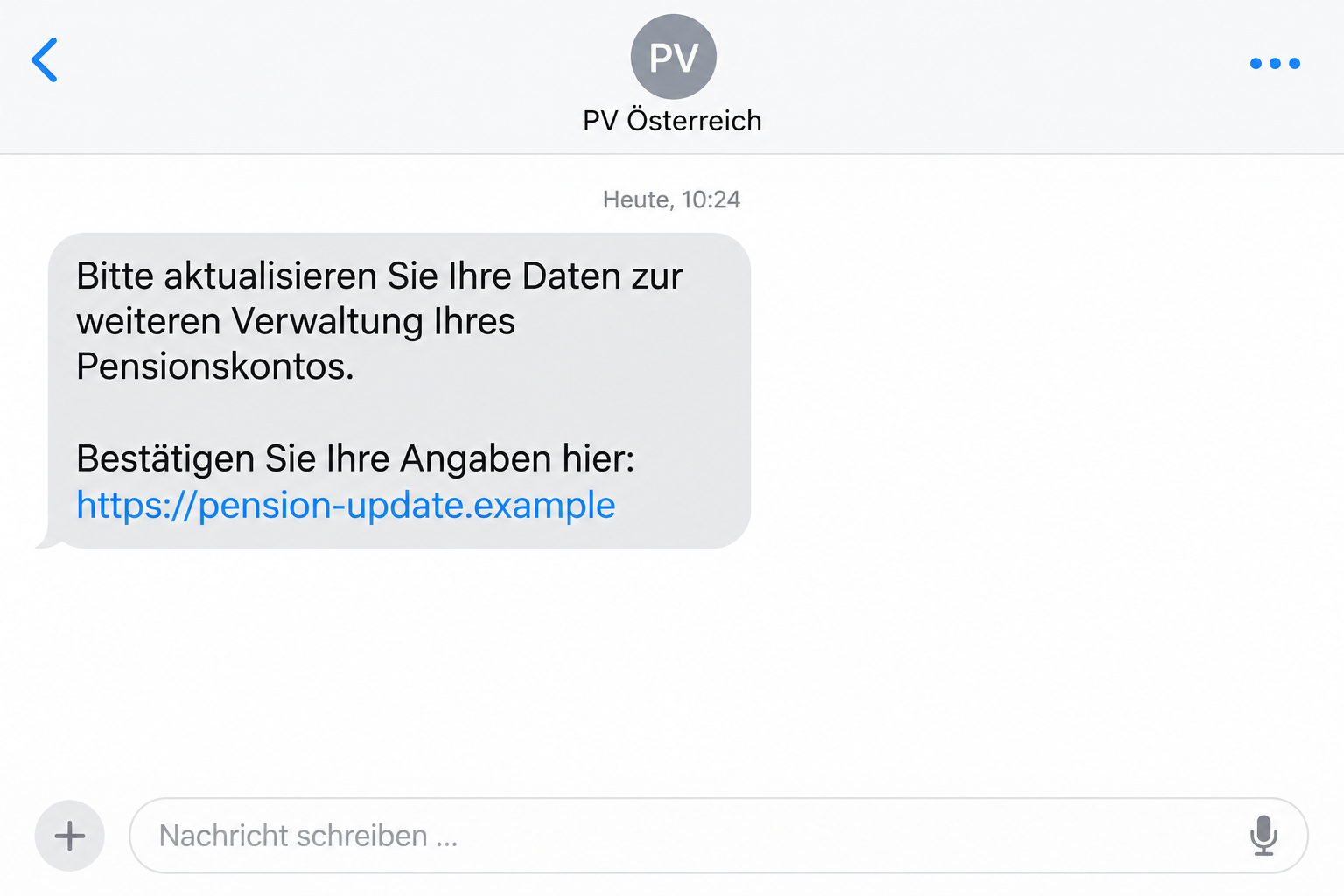
The lead image illustrates the SMS approach. The example address isn’t a working pension service or an original campaign destination.
It Sounds Like Paperwork, Not a Request for Money
The message’s strength is how ordinary the task sounds. Updating details seems like something a public service could reasonably require.
You might recently have changed jobs, moved home or started thinking about retirement. Any of those circumstances can make the request feel timely.
But an apparently relevant moment doesn’t identify the sender. The text still needs to connect to the institution through a route you can verify.
The vague instruction also invites the reader to supply an explanation. Maybe the phone number is outdated. Perhaps an employer’s information hasn’t reached the record.
Once you’ve imagined a plausible reason, opening the form can feel like responsible housekeeping. The message doesn’t have to explain very much itself.
You don’t need the text to fix genuine paperwork. Open the insurer’s service yourself and ask what, if anything, actually needs updating.
People helping a parent or partner may feel extra pressure to complete the task. Don’t let helpfulness turn into filling unfamiliar boxes on their behalf.
Ask the account holder to use their established service, or help them locate the real insurer. You can assist without touching the suspicious link.
How the Austrian Pension Account Text Scam Works
Step 1: The SMS makes a data update sound necessary
The text borrows the pension institution’s identity and frames the request as continued account administration. It gives you a task without a trustworthy context.
Read it as a claim made by a message, not a decision already recorded by the insurer. That distinction keeps the sender from setting the rules.
A recognizable label such as PV Österreich doesn’t authorize the request. Check whether the communication matches the organization’s stated practices.
Don’t answer by listing the details you think need updating. An explanation about a new address or bank account could add information to the attempt.
If your genuine circumstances changed, use the insurer’s real process to handle them. That process doesn’t depend on responding to this SMS.
Save the message if you need to report it. You don’t need to reply to preserve the sender and link information.
Step 2: The link moves official-looking administration onto an untrusted site
The destination is the decisive part of the handoff. It may look like a service page while belonging outside the insurer’s authorized systems.
A pension-related word in a hostname is a description, not proof of institutional ownership. Similar lettering is particularly easy to skim on a small screen.
Rather than trying to decide from the design, open the genuine service independently. Use a known bookmark or the government account-query guidance.
Don’t test the imitation with invented details. A form doesn’t have to accept your submission for you to decide that its request is unverified.
And don’t assume an unavailable website makes the SMS legitimate. A destination that stops loading says nothing about the authority behind the original demand.
The insurer’s own denial is stronger evidence than the page’s appearance or uptime. You can reject the message without completing its journey.
Step 3: The form asks for information under the update pretext
At this stage, the apparent account task becomes a collection of data. Different fields carry different risks, even when the page presents them as one update.
A name, contact number, bank login and identity-service password aren’t interchangeable. Record which information you actually entered before deciding what must be secured.
A1’s security portal also warns about the pension SMS pretext and identifies personal and banking information as targets.
That doesn’t establish an identical bank-selection or approval stage for every text. If your own form presented one, include it in your incident report.
A submitted password can create risk beyond the pension record. The same credential may work elsewhere if you reused it.
Stop as soon as you recognize the mismatch. Completing one page doesn’t oblige you to finish the rest of the supposed update.
A Pension Account Is a Record, Not an Ordinary Bank Balance
The phrase pension account can be confusing, particularly if you’re reading an English explanation of a German-language notice.
Austria’s Pensionskonto records pension entitlements linked to insured periods and contribution information. It isn’t simply a bank account you manage with a debit card.
The government’s account-query guidance explains the genuine checking route through ID Austria or FinanzOnline and states that viewing the record has no fee.
That gives the reader a concrete alternative. You don’t have to follow an unsolicited text to find out whether the real record needs attention.
A bank credential request shouldn’t be accepted merely because the word account appears in the message. Ask what that information would actually authorize.
Similarly, an apparent update doesn’t prove pension payments will stop if you refuse the link. Check any real administrative requirement with the insurer.
Don’t confuse that with advice to ignore genuine correspondence. Authentic pension matters can require action, but the institution must confirm them through its real channels.
If you have a separate question about missing periods or recorded contributions, ask that question directly. The SMS form isn’t a reliable place to correct them.
Three Checks That Keep the Request in Perspective
Which institution actually handles your record?
Different Austrian insurance providers can be relevant to different people. Don’t select one merely because its initials appear in a message.
Use correspondence you already hold or the government service guide to identify the appropriate provider. That helps avoid contacting an impersonator’s invented help desk.
If you’re helping somebody else, let them identify their established account route. Don’t ask them to share their password so you can test the link.
An unknown sender doesn’t need your insurance number to answer a general authenticity question. Start with the suspicious wording, not extra personal information.
What specific information does the form demand?
A request to confirm contact details differs from a request for a bank PIN. Don’t let the page group both under a vague verification heading.
Consider what each field could allow someone to do. A password can protect access; an approval can authorize an operation; a contact detail can support follow-up.
This distinction is useful after an incident too. It tells the bank and insurer where protective action belongs.
You don’t need to reconstruct fields you never reached. Avoid reporting imagined stages as though they happened to you.
Does the real account show the same issue?
Open the official service outside the SMS and look for actual messages or account tasks. Don’t simply compare its logo with the imitation.
If no equivalent request appears, contact the insurer using published contact details. Ask whether an update is genuinely required.
If a real task does exist, complete it from the genuine service. The coincidence doesn’t authenticate the route supplied by the text.
Keep your record of the real task separate from the scam report. That makes it easier to explain both without confusing their instructions.
If Somebody Calls About the Same Pension Issue
A telephone explanation can seem reassuring after a confusing text. It may feel like a chance to ask questions before entering anything.
But a caller’s knowledge of the topic isn’t independent authentication. An unexpected person can repeat the same account-update story.
SVS’s September 2026 notice separately warns about calls asking for banking details. It says not to disclose the banking access number or PIN by telephone.
That is a related warning, not proof that every pension SMS is followed by a call. Treat a new contact as a new verification decision.
If someone requests a banking secret, end the call. Contact the institution through your established route and ask about the claimed instruction.
Don’t stay connected while opening banking or identity apps at the caller’s direction. Check the purpose of any prompt without their explanation controlling the answer.
For a genuine reimbursement-data change, SVS points users to its secure svsGO profile. A surprise caller doesn’t need your online-banking password to provide that route.
Keep the caller’s number and time in your report if available. Don’t call back to confront them or prove they are an impostor.
What to Do if You Have Fallen Victim to This Scam
-
Stop the update process and note your exposure. Close the page and record whether you submitted contact details, passwords, payment data or an approval.
If you only read the SMS, report it and block the unwanted sender. The message alone doesn’t show that a pension record was compromised.
If you typed information but didn’t finish, mention that too. A failed or incomplete form isn’t a guarantee that its fields remained private.
-
Speak to the bank if its access was involved. Use a trusted banking contact and explain the pension-update pretext.
Describe the credential or operation precisely. Ask about account access, registered devices and pending payments according to what actually happened.
Don’t wait for a pension payment to go missing. The bank should assess exposed banking access independently of the insurer’s record.
-
Secure any identity-service or account credential you entered. Recover access through the genuine service rather than an address provided by the text.
If ID Austria was involved, contact its genuine support route for appropriate action. Don’t assume changing an unrelated website password secures that identity service.
Replace reused passwords on other accounts as well. Pay particular attention to email if it receives your login or recovery notifications.
-
Contact the real pension provider about submitted personal data. Use the contact section on its established website or details from previous correspondence.
Explain which details were disclosed and ask whether any account information or payment destination should be checked.
You aren’t asking support to investigate an imagined loss. You’re giving it enough information to assess the exposure and identify any relevant account action.
-
Preserve useful evidence and report misuse. Keep the SMS, full destination, time, form requests and any separate banking notifications.
Use the insurer’s official reporting guidance. PV also identifies Austria’s telephone-misuse reporting platform as a route for suspicious messages.
If there was financial loss or identity misuse, report it to police. Keep report references alongside your provider’s case number.
-
Investigate software only if the interaction involved it. Remove an unexpected download or permission and follow device-specific cleanup advice.
Malwarebytes can help assess suspected malicious software on supported systems. It doesn’t protect a password already handed to an impostor.
AdGuard can reduce some unsafe advertising exposure during browsing. It can’t certify an official pension message or reverse a banking approval.
-
Tell people who help manage your paperwork. Explain that pension-update texts must be checked through the real provider.
Share the wording or a redacted screenshot, without an active link. Someone helping you shouldn’t accidentally complete the same form later.
If you’re the helper, stay calm. Work through the bank and insurer together instead of blaming the account holder for believing official-looking administration.
Frequently Asked Questions
Does PV send these pension data-update texts?
PV has identified the documented messages as fakes and says it doesn’t request personal-data entry through SMS. Check concerns through its official channels.
Will ignoring the text erase my pension entitlement?
The fake message doesn’t establish any change to your record. Ask the genuine insurer about real account tasks instead of following the link.
Is a pension account the same as my bank account?
No. The pension record concerns entitlements and contribution information. That doesn’t justify giving an unsolicited update page your banking access credentials.
Can I check the real account without paying?
Yes. Government guidance describes free account access through official routes using ID Austria or FinanzOnline. Start from the genuine service.
What if I only supplied my address and phone number?
Report those details to the insurer and watch for targeted follow-ups. Don’t assume banking compromise unless banking information or activity was also involved.
Should I trust a caller who explains the text?
Not without independent verification. End requests for secrets or approvals and contact the institution using established contact information.
The Bottom Line
Don’t update your record through the Austrian pension account text scam. Use the genuine pension service to check any real administrative issue.
If you shared banking or identity credentials, secure that access now. Then tell the insurer what happened and report the false message.








