

A quick apartment tour interrupts your TikTok feed. The kitchen looks bright, the neighborhood sounds convenient, and the rent finally fits what you can afford.
It is tempting to message before someone else does. But a good-looking apartment video leaves one important question unanswered: who is actually offering you the keys?
Overview
A real apartment can appear in a fake listing
TikTok rental scams use appealing property videos to attract people looking for affordable housing. The person answering inquiries may have no authority to rent the home.
Sometimes the property is available through someone else. Sometimes it is for sale, already occupied, or described incorrectly. Its existence does not authenticate the social account.
The FTC’s rental-scam guidance warns that criminals copy genuine listings and replace the contact details. A copied virtual tour can be part of that deception.
The application can be as dangerous as the payment
A fake landlord may ask for a fee before arranging a viewing, followed by an application containing personal and financial information.
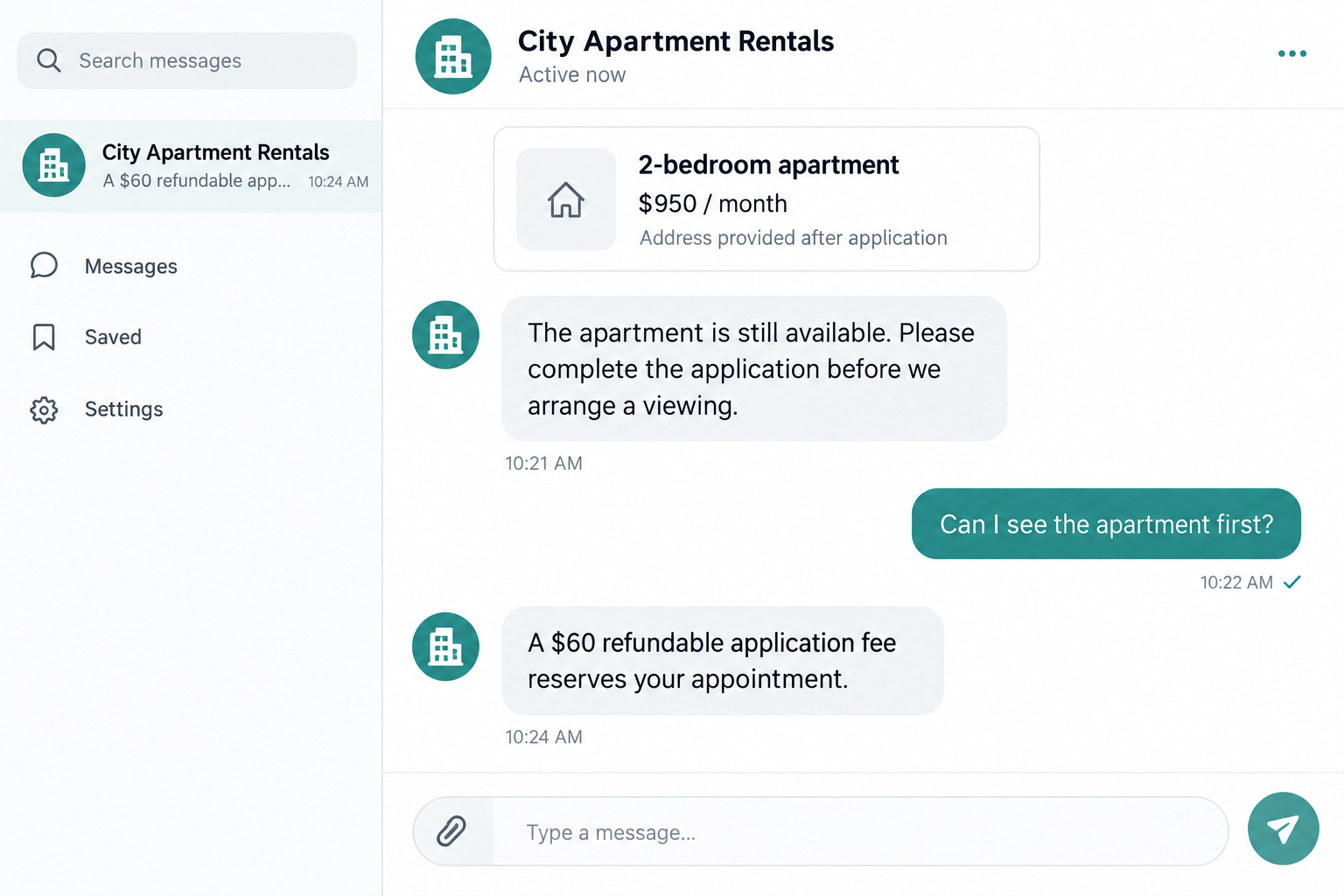
In CNC Intelligence’s rental-listing research, one flagged account requested a $60 refundable application fee and details including date of birth, address, occupation, and income.
Those findings concern examined listings, not every rental on TikTok. A warning-sign study is not proof that every flagged account committed fraud.
The illustration above uses a fictional conversation to explain the pre-viewing fee request. It is not a capture of that account or a real landlord.
Verify rental authority before sending money or documents
The essential check is whether the person offering the apartment is authorized to offer that specific unit, on those terms, through that application process.
Pause when several of these features appear together:
- The address is withheld until you pay or submit extensive information.
- The advertised rent is unusually low compared with similar local units.
- The poster cannot arrange a credible viewing through the property manager.
- The same interior appears under different names or conflicting locations.
- A personal payment account is supplied without a verifiable connection to the landlord.
- The sender discourages checking with the building or management office.
Not every inexpensive apartment, new account, or application fee is fraudulent. Refusal to verify authority is the more serious problem.
Why These Videos Can Feel More Convincing Than Listings
A video gives you a little experience of living there. You can imagine making coffee by that window or walking home from the nearby station.
That feeling can arrive before you know the street address. The apartment has become emotionally real while the person renting it remains unverified.
Comments add another layer. Other viewers asking whether the unit is available can create the impression that you are competing for a genuine opportunity.
But interested commenters are not satisfied tenants. A busy comment section shows attention, not ownership, management authority, or an available lease.
A familiar city hashtag does not locate the property either. Check the address independently rather than treating a caption as a property record.
Imagine a post calling an apartment “minutes from downtown” without naming the building. A short tour cannot answer whether that promise describes the filmed home.
Likewise, a friendly voice explaining the rooms proves only that somebody narrated the video. It does not establish a relationship with the owner.
Use the video as a starting point for research. Do not let it substitute for the checks you would make before paying through any other listing service.
How the TikTok Rental Scam Works
Step 1: An attractive apartment reaches the right audience
The listing combines an appealing interior with a rent figure, city label, or promise of easy approval. It encourages viewers to inquire quickly.
The images may come from another property’s listing or tour. A criminal does not need access to the building to make the initial post convincing.
Look beyond whether the kitchen appears real. Ask where the property is, which unit is offered, and which business or owner manages it.
A beautiful tour does not answer those questions. If the poster stays vague, keep your payment and documents to yourself.
Step 2: The inquiry moves into a private conversation
You message the account and receive a quick answer: the apartment is available, several people want it, and there is a simple way to reserve your place.
The conversation may move to text or another messaging app. That move alone is not fraud, but it separates the discussion from the original public listing.
Keep the handle, post address, and initial messages together. If the sender later changes names or terms, you will have a record of the original offer.
Do not assume that a person answering detailed questions must be the landlord. Public listings provide enough information to imitate a knowledgeable representative.
Step 3: A fee becomes the condition for viewing
The supposed landlord introduces an application, credit-check, or reservation charge. The amount may seem modest compared with the rent you hope to save.
A “refundable” label lowers resistance, but it does not identify who holds the money or how a refund would actually be obtained.
Ask for the written fee terms and the authorized management company. Verify them separately before submitting either payment or an application.
Application-fee rules vary by location. The safety issue here is paying an unverified person, not assuming every legitimate screening charge is prohibited.
Step 4: The form gathers more than a viewing request
An application can request employment details, addresses, identity documents, or financial information. Those requests may resemble ordinary tenant screening.
Ordinary-looking fields do not make an unverified recipient safe. Establish the landlord and official application destination before sending sensitive documents.
Consider the difference between asking how many bedrooms you need and demanding an ID photograph before identifying the building. The second request creates much greater exposure.
Do not provide online-banking passwords or authentication codes for a credit check. Those credentials are not a normal way to prove your ability to rent.
Step 5: A larger payment is presented as the next necessary step
After the application, the sender may request a holding deposit or advance rent. You now feel close to securing the apartment.
That earlier fee can make leaving harder. Walking away feels like wasting the application payment, even though sending more could create a much larger loss.
Stop if verification remains unresolved. Money already sent is not evidence that the next payment will deliver keys, a valid lease, or a refund.
A lease document also needs checking. A property address and copied owner’s name do not prove the signer has authority to enter that agreement.
Step 6: Excuses delay the viewing, keys, or refund
The poster may claim travel, maintenance, or scheduling problems. A promised viewing or refund keeps moving while the supposed reservation remains unverifiable.
There can be genuine delays in rental transactions. What matters is whether the verified owner or manager recognizes your application and the payment.
Contact that organization through details you find independently. If it denies the offer, do not let the original sender override that answer with another reassuring message.
Report the listing and seek payment assistance promptly. Waiting for the stranger’s next explanation can cost you time without resolving the missing rental authority.
Property, Landlord, Application, and Payment Checks
Match the actual unit, not just the building
Search the address and compare interiors, room count, availability, and unit number. A building can be genuine while the advertised apartment is not available.
Conflicting results deserve investigation. A sale listing is a warning, but properties can change status; ask the verified management contact what is currently offered.
Use these records to find a reliable contact, not to confront a resident. Do not arrive at an occupied home demanding keys from someone uninvolved.
Confirm who is authorized to rent it
Locate the management company’s established website or the owner’s independently verifiable contact information. Ask whether the named representative and offer belong to its process.
A registry record naming an owner is useful, but anyone can copy that name. The message sender’s relationship with the property still needs confirmation.
An ID photograph supplied by the poster is not enough. It can identify somebody else without proving the person messaging you owns or manages the unit.
Find the application through the verified manager
Start from the manager’s own public website or confirmed instructions. Compare the applicant portal, fees, required information, and privacy notice with the social-media request.
If a familiar screening service is mentioned, verify that the specific application belongs to the property. A recognized provider’s name can be copied into a fake conversation.
Do not upload documents simply to learn whether the listing is genuine. Verification should happen before the application receives your most sensitive information.
Know who receives your payment
Confirm the payee, amount, purpose, refund terms, and accepted method. Keep a written connection between that recipient and the verified landlord.
Money transfers, cryptocurrency, or personal-payment methods can be difficult to recover. A seller’s promise that the transaction is protected does not create actual purchase protection.
Check the payment provider’s applicable terms yourself. Do not mislabel a commercial rental payment as a gift because the recipient says it will save fees.
A Viewing Helps, but It Is Not the Entire Check
Seeing the property is important. However, the FTC also warns that scammers can misuse self-guided tours offered by genuine landlords.
Being allowed through a door is not the same as verifying who can sign the lease or receive your deposit.
Arrange the tour through the verified management process. Confirm afterward that your application, intended unit, and payment instructions match that same organization.
A live video can clarify the layout when you cannot visit, but it should not replace checking the person presenting it.
For an out-of-town move, consider asking a trusted local person to help verify the property. Avoid sending additional identity documents to a stranger offering that help.
What to Do If You Fell Victim to a TikTok Rental Scam
There is no reason to be embarrassed about wanting affordable housing. Focus on stopping further exposure and separating the failed offer from your next housing decision.
- Stop additional payments.
Do not send another deposit, release fee, or refund-processing payment. Save the original conversation before blocking the account.
Tell anyone helping with your move that this offer is unverified. A partner or relative should not pay the sender while you are investigating.
- Contact the payment provider.
Explain that the recipient falsely claimed rental authority. Supply receipts, transaction references, the listing, and any confirmation from the genuine manager.
Ask about a reversal, dispute, or fraud report appropriate to the payment method. Be accurate about whether you authorized the transfer under false pretenses.
- Protect exposed financial information.
If you entered card details, ask the issuer about replacement and monitoring. If you disclosed banking credentials, secure the account through the bank directly.
Record what you shared rather than assuming every account is compromised. Your bank can respond more effectively when the exposure is described precisely.
- Address identity-document exposure.
List documents and identifying information uploaded to the application. For US identity-theft concerns, use IdentityTheft.gov to build an appropriate recovery plan.
Ask the relevant issuing agency about a compromised document. Do not post the application or ID images publicly while warning others.
- Report the account and copied listing.
Report the video, profile, and messages through TikTok’s tools. Provide identifying links and explain the request for fees or documents.
Notify the real property manager using its established contact route. It may need to warn other applicants or report misuse of its listing.
- Keep a complete case file.
Store the property address, advertised terms, payment records, email addresses, and timeline. Include any promises about viewing, keys, or refunds.
Report the incident to the appropriate fraud authority. US consumers can also submit a report through ReportFraud.ftc.gov.
- Secure passwords used on the application.
If you reused an existing password, change it on the genuine accounts. Check recovery information and unfamiliar sessions where the credential was reused.
If the site only received a new application password, avoid assuming your whole phone was hacked. Investigate downloads or unusual account activity separately.
- Restart the housing search safely.
Do not commit to movers, give notice, or travel based solely on the disputed reservation. Confirm your next offer through a verified owner or manager.
Beware anyone contacting you with guaranteed recovery or a replacement apartment that requires another urgent payment. Your earlier loss does not authenticate a new offer.
Frequently Asked Questions
Are all TikTok apartment listings scams?
No. TikTok is a legitimate platform, and genuine properties can be promoted there. The account, rental authority, application, and payee still need independent verification.
Does a real address prove the offer is genuine?
No. Criminals can copy a real address and interior tour. Verify who is authorized to offer the specific unit and collect the payment.
Is a refundable application fee automatically fraudulent?
No. Fee rules vary, and legitimate screening can involve charges. Do not pay an unverified recipient merely because the word refundable appears.
Can a self-guided tour still be part of a scam?
Yes. Access to a genuine property does not necessarily establish the poster’s authority. Confirm the tour and lease through the real management organization.
What if I sent documents but no money?
You still need to assess the information exposure. Keep a list of what was supplied and seek identity-protection guidance appropriate to those documents.
Should I pay quickly to avoid losing the apartment?
Not before verification. A stranger’s deadline is not a reason to bypass the owner, management office, written fee terms, or confirmed application route.
The Bottom Line
Do not pay an unverified TikTok landlord or send sensitive documents to unlock a viewing. A convincing tour cannot prove rental authority.
Confirm the unit, representative, application, and payee through the actual property manager. If that confirmation is refused, leave the offer and keep your money.








