

A traffic fine lands in your inbox with a short deadline. The message says waiting could cost you more than money.
Before you reach for your card, check how the demand arrived. With this CJIB fine scam, the delivery method tells an important story.
Overview
A Government Fine Becomes an Urgent Online Demand
Scammers impersonate the Centraal Justitieel Incassobureau, the Dutch government agency commonly known as CJIB. They use unpaid-fine messages to push recipients toward fraudulent payments.
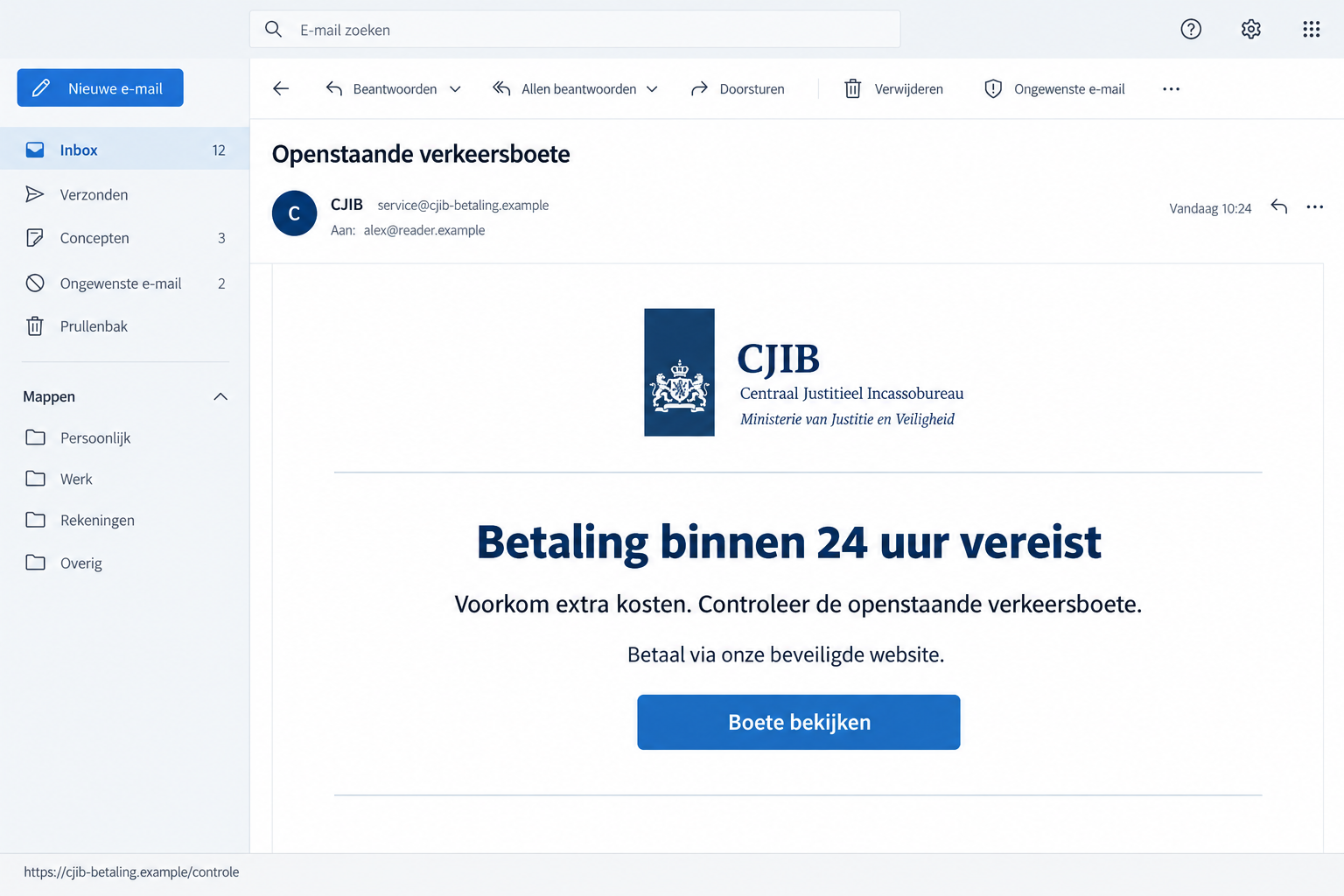
The documented email version combines punishment with a tempting concession. You’re told to act quickly, then offered a partial refund after paying.
The image above is an illustrative email layout with fictional contact details. It doesn’t reproduce a real person’s message or an active payment link.
CJIB Has Confirmed Thousands of Inquiries
CJIB’s March 25, 2026 warning described thousands of inquiries about false fines, including 5,200 calls during the previous week.
Those were calls about the messages, not a count of people who lost money. The figures show how many people were questioning the demands.
The agency says it never sends fines, reminders, or arrears demands by email, SMS, or messaging app.
The Safe Answer Is Outside the Message
A genuine fine and a fraudulent message can exist at the same time. Check your actual position through CJIB’s website, not the sender’s payment route.
- An email, text, or app demand for an unpaid CJIB fine is the impersonation to reject.
- A deadline, reference number, or government logo doesn’t authenticate the request.
- The reported form sequence collects identity details and then payment-card information.
- If you already disclosed a card, contact its issuer rather than waiting for a promised refund.
The Refund Promise Is Part of the Trap
A fine normally makes you want to settle a problem. A refund promise adds a second reason to comply: perhaps paying immediately will reduce the damage.
Fraudehelpdesk’s March 13 alert describes a version offering to return half the fine after payment through the supposed secure website.
That offer shouldn’t send you searching for the best way to claim it. It’s part of the fraudulent demand, not a verified government discount.
The promise also gives the card request a purpose inside the story. You may think you’re completing both a payment and a refund arrangement.
Instead, you are being asked to trust a website reached from a false message. The claimed saving doesn’t make that destination accountable.
Don’t pay a small amount to test whether the refund arrives. A transaction can cost money while the form separately exposes your card information.
There is no need to negotiate with the sender about a reduced amount. The right move is to verify whether you owe anything at all.
How the CJIB Fine Scam Works
Step 1: An Unexpected Notice Claims You Owe a Fine
The approach uses a name many drivers recognize. Someone who has driven in the Netherlands may assume a camera or administrative delay explains the surprise.
You don’t have to remember doing something wrong for the story to work. The uncertainty itself encourages a closer look at the message.
A reference number may make the demand look traceable. But a number printed by the sender isn’t evidence that CJIB has a matching case.
Likewise, receiving the demand on an address you use for official matters doesn’t prove it came from a government system.
Step 2: Threats Try to Shorten Your Decision
The reported version demands payment within 24 hours and threatens extra costs, license points, or other driving-related sanctions.
Those are the scammer’s claims. Don’t treat them as an explanation of Dutch traffic law or as consequences already attached to your license.
The pressure makes ordinary checking feel risky. You may worry that finding the real agency will take longer than the deadline allows.
That reverses the sensible order. Verification comes before payment, particularly when the demand arrived through a channel the agency says it doesn’t use.
Save the threatening message, then leave it. You can show it to someone you trust without following its payment instructions.
Step 3: A Form Turns the Fine Into a Data Request
Fraudehelpdesk describes pages requesting a name, address, date of birth, email address, and phone number before the card stage.
That sequence can feel like ordinary case matching. You supply details because you expect the site to locate the alleged violation.
But entering information doesn’t verify the organization collecting it. A false portal can ask the same questions a real service might ask.
If you reach a form unexpectedly, stop before completing it. Checking the fine through a separately opened official account is more useful than testing the form.
Step 4: The Card Stage Adds a False Incentive to Pay
The documented flow asks for the cardholder name, card number, expiration date, and security code. The partial-refund claim appears alongside the payment request.
A polished payment layout can make this stage feel familiar, especially after you’ve already spent time filling out the earlier pages.
You can still stop. Completing one screen doesn’t create an obligation to finish the next, and the sender hasn’t gained legal authority through your cooperation.
If you submitted card information, treat that as exposure even when the page displayed an error or no payment confirmation arrived.
Only your card issuer can advise what happened to a transaction and what protection is appropriate. The false site cannot provide a trustworthy cancellation.
Checking a Fine Without Trusting Its Sender
Type CJIB’s web address yourself or use an established bookmark. Follow the agency’s instructions to check what is recorded for you.
When DigiD is required, use it only through that independently reached official process. Don’t give its password or approval code to a message sender.
If you need help, locate the contact details on the genuine website. Explain the question without reading sensitive credentials to anyone.
Someone living abroad may find a Dutch fine confusing. That uncertainty is a reason to seek official assistance, not to trust an English-language payment shortcut.
The Dutch police also warn about false CJIB notices. The impersonation warning is not limited to one inbox provider.
If a legitimate amount is outstanding, deal with it through the official account or confirmed agency instructions. Ignore the fraudulent demand, not your genuine obligations.
Keep the two matters separate in your notes. Paying the real agency doesn’t mean a scammer’s form was safe, and reporting the scam doesn’t settle a real fine.
What if Someone Calls About the Message?
CJIB explains that it can genuinely call about payment arrangements. It doesn’t then send SMS or WhatsApp payment instructions.
A displayed phone number isn’t enough to verify a caller. The agency warns that caller identification can be spoofed.
End a doubtful conversation and make your own call using independently located contact information. Don’t accept a transfer arranged by the person you’re trying to verify.
If a caller insists you must keep talking to avoid punishment, resist that pressure. You can explain the concern when you reach the real organization.
Why Blocking One Number Doesn’t End the Problem
A sender address or phone number is one delivery route, not the whole scam. Another version can carry the same demand from somewhere else.
Focus on the requested action and the agency’s actual communication practices. Those remain useful when the colors, wording, or apparent sender change.
CJIB describes reporting suspected accounts, websites, and sender numbers to the relevant organizations for investigation or disruption.
That work doesn’t mean every false page disappears immediately. A page still loading isn’t evidence that the agency has approved it.
Nor does a failed link prove the message was harmless. It may simply be unavailable by the time you check.
Don’t revisit it to see whether it comes back. Preserve the message you already have and use the reporting route instead.
What to Do if You Have Fallen Victim to This Scam
You don’t need to finish identifying the sender before asking for help. Prioritize the exposed card or payment, then document the incident.
-
Contact the card issuer if you entered card details. Use your banking app, the number on your card, or a trusted bank website.
Say that the details were submitted to a fake government-fine page. Ask about blocking or replacing the card and reviewing pending transactions.
-
Report any payment immediately. Tell the provider the amount, time, payment method, and destination shown in your transaction record.
Ask whether a recall, dispute, or other recovery process is available. Don’t assume a pending transaction will fail because the scam website showed an error.
-
Protect credentials only where they were involved. If you supplied a password, reset it at the real service and replace any reused copies.
If banking approvals or government credentials were exposed, tell the relevant provider exactly what you approved. Don’t describe everything as just clicking a link.
-
Keep evidence without continuing the payment flow. Save the original message, its sender details, screenshots already taken, and the bank’s transaction information.
Remove full card numbers and identity documents from anything you share publicly. Police or your bank can explain how to submit sensitive evidence privately.
-
Use the official reporting route. CJIB directs false-message reports to valse-email@fraudehelpdesk.nl. If you paid the impersonator, report the fraud to police too.
Forwarding the email is different from asking the real agency about a fine. Use CJIB’s independently located channels for that separate account question.
-
Investigate unexpected software separately. If you downloaded or installed something, stop using it and get help assessing the device.
A check with Malwarebytes may be appropriate for suspected malware. AdGuard can help with unwanted advertising or redirects where relevant.
Neither tool cancels a card payment or repairs disclosed identity information. Receiving the fine message alone doesn’t establish that your device is infected.
If You Recently Drove a Rental Car or Visited the Netherlands
A recent trip can make an unexpected traffic notice feel believable. It still doesn’t turn a false digital demand into an official CJIB message.
Separate three questions: who contacted you, whether an actual violation exists, and who would legitimately collect any amount connected with it.
If a rental company contacts you about its own account or contract, verify that separately through the company you actually used.
Don’t assume every travel-related fee is the same as a CJIB fine. Equally, don’t accept a CJIB-branded payment link because you remember hiring a car.
Find your original booking records and established company contact details. Don’t use a new number supplied by someone claiming to explain the government notice.
When asking the real agency for help, identify the message as a suspected impersonation. Ask how to establish any genuine obligation using its official process.
If you need language assistance, have a trusted person help explain the question. Keep government-login secrets private while they help you understand the response.
A stranger offering to handle the fine for an immediate fee adds another payment decision. They don’t become trustworthy by offering a translation.
Keep official answers and transaction records together. That makes it easier to distinguish the real travel paperwork from the fraudulent demand if another reminder arrives.
The goal isn’t to avoid a lawful fine. It’s to prevent a believable travel story from directing your payment or identity details to an impostor.
If You Shared Identity Details but Didn’t Pay
Write down the fields you completed. A name and phone number require a different response from a full identity document or an account password.
Watch for contacts that reuse those details to sound informed. A person who knows about the supposed fine could still be another impersonator.
Don’t confirm additional information to a caller offering to cancel the case. Reach the claimed organization independently before discussing anything sensitive.
If you see actual misuse, preserve the evidence and seek advice from the appropriate official identity-fraud or police service.
Finally, avoid anyone promising guaranteed recovery for an advance fee. A payment to a second stranger doesn’t make the first transaction recoverable.
Frequently Asked Questions
Does CJIB Send Traffic Fines by Email or SMS?
No. Its warning says fines, reminders, and arrears demands do not arrive through email, SMS, or messaging apps. Check independently through CJIB.
Is the 24-Hour License Threat Real?
It is a claim in the reported scam message, not proof of an actual penalty. Don’t follow its payment link to protect your license.
Will Paying Get Half the Fine Refunded?
The partial refund belongs to the fraudulent pitch. Don’t send money or expose your card to try to claim it.
What if the Email Shows a Real-Looking Reference Number?
A printed reference can be invented or copied. Use the genuine agency’s records to establish whether a fine exists and what it concerns.
Can a Real CJIB Employee Telephone Me?
Genuine payment-arrangement calls can happen. Verify a doubtful call yourself; caller ID and a follow-up message don’t establish the caller’s identity.
Should I Wait for a Charge Before Calling My Bank?
Not if you exposed card or banking information. Tell your provider promptly so it can assess protective action before additional use occurs.
The Bottom Line
Reject the CJIB fine scam’s payment route. A punishment threat and a promised refund don’t turn an unexpected digital demand into an official fine.
Check any genuine obligation through CJIB itself. If you supplied payment details or paid, contact the financial provider now and preserve the message for reporting.

Join the discussion
0 commentsShare your experience or ask a question about this article.
Discussion
Start the conversation
Have a question or something useful to share? Add the first comment.