

A Makro email says your business details need confirming. Leave it too long, the message warns, and your membership could disappear.
For a busy business owner, that sounds like paperwork worth clearing quickly. The real question is who is asking you to complete it.
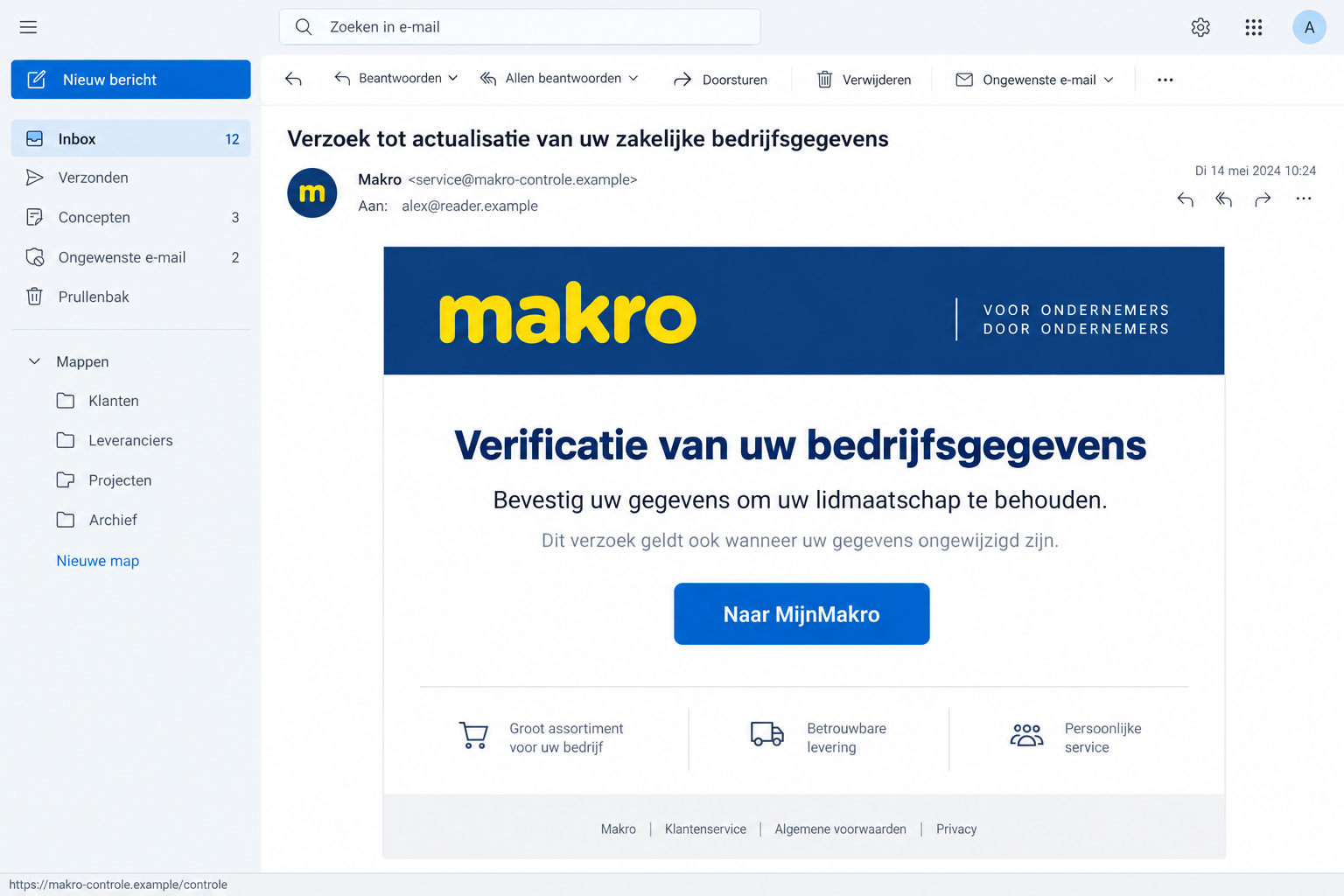
Overview
A Membership Threat Disguised as Compliance
The Makro email scam uses the Dutch wholesaler’s identity to request a business-information check. Its pitch sounds administrative rather than promotional.
The email says legal requirements make the review necessary. It tells recipients to complete a verification form, even when their company details haven’t changed.
That explanation closes an obvious escape: you can’t simply decide that no update is needed. The sender makes reconfirming unchanged information part of the task.
Recurring False Messages Are Documented
Fraudehelpdesk’s October specimen shows a false request dated October 12, threatening membership loss unless details arrive by October 16.
A separate September membership message carries a similar demand, showing how the same membership threat returns with a different deadline.
The lead illustration uses fictional contact information. Its inbox date, branding arrangement, and surrounding interface shouldn’t be read as an original scam capture.
Separate the Real Account From the Email’s Instructions
Makro is a real business, and genuine customer records need maintaining. Neither fact verifies a stranger’s link to a supposed MijnMakro form.
- The lure is continued access to membership, not a prize or supermarket voucher.
- The authority claim comes from vague references to legal compliance.
- The requested action is a business-data verification through the supplied route.
- Confirm the request with Makro independently before providing information.
Why This Looks Like a Task You Shouldn’t Ignore
A supplier relationship often involves ordinary housekeeping: billing addresses, authorized contacts, account details, and access for staff.
That makes a request to check records less surprising than a free gift. The sender is borrowing a real business habit.
The threatened consequence also fits the reader’s routine. Losing access could complicate purchasing, so completing a short form seems like the smaller inconvenience.
But the message hasn’t earned the authority to make that choice for you. Its deadline and membership threat are claims from the sender.
You don’t need to research every possible compliance law before responding safely. First establish whether Makro actually sent the request.
A genuine business obligation can be explained by the genuine business through a verified channel. It doesn’t become legitimate because an email mentions regulations.
The same applies to titles such as customer-service manager. A job title in a signature doesn’t prove that the person holds that role.
How the Makro Email Scam Works
Step 1: The Request Arrives Wearing a Supplier’s Identity
The email presents itself as a Makro account matter. A business recipient may put it alongside invoices and supplier correspondence rather than suspicious promotions.
That placement matters in a shared inbox. Someone processing ordinary administration can forward the message to a manager without questioning the original source.
Internal trust can then attach to the forwarding colleague instead of the external sender. The next person sees a task already moving through the business.
If this happens at work, pause the chain. Ask the account owner to confirm the request through the contact route already used for Makro.
Step 2: Legal Wording Makes the Check Sound Mandatory
The sender presents periodic verification as necessary for compliance. It doesn’t need a dramatic threat when routine obligations already sound important.
The October version also applies the demand to customers whose information hasn’t changed. That pushes recipients toward the form regardless of their actual circumstances.
Don’t confuse a description of a process with proof that the process exists. A convincing explanation can still come from an impersonator.
If you want to know whether an update is required, ask Makro directly. Don’t ask the suspect sender to certify its own message.
Step 3: A Deadline Turns the Form Into the Apparent Solution
The false message links keeping membership active with completing the supplied verification. Its MijnMakro wording borrows the name of a genuine customer environment.
That’s the crucial handoff. A real account name on a button doesn’t establish where the button leads or who receives the information.
The published specimen doesn’t reveal an accessible final form. We therefore can’t list its exact fields or claim that everyone reaches a banking screen.
Don’t use the link to discover what it wants. Reach the real account separately, then ask about any outstanding information request.
You can stop even if you already started filling out a page. Don’t finish just because the first questions seemed ordinary.
What Genuine Business Details Do and Don’t Prove
Makro’s privacy information describes handling customer and company records, including contact and account information.
This is why a blanket rule such as “Makro never asks about business details” would be misleading. The identity and route of the request matter.
The policy also explains that some business information can come from public or commercial sources. An accurate company name isn’t a private authentication secret.
If an email knows your workplace or lists a recognizable address, treat those as details to check, not credentials proving who sent it.
A copied postal address or registration number is equally limited. It can identify the company being imitated without identifying the person operating the email.
Don’t try to resolve that uncertainty by sending more data. A request for an identity document or banking information deserves its own independent confirmation.
The public examples establish the false verification request, but don’t show a payment amount, software download, or completed account takeover.
Checking MijnMakro Without Taking the Email’s Shortcut
Go to Makro through an existing bookmark, its known website, or the genuine app you already use. Start outside the questionable message.
Look at the account associated with your business. Don’t create a replacement profile just because the email says the old membership is in danger.
Compare any genuine account notice with the requested task. If the request isn’t clear, ask customer service to explain whether action is needed.
Makro publishes independent contact options. Use those rather than a new number or reply address supplied by the email.
Before sharing information with support, explain that you’re checking a suspected impersonation. Let staff tell you what they need to identify the genuine account.
Never send a password or one-time login code as account evidence. Helping someone locate a customer record shouldn’t require handing over your login.
If another employee owns the membership relationship, involve them. Buying authority, account administration, and access to company documents may belong to different people.
Keep the result of the check in your internal notes. That prevents a second employee from responding to the same false request later.
When “It’s Only Business Information” Is the Wrong Reassurance
Some business details are public, but a tailored response can still reveal who handles the account and which contact is likely to act.
For example, a stranger may learn that you manage purchasing and that a particular email address reaches you directly. That can sharpen a later approach.
This doesn’t mean account theft inevitably follows. It means you should verify a subsequent request even when it refers to information you recognize.
A caller saying they’re finishing your verification could simply be repeating what you provided. Familiarity isn’t independent proof of authority.
Don’t transfer money, approve a login, or install a remote-help tool because someone already knows about the membership email.
Those would be new requests requiring fresh verification. They are not confirmed stages of every Makro message covered here.
If you uploaded a document, identify exactly what it contained. A business certificate, personal identity document, and bank statement expose different information.
Share that inventory with your organization’s security or privacy contact. Avoid circulating the document itself to everyone who asks what happened.
What to Do if You Have Fallen Victim to This Scam
Respond according to what left your control. There’s no reason to cancel a real membership simply because an impersonator contacted you.
-
Break off the false verification. Close the form and stop replying. Don’t accept a follow-up call as proof that the process is legitimate.
Save the message and note which device and mailbox were involved. Preserve what you already have rather than returning to collect more screenshots.
-
Confirm the real account with Makro. Ask whether a business-information update is required and whether any unauthorized changes are visible.
Keep legitimate purchases and account maintenance separate from the scam report. Customer service can clarify the genuine relationship without validating the email.
-
Replace any password entered on the false site. Use the genuine account’s recovery controls and choose a new, unique password.
If that password protected your email too, secure the mailbox promptly. Review recovery settings and unfamiliar access using the mail provider’s own tools.
-
Tell the appropriate people at your business. State the exact information supplied, including whether a document was uploaded or a code was approved.
Ask purchasing and finance staff to independently confirm subsequent changes. Avoid sending a company-wide alarm containing active scam links or sensitive attachments.
-
Contact the bank if payment information or money was involved. Use a trusted banking channel and explain the impersonation.
Ask about protecting the exposed payment method and investigating transactions. Don’t wait for Makro to recover money sent outside its genuine process.
-
Report the false email. Fraudehelpdesk publishes valse-email@fraudehelpdesk.nl for suspicious messages. You can also alert Makro through its official contact channel.
For losses or actual identity misuse, seek appropriate police or official fraud assistance. Keep report references with the original message and payment records.
-
Review software exposure only if relevant. A membership email doesn’t establish infection. An unexpected installed app or downloaded program warrants a separate check.
Malwarebytes can assist with suspected malware. AdGuard may help curb unwanted advertising or redirection where that’s part of the exposure.
Neither service removes information from an impersonator’s records. Password replacement, financial protection, and incident reporting remain separate jobs.
What to Ask if a Document Was Uploaded
Start by identifying the document, not by guessing what criminals might do with it. Was it a public business record or something personally sensitive?
List the information visible on the file and whether it included signatures, identity numbers, or financial records. Keep the document itself in a controlled location.
Ask your organization’s responsible contact which people or providers need notifying. A supplier-verification incident may involve company information as well as one employee’s details.
If you suspect actual misuse, explain the observed event to the relevant institution. Separate a possible risk from a transaction or account change you can confirm.
Don’t pay someone online to “delete” the document from a scammer’s computer. That promise gives you no reliable control over copies already made.
Preserve any new message referring to the uploaded file. It may help connect a later impersonation attempt with the original disclosure without proving the sender’s identity.
You can ask for help before misuse appears. The useful information is what was disclosed and through which request, not a dramatic label for the incident.
Keeping Supplier Verification Out of the Shared-Inbox Rush
A small business doesn’t need a complicated security department to slow this down. It needs a clear owner for important supplier accounts.
Record who checks membership and billing changes. A receptionist or junior colleague should know whom to ask before providing documents.
Keep verified contact details outside incoming emails. Old invoices, established account bookmarks, and independently confirmed supplier contacts are more useful than a fresh signature block.
When warning colleagues, describe the action to avoid: don’t complete the unexpected business-check form. A generic “watch out for scams” message gives them less help.
If legitimate information does need updating, have the authorized person complete it through the genuine account. Don’t let suspicion turn into neglected administration.
Finally, make it easy to report a mistaken click. Staff who fear blame may delay telling you that a password or document was supplied.
A short, factual report lets the business act while the details are fresh. You can improve the process after the immediate risk is handled.
Frequently Asked Questions
Is Makro Sending These False Membership Emails?
The reported messages are impersonations. The warning concerns people misusing Makro’s identity, not an allegation that the genuine wholesaler operates this scam.
Do I Have to Reconfirm Unchanged Business Information?
The false email says you do. Don’t rely on that claim; ask the real company whether your account has a genuine outstanding requirement.
Will Ignoring the Fake Deadline Cancel My Membership?
A scammer’s email cannot establish a real cancellation. Check the membership through Makro itself and deal with any legitimate requirement there.
Does the MijnMakro Button Prove the Link Is Safe?
No. The sender controls the button’s wording. Reach the genuine account from a known website or app instead of trusting its label.
What if I Shared Details That Were Already Public?
Don’t assume that means account takeover occurred. Record what you supplied and independently verify later requests that use those details to sound credible.
Should I Call the Number Printed in the Email?
Find customer service on Makro’s independently opened website. Even a copied genuine contact detail doesn’t authenticate the rest of a false message.
The Bottom Line
Don’t complete the form in this Makro email scam. A membership deadline and vague legal wording don’t establish a genuine business-verification requirement.
Check with Makro through an established route. If you responded, secure any exposed login, document the information shared, and involve your bank when financial exposure occurred.

Join the discussion
0 commentsShare your experience or ask a question about this article.
Discussion
Start the conversation
Have a question or something useful to share? Add the first comment.