

Your domain needs renewing, and a Vimexx email says the invoice is already overdue. The thought of losing your website makes the button hard to ignore.
But a renewal reminder can hide a very different request. Before you sign in or pay, separate the real hosting account from the message.
Overview
An Overdue Invoice Creates a Website Emergency
The Vimexx invoice scam impersonates a legitimate hosting provider. Its emails use domain renewal or service suspension to make an account visit feel urgent.
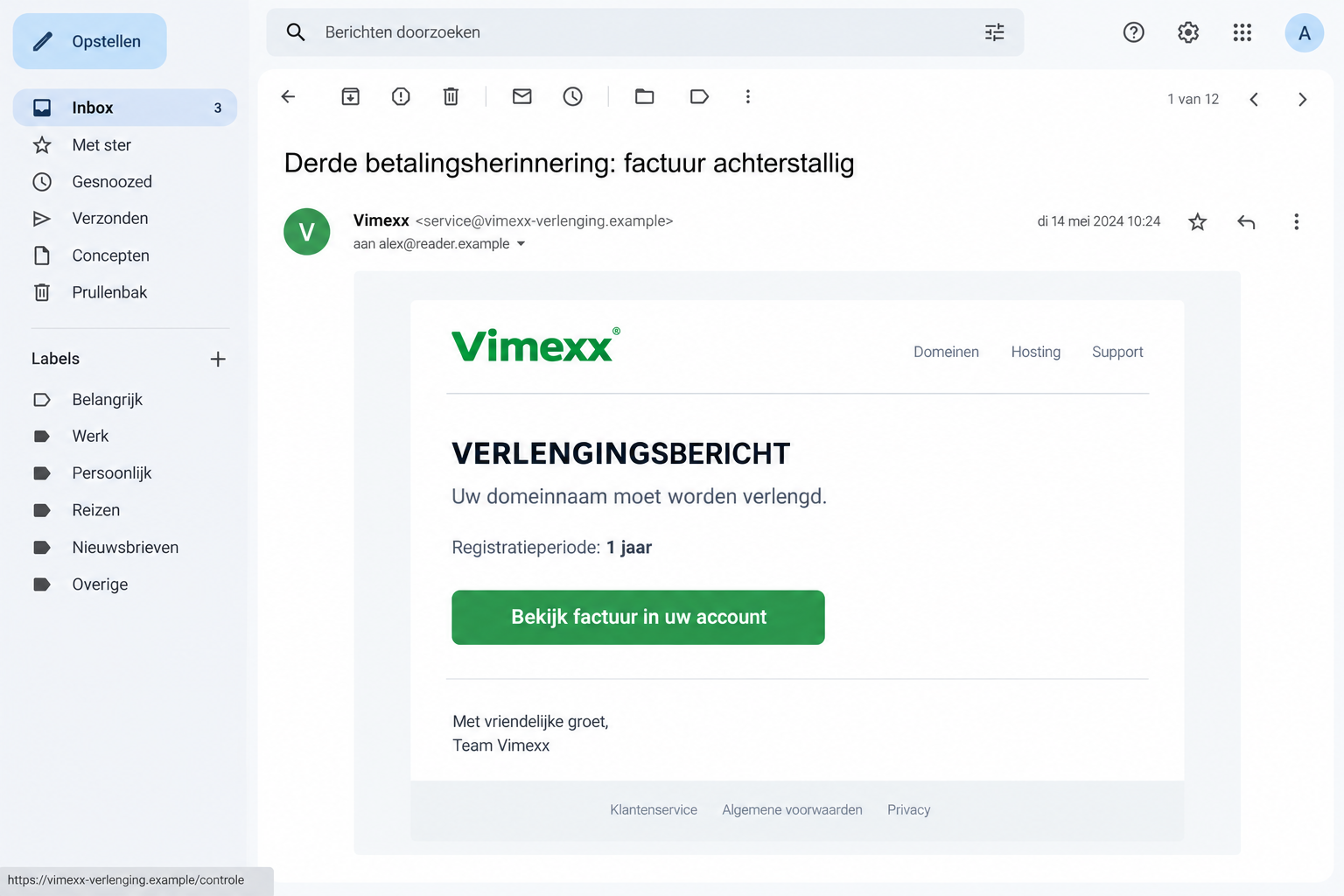
One reported version calls itself a third reminder, then presents an account-invoice button. Another says a payment failed and asks you to update billing details.
These are false messages abusing Vimexx’s name, not evidence that the actual hosting company is operating a fraudulent service.
The Provider Confirms Repeated Phishing
Vimexx’s own warning describes multiple customer reports and imitation emails that can lead to stolen card information or account credentials.
An October 13 false renewal notice, published the following day, shows the same believable invoice framing.
Our image is an illustrative reconstruction. Its fictional address, interface date, and layout are not details from that original message.
Verify the Renewal in Your Existing Account
You can protect a domain without using the email’s route. Open the provider independently and check the actual service, invoice, and renewal date there.
- The brand is Vimexx; the suspicious conduct is the impersonator’s renewal or billing request.
- A familiar domain name inside a message doesn’t authenticate the sender.
- Credit-card exposure and hosting-login exposure need different protective steps.
- Don’t cancel genuine hosting because of a false reminder. Resolve the real account separately.
Why Domain Owners Are Easy to Rush
A website isn’t just a page on the internet. For a small business, it may carry bookings, customer inquiries, product orders, and everyday email.
A renewal warning therefore sounds like several problems arriving at once. Losing access could feel more costly than paying a modest bill immediately.
That pressure is useful to the impersonator. You’re pushed to preserve a service before establishing who is asking for the payment.
The word “third” adds another nudge. It suggests you overlooked earlier reminders and should fix the mistake rather than question the current one.
But a sender can write “third reminder” without having sent a first or second. The label isn’t proof of an unpaid invoice.
Likewise, “view in your account” sounds safer than “pay here.” It can still lead to an imitation login instead of your existing customer account.
You don’t have to decide whether your domain genuinely expires soon from the email alone. Your established account or provider can answer that question.
How the Vimexx Invoice Scam Works
Step 1: The Email Borrows the Provider’s Billing Format
The reported renewal version includes invoice-style fields and a one-year registration period. Those ordinary details make it resemble routine hosting administration.
A neat layout can encourage you to scan for a due date rather than inspect the request itself. That’s especially easy during a busy workday.
Don’t treat a reference, logo, or copied footer as an account record. Compare the request with information obtained after reaching the real provider independently.
If a colleague forwards the reminder, ask whether they confirmed it. An internal forwarding note may be genuine even when the external email isn’t.
Step 2: A Renewal Deadline or Suspension Threat Prompts Action
The October specimen pairs its overdue-invoice subject with a payment deadline the next day. That short window makes a quick login seem reasonable.
A separate false billing-update email threatens hosting, domain, or email disruption unless payment details are updated within 48 hours.
One message says renew; another says update your payment method. Both try to make following the sender’s instructions feel necessary for keeping services running.
An expiring service still deserves attention, but attention doesn’t require using this button. Leave the email and inspect the actual account.
If you aren’t the person who manages hosting, involve that person. Don’t improvise a renewal payment from a shared company card.
Step 3: The Link Offers an Imitation Account or Payment Route
Vimexx warns that fraudulent messages can look like its emails while directing customers elsewhere. A copied appearance doesn’t make the destination part of its platform.
The provider identifies vimexx.nl, vimexx.eu, vimexx.be, and vimexx.com as its expected destination domains.
Read domain boundaries carefully. A company name added before or after another site’s address doesn’t turn that site into the provider’s property.
If you aren’t confident reading a long address, don’t wrestle with it. Start a new browser visit from the website you already know.
The exact destination in the latest published specimen is withheld. We can’t claim which final form that particular button displayed.
Step 4: An Ordinary-Looking Form Requests Valuable Information
The provider’s warning identifies both card details and account passwords as possible targets. Don’t assume only one matters because the email mentioned an invoice.
A login gives a stranger different opportunities from a card number. Recovery should match what you supplied, not just the subject of the email.
A page that rejects your password may still have received it. Don’t keep trying several passwords while looking for one that works.
If a payment screen fails, don’t test another card. Stop and ask the financial provider about the information or transaction already exposed.
Checking the Real Bill Without Interrupting Your Website
Use a trusted bookmark or type the provider’s address yourself. Avoid a new search advertisement promising urgent account recovery.
Inside the genuine customer environment, identify the exact domain or service. Check whether it belongs to your organization and whether a payment is actually due.
Compare the account’s invoice information with your business records. A matching-looking amount alone isn’t enough if the payment destination came from the questionable email.
If an agency manages the domain for you, contact it using an existing number or conversation. Don’t adopt new contact details supplied by the reminder.
A website still loading doesn’t answer every renewal question. Equally, an email warning doesn’t prove suspension has occurred. Ask the provider about the actual account state.
When an invoice is genuine, settle it through the verified account. Keep the receipt with your ordinary records rather than replying to the suspicious sender.
When the invoice doesn’t match, reach Vimexx support through its official help page. Include enough context for staff to identify the request.
Don’t include your password, full card number, or a security code in a support ticket. Staff can ask for appropriate account-verification information through their process.
Explain whether you control the customer account or only the website it hosts. That helps support direct the question without assuming you hold every permission.
For an account created by a former employee, locate the authorized business owner rather than using an unsolicited recovery offer. Keep ownership checks inside the provider’s process.
If access must be recovered, ask which details are needed and how to submit them securely. An unexpected invoice doesn’t justify emailing a collection of company documents.
A Hosting Login Isn’t the Same as Every Website Password
Domain registration, hosting administration, mailbox access, and a website’s own dashboard can involve separate credentials and permissions.
That distinction prevents both underreaction and panic. One exposed password doesn’t automatically prove every layer has been taken over.
Start with the specific login you entered. Ask the provider which services it controls and which account settings deserve review.
If the same password was reused elsewhere, replace those copies. Use different passwords for different services so one mistake doesn’t spread unnecessarily.
Review recovery addresses and security settings on the affected account. A password change is less reassuring if an unfamiliar recovery contact remains.
For an exposed hosting account, ask about unexpected users, domain changes, or service settings. Don’t make speculative DNS changes while trying to undo an unconfirmed takeover.
Vimexx documents separate webmail two-factor authentication. Protecting the mailbox matters if it receives password-reset messages.
Its website-security guidance also distinguishes customer-panel and website protections. Choose the controls relevant to the account, rather than treating them as interchangeable.
What to Do if You Have Fallen Victim to This Scam
Tell the relevant provider what you did in plain terms. “I entered a password” and “I approved a payment” are more useful than “I was hacked.”
-
Leave the false renewal page. Don’t submit more details, download an invoice viewer, or accept help from a chat opened by that page.
Keep the original email and a note of the page address if already available. You don’t need to reopen it to collect extra evidence.
-
Reset an exposed Vimexx login. Reach the actual provider yourself and change the password through its account controls.
If you can’t get in, use official support. Describe the suspected phishing so staff can help assess recovery and any unauthorized account changes.
-
Alert your card issuer about submitted card details. Vimexx’s warning specifically advises blocking an exposed card through the bank.
Explain whether a charge occurred and whether you approved any additional banking prompt. Ask the issuer how to handle replacement and suspicious transactions.
-
Notify the responsible person at work. A business domain may affect other staff even when the phishing landed in one mailbox.
Give IT or the account administrator the facts before anyone resets unrelated systems. Preserve existing site access and avoid conflicting changes by several people.
-
Report the message using independently verified contact details. Vimexx lists support@vimexx.nl in its warning and offers support through its website.
Keep your report focused on the impersonation. The real company can help assess the account, but it doesn’t control a stranger’s promises about refunds.
-
Assess downloads or unexpected software if applicable. An email invoice lure doesn’t prove malware, but installing something from it creates a separate concern.
Malwarebytes is an option for checking suspected malicious software. AdGuard may help when unwanted advertising or redirects are part of the problem.
A clean scan doesn’t invalidate credential theft or card exposure. Continue account and payment recovery even if no malware is found.
If the Website or Email Really Stops Working
An outage is frustrating, but it doesn’t retroactively authenticate the reminder. A genuine service problem and a phishing attempt can overlap.
Use the account or support route you established before the email. Ask whether billing, a configuration issue, or another service problem needs attention.
Tell support if an exposed password may affect the investigation. That helps them distinguish ordinary troubleshooting from a possible account-security issue.
If a developer has already made changes, explain those too. Several people trying unrelated fixes can make the original problem harder to identify.
Don’t change nameservers, transfer a domain, or restore an old site simply because a stranger recommends it. Those actions can affect legitimate services.
Ask the authorized administrator to review any proposed change and preserve the current configuration where appropriate. Recovery should address an identified problem.
If your mailbox is unavailable, use an alternative contact method published by the genuine provider. Don’t let the suspicious sender become your only support channel.
Once service is restored, check whether any password or payment exposure remains unresolved. A working website doesn’t prove that submitted credentials are safe.
For a customer-facing incident, communicate confirmed facts to colleagues. Avoid announcing a data breach or stolen domain before there is evidence of either.
Keep a timeline of the suspicious email, any submitted details, observed outage, and confirmed support findings. That separates events without assuming they share a cause.
A Simple Renewal Routine for a Small Business
Keep a private list of who manages each domain and where the real provider account is. That removes guesswork when a reminder arrives.
Record renewal dates in your own calendar. A known schedule gives you something independent to compare against a sudden deadline.
Use a company process for approving unfamiliar bills. The person receiving a message shouldn’t have to decide alone while worrying about a website going offline.
If you employ an outside developer, agree how renewal questions are confirmed. A familiar business relationship is more useful than a fresh link in an inbox.
Don’t publish account identifiers or screenshots containing customer information when warning others. Share the lure and verification method, not your organization’s access details.
After resolving the incident, document the trusted contact route. The next employee should be able to check a message without following its instructions first.
Frequently Asked Questions
Is Vimexx Itself a Scam?
No. This report concerns fraudulent emails impersonating the hosting provider. Vimexx has issued its own warning about the messages.
Does an Overdue Invoice Subject Prove I Owe Money?
No. Check the genuine account for the exact service and invoice. A claimed third reminder doesn’t establish that earlier notices or a debt exist.
Can the Scam Steal More Than a Renewal Payment?
Vimexx identifies card information and login credentials as possible targets. What you entered determines which financial or account-protection steps you need.
What if My Domain Really Is Due for Renewal?
Renew through the independently accessed provider account or your established administrator. A real renewal date doesn’t authenticate a separate email’s payment button.
Should I Reset Every Website Password After Opening the Email?
Opening an email doesn’t establish password theft. Secure any login you actually submitted, change reused passwords, and let support assess relevant account permissions.
Does a Padlock Make the Invoice Page Safe?
No. A secure connection to the wrong website still reaches the wrong website. Confirm the provider and account before entering information.
The Bottom Line
Don’t pay through a suspicious Vimexx invoice email. Protect your website by checking the real renewal record, not by obeying an unverified deadline.
If the Vimexx invoice scam captured a login or card, secure that specific access now. Involve the provider, your bank, and your business administrator as appropriate.

Join the discussion
0 commentsShare your experience or ask a question about this article.
Discussion
Start the conversation
Have a question or something useful to share? Add the first comment.