

The text can look like an ordinary delivery problem, an unpaid fee, or a request to confirm identity. It contains a short link and a familiar instruction: settle the issue now so the package, account, or service can continue.
The page that opens does more than collect a card number. It can watch the session in real time, change the next screen, reject one card, request another, and wait for the banking code that completes the theft.
Group-IB traced this machinery to a phishing kit called JWR, used by an operator cluster inside the wider Smishing Triad criminal ecosystem.
Overview
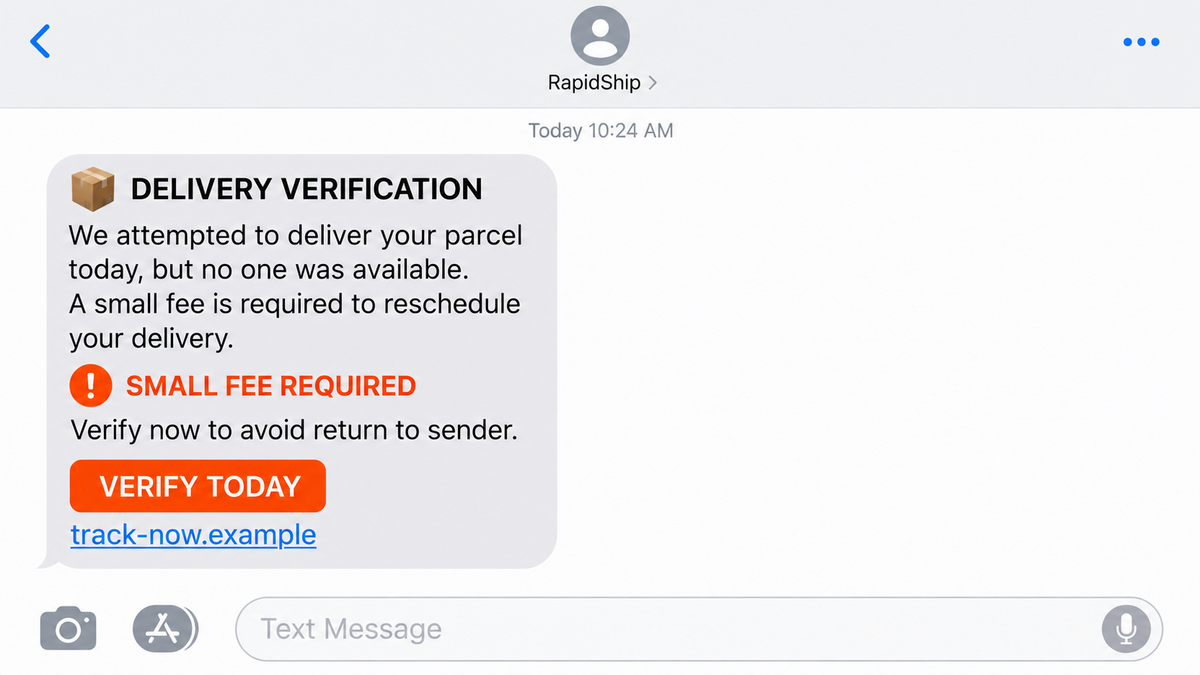
The SMS impersonates an official service
Group-IB identified a widespread campaign in which texts impersonated trusted entities and asked recipients to complete verification, settle an outstanding fee, or confirm delivery details. The exact brand can change because the kit supports many templates.
The message needs only one familiar problem. A delayed parcel, a small toll, or an account check is common enough that thousands of recipients can imagine a reason it might apply to them.
The short link keeps the real destination out of view. It can redirect through one service and arrive at a disposable domain that was created for the phishing kit.
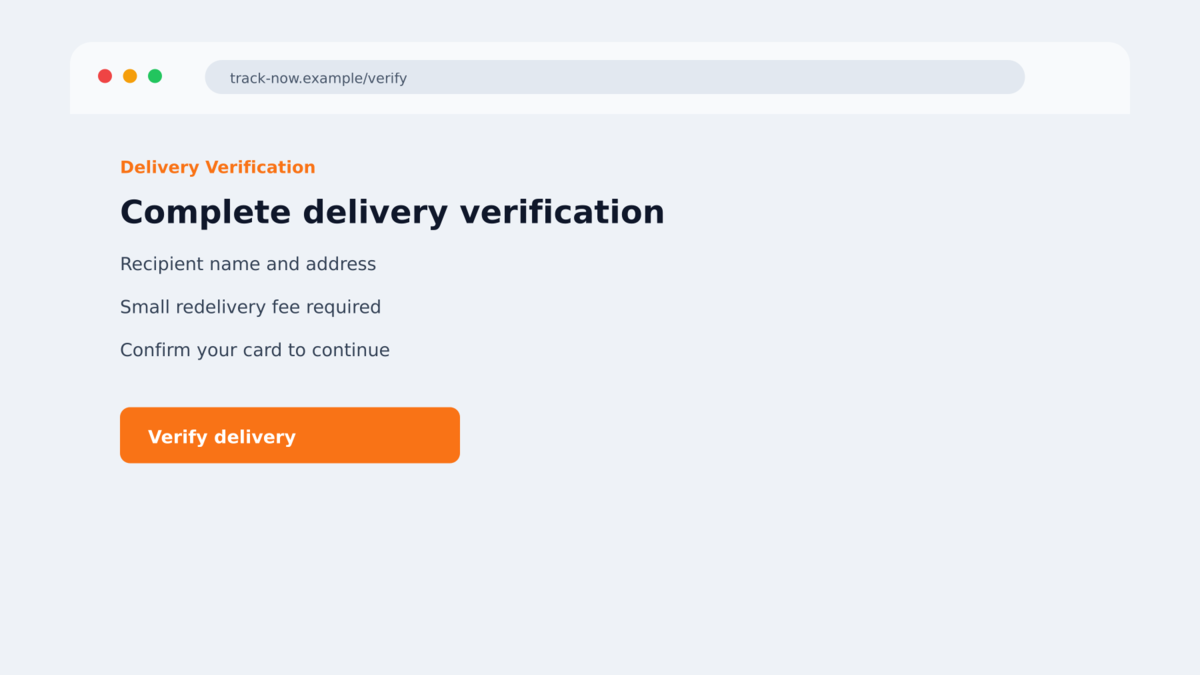
The website is an interactive theft funnel
The JWR kit can collect identity details, card information, one-time passwords, data for a second bank, and even wallet information. These are not static pages that record one form and stop. A human operator can watch the session and decide which screen the victim sees next.
If a card is rejected, the page can ask for another. If the bank sends an OTP, the page can display a waiting screen while the operator uses the code. If the victim becomes suspicious, the screen can be changed again to keep them engaged.
The operation is part of a much larger marketplace
Group-IB described Outsider as an operator cluster using JWR within the Smishing Triad ecosystem. The wider ecosystem has been linked in public reporting to more than 194,000 malicious domains since 2024 across more than 121 countries.
Smishing Triad is not best understood as one person sending texts. It is a service economy involving kit developers, phone-list suppliers, SMS senders, domain providers, hosting services, and operator crews. That structure explains why the same scam can return under a different brand days after a domain is blocked.
- The first contact is a bulk SMS that impersonates a trusted organization.
- A short link hides a disposable phishing domain.
- The landing page can switch between delivery, toll, identity, banking, and wallet themes.
- Card details and OTPs are sent to the operator while the victim is still on the page.
- The operator can push one of many screens to the victim in real time.
- A rejected-card message can be used to obtain a second card.
- Domains are replaced quickly when scanners or providers block them.
- The surrounding criminal marketplace makes the campaign easy to reproduce at scale.
Why the Smishing Triad Text Feels Convincing
The problem is ordinary and inexpensive to solve
A small delivery fee or verification charge can feel routine. The victim is not being asked to believe in a windfall. They are being asked to fix an inconvenience for a modest amount.
That makes the card form seem proportionate. The criminal gains full payment details even when the displayed fee is only a small amount.
The page reacts like a real transaction
Static phishing pages can feel suspicious when nothing changes after a form is submitted. A real-time kit can show progress, request an OTP, reject a card, or display an app-confirmation message at exactly the moment the bank sends an alert.
The victim interprets that timing as proof that the page is connected to a legitimate service. In reality, the timing can reflect the operator trying the stolen card elsewhere.
Rapid domain rotation hides the campaign’s history
Many victims search a domain before paying. A domain that is only a day or two old may have no warnings, reviews, or search results. The absence of reports does not make it safe.
When one address is blocked, a new one can serve the same template. The brand changes, but the short-link delivery and payment sequence remain recognizable.
Company and Checkout Checks
The sender name is only an impersonation
An SMS can display a company name, share a thread with earlier messages, or use wording copied from a real service. None of those details verifies the sender. Check the issue in the official application or website opened independently.
The domain is disposable infrastructure
Group-IB found that many domains connected to the broader operation remained active for two days or less. A newly registered address behind a short link should never be treated as a safe payment route.
The page’s support channel belongs to the operator
A help button, chat box, or phone number on the phishing page keeps the victim inside the attacker’s environment. Contact the real organization using the number on a statement, card, or official site.
The data path can include several criminal services
The person sending the SMS may not be the kit developer, domain seller, or operator using the card. The marketplace separates those roles, which can make the infrastructure look fragmented while supporting the same theft process.
That separation also creates a false sense that a single blocked domain solved the problem. The message distributor can swap in another address, while the same operator panel and payment workflow continue behind it.
Public reporting of the ecosystem is useful because it connects those moving parts. A new delivery brand may still be running the same kit, collecting the same fields, and sending the same real-time requests to an operator.
Victims should therefore record the full link, not only the brand shown on the page. The registered domain, redirect sequence, sender number, and time of the contact can help investigators connect related campaigns.
The page can also be localized for a country or language. A familiar spelling and local fee do not prove that a government agency, carrier, or bank owns the address.
Do not test a suspicious page with real details just to see what it does. A controlled security review belongs to researchers and providers; a consumer should leave and report the address.
Operators also benefit from victims who keep the original text. The sender number, timestamp, link shortener, and final domain can reveal relationships that disappear when a message is deleted.
A screenshot is useful, but preserve the original message when possible. Investigators can sometimes extract routing details from the original that are missing from an image.
Never forward the link to friends as a warning unless it is clearly marked and safe to handle. Sharing an active phishing URL can create new victims and extend the campaign’s reach.
The strongest check is simple: use the official application or a known bookmark, not the path offered by the text.
That habit also protects people who never saw the original campaign warning. The safe route does not depend on recognizing today’s brand, wording, or web address.
How the Smishing Triad JWR Scam Works
Step 1: A bulk SMS creates a simple problem
The campaign sends texts about a delivery, fee, verification, or account issue. The recipient is given a short deadline and a link. The message avoids details that could easily be checked against a real account.
Sending messages at scale is cheap. The operation does not need every text to match a real event if a small number of recipients are expecting a package or recent service.
Step 2: The short link selects a disposable destination
The link can route the victim through a shortening service before opening the final domain. This hides the registered address in the message and lets operators change destinations without rewriting the entire campaign.
Filtering can also show different content based on country, device, or referral source. A scanner may not see the same page as the intended victim.
Step 3: The phishing template copies the expected service
The landing page repeats the problem from the text. A delivery version may ask for an address. A toll version may show a balance. A banking version may ask for identity confirmation.
The visual design is modular. Logos, colors, and language can be swapped without changing the code that sends the victim’s input to the operator.
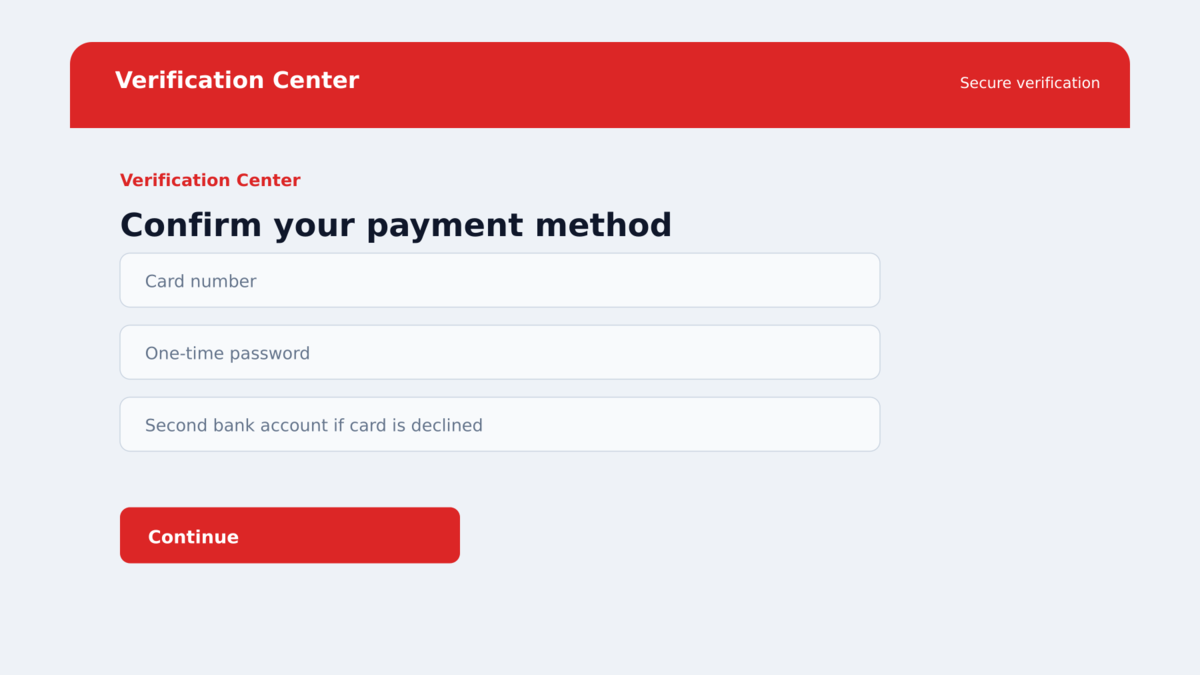
Step 4: Identity and card details are streamed to the operator
The page captures information as the victim progresses. Group-IB found a dedicated communication channel and encrypted traffic between the page and the operator side of the kit.
The encryption protects the criminal workflow from casual inspection. It does not protect the victim from the operator receiving the data.
Step 5: The operator requests the bank confirmation
When the stolen card is used, the bank may send an OTP or app prompt. The phishing page shows a verification screen and asks the victim to enter the code. The operator can use it while it is still valid.
If the bank declines the attempt, the page can ask for another card or claim that the first card is unsupported. That converts one victim into several stolen payment methods.
Step 6: The page stalls while money is moved
A loading message, confirmation delay, or app-approval screen keeps the victim from leaving. The operator needs only a short window to complete a purchase, add the card to a wallet, or try another transaction.
By the time the page displays an error, the useful information may already have been copied and tested.
Warning Signs of a JWR-Style Smishing Page
- An unexpected text asks you to settle a fee or confirm delivery details.
- The link is shortened or hides the final registered domain.
- The site asks for a card to solve a problem that should be visible in an official app.
- The page requests an OTP, banking code, PIN, or app approval.
- A rejected-card message immediately asks for a different card.
- The page displays repeated loading or verification screens while nothing is confirmed.
- The domain is very new, unrelated to the named organization, or active only briefly.
- The message discourages you from checking the issue through another channel.
What to Do if You Have Fallen Victim to This Scam
- Close the page and stop submitting data. Do not enter another card when the form says the first one failed.
- Contact every affected card issuer. Use the numbers printed on the cards. Ask for an immediate freeze, replacement, and review of pending transactions.
- Explain whether an OTP was entered. The bank needs to know that a verification code or app approval may have authorized the criminal’s transaction.
- Secure exposed accounts. Change passwords for email, delivery, banking, and any service whose credentials were submitted. Enable strong two-factor authentication.
- Review mobile-wallet enrollments. Ask the bank whether the card was added to a new wallet or device and remove unfamiliar tokens.
- Preserve the evidence. Save the SMS, full URL, screenshots, times, bank alerts, and transaction identifiers without reopening the site.
- Scan the device if anything was installed. Malwarebytes can check for malicious or unwanted software. AdGuard can help block known phishing destinations and deceptive redirects.
- Report the infrastructure. Use the carrier’s spam option, notify the impersonated organization, and report financial loss to the bank and fraud authority.
- Ignore recovery contacts. Anyone promising to reverse the loss for an upfront payment may be using information from the first scam.
Frequently Asked Questions
What is the JWR phishing kit?
JWR is the name Group-IB found in the recovered phishing code used by an operator cluster it calls Outsider. The kit supports real-time control of multi-stage phishing pages.
Is Smishing Triad one hacking group?
It is better understood as a criminal marketplace. Kit developers, phone-list brokers, SMS senders, hosting providers, and operator crews can work through shared services.
Why does the page ask for another card?
The operator may want additional payment methods after one is declined or blocked. A rejected-card message can be a deliberate collection tactic.
Can an OTP make the fraudulent payment valid?
An OTP may authorize the transaction the criminal is attempting. Contact the bank immediately and explain that the code was entered on a phishing page.
Does HTTPS make the SMS link safe?
No. HTTPS encrypts the connection to the domain. It does not confirm that the domain belongs to the company named in the text.
What if I clicked but entered nothing?
Close the page and do not return. Update the browser and scan the device if anything downloaded, but the main documented risk is the information entered into the phishing flow.
The Bottom Line
The Smishing Triad JWR scam is dangerous because the page reacts to the victim. It can request cards, OTPs, app approvals, and additional data while a human operator watches the session.
No delivery fee or account check should require a payment code through a link in an unexpected SMS. Verify the issue in the official app or website instead.
If you entered a card or OTP, call the bank now. Do not wait for the fake page to display a final confirmation.

Join the discussion
0 commentsShare your experience or ask a question about this article.
Discussion
Start the conversation
Have a question or something useful to share? Add the first comment.