

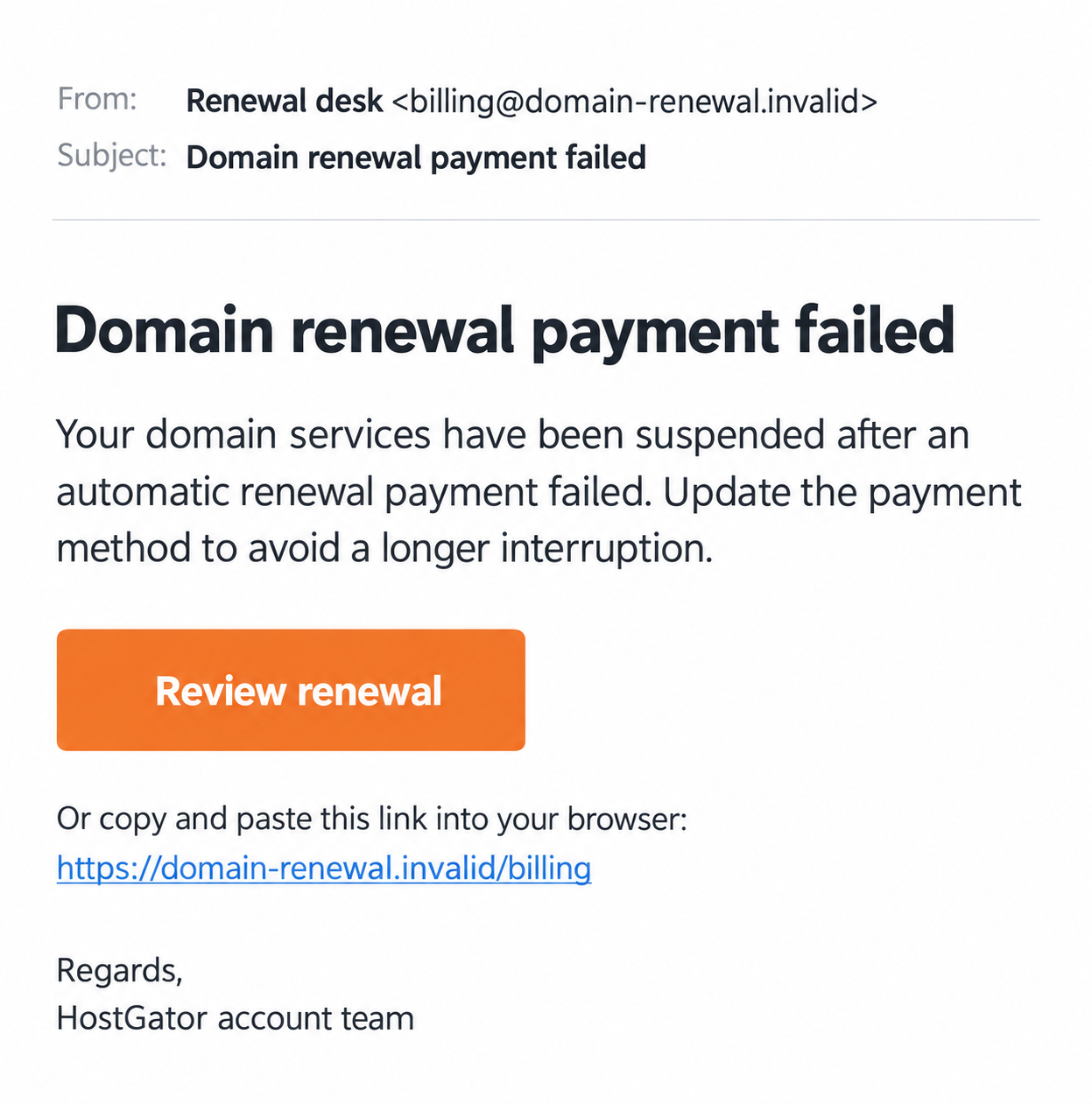
The email says a renewal payment failed and your domain services have been suspended. For someone running a business website, that sounds like a problem to fix immediately.
The HostGator renewal email scam uses that anxiety to make an unfamiliar billing link feel necessary. Before updating a card, find the actual invoice and service status.
Overview
The failed-renewal story is an excuse for a false payment route
The reported message claims an automatic renewal failed because of a card or bank problem. It says services are suspended and urges the recipient to resolve the payment.
The risk begins when that notice directs the reader to a page outside the genuine account process. A copied billing form can collect credentials or financial information.
HostGator is a legitimate provider. The scam is the impersonation, not the existence of renewal bills, declined cards, or a website that needs an active service plan.
The October 2026 source report is a lead, not a raw email captured here. The image is a fictional example with a nonfunctional address and no customer information.
HostGator has documented a related card-update phishing lure
The provider’s phishing warning describes a spoofed billing email claiming a declined card and encouraging an update. Some wording also used a discount coupon.
That first-party warning supports the deceptive pattern. It does not establish that every renewal email is fraudulent or that every imitation uses the same page.
HostGator also sends real billing correspondence. Check the actual product, invoice, account role, and payment history rather than deciding from a failed-payment subject line alone.
The invoice and domain records should tell a consistent story
- Reach the Customer Portal through your established official route.
- Compare the alleged charge with genuine invoice records.
- Separate the hosting package from the domain registration.
- Identify whether the domain is registered with HostGator or elsewhere.
- Ask the authorized account holder about billing you cannot access.
- Protect any password, payment detail, or access code already disclosed.
Knowing your domain name is not proof of managing it. The address can be public, and a message can borrow it without possessing a legitimate billing relationship.
Why This Warning Can Reach the Wrong Person
One website can depend on several separately billed services
A website may use one provider for hosting, another for registration, and a separate service for email. Those arrangements are easy to overlook during a rushed renewal.
The email compresses them into one threatened outcome: fix this payment or lose the domain. That wording can hide which product is supposedly overdue.
A hosting-plan renewal does not necessarily renew a separately registered domain. Paying an imitation invoice does neither, even if the button uses the right website name.
Ask which service the invoice covers before evaluating the deadline. Your receipts and account records can identify the relationship more accurately than the sender’s broad warning.
The recipient may manage the website but not the billing account
Developers, assistants, and marketing staff can receive website-related correspondence without being authorized payers. They may assume an urgent notice belongs to a task they should handle.
The actual account holder may have already renewed, changed payment details, or moved the registration elsewhere. Internal communication can resolve that uncertainty without using the email’s link.
Route an unexpected bill to the person who normally approves it. Do not create a new payment arrangement simply because you are the first person to see the notice.
How the HostGator Renewal Email Scam Works
Step 1: The message announces a failed automatic renewal
The email names a payment issue and describes consequences for the domain or related services. An outdated card or bank decline supplies an ordinary-sounding explanation.
The sender can use the provider’s name in a display label or signature. Those elements are not the same as an authenticated message from the billing system.
A correct domain name makes the warning feel personalized. It still does not demonstrate that the sender holds the registration or can suspend the genuine account.
Keep the message for a report if needed. Your first investigation should be the real record, not a reply asking the sender to prove its own story.
Step 2: A renewal button places the sender’s destination in your workflow
The notice presents a convenient route to settle the supposed outstanding amount. A reader worried about downtime may follow it before identifying the actual host.
A link can contain hosting or billing terminology without belonging to HostGator. Read the destination carefully or bypass the link and open your normal portal.
An encrypted page can still be an imitation. HTTPS does not prove that a payment request belongs to the company named on the screen.
If a genuine invoice exists, you can handle it after reaching the authentic account. The suspicious message does not need to remain part of that transaction.
Step 3: The update page requests credentials or card information
The imitation may ask the reader to sign in, replace an expired card, or supply billing details. The stated administrative purpose makes those requests appear routine.
At this point, the question is not whether a provider sometimes needs payment information. It is whether this particular page is the authorized place to receive it.
A password entered on a counterfeit sign-in can expose more than one invoice. An account may hold services, contacts, and settings unrelated to the alleged renewal.
Card disclosure creates a separate financial issue. Record what you submitted so the provider and issuer can assess their respective risks without guessing.
Step 4: A second request can expand the attempted authorization
The flow may introduce an access code, payment approval, or further verification. A genuine notification can appear if someone initiates an action using information already supplied.
Read that notification on its own terms. A code for a sign-in or transaction is not automatically a code for repairing your hosting account.
Do not approve an unexpected action merely to finish the renewal. Stop and consult the relevant service through its normal recovery or support process.
This is a possible phishing escalation, not a claim that the reported October email collected every type of code or successfully changed a particular customer’s domain.
Step 5: A confirmation can conceal an unresolved invoice or access problem
A completion screen may say the service was restored or that the payment will be reviewed later. The website might even redirect to a real provider page.
That ending does not validate the earlier form. Check whether the genuine account shows a matching transaction and whether the intended service remains correctly configured.
If payment never reached the actual provider, a legitimate bill may remain due. Address it independently while also reporting the disclosure or unauthorized charge.
A follow-up claiming the renewal still needs another payment deserves the same separation. It should not become the default authority merely because it references the first message.
Check Real HostGator Invoices and Domain Status
Match the invoice to a specific product and billing period
HostGator’s invoice guide identifies Order History for paid invoices and the Renewal Center for unpaid or upcoming billing. Use the genuine records to compare details.
Check the product, term, amount, date, and payment status. A domain-related subject cannot substitute for an invoice identifying what is actually being renewed.
If several products are present, avoid paying a combined amount based on the email alone. Ask the payer or provider to explain which entries require action.
An external domain has a different renewal relationship
The Domains tab documentation explains that the portal can show domains registered elsewhere. Their renewal management remains with the actual registrar.
A domain connected to HostGator hosting does not necessarily have its registration there. Check the specific domain record before interpreting a HostGator-themed expiration claim.
Do not transfer the domain simply to satisfy the email. A registration transfer is a separate ownership and account-management action, not a routine substitute for verifying a bill.
A billing restriction can reflect the user’s role
The payment guide notes that available billing functions depend on the account role. A technical user may need the Primary Account Holder.
Not seeing a payment control does not prove that no invoice exists. Escalate to the authorized payer through an established internal channel rather than the sender’s support address.
Keep a small record of who manages hosting, registration, and recovery email. It reduces confusion the next time a genuine renewal or suspicious notice arrives.
A Real Website Problem Still Needs Its Own Diagnosis
Availability and account security are separate observations
A site can remain online after a password was exposed, or stop loading for a reason unrelated to renewal. Neither observation resolves the whole email investigation.
Tell genuine support what changed and when. Distinguish a visible outage, an invoice, a password disclosure, and an unfamiliar domain setting in your notes.
Do not make hurried DNS or service changes because the email prescribes them. The provider or your established administrator should investigate the actual configuration.
Some provider verification messages are legitimate
HostGator’s domain guidance describes real confirmation emails for certain registrant changes. Their existence is why every message mentioning verification cannot be dismissed as phishing.
Check whether an authorized person initiated the change. A legitimate confirmation process does not give an unrelated renewal email authority to request your credentials.
If nobody initiated it, treat the unexpected change as an account-security matter. Reach the provider separately instead of completing the instructions to see what happens.
What to Do if You Have Fallen Victim to This Scam
-
Stop using the payment-update page. Decline further fields, codes, or attachments. Keep the email and the visible URL without revisiting the destination solely for more evidence.
Record the information entered and any approved transaction. Tell the account’s established administrator or payer so nobody else repeats the renewal attempt.
-
Protect a disclosed portal password. Access HostGator through your verified route and follow its recovery procedure if needed. Update reused credentials on other relevant accounts.
Review unfamiliar users, contact changes, and account activity with genuine support. A password reset does not automatically undo settings an intruder may already have changed.
-
Secure the recovery email if it was affected. Examine unfamiliar sessions, forwarding rules, and recovery contacts through that email provider’s actual security settings.
An exposed inbox can receive future hosting reset messages. Protecting it is separate from changing the password on the account named in the phishing email.
-
Contact the issuer about financial details. Report a card number, banking disclosure, payment approval, or charge accurately. Ask which protections and dispute options apply.
Keep the amount, merchant description, date, and bank reference. Do not send more money to a person claiming a second payment is necessary to reverse the first.
-
Have the genuine provider review domain and service changes. Identify the actual registrar and explain any unexpected transfer, contact, nameserver, or related configuration activity.
For a business site, involve the administrator who normally manages it. Do not attempt a speculative repair or disclose transfer credentials to the renewal sender.
-
Resolve the real invoice separately. Check the authenticated billing record with the authorized account holder. An impostor’s charge or success screen does not extend your service term.
If something genuinely remains due, handle it through the provider’s normal payment process. Document the fraudulent transaction as a different incident.
-
Report the impersonating email and any technical exposure. HostGator’s phishing guidance asks for full headers through verified support. Avoid publishing account information in public complaints.
If the link introduced suspicious software or browser permissions, investigate that exposure. Malwarebytes can assist with software inspection; AdGuard can reduce some harmful redirects or advertising.
Neither tool repairs a stolen domain, refunds a payment, or establishes that an account remained secure. Use provider and payment investigations for those questions.
-
Prepare for repeated renewal or recovery messages. Keep a timeline and genuine case references. Reject unsolicited offers to restore the domain or retrieve money for an upfront fee.
Communicate through the support and administrator channels already established. A new caller quoting the domain name has not proved involvement in the genuine recovery process.
Frequently Asked Questions
Is HostGator itself the scam?
No. The report concerns an impersonating renewal message and unsafe information-collection route. HostGator is a real provider with legitimate billing and domain-management processes.
Can an automatic renewal really fail?
Yes. A genuine payment problem can happen. Check the actual invoice and payment status before accepting a separate message’s explanation or update link.
Why does HostGator show a domain registered somewhere else?
The portal can include external domains connected to its services. Their registration renewals still need to be checked with the actual registrar.
What if I cannot access the Renewal Center payment controls?
Your role may restrict billing functions. Ask the Primary Account Holder or verified support; missing access does not independently establish that a message is genuine or fraudulent.
Does a redirect to the real website prove the form was safe?
No. A phishing page can send the reader elsewhere after collecting information. The destination reached afterward does not authenticate where your details were entered.
Will changing my card restore the domain?
Not automatically. Card protection, invoice payment, and recovery of unauthorized domain changes are different tasks. Coordinate with the issuer, genuine provider, and actual registrar.
The Bottom Line
The HostGator renewal email scam uses threatened downtime to shortcut a billing check. A claimed suspension does not authorize an unfamiliar page to collect payment or login details.
Match the invoice, account role, and domain status through genuine records. If information was disclosed, protect the affected access and finances while resolving any real renewal separately.

Join the discussion
0 commentsShare your experience or ask a question about this article.
Discussion
Start the conversation
Have a question or something useful to share? Add the first comment.