

A message about your Amazon account lands just as a major sale approaches. The timing makes it feel less random than most inbox surprises.
Before you tap the button, there are a few details worth noticing. They matter more than the urgency in the subject line.
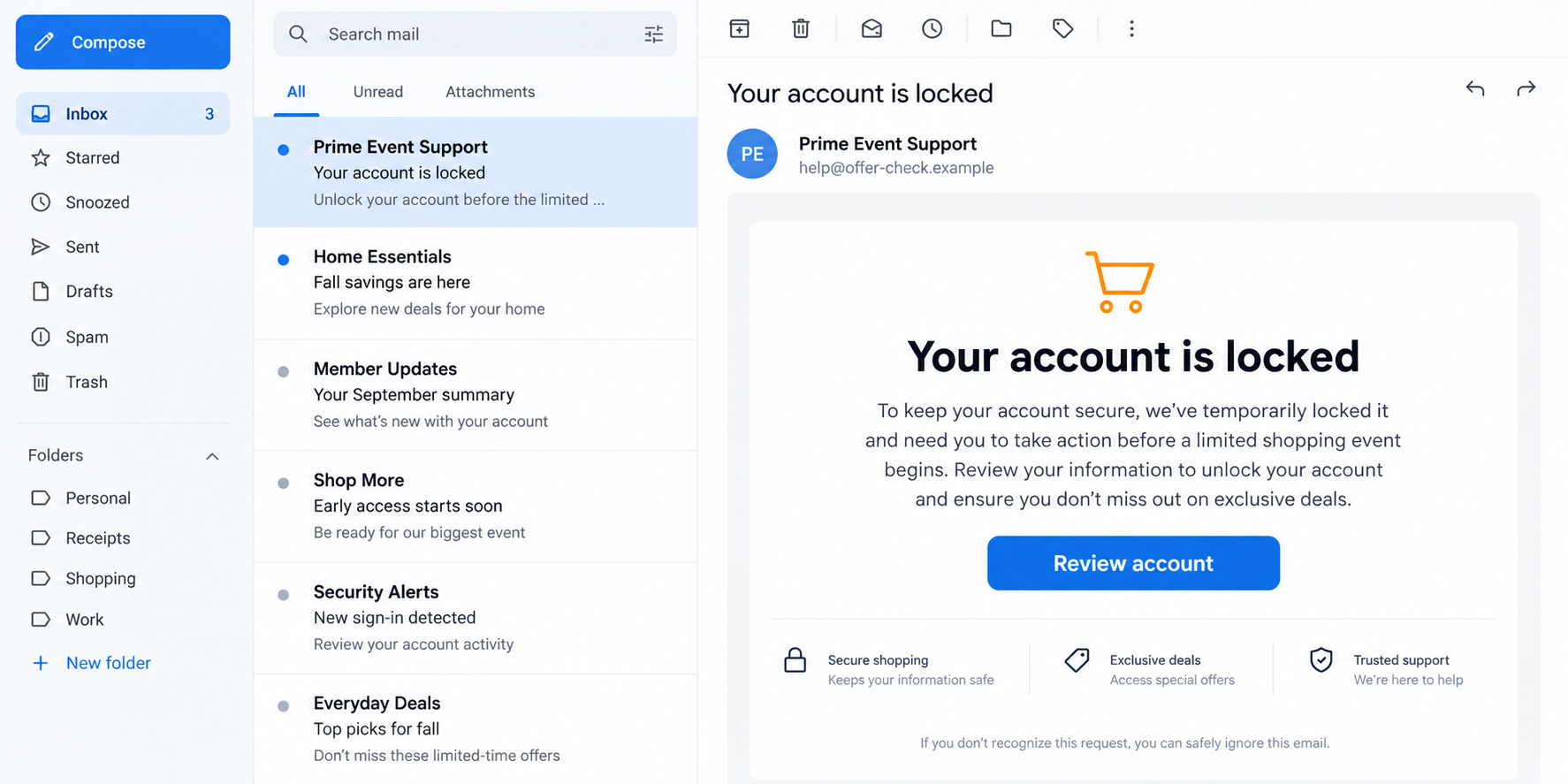
Overview
Why the timing makes this believable
Amazon’s Prime Big Deal Days are scheduled for October 6 and 7, 2026. Shoppers expect sale reminders, delivery updates, and account notices around that window.
Criminals can blend their messages into that normal traffic. An unfamiliar email may seem plausible when a reader has recently browsed deals or placed an order.
Check Point researchers reported a rise in newly registered Amazon- and Prime-themed domains before the event, alongside phishing pages and related email lures.
The research documented free gift-card and locked-account themes. It does not mean every shopping notification in October is malicious.
What the suspicious message wants
A locked-account notice tries to make the recipient worry about losing access. A gift-card message offers a reward that appears easy to claim.
Both stories direct attention to a button or link. The destination can resemble an Amazon sign-in, while the address belongs to someone else.
The counterfeit page may ask for an email address and password. Some copies could also request payment or verification details, although outcomes vary by page.
The safest question is not whether the email looks polished. It is whether the account problem appears when you open Amazon independently.
What the evidence does and does not show
Check Point counted 905 relevant domain registrations in July and 1,284 in September, an increase of roughly 42%. Registrations are not confirmed scam websites.
Its analysis classified 6.5% of September’s newly observed Amazon- or Prime-related domains as malicious or suspicious. That is a subset of its monitored sample.
The researchers also identified fake sign-in pages aimed at visitors in several countries. A copied page can be convincing without being an official Amazon property.
- The real sale is an ordinary Amazon event, not the scam.
- The suspicious emails use account trouble or a reward to move readers off their normal route.
- The decisive clue is the destination and whether Amazon confirms the issue independently.
- No public count in this research establishes how many people lost money or credentials.
How the Amazon Prime Big Deal Days Email Scam Works
Step 1: An event creates a convenient excuse
Large sales change inbox behavior. People expect more promotional mail, and they check accounts more often to compare prices or track purchases.
That ordinary routine gives a false notification cover. The sender does not need to know whether the recipient actually has an order.
They can send broad account-themed messages and rely on a small number of people being busy, worried, or curious enough to click.
Some lures lead with a free gift card. Others claim an account was locked. The emotional direction differs, but both push toward immediate action.
A real promotion usually survives a pause. If an email says the benefit disappears unless you sign in through its button, treat that as pressure.
Even a message that names the correct sale dates can be fake. Dates and logos are public information, not proof of sender identity.
Step 2: The email borrows Amazon’s familiar visual cues
The message may use dark buttons, orange accents, product images, and customer-service language. These are easy to reproduce in an ordinary email template.
A displayed sender name such as Amazon Support can hide an unrelated sending address. A familiar name alone tells you very little.
Reply-to addresses can differ from the apparent sender. A scammer might also place a fake phone number where readers expect customer support.
Spelling mistakes are possible, but a polished message is not safe by default. Modern phishing emails can have clean grammar and responsive layouts.
Look at the claim, not just the styling. If the email says your account needs urgent unlocking, the account itself should show that problem.
Open the official app or type Amazon’s address into your browser. Do not use the email’s button as your verification method.
Step 3: A lookalike domain catches the click
Check Point found new domains built around Amazon- and Prime-related words. Some looked like support or video-service addresses at a glance.
The actual host name matters more than words elsewhere in a URL. A page can mention Amazon repeatedly while living on an unrelated domain.
Subdomains can add confusion. In a long address, “amazon” may appear before a different base domain that controls the page.
A padlock only indicates an encrypted connection to that website. It does not certify that Amazon owns the destination.
Attackers can also change where a link leads after an email is sent. A harmless-looking redirect should not become a substitute for direct navigation.
When checking on a phone, expand the address bar if needed. Small screens often hide the part of the address you most need to inspect.
Step 4: The page turns a story into a sign-in
The visitor sees a familiar logo and a request to continue. A fake login can copy the shape of a genuine Amazon page closely.
If the reader enters credentials, the attacker may collect them. The counterfeit page could then show an error or redirect to the real site.
That redirect is especially misleading. Seeing the real Amazon site afterward does not prove the earlier page was genuine.
Some lures may add a supposed identity check or payment update. Do not assume that every version has the same fields or final screen.
The important boundary is the same: a sale email should not control where you authenticate. Start inside the official app or verified website.
Never test a suspicious login by entering a partially correct password. That still tells an attacker the account exists and reveals your habits.
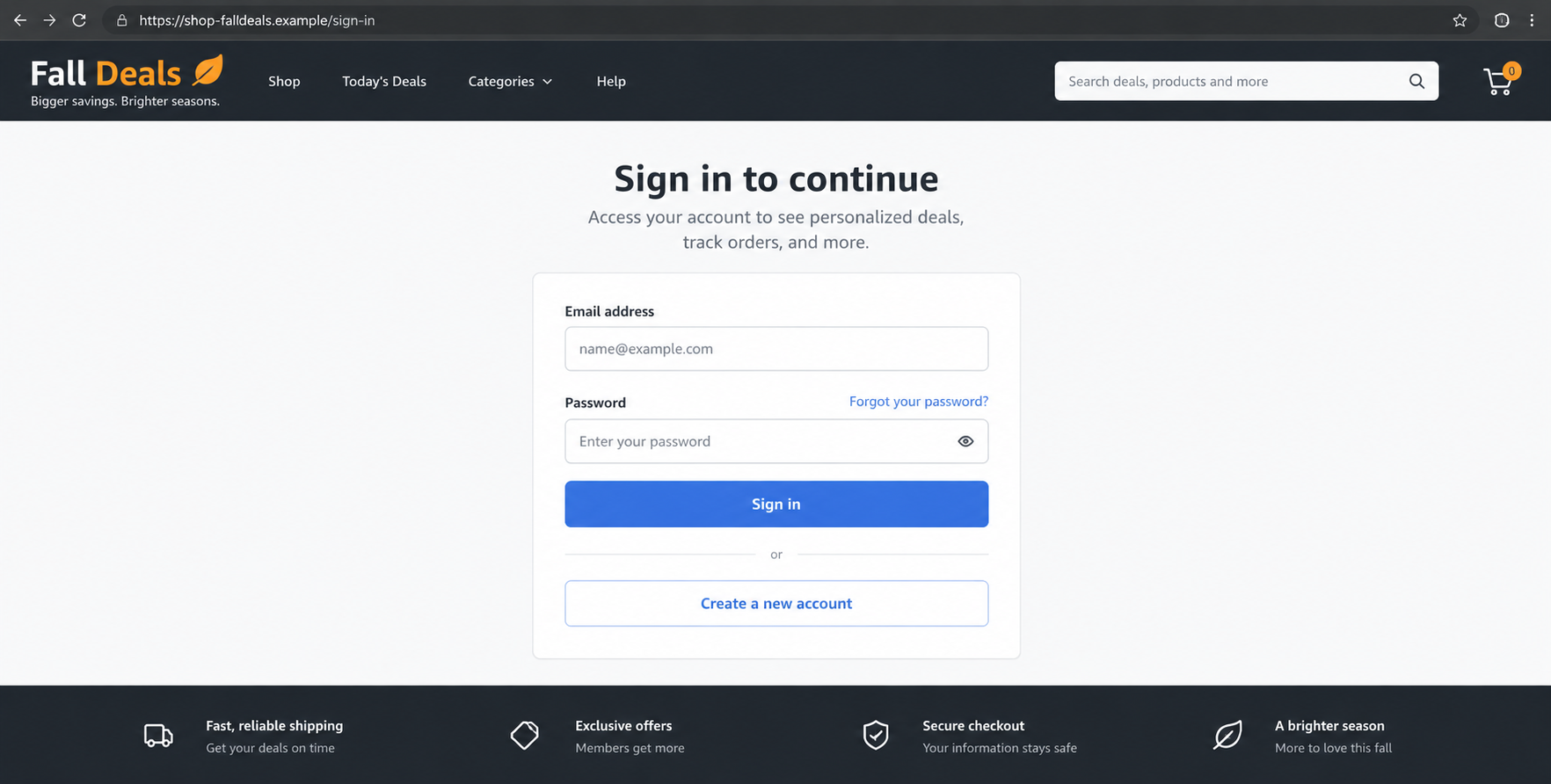
Step 5: Stolen access can lead to a second problem
An Amazon password may let someone inspect saved addresses, order history, and account settings. It may also be reused on unrelated services.
Attackers might attempt purchases, gift-card orders, or changes to recovery information. Whether that succeeds depends on account protections and payment controls.
If the same password protects your email, the risk grows. Email access can support resets across many accounts, not just shopping.
Some criminals use the first message as a lead for follow-up calls. They may claim a charge was stopped and ask for more information.
A customer-service caller who asks you to install remote-control software or move money is not resolving an ordinary Amazon account issue.
Stopping the first click is best, but quick account recovery still matters after a mistake. The response is practical, not embarrassing.
How to Verify an Amazon Message Without Using Its Links
Start with the Amazon app you already use, or a browser bookmark you created previously. Sign in there without copying an address from the email.
Check the message center, account alerts, order history, and payment settings. If the claimed lock is real, you should be able to confirm it independently.
Look at recent orders for unfamiliar items. Examine digital purchases and gift-card activity as carefully as physical packages.
If the message advertises a sale, compare it with Amazon’s official event page. The company confirms Prime Big Deal Days for October 6 and 7.
A sale date by itself cannot authenticate a special voucher. Search for that particular offer from the official account, not from the sender’s landing page.
Be careful with search ads while verifying. A sponsored result may point to an impersonator, even when its headline resembles support.
For account support, use contact options reached from Amazon’s own website or app. Avoid phone numbers embedded in the suspicious message.
If the email contains a supposed order number, search your legitimate order history. The number may be invented or copied from a data leak.
Do not reply with a screenshot of your account. A reply can confirm that your address is active and may expose information the sender lacked.
Ask another household member before assuming an unfamiliar order is unauthorized. Shared accounts sometimes create confusing but harmless notifications.
If uncertainty remains, contact Amazon through its verified support route. Explain the exact claim without forwarding personal account details to a stranger.
There is no need to complete a “temporary verification” form simply to ask whether an email is real. The official account is the better starting point.
Red Flags That Matter More Than a Polished Design
A good phishing page can be beautiful. Warning signs often sit in the workflow, where a rushed shopper is least likely to look.
- The message insists a gift card expires unless you sign in through one particular link.
- The sender’s actual address is unrelated to Amazon, even though the display name is familiar.
- A supposed support page lives on a recently invented or unrelated domain.
- The email claims an account lock that the official app does not show.
- A support representative demands gift cards, remote access, or a transfer to “protect” funds.
None of these checks requires technical expertise. They require separating the claim from the channel that delivered it.
It is possible to receive a real Amazon notification and a fake one on the same day. Treat each message as its own event.
Likewise, one suspicious domain does not mean every new Prime-related domain is malicious. Researchers identified a concerning subset, not universal guilt.
Forwarded screenshots can also mislead. A friend may pass along a fake gift-card promotion without knowing the destination changes after a tap.
Ask for the official listing, not another screenshot. The existence of a shareable graphic is not evidence that the promotion exists.
If you manage a family member’s account, explain the direct-navigation habit before a busy sale begins. It is easier to remember than a list of domains.
What to Do if You Followed a Fake Amazon Email
Act according to what you did. Merely opening an email is different from entering a password, approving a prompt, or providing payment information.
- Stop interacting with the page. Close the tab. Save the sender address and URL only if you can do so without revisiting the site.
- Change your Amazon password from the official site. Use a unique password. If you reused the old one elsewhere, change those accounts too.
- Review account security. Check recovery details, active devices, shipping addresses, and recent orders. Enable or strengthen two-step verification where available.
- Protect your payment methods. If card information was entered, call the issuer through the number on the card and ask about replacement or monitoring.
- Check your email account. A reused password can expose messages and reset links. Review forwarding rules and sign-in activity if the email password matched.
- Watch for follow-up impersonation. Ignore calls or texts claiming the “fraud team” needs remote access, gift cards, or a transfer to reverse a charge.
- Scan if anything downloaded. Malwarebytes can help check a computer that opened an unexpected attachment; AdGuard can reduce exposure to known malicious links.
- Report the attempt. Use Amazon’s official reporting path and your local fraud-reporting service. Include the suspicious link without publishing sensitive account details.
If an unfamiliar purchase appears, report it promptly to Amazon and your card issuer. Keep order numbers and correspondence in a safe place.
Do not pay a third party that promises to recover money or “trace” the sender. Recovery offers often target people already worried about a scam.
If you only clicked but did not enter information, update your browser and review downloads. A click alone does not prove account theft.
Ask family members who share the account to avoid the same message. Send a warning in your own words, without forwarding the active phishing link.
Frequently Asked Questions
Is Prime Big Deal Days 2026 a real Amazon event?
Yes. Amazon announced the October 6 and 7 event. Scammers exploit that real schedule to make unrelated messages look timely.
Verify any specific promotion within Amazon’s official app or site. A genuine event does not validate every voucher email using its name.
Does an account-locked email mean my Amazon account is locked?
No. It is only a claim in a message. Open your account independently to see whether access is actually restricted.
If you cannot sign in through the official route, use its built-in recovery process rather than the email’s link.
Can a phishing page have HTTPS and still be fake?
Yes. Encryption protects the connection to whatever site you reached. It does not verify that Amazon controls that site.
Read the actual domain and navigate independently. Do not use the padlock as a brand certificate.
What if I entered my password but no payment information?
Change the password immediately on the official site. Review account changes and every other account that shared that password.
Payment details may already be saved in an account. Check order history and contact Amazon if anything looks unfamiliar.
Are all new Amazon-themed domains phishing sites?
No. A registration count measures names being created, not confirmed fraud. Check Point flagged a smaller portion as suspicious or malicious.
The practical takeaway is to distrust an unfamiliar destination, not to declare every new domain criminal.
Should I call the number inside the suspicious email?
No. A fake support number can lead to a second-stage impersonation or a remote-access request.
Find contact options from Amazon’s official account pages. If a charge is involved, contact your card issuer independently as well.
The Bottom Line
The real shopping event gives fake account notices and gift-card offers a believable setting. The email’s branding and timing cannot prove its destination is safe.
Open Amazon directly, check the claim there, and keep account recovery separate from the message that frightened or tempted you.

Join the discussion
0 commentsShare your experience or ask a question about this article.
Discussion
Start the conversation
Have a question or something useful to share? Add the first comment.