

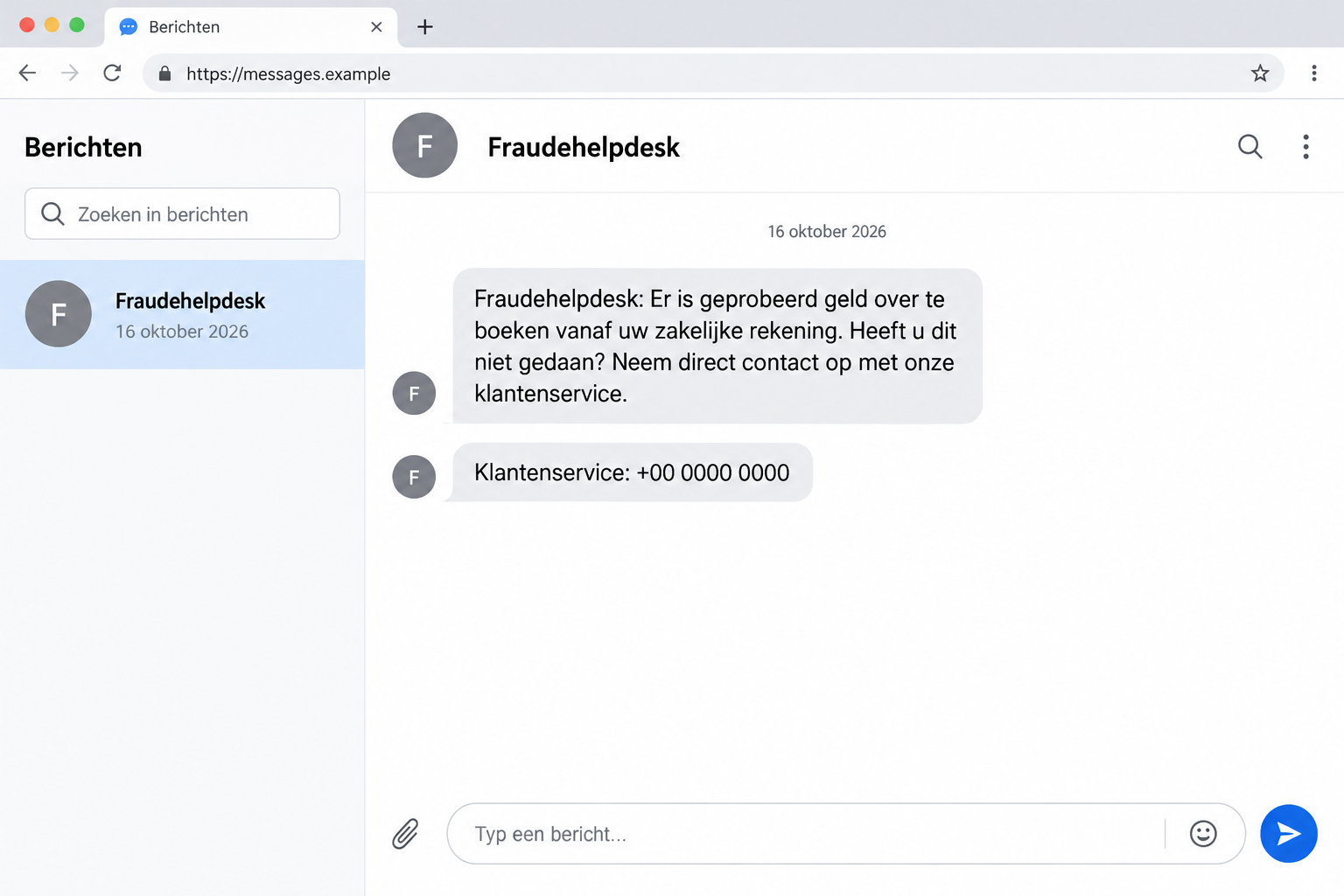
A text carrying Fraudehelpdesk’s name warns about a suspicious transfer from your business account. It says to contact customer service if you didn’t authorize it.
The name sounds reassuring. After all, a fraud helpdesk should be the place to turn when something looks wrong with your money.
Overview
The Organization Supposed to Help Is the Identity Being Stolen
The Fraudehelpdesk text scam misuses the name of the Dutch fraud-reporting service. It presents a bank-security concern as a reason to contact an impostor.
The real service also warns about calls using its identity and spoofed telephone number. The familiar name or number is part of the deception.
This isn’t an allegation against Fraudehelpdesk. The organization itself has described the fraudulent approaches and told recipients not to comply.
The Warning Covers Texts and a Remote-Access Call Version
Fraudehelpdesk’s published alert identifies texts about a supposedly suspicious business-account transfer. It separately describes calls that escalate to a supposed supervisor.
In that call version, the supervisor wants remote access to the recipient’s computer or phone. Claimed help becomes a request for control.
The image illustrates a false text, using an invalid callback number. It is not an original recipient’s conversation or evidence of a specific active number.
Leave the Contact Route Chosen by the Sender
Don’t call back through the text or remain on an unverified bank-security call. Reach your bank independently if you need to check your account.
- The real Fraudehelpdesk says it doesn’t approach people about banking matters.
- A spoofed number can look like an organization’s genuine number.
- A stranger’s remote-control request isn’t required to check whether your bank contacted you.
- Financial containment and device cleanup are separate tasks if access was granted.
Why a Fraud Warning Can Make You Easier to Rush
The message doesn’t ask you to trust an obvious opportunity. It asks you to respond to a problem you would naturally want stopped.
That changes the decision in your mind. Instead of considering an unfamiliar request, you’re trying to prevent a transfer you don’t recognize.
The identity strengthens that pressure. You may expect someone claiming to work for a fraud-reporting service to know how to protect you.
But recognizing an organization’s purpose doesn’t verify the person contacting you. A scammer can use a protective-sounding role as effectively as a bank name.
You don’t need to decide whether the supposed transfer is impossible before leaving the conversation. Your real bank can check actual account activity.
By choosing the contact route yourself, you can address the concern without accepting the sender as the person qualified to solve it.
If a caller objects to that independent check, don’t debate the point. End the interaction and use the bank’s established support route.
How the Fraudehelpdesk Text and Call Scam Works
Step 1: A Bank-Security Story Gets Your Attention
The documented text describes an attempted transfer from a business current account. It tells the recipient to contact customer service if the activity wasn’t theirs.
The call version uses other bank-related explanations, such as an unexpected card application, an address change, or a debit.
These are alternative approaches in the warning, not proof that every text recipient goes through an identical call sequence.
The common feature is the unverified claim that someone contacting you can manage an urgent banking problem under Fraudehelpdesk’s name.
Step 2: The Caller Borrows Familiarity and Authority
Fraudehelpdesk warns that its own number has been spoofed. The display can therefore show a genuine organization while concealing the caller’s actual origin.
A correct-looking number is not a reason to remain on a doubtful call. You can end it and contact the organization through an independently found route.
The alert also describes questions about a bank card’s color or requests to check the account. Ordinary-sounding questions can keep the interaction moving.
Answering one question doesn’t commit you to the next. If the request becomes intrusive or confusing, stop before sharing more information.
Step 3: A Supposed Supervisor Offers to Look Along
In the call version, the recipient is transferred to someone presented as a supervisor. That role makes the next request sound like escalation to an expert.
The handoff is still happening inside the same unverified interaction. A second voice doesn’t independently authenticate the first caller.
Don’t treat a department name, job title, or internal transfer as evidence of authority over your account. Ask your actual bank about the underlying concern.
If you’re told that only this supervisor can prevent a loss, leave the conversation. You’re being asked to trust their claim before checking who they are.
Step 4: Remote Assistance Becomes Access to Your Device
The reported supervisor requests software that allows remote control of a computer or phone. That changes the risk beyond merely receiving a message.
Once access is granted, the stranger may be able to observe or operate parts of the device. Banking activity becomes especially sensitive in that situation.
The source doesn’t identify one universal program or establish the same loss for every recipient. Don’t rely on a particular app name as the only warning sign.
The important question is who asked for control and why. A claimed fraud investigation isn’t sufficient reason to let an unsolicited contact operate your device.
A Real Number on the Screen Isn’t a Verified Caller
Caller identification is useful for deciding whether you recognize a contact. It isn’t a guarantee that the displayed organization placed the call.
Don’t ask the caller to prove the number by sending a text. That would provide another message from the same unverified interaction.
Don’t rely on an offered transfer to your bank either. You haven’t independently established where that transfer goes.
Instead, use an established banking app, the bank’s known website, or a trusted telephone number. Start a new contact outside the caller’s route.
Tell the bank why you’re checking: someone claiming to be Fraudehelpdesk raised a concern about an account or transaction.
Ask whether there’s actual activity requiring action. Let the real institution explain its process rather than repeating instructions from the impostor.
If you want fraud-reporting advice, open Fraudehelpdesk’s genuine reporting page yourself. Requesting help independently is different from trusting an unsolicited approach.
Remote-Control Software Isn’t Automatically Malicious
Remote assistance can be used legitimately. The danger here is an unverified person persuading you to give them access under a false identity.
Don’t decide that a request is safe because you recognize the software. A legitimate tool can still be used by the wrong person.
Likewise, don’t assume an antivirus program will classify every remote-support application as malware. The program’s legitimacy doesn’t resolve the abuse of access.
The FTC’s remote-support scam guidance explains how fear and claimed assistance can lead people to grant control or disclose financial information.
The software’s name isn’t a safe way to judge the caller. Check the person requesting access before deciding whether any remote assistance is appropriate.
If someone unexpectedly asks to watch while you open banking services, stop. You can check account activity without giving that person a view or control.
If Someone Is Still Connected to Your Device
Stop entering passwords or approving transactions. Don’t continue following the caller while trying to decide whether they’re genuine.
Disconnect the affected device from the internet to interrupt its connection. Use a different, trusted device or phone to contact your bank.
Tell the bank that remote access may have been active during banking activity. That is more precise than saying you received a suspicious text.
Don’t let the caller supervise a password change. If they can still observe the screen, the new information may be exposed during the supposed fix.
For a work computer or business account, involve the authorized IT and finance contacts promptly. Explain which device and accounts were involved.
Keep the software name and a timeline if you already know them. Don’t reconnect a doubtful device just to collect more information.
A trusted technician can assess the remote-access setup and other changes before normal use resumes. Removing a desktop shortcut alone isn’t a complete access review.
If the caller phones again, don’t reconnect to hear their explanation. Tell the bank or technician about the renewed contact through the route you already verified.
For business equipment, ask IT how to preserve useful records while keeping the device isolated. Don’t erase everything in a rush to remove an unfamiliar icon.
Use an unaffected way to coordinate urgent work. Returning a potentially controlled computer to service just to meet a deadline can expose more accounts.
What to Do if You Have Fallen Victim to This Scam
Work through the actual exposure: contact, financial activity, credentials, and device permissions. One cleanup action doesn’t automatically resolve the others.
-
End the false contact. Stop calls, texts, and any remote session. Don’t accept a follow-up message as proof that the situation is under control.
If a device was connected to the stranger, keep it offline while arranging trusted help. Use a separate device for urgent banking contact.
-
Speak to your bank directly. Explain any information shared, payment authorized, or account activity performed while access was available.
Ask the bank what it can block or investigate now. Keep its genuine instructions separate from the caller’s claims about protecting or reversing transfers.
-
Review financial records with the provider. Use actual transactions and account activity rather than a screen the stranger described or controlled.
Report unfamiliar changes and ask about available recovery options. Don’t send another payment to “unlock” a reversal or demonstrate that the account works.
-
Replace exposed passwords from a trusted device. Prioritize accounts used or displayed during the interaction and any other services using the same password.
Review available security settings, recovery contacts, and active access. Ask the provider how to end unfamiliar sessions when that option is relevant.
-
Arrange a proper device assessment. Tell the technician what was installed and what permissions were granted. For business equipment, use your organization’s incident process.
Malwarebytes can assist with suspected malware, but a scan doesn’t establish that every remote-access permission or account change has been removed.
AdGuard may help with unwanted advertising or redirects if those occurred. It doesn’t end remote-control access or protect an already disclosed banking credential.
-
Preserve evidence and report through the real service. Keep the original text, call details, known software name, and payment records.
Use Fraudehelpdesk’s independently opened website for reporting and advice. If money was stolen or other fraud occurred, seek appropriate police assistance too.
If You Only Received the Text
Receiving a false alert doesn’t establish that someone controls your bank account. Don’t install software or surrender credentials merely to investigate the allegation.
If you have a genuine concern, inspect your account through the usual secure route. Contact the bank about anything you actually don’t recognize.
Keep the message long enough to report it, then remove the attempt from your inbox. Blocking one sender can reduce contact but isn’t a universal defense.
If the message reached a business phone, tell the appropriate colleague what the false request concerned. Avoid forwarding it as an urgent callback task.
A warning to staff should identify the action to reject: don’t call the supplied customer service or grant remote access to someone using this story.
It should also provide the genuine internal route for account concerns. That lets someone act on a real problem without improvising under pressure.
Helping Someone Who Trusted the Caller
The protective identity is part of the trick. A person who responded may have believed they were already doing the responsible thing.
Focus first on stopping access and contacting the bank. Blame can delay a useful account of what was shared or approved.
Ask specific questions: Was a program installed? Was banking opened? Was a code given? Did an actual transfer appear in the bank’s records?
Don’t ask them to reconnect with the caller to fill in missing details. Work with evidence already available and the relevant providers.
Afterward, agree on a simple rule for future contacts: unsolicited banking alarms get checked through the bank, even when the caller claims to prevent fraud.
Be wary of another stranger promising guaranteed recovery. A helpful-sounding role and confident explanation are exactly what made the first approach convincing.
Frequently Asked Questions
Does Fraudehelpdesk Send These Bank-Transfer Alerts?
No. Its warning identifies the bank-security texts as false and says it doesn’t approach people about banking matters.
Why Did the Caller Display the Real Number?
Fraudehelpdesk reports number spoofing. A genuine-looking display doesn’t establish the caller’s origin. Make your own independently routed contact instead.
Does Every Text Lead to a Remote-Access Program?
No universal sequence is established. The source describes text and call versions; the supervisor’s remote-access request belongs to the reported call pattern.
Is a Recognized Remote-Support App Safe Here?
Not simply because the software is legitimate. The problem is giving an unverified person control under a false identity.
What if I Installed Something but Didn’t Open Banking?
Stop the connection and arrange trusted assessment. Tell the technician what happened, and secure any information or accounts exposed during the session.
Will a Virus Scan Fix the Whole Incident?
No. Device assessment, access permissions, passwords, and financial activity need separate attention. A clean scan doesn’t undo a transfer or revoke account access.
The Bottom Line
Don’t call the supplied number or grant control in this Fraudehelpdesk text scam. The protective name and familiar caller display don’t authenticate the contact.
Check banking concerns directly with your bank. If remote access or financial exposure occurred, stop the connection and get the bank and trusted technical help involved promptly.

Join the discussion
0 commentsShare your experience or ask a question about this article.
Discussion
Start the conversation
Have a question or something useful to share? Add the first comment.