


An email says the move from iDEAL to Wero requires a quick verification. Miss the deadline, it warns, and your online payments could stop working.
The names are familiar, and the change sounds plausible. But a real change in payment branding doesn’t explain why this sender wants you to act.
Overview
A Genuine Payment Change Becomes a False Activation Task
The iDEAL to Wero email scam uses a real transition as cover for a fake account or identity check. It makes continued payment access seem conditional.
The sender wants you to move from recognizing a name to trusting an instruction. Those are different decisions, even when the branding looks familiar.
This report concerns impersonation messages. It doesn’t accuse the genuine iDEAL or Wero payment services of running the scam.
The Payment Scheme Explicitly Rejects These Requests
iDEAL’s own communication guidance says it doesn’t email consumers to verify identity, make a payment, or activate Wero.
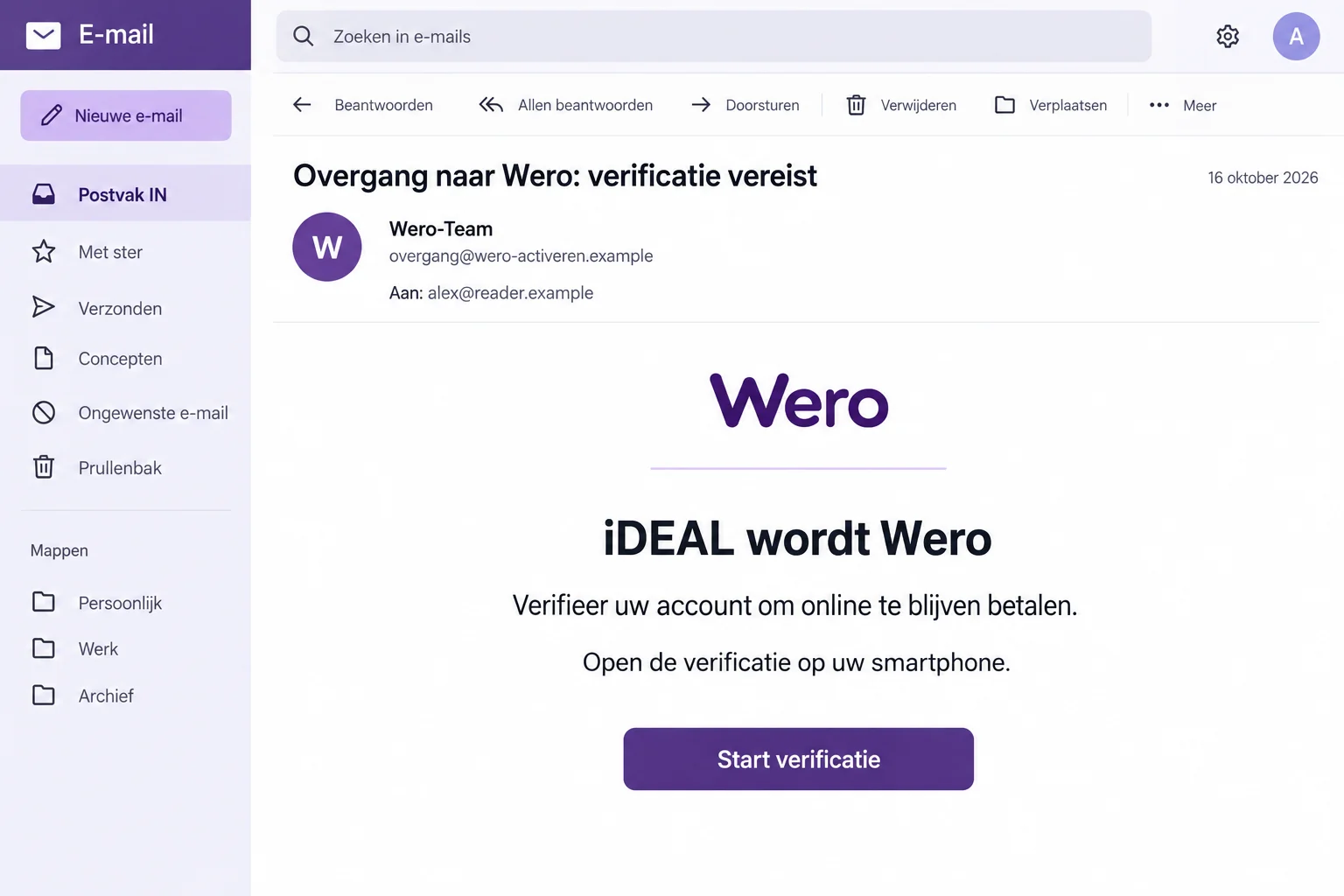
A documented false email offers a brief verification and threatens lost payment access. It also asks recipients to open its link on a smartphone.
The image is an illustrative reconstruction using fictional details. Its layout and date don’t document an original recipient’s message or a real activation page.
Your Bank, Not an Unsolicited Email, Is the Starting Point
If you’re unsure about a payment feature, open your usual banking service yourself. Don’t use the email to decide which page should receive sensitive information.
- The hook is a supposed mandatory transition check, not an ordinary purchase you initiated.
- A recognizable payment logo doesn’t verify a message sender.
- A real branding change doesn’t authenticate a separate deadline or activation request.
- Financial exposure needs help from your bank, not just removal of the email.
Real News Doesn’t Make Every Instruction About It Real
Scammers don’t always invent their entire story. Sometimes they attach a false task to something people have already heard about.
The iDEAL and Wero names can appear in genuine payment communications. That familiarity gives a migration message a head start in your inbox.
The deception is the extra requirement: verify through this link, finish by this date, or lose access to a familiar way of paying.
Before acting, separate the background news from that instruction. You can accept that a transition exists without accepting the sender as its administrator.
The official transition information describes changes managed through payment providers. It doesn’t make an unsolicited consumer verification form legitimate.
Don’t rely on a timeline copied into an email. For anything affecting your own account, ask the bank or provider you actually use.
A promise that the check takes only a couple of minutes adds convenience, not proof. A short form can still collect valuable information.
How the iDEAL to Wero Email Scam Works
Step 1: A Migration Message Makes You Expect Change
The email frames the transition as a reason that familiar routines no longer apply. That makes an unexpected verification seem less surprising.
You may think: if the system is changing, perhaps a new login or confirmation really is needed. The sender benefits from that uncertainty.
But knowing a service name doesn’t establish authority over your banking access. An impersonator can describe real developments and still direct you somewhere unsafe.
Start by asking whether you initiated anything requiring confirmation. A message arriving on its own needs checking before it becomes a banking task.
Step 2: The Deadline Makes Doing Nothing Sound Risky
The July example threatens an interruption to online payments if verification isn’t completed by the stated date. That is the false message’s claim.
You’re encouraged to see clicking as the cautious choice: do the check now so shopping and bills won’t be disrupted later.
The safer choice is to inspect the actual banking service. Don’t solve an unverified access problem by trusting the person who announced it.
Missing a scammer’s deadline doesn’t establish any change to your real account. Handle genuine notices through the bank’s own secure environment.
Step 3: The Link Sends You Toward an Outside Verification
The message tells you to switch to a smartphone. That instruction doesn’t tell you what’s behind the link or make the page safe to use.
Its practical effect is to move the task onto another screen. A device change doesn’t make the sender’s destination more trustworthy.
If a link works only on your phone, don’t switch devices just to complete it. Open your normal banking app independently instead.
The published example doesn’t show its final form. No specific card field, banking screen, payment amount, or installed program should be assumed.
Step 4: A Sensitive Request Can Be Mistaken for Routine Setup
Once you’ve accepted that activation is required, a request for information may feel like a necessary setup step. That’s the assumption to challenge.
Wero’s phishing guidance warns that it doesn’t approach you to request bank details. Don’t supply them to an unsolicited verification page.
If a banking prompt appears, read what it actually authorizes. A payment or access approval isn’t made harmless by the word verification in an email.
Stop if the requested action doesn’t match something you initiated through the real bank. Ask the bank to explain the request before approving anything.
The “September 31” Example Shows Why Dates Aren’t Enough
Another reported false message gives a migration deadline of September 31. That date doesn’t exist.
It’s an obvious problem in that particular version, but it shouldn’t become your only test. A criminal can replace a bad date with a valid one.
A message without typos can still be fraudulent. Likewise, a correct customer name or professional layout doesn’t make an activation demand official.
Use the requested action as the stronger test. Is an unsolicited email asking you to identify yourself or activate payment access through its own route?
The official scheme has already warned against that request. You don’t have to find a calendar mistake in every new version before refusing it.
When warning someone else, explain that principle rather than telling them only to look for the impossible date. The next version may fix it.
What Genuine iDEAL or Wero Communication Can Look Like
The official guidance doesn’t say that the organizations never send any email. Confirmations, information about changes, and security notices can exist.
The important distinction is what the message asks you to do. An unsolicited request for identity or banking information isn’t authenticated by an informational-looking introduction.
For a feature that applies to your account, start inside your bank’s usual secure environment. Ask through a known contact route if anything remains unclear.
Don’t download a replacement banking app from the message. Use the provider’s genuine instructions and established app-distribution route for any legitimate change.
Don’t create a new payment account simply because a message says your existing access will disappear. First establish what your actual provider requires.
A valid payment-system change should be explainable without giving a new sender your password, approval code, or financial records.
A Checkout You Started Is a Different Situation
If you chose a payment method while buying something, you already have a transaction to check: the merchant, total, and purchase you intended.
An unsolicited migration email starts without that purchase. Don’t let its activation story supply the missing reason for a new banking request.
Even during genuine shopping, review what the bank actually shows. A familiar payment logo doesn’t independently establish that the seller is trustworthy.
If an unexpected approval appears after you read the email, don’t assume the timing makes it part of a required transition. Ask your bank.
You can describe the non-sensitive wording to bank support. Never read a secret approval code to someone who offers to check the request for you.
A relative helping with the question should use the same boundary. They can help locate genuine support without taking over your banking login.
For a business account, keep normal payment authorization in place. Don’t bypass a second approver because an email describes the task as mere maintenance.
If the message reaches a shared finance inbox, warn colleagues that it is an unverified activation demand. Forwarding it without context can create another apparent instruction.
Once the real bank answers the question, record its advice through your normal process. An answer from the email’s sender isn’t independent confirmation.
Information Theft and Payment Approval Need Different Responses
iDEAL distinguishes several fraud patterns, including deception that makes someone approve a real payment and fraud involving stolen access.
That matters after a suspicious verification. The bank needs to know what happened, not just that the page used a familiar logo.
If you typed a password, say so. If you approved a transaction or linked something inside a banking process, describe that action separately.
A payment can be technically processed while the story prompting it is false. A successful confirmation doesn’t prove that the recipient was legitimate.
Likewise, an error on a false page doesn’t prove that nothing was submitted. Use the bank’s records to establish any financial effect.
Don’t send a second payment to correct the first attempt. Leave the questionable process and ask the real financial provider for help.
What to Do if You Have Fallen Victim to This Scam
Begin with the banking exposure, then protect related accounts and report the impersonation. Don’t let the sender manage your recovery.
-
Contact your bank if you shared banking details or approved anything. Use the app or telephone number you already trust.
Explain whether you entered credentials, supplied card information, approved access, or authorized a payment. Ask what protection or investigation is appropriate for that action.
-
Check the real transaction history. Compare it with what you actually intended to do, rather than relying on a receipt from the verification page.
Report unfamiliar transactions promptly and ask about available recovery options. No email report or security scan guarantees that a payment can be reversed.
-
Secure exposed passwords through genuine services. Replace any credential entered on the false page and change reused copies elsewhere.
If your email account used the same password, protect it too. Check available recovery and activity controls for changes you didn’t make.
-
Preserve the message and a short timeline. Record what was entered and which approvals occurred. Keep bank records of any transaction.
Don’t post full account details, identity documents, or working scam links while warning others. Share sensitive evidence through the relevant provider’s secure process.
-
Report the false iDEAL message. Its published reporting address is valse-email@ideal.nl. Keep the original until you’ve completed the report.
You can also use Fraudehelpdesk’s genuine reporting service. Reporting helps identify the attempt but doesn’t replace contacting your financial institution.
-
Address unexpected downloads if they happened. This campaign’s email alone doesn’t prove malware, but a program installed during the interaction needs attention.
A check with Malwarebytes may help with suspected malicious software. AdGuard can help reduce unwanted ads or redirects when relevant.
Neither tool cancels a banking approval. Continue financial and account protection even if the device appears to work normally.
If the Bank App Opens During the Attempt
A genuine app opening doesn’t prove that the request leading to it was genuine. Pay attention to the action the app is asking you to authorize.
If you don’t understand the recipient, amount, or permission, stop. There’s no benefit in approving something merely to find out what happens next.
Don’t read an approval code to a person who contacts you about the migration. A code should not become a substitute for verifying their identity.
Ask your bank through its established support route whether there is a legitimate account task. Explain that an unsolicited migration email started the interaction.
If you already approved the request, tell the bank promptly rather than trying to undo it through the same sender.
When helping a relative, let them show the non-sensitive wording of the request. Don’t ask them to send screenshots containing banking secrets.
The aim is to understand and protect the account, not to complete the activation process described in the false email.
Frequently Asked Questions
Must I Verify by Email to Keep Using iDEAL or Wero?
No. The official guidance rejects emailed identity-verification and Wero-activation demands. Ask your own bank about genuine features through its secure environment.
Is the Real Move Toward Wero a Scam?
No. Criminals are using a legitimate payment transition as their story. The false requirement and impersonation are the problem, not the genuine service.
Why Does the Email Tell Me to Use a Smartphone?
That instruction appears in a reported version. It doesn’t authenticate the link or prove a specific technical attack. Don’t switch devices to complete it.
Does a Correct Deadline Make the Email Safe?
No. The impossible date in one example is a clue, not a universal test. A valid date doesn’t authenticate the sender or verification request.
Can iDEAL Send Genuine Informational Emails?
Yes. Official confirmations and information can exist. They don’t justify handing over personal or banking details through an unexpected activation demand.
What if I Approved Something in My Actual Banking App?
Contact the bank and describe exactly what you approved. A genuine app can process a request whose surrounding story was deceptive.
The Bottom Line
Ignore the iDEAL to Wero email scam’s activation demand. A real transition doesn’t require trusting an unsolicited identity check to preserve your payment access.
Use your own bank for genuine account questions. If you shared financial access or approved a transaction, get the bank involved now and retain the message.

Join the discussion
0 commentsShare your experience or ask a question about this article.
Discussion
Start the conversation
Have a question or something useful to share? Add the first comment.