

An email says your TV Licence renewal failed. It offers a quick payment update, just as you are trying to get through the rest of your inbox.
The TV Licensing email scam borrows a familiar household obligation. A few careful checks can separate that frightening notice from a real payment problem.
Overview
The renewal warning directs attention toward a counterfeit payment route
The scam impersonates TV Licensing and says a licence, renewal, or payment needs attention. The message encourages the reader to resolve it through the supplied link.
A fraudulent form can collect personal information, card details, or banking information. Its appearance does not establish that the organization named in the email receives those details.
The March 2026 warning discussed here describes this impersonation pattern. We have not obtained a recipient’s original message or authenticated a currently circulating scam destination.
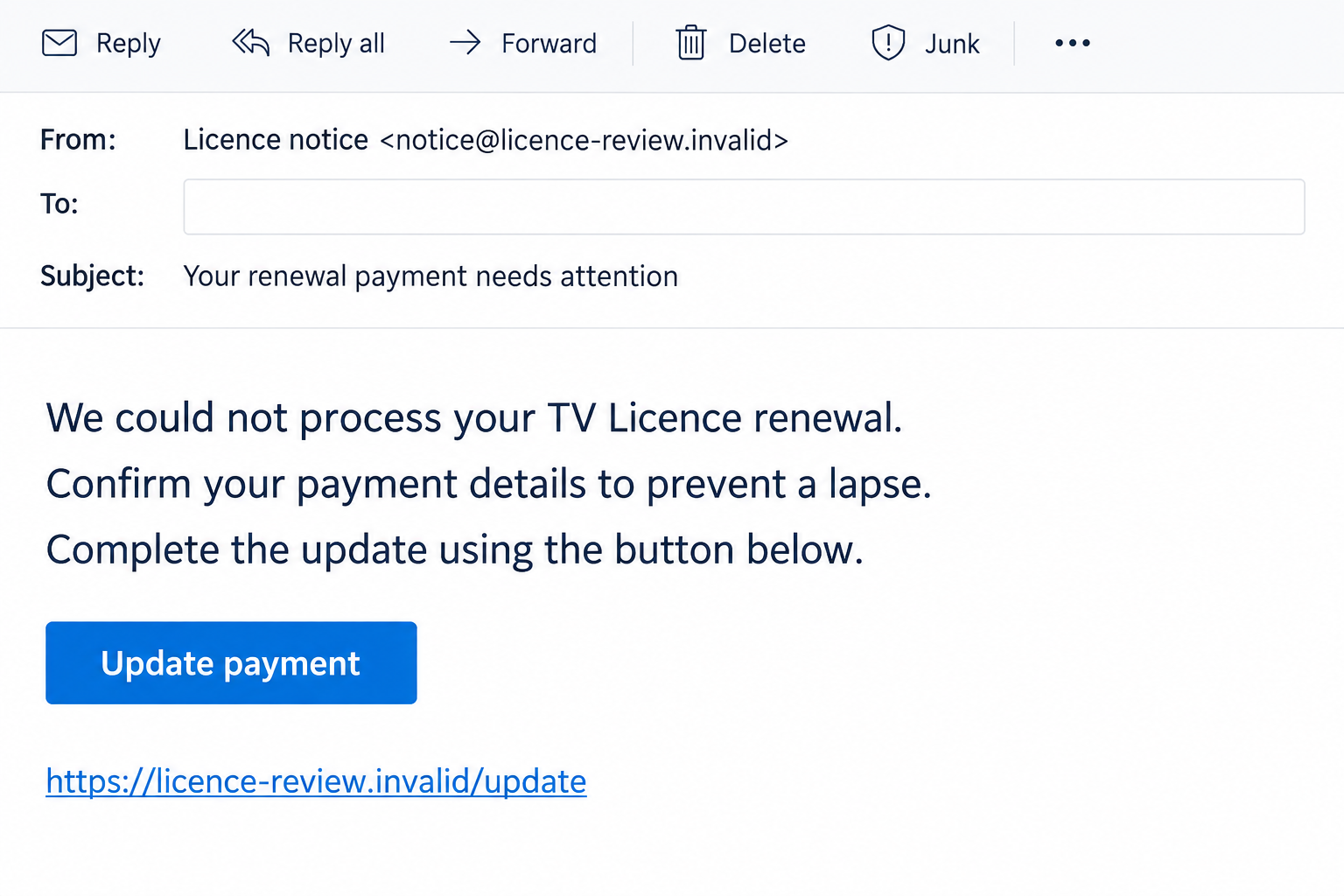
The illustrated email uses a fictional sender and nonfunctional address. It shows the renewal hook without reproducing a customer’s licence record or pretending to be a captured specimen.
Genuine payment reminders also exist
TV Licensing publishes advice on spotting suspicious communications. Its guidance distinguishes false urgency from actual reminders about missed payments.
The existence of a real payment issue does not authenticate a separate email. Someone can have a genuine overdue balance and still receive an unrelated phishing message.
Check the licence or payment plan through the official account, opened separately. That prevents the suspicious email from controlling both the diagnosis and the supposed remedy.
Use several checks, then confirm through the real service
- Compare the message with your known licence and payment records.
- Inspect the actual sender and destination, not only the display name.
- Do not reply with passwords, card details, or banking information.
- Investigate unfamiliar partner names through TV Licensing itself.
- Report a suspicious email without following its payment instructions.
A name, postcode fragment, or convincing licence number is a clue, not conclusive identity proof. Those details cannot replace checking the request through a channel you chose.
Why a Renewal Problem Feels Hard to Ignore
The email borrows a task you may genuinely expect
Household payment arrangements change. Cards expire, Direct Debits move, and renewal dates are easy to forget. An administrative notice can therefore feel plausible before you inspect it.
The subject may arrive near the time you remember paying, or while you are changing bank details. That coincidence can supply reassurance the message has not earned.
Start with what you already know: how you normally pay, when the last payment occurred, and where you keep the genuine licence correspondence.
You do not have to reconstruct every billing detail before disengaging. A calm visit to the authentic account is sufficient to begin checking the matter.
The warning makes a link look like a way to prevent trouble
A button labeled update, renew, or confirm presents the next action as maintenance rather than disclosure. It feels like completing a task instead of opening a new relationship.
The important change is who receives the information. A copied payment screen can ask familiar questions while sending the answers somewhere unrelated to TV Licensing.
A clean layout, correct spelling, or encrypted connection cannot solve that identity problem. Those features can appear on a fraudulent site as well as a legitimate one.
How the TV Licensing Email Scam Works
Step 1: A notice announces a licence or renewal problem
The email claims a payment failed, details need updating, or access to a valid licence is at risk. It may address the recipient generically or display personalized-looking information.
A person who recognizes the organization may skip past the sender details. The familiar subject supplies urgency before the destination has been examined.
Save the message if you intend to report it. There is no need to answer the sender to establish whether the household has a genuine billing issue.
A copied logo or reference number is part of the presentation. Neither proves the message originated with the organization or matches your actual account.
Step 2: The email supplies its own update or payment link
The button takes the reader toward a destination selected by the sender. Words such as licence, payment, verification, or TV in an address can disguise an unrelated host.
A link label may show reassuring wording while the destination differs. On a small screen, that distinction can be difficult to inspect quickly.
If the address is unclear, avoid the link altogether. Open the official TV Licensing website through your own bookmark or by entering its address yourself.
Do not rely on the browser’s padlock to identify the recipient of your information. Encryption protects a connection; it does not certify the payment story.
Step 3: A fake form requests information under an administrative excuse
The page may ask for a name, address, card number, or other details ostensibly needed to repair the renewal. Each completed field can disclose useful information.
The requested combination matters. An ordinary contact field and a banking password do not carry the same risk, even when both appear in a single form.
Never make sensitive disclosure the price of finding out what is allegedly wrong. Check the real account first and handle genuine changes within its established process.
If the form asks for an account password, consider whether it is actually an authentic sign-in. A licence-update heading does not explain an unrelated credential request.
Step 4: Further verification can introduce another exposure
A follow-up screen or caller may ask for a security code or payment approval. Read what the genuine bank or account notification says that action authorizes.
A code arriving from your bank does not authenticate the page asking for it. It may relate to an action initiated while you were completing the false form.
Stop if the request does not match a transaction you intended to make. Contact your bank using a trusted route rather than accepting the sender’s explanation.
These are possible extensions of a payment-phishing flow, not findings that every historical TV Licensing email requested bank access or captured a second authentication factor.
Step 5: A completion message leaves the real payment question unresolved
The site may announce that your licence was renewed, your details were accepted, or processing will continue later. That can discourage an immediate account check.
The real service may have received nothing. You need to confirm actual payment and licence status separately from the imitation page’s reassuring ending.
If information was disclosed, respond according to what you supplied. A card replacement, account recovery, and correction of a real missed payment are different tasks.
A later refund or verification message should not be treated as proof of successful renewal. It may simply continue the conversation with another request.
Genuine Partner Names Can Make a Quick Verdict Difficult
Themis messages require verification, not automatic dismissal
TV Licensing’s Themis information page describes a real outreach trial involving letters, emails, and texts to people whose licences expired.
That does not authenticate every message displaying the name. It means an unfamiliar organization should be checked against official information before you decide what it represents.
Reach TV Licensing independently and ask about your particular contact. Do not pay a person merely because the sender resembles a partner mentioned on a genuine webpage.
Payment-plan communications can use other authorized names
The Simple Payment Plan FAQs discuss genuine Wescot and Direct Debit communications. TVL Pay users may also encounter documented PayPoint email notifications.
For that reason, a rigid rule that only one sender name can ever be legitimate is unreliable. Review your actual plan and the purpose of the contact.
The useful boundary remains the request: an email or text is not an appropriate place to send bank details or a password back to an unknown contact.
What to Compare Before Changing Payment Details
Your existing records are more useful than the email’s reference
Find a previous genuine letter or payment record and check the account through the official website. Compare the current plan with what the new message describes.
A number printed in an email might be invented, copied, or unrelated. Treat it as information to compare, not as a pass that makes the message authentic.
If another household member handles the licence, check with them first. The email may be describing an arrangement you do not manage or a payment they already completed.
The bank record and the licence record answer different questions
A bank statement can show that money moved. The licence account can show whether a particular payment was credited to the intended plan.
When the two do not line up, preserve the dates, merchant description, and confirmation. Support needs those details to distinguish an authentic payment from an unrelated charge.
Do not cancel a genuine household arrangement simply because a scam email mentions it. Address the legitimate account and the suspected fraud through their respective providers.
A Renewal Problem Does Not Explain a Surprise Refund
Keep the promised direction of the money separate from the request
A message can switch from a failed renewal to a refund explanation. Both stories may direct the reader to the same information-collection page.
Consider what the form actually requests. A promise of money coming back does not make a banking password, card code, or unfamiliar payment approval appropriate.
If you believe you overpaid, consult the genuine service about that specific payment. Do not ask an unexpected email sender to establish your entitlement.
Preserve the difference between a billing query and a security incident
Your account may need a normal correction while your card also needs protection after disclosure. Describe those problems separately when speaking to the providers.
Keep a short chronology of the original payment, the message, any submitted details, and subsequent charges. It is easier to investigate than an undated collection of screenshots.
A legitimate billing response should explain the existing record. It should not require another secret or advance payment merely because a different caller promises to help.
What to Do if You Have Fallen Victim to This Scam
-
Leave the renewal link and stop supplying information. Do not complete another form to undo the first one. Preserve the original email and any visible destination.
Write down whether you opened a page, entered details, approved a code, or made a payment. Those stages require different responses.
-
Contact your bank for financial exposure. Explain precisely what card details, account information, approvals, or transactions were involved. Obtain the relevant case reference.
Ask about blocking further misuse and reviewing the payment. Refund or reimbursement rights depend on the facts; an article cannot promise the result of a bank investigation.
-
Check your genuine licence or payment plan. Enter the real service independently and determine whether there is an authentic outstanding task. Contact verified support if records are unclear.
Keep genuine obligations separate from the fraudulent collection route. An impostor’s confirmation does not demonstrate that your ordinary renewal was processed.
-
Replace credentials that were disclosed. Use the affected service’s normal recovery process, not another link supplied by the email. Change reused passwords wherever necessary.
If your email account was exposed, review recovery details and unfamiliar sessions. It can be a gateway to other accounts beyond the licence notice.
-
Report the suspicious email to the NCSC. Current TV Licensing guidance directs email reports to report@phishing.gov.uk. Forward the original message rather than engaging its sender.
The NCSC’s phishing guidance explains reporting and response. A report does not guarantee immediate removal of a page or restoration of money.
-
Document any identity-related disclosure. List the kinds of personal details provided, along with dates and supporting correspondence. Do not post full identifiers in a public comment.
For an actual fraud incident, use the current reporting route for your location. England, Wales, and Northern Ireland use Report Fraud; Scotland has its own police route.
-
Inspect technical changes if they occurred. Check unexpected downloads, extensions, notification permissions, or continuing redirects introduced by the link. A received email alone does not establish infection.
Malwarebytes can help investigate suspicious software, and AdGuard can reduce some harmful advertising or known destinations. They do not replace bank contact or recover a disclosed password.
-
Keep the household informed and reject rescue fees. Explain what happened to the person managing the licence and to anyone who might answer follow-up messages.
Do not pay a new caller to clear the notice, restore the licence, or obtain a refund. Continue through the bank and official contacts already established.
Frequently Asked Questions
Does a missed-payment TV Licensing email always mean a scam?
No. Genuine reminders can exist. Verify the actual licence and payment plan independently rather than judging the message solely by its subject or urgency.
What if the email contains my name or part of my postcode?
Those details can help comparison, but they do not authenticate the sender or destination. Use your own records and the official account to confirm the request.
Are all Themis, Wescot, or PayPoint messages fraudulent?
No. TV Licensing documents relevant authorized communications. Check the specific message and your account arrangement through official guidance rather than trusting or rejecting a name alone.
Should I give bank details in an email reply?
No. Do not send financial details or passwords back through an unverified message. Handle genuine payment changes through the authentic service and its established process.
What if I clicked but entered nothing?
Close the destination and examine any separate download or permission change. Opening the page does not, by itself, establish that your bank account was compromised.
Who should receive a suspicious renewal email?
Current guidance directs suspicious email reports to report@phishing.gov.uk. Contact the bank separately for payment exposure and official TV Licensing support for the real account.
The Bottom Line
The TV Licensing email scam makes a routine renewal issue the excuse for an unsafe disclosure. Check the genuine licence before accepting the message’s payment route.
Real reminders and partner communications deserve careful verification, not blanket suspicion. If you responded to an impostor, protect the information supplied and resolve actual billing separately.

Join the discussion
0 commentsShare your experience or ask a question about this article.
Discussion
Start the conversation
Have a question or something useful to share? Add the first comment.