

A pension message arrives under ABP’s name, asking you to check your details. When retirement income is involved, even routine administration can feel important.
Perhaps you’re expecting an update or haven’t checked your account for a while. The invitation looks familiar enough to deserve a closer look.
Overview
A Pension Relationship Is Used to Ask for Sensitive Information
The ABP pension email scam impersonates the genuine Dutch pension fund. False messages ask recipients to follow links, disclose information, or share login codes.
The subject matters because pension records can contain private financial and personal details. People may respond quickly rather than risk missing something connected to retirement.
But an ABP label doesn’t establish the sender’s identity. The scam is the impersonation, not the pension fund or its legitimate correspondence.
ABP Warns Against Linked Requests for Banking Details and PINs
ABP’s phishing guidance says it doesn’t request confidential information such as PINs or banking details through a link.
It describes pressure to act quickly, lookalike addresses, and messages asking for personal information. Genuine sensitive communication belongs in a verified relationship.
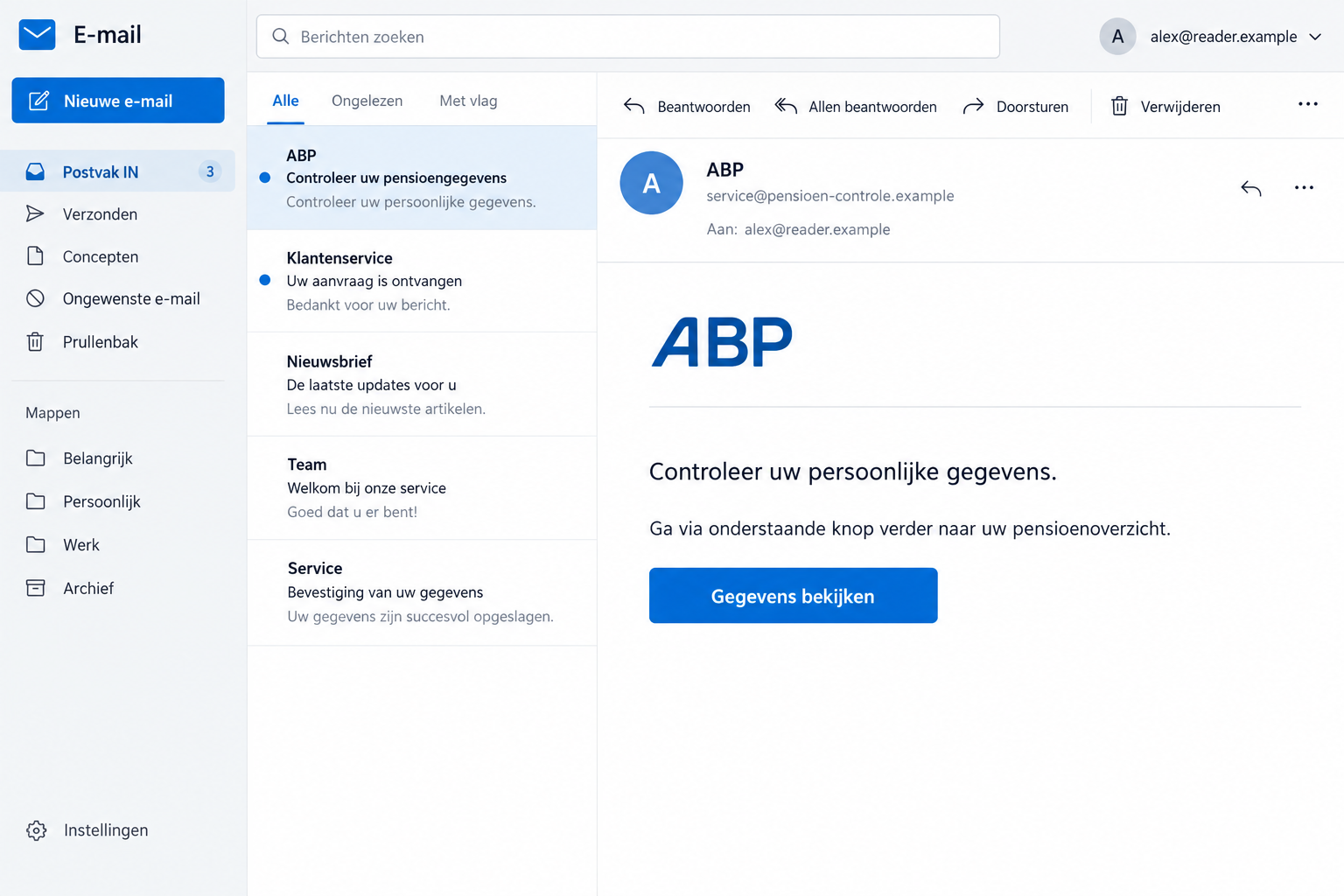
The image uses a generic illustrative request with fictional identifiers. It isn’t an original campaign email, a real account statement, or evidence of a pension change.
Verify the Message Without Handing Over the Information It Seeks
Reach MijnABP through ABP’s genuine website or contact the fund independently. You don’t need an unexpected sender’s button to find out whether something needs attention.
- A correct-looking pension logo doesn’t identify the person who sent it.
- A sensitive-data request deserves more than a check for spelling mistakes.
- Legitimate customer research can involve recognized research partners.
- If DigiD was exposed, protect that identity access as well as reviewing pension records.
Why Pension Administration Is a Useful Disguise
A pension isn’t something most people manage every day. That makes it harder to judge an unexpected request against a familiar routine.
You may remember a newsletter, an employer change, or an upcoming retirement decision. A message can seem to fit that background without coming from the fund.
Scammers benefit when you fill in the missing explanation yourself. Recognizing a relevant topic can be mistaken for recognizing an authorized task.
Start with the account question instead: what, if anything, does your actual pension record require? Use the real service to establish that.
If you’re expecting a document, locate it through the genuine account. Don’t let anticipation turn a separate unsolicited link into the delivery route by default.
And if you aren’t sure which pension fund holds your record, check your own employment or pension documents. Don’t send identity information to every organization named in incoming mail.
You can take a message seriously without complying with it immediately. Independent checking addresses the pension concern while keeping the sender outside your account.
How the ABP Pension Email Scam Works
Step 1: The Message Borrows the Fund’s Familiar Name
The contact presents itself as ABP business. That can encourage you to interpret its request as part of an existing financial relationship.
A display name and logo are easy to imitate. They don’t establish that the message passed through the pension fund’s genuine communication process.
ABP also describes phishing through texts, social media, and calls. An approach moving outside email doesn’t become trustworthy merely because the name stays familiar.
If someone contacts you through a social account, use the fund’s own website to locate official support. Don’t rely on a profile’s confidence or appearance.
Step 2: An Administrative Request Makes Disclosure Feel Helpful
A request to check personal details sounds less alarming than a demand for money. You may feel you are correcting an account rather than taking a risk.
That is where the information being requested matters. An unexpected link shouldn’t collect the secrets used to access banking or identity services.
If a deadline is used, don’t let it determine your verification method. A short window written by an impostor doesn’t authenticate the task.
Likewise, a promised reward doesn’t establish a genuine relationship. ABP lists prize and gift promises among the warning signs in its phishing guidance.
You can leave an unfinished request. Starting a form doesn’t commit you to providing the next piece of information it demands.
Step 3: The Linked Page or Conversation Becomes the Place You Trust
The risky change happens when the sender’s route becomes your account route. You’re now relying on an unverified contact to decide where sensitive details belong.
The public warning doesn’t identify one universal template or final form. Don’t assume every ABP impersonation asks for the same fields or causes the same loss.
Use the request itself to decide when to stop. A person seeking a PIN, password, or login code through unsolicited contact doesn’t need further cooperation.
If you already supplied information, don’t enter more to resolve an error. Move to the genuine fund and relevant account provider for help.
Any familiar branding on the next page still needs an authentic destination behind it. A copied interface isn’t a new reason to trust the original message.
Sender Checks Help, but Your Account Is the Better Starting Point
ABP identifies @abp.nl and @mail.abp.nl as its genuine email domains. Read the complete sender address rather than the name shown in the inbox.
A lookalike can add words, substitute letters, or use an unrelated ending. Don’t judge an address solely because it contains the letters ABP.
Nor should a plausible address end the check. The specific request and its destination still need to make sense within your real account relationship.
Use ABP’s official contact page if you’re unsure. Avoid asking the email’s sender to verify its own authority.
When describing the message, give its subject and requested action. You don’t need to send a banking PIN or account password as proof of who received it.
If you’ve already received a genuine letter, compare the issue through independently reached support. A scammer can refer to an ordinary pension topic without owning the case.
Save any confirmed instructions in your records. That gives you a reliable answer if another version of the same request arrives later.
If you recently changed employers or contact information, mention that when asking about a notice. It gives genuine support context without authenticating the suspicious sender.
Don’t send the same correction through both routes to be safe. Completing a real account update doesn’t make a copy sent to an impostor harmless.
And don’t approve a new login simply because you’re already talking to someone about pensions. Keep every access request tied to an action you initiated.
Real Research Invitations Are an Important Exception
ABP explains that it conducts customer research, including through selected research agencies. Some legitimate invitations can therefore involve a partner’s address.
A blanket rule that every outside domain is fraudulent would be misleading. Check the current partner information on ABP’s own research page.
That verification should establish the actual invitation, not merely that a company exists. A real research firm’s name can also be copied.
Keep the purpose of the questionnaire in view. An invitation to give an opinion doesn’t justify revealing your banking PIN or sharing a login code.
If participation isn’t something you want, you can decline without following an unverified unsubscribe route. Ask the genuine fund about its available preference options.
Don’t Confuse a Pension Record With a Banking Login
A pension contact-detail update isn’t a reason to hand a stranger the code that opens your bank account. Check what each requested item would let someone do.
Putting those requests inside a pension-themed page doesn’t make them interchangeable. Ask why the specific information is needed before providing anything through an unfamiliar route.
If your real banking details need updating with the fund, use its verified process. Don’t rely on a request arriving unexpectedly to choose that process.
If you entered DigiD details, DigiD’s own security response is relevant too. Pension support alone doesn’t replace protecting the identity credential.
Likewise, changing an identity password doesn’t necessarily correct a pension record already altered. Ask the fund to review the actual information where there is cause for concern.
A person receiving phishing hasn’t automatically lost their pension. Work from disclosed information and observed activity rather than assuming the most frightening outcome.
What to Do if You Have Fallen Victim to This Scam
Be specific about what left your control. That helps you reach the right provider and avoid making unrelated changes in a panic.
-
Stop responding to the false request. Close its form and don’t provide another code or document to finish an earlier attempt.
Preserve the original message and note the approximate time. Record the type of information entered without copying passwords into your notes.
-
Tell ABP about the impersonation. Reach the fund through its own website and explain which message concerned you.
If you disclosed pension-related information or suspect a record change, describe that separately. Ask what needs checking through the fund’s genuine procedure.
-
Secure any identity login disclosed. Follow DigiD’s official guidance if its credentials were involved. Use the relevant provider for another identity method.
Check available usage history and contact support about activity you don’t recognize. Don’t let the suspicious sender supervise recovery.
-
Protect other exposed passwords. Change each through its genuine account and replace reused copies. Include email if its password or recovery access was shared.
Review available account-security controls for unfamiliar changes. Prioritize the accounts actually involved rather than resetting unrelated services at random.
-
Contact your bank after financial exposure. Explain any banking information, PIN, code, approval, or payment supplied during the interaction.
The bank can advise on appropriate immediate protection. Don’t wait for a supposed pension administrator to confirm that a transaction was fraudulent.
-
Preserve evidence of actual misuse. Keep account notices, transaction records, and support references already available. Share sensitive material only through verified reporting channels.
If identity misuse or theft occurred, seek official fraud-reporting or police assistance. A message carrying personal details isn’t, by itself, proof of a breach at ABP.
-
Investigate software when relevant. A pension email doesn’t itself establish infection. Tell a trusted technician about downloads, remote access, or unusual browser behavior.
For a suspicious program, consider assessment with Malwarebytes. If ads or redirects appeared during browsing, AdGuard may help block that unwanted content.
A device check doesn’t recover a disclosed PIN or reverse account changes. Continue the fund, identity-provider, and banking actions appropriate to your exposure.
Helping a Parent or Relative Check the Message
Begin with the concern behind the click. They may worry that ignoring an official-looking request will affect income they rely on.
Help them locate the genuine fund’s contact route. You can read the message together without asking them to reveal passwords or approve anything.
If you assist with a call, explain the situation accurately. A missed pension message, a shared code, and an unauthorized payment are different issues.
Let the account holder keep control of sensitive entry. Assistance shouldn’t become informal ownership of another person’s identity login.
If ongoing help is needed, ask the provider about proper representation or support options. Sharing a permanent credential is a poor substitute for a legitimate arrangement.
Keep one clear list of confirmed actions and contacts. Multiple relatives giving conflicting reset instructions can make a stressful incident harder to untangle.
Once immediate concerns are addressed, save a trusted route to the pension service. A familiar bookmark is easier to use than judging a new email every time.
If You Answered Only a Few Questions
List those answers before assuming that every financial account is exposed. Contact details and a login secret do not create identical risks.
Someone who has your number may try a more informed follow-up call. Knowledge of the earlier questionnaire doesn’t prove that the caller is authorized.
If you disclosed health, family, or financial information, tell genuine support what categories were involved. Don’t circulate the full answers while warning friends.
If no secrets or payments were shared, proportionate reporting may be enough. Use your real account to check any remaining pension question.
Don’t return to the page to find out what the next question asks. You can stop without mapping the entire website.
Be cautious about unsolicited recovery offers afterward. A stranger promising to protect or restore pension access still needs independent verification.
Frequently Asked Questions
Is ABP Itself Running the Pension Scam?
No. Criminals are borrowing the fund’s identity to approach recipients. Contact the genuine ABP independently if a message concerns you.
Does ABP Ask for Banking PINs Through an Email Link?
Its guidance says it doesn’t request confidential details such as PINs or banking information through links. Use verified account channels instead.
Are All Research Invitations From Outside ABP Fraudulent?
No. Selected research partners can send genuine invitations. Verify the actual sender and invitation through ABP’s current research information.
Does Receiving the Email Mean My Pension Was Reduced?
No. The message doesn’t establish any real change. Check the actual pension record or contact the fund independently.
What if I Entered DigiD on the Linked Page?
Follow genuine DigiD recovery promptly and ask ABP to review relevant activity or records. Protecting identity access and checking pension information are separate tasks.
Should I Ignore Genuine Pension Mail After This?
No. Continue handling real correspondence through verified routes. Reject the impersonator’s instructions without neglecting legitimate account matters.
The Bottom Line
Don’t provide sensitive details through the ABP pension email scam’s link or caller. Check the actual request with the genuine fund instead.
If information was disclosed, secure the specific login and involve ABP about relevant records. Contact the bank immediately when financial credentials or money were involved.

Join the discussion
0 commentsShare your experience or ask a question about this article.
Discussion
Start the conversation
Have a question or something useful to share? Add the first comment.