


Your website’s domain is about to expire, an email warns. Your site, email, and connected services could stop working unless you renew it soon.
The message carries Yourhosting’s name and offers a convenient renewal button. If your business depends on that address, it’s a difficult warning to ignore.
Overview
A Domain Deadline Turns a Routine Business Expense Into Pressure
The Yourhosting email scam impersonates the hosting provider to make an unexpected renewal or payment request look like account maintenance.
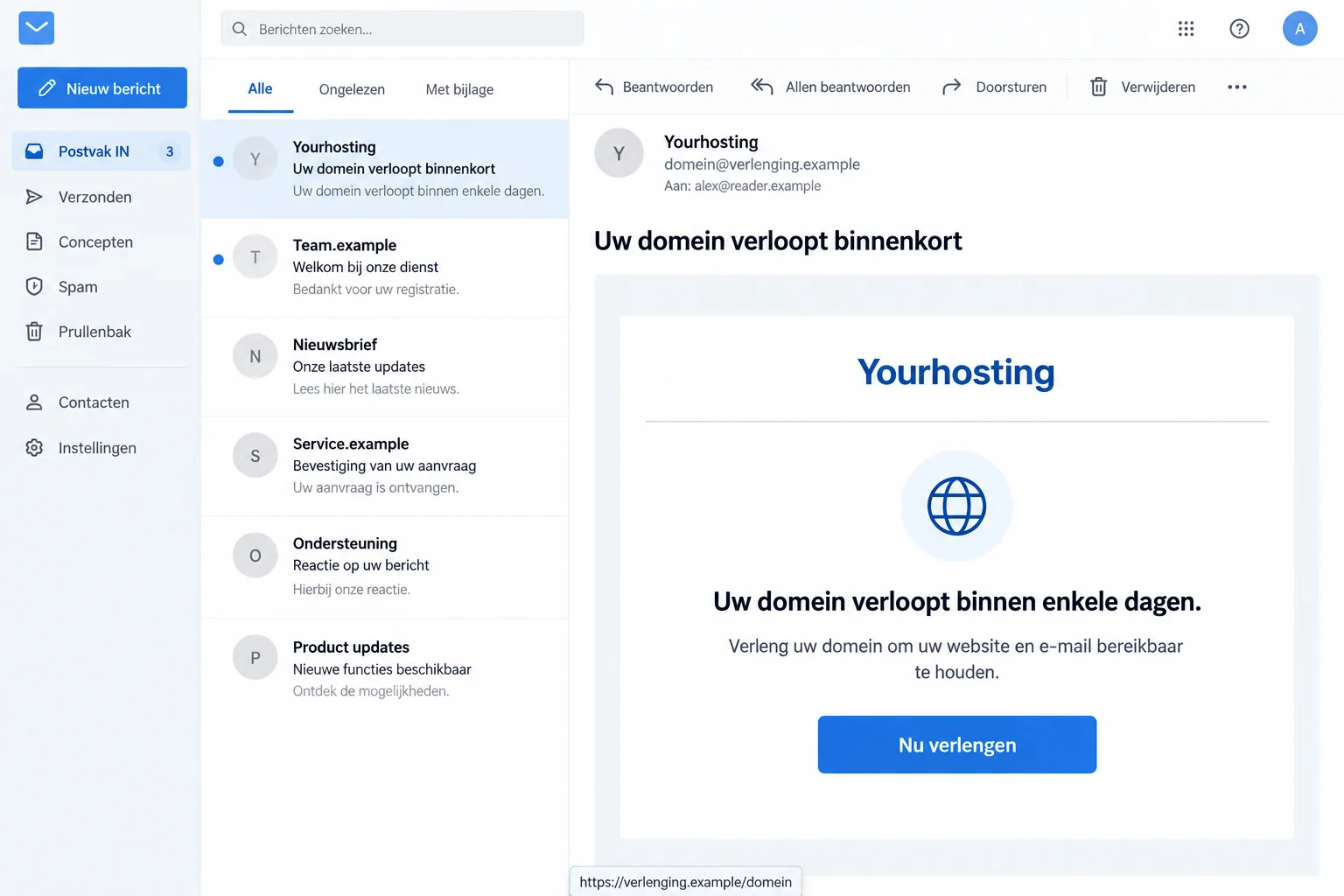
One false message says a domain will expire within days. It threatens disruption to the website and email, followed by possible registration by someone else.
That is the sender’s story. Receiving it doesn’t establish that your domain is expiring or that Yourhosting has decided to suspend anything.
The Real Provider Has Warned About Fake Payment Emails
Yourhosting confirms that criminals send imitation payment messages. It tells customers to inspect actual invoices through its independently reached account portal.
Fraudehelpdesk identifies the domain-expiry email as false. Its publication shows the renewal lure, not the complete page behind the button.
The illustration uses fictional addresses and a simplified layout. It depicts the request, not an original recipient’s email or an authenticated payment screen.
The Genuine Account Can Answer Without the Renewal Button
Start at Yourhosting’s real website and open your existing customer account. Check the actual service, invoice, and renewal status there.
- A recognizable provider name isn’t confirmation of the sender.
- A genuine unpaid invoice doesn’t authenticate a stranger’s separate payment link.
- Website administration, customer-account access, and mailbox access may involve different credentials.
- If you already paid, involve the payment provider instead of waiting for the supposed renewal to complete.
Why Losing a Domain Sounds Worse Than Missing a Bill
A domain can appear on business cards, invoices, advertisements, and years of correspondence. Losing it sounds like losing a way for customers to find you.
The email uses that practical concern to make its button feel protective. You aren’t weighing a new purchase; you’re trying to preserve something established.
It also bundles several services into the threat. A website outage sounds bad enough, but adding email makes the situation feel harder to recover from.
Before responding, identify which provider actually manages the domain. The company handling your website design may not be the company holding its registration.
Your own records are more useful here than the message’s signature. Look at previous genuine invoices, the known account, or your existing administrator’s records.
If someone else normally handles renewals, contact them through an established channel. Don’t forward the suspicious button as an urgent instruction to pay.
The right person can check the real account without using the email. That preserves the chance to resolve a genuine issue without accepting the impersonator’s route.
How the Yourhosting Email Scam Works
Step 1: The Sender Announces an Approaching Expiry
The false notice presents itself as helpful advance warning. It thanks the recipient and says the domain needs renewing to keep connected services available.
That tone matters. A message doesn’t need to sound aggressive to create urgency when the consequence is interruption to a business’s website.
Check whether it identifies a domain you actually manage. Even if it does, knowing a public website address doesn’t prove control over its registration.
If the address isn’t yours, don’t reply with the correct one. Giving the sender better account information won’t turn the message into genuine support.
Step 2: The Warning Makes Delay Sound Like Losing the Address
The reported version describes temporary blocking and eventual availability to third parties. That makes the reader imagine someone else taking over an established name.
Don’t treat those statements as your provider’s actual timetable. The email hasn’t established the domain’s status, your contract, or the sender’s authority.
You can still act promptly. Open the known account, check its records, and ask the provider about anything unclear.
If the real account shows an outstanding renewal, complete it through the verified service. The existence of a real task doesn’t make every reminder genuine.
A scam can arrive close to a genuine renewal by chance. You shouldn’t need to resolve that coincidence before choosing a safe payment route.
Step 3: A Reassuring Button Moves the Renewal Outside Your Checks
The button offers a simple way to make the problem disappear. Words about secure connections or encryption add reassurance without identifying the organization receiving your information.
The October example doesn’t disclose the final form. We can’t assign it a particular price, card field, subscription, or downloaded program.
The provider’s broader warning establishes the risk of following false payment instructions. Money or data can reach criminals rather than the company you meant to contact.
Don’t make a small test payment to see whether renewal succeeds. Check the account first, before an unfamiliar page receives anything.
If a page rejects a password, stop trying alternatives. An error screen doesn’t tell you whether the information you typed was collected.
Check the Invoice, Domain, and Recipient Together
Yourhosting points customers to its genuine customer portal. Reach it independently, not through the warning you’re trying to assess.
Compare the service listed there with your own records. A domain name in a message and a hosting package in an account aren’t automatically the same bill.
Look at whether the invoice is open or already settled. If you’ve recently paid, use your bank’s transaction record rather than a receipt from the suspicious page.
Ask genuine support to explain mismatches. Don’t pay twice simply because the email claims your previous payment hasn’t been processed.
For a business account, confirm who has payment authority. The person receiving administrative email may not be authorized to change billing or renew services.
Keep the payment destination connected to the verified invoice. An accurate domain or believable amount doesn’t independently validate a different recipient.
If several people manage the site, tell them which warning is being checked. Otherwise another colleague may pay while you’re confirming it.
Read the Full Sender Address Without Making It the Only Test
Yourhosting identifies addresses ending in @yourhosting.nl or @emails.yourhosting.nl as genuine sending domains. Expand the sender details rather than reading only the display name.
A name such as Yourhosting Support can be entered by someone else. A similar-looking address may use a completely different domain.
Even a plausible sender isn’t a complete payment check. Continue through your existing account so the message doesn’t choose where you sign in or pay.
Don’t use the telephone number in the warning to verify that same warning. Locate the provider’s real contact page separately.
You don’t have to investigate every link in a footer. Once the payment request is doubtful, further clicking isn’t necessary to protect the domain.
If Your Website or Email Really Is Having Problems
An unrelated outage can make this email seem unusually convincing. A failed website load doesn’t demonstrate that the sender diagnosed the cause correctly.
Ask the real provider what is happening before changing anything. Don’t replace technical settings with instructions supplied by an unexpected renewal message.
If an administrator manages the site, let them assess its actual configuration. A hurried change can create a second problem while the first remains unexplained.
Also distinguish a website login from the hosting customer account. Resetting WordPress access wouldn’t necessarily secure an exposed hosting credential, or the other way around.
Likewise, a password for an individual email inbox may be separate. Write down which credential you entered before deciding what needs replacing.
If you can’t use your normal business email, contact support through another trusted route. Don’t depend on the suspicious sender to restore communication.
Avoid giving a new helper remote access merely because they promise to fix expiry. Establish their relationship with your real provider or administrator first.
Tell Your Administrator Which Access Was Exposed
If someone obtained the customer-account password, ask the administrator what that account can manage. Don’t limit the conversation to whether the homepage still loads.
Ask whether the exposed account controls domain settings or mail routing. If it does, have those settings reviewed rather than judging security by a working homepage.
For email handled by another company, involve that provider if its access is affected. Yourhosting documents how external mail hosting works.
Keep the existing configuration or records available for comparison. Don’t replace settings from memory or copy instructions from a new person replying to the incident.
If only the domain name was supplied, explain that too. An already-public address isn’t the same exposure as a password that opens its management controls.
Before recovery is finished, agree who will confirm that the genuine renewal is handled. Security work and billing work can otherwise leave each other unfinished.
Use an unaffected communication channel if the business mailbox is in doubt. That keeps the person investigating access from depending on the same potentially exposed account.
What to Do if You Have Fallen Victim to This Scam
Work from what actually happened. Paying, exposing an account password, and simply receiving the notice create different problems.
-
Stop the false renewal. Leave the linked page and don’t supply more information to correct an earlier attempt. Preserve the original message privately.
Note the domain mentioned, arrival time, and any information you entered. Don’t store actual passwords in your incident notes.
-
Contact your bank or payment service after a payment. Explain that the supposed hosting renewal came through an impersonation email.
Provide the real transaction reference, amount, recipient, and payment method. Ask what blocking, dispute, or recovery options apply; don’t rely on a promised refund.
-
Secure the specific account disclosed. Replace the relevant password through the genuine service. Change reused copies at other sites as well.
If the account is managed for your business, involve the authorized administrator. Tell them whether the exposed login concerned hosting, the website, or a mailbox.
-
Have the provider review unexpected account changes. Ask about unfamiliar billing details, contacts, users, or domain-related settings where relevant.
Don’t assume those changes occurred just because you clicked. If something is wrong, let the provider or trusted administrator help restore the correct configuration.
-
Verify the real renewal separately. Check actual invoices and domain status through the existing account, even if you’ve already paid the impersonator.
A fraudulent payment doesn’t necessarily settle a genuine invoice. Explain the situation to the provider without expecting the scammer’s receipt to update its records.
-
Report the impersonation. Use Yourhosting’s independently located support and the genuine fraud-reporting service. If money was lost, seek appropriate police assistance.
Keep copies of the message and payment evidence. Share sensitive records privately rather than posting account or card details in a public warning.
-
Assess downloads only if the interaction included them. The renewal email alone doesn’t establish that malware reached your device.
Malwarebytes can help investigate suspicious software. If browsing produced unwanted advertising or redirects, AdGuard may provide useful blocking.
These tools don’t renew a domain, revoke exposed credentials, or reverse a payment. Continue the relevant account and financial actions separately.
Keep a False Renewal Out of the Office Payment Queue
After reporting, remove the message from active tasks. A fraudulent renewal left marked as unpaid can be processed later by someone covering the mailbox.
Give colleagues the subject and the action to reject, not an alarming claim that the whole website has been taken over.
If a legitimate invoice remains outstanding, identify it through the real account. Don’t combine the real bill and false email into one forwarded instruction.
Keep a short record of who manages registration, hosting, and billing. Different providers or employees may be responsible for each.
Agree how an unfamiliar payment request is approved when the usual administrator is absent. An established contact is more useful than a last-minute internet search.
If customer email was actually affected, assess that through normal business support. Don’t announce data theft without facts showing what happened.
Once the immediate problem is resolved, save a genuine account bookmark. Future expiry concerns can be checked without searching through old renewal messages.
Frequently Asked Questions
Is the Yourhosting Domain-Expiry Email Genuine?
The reported notice is false. Check your actual domain and invoices through the genuine customer portal before taking action.
Does Receiving It Mean My Domain Is About to Be Taken?
No. The sender’s warning doesn’t establish your domain status. The real provider can explain the registration and any genuine renewal requirement.
What if I Really Have an Unpaid Hosting Invoice?
Handle it through your verified account. A real outstanding balance doesn’t authenticate a separate link or payment recipient in an unsolicited message.
Can I Trust a Button That Says the Renewal Is Secure?
No. Security wording doesn’t identify the page’s operator. Use your known provider route rather than the button’s promise.
Should I Change My Website Password After Entering a Hosting Login?
Secure the credential actually exposed. Website and customer-account passwords may differ; involve your administrator if you’re unsure which account was used.
Will Yourhosting Automatically Receive Money Paid Through the False Link?
No such assumption is safe. Check the actual invoice with the provider and contact your payment service about the fraudulent transaction.
The Bottom Line
Don’t renew through this Yourhosting email scam. Check the actual domain and invoice in your existing account instead of letting an expiry threat choose the payment route.
If you paid or entered credentials, contact the payment provider and secure the affected account now. Verify any genuine renewal separately with Yourhosting.

Join the discussion
0 commentsShare your experience or ask a question about this article.
Discussion
Start the conversation
Have a question or something useful to share? Add the first comment.