


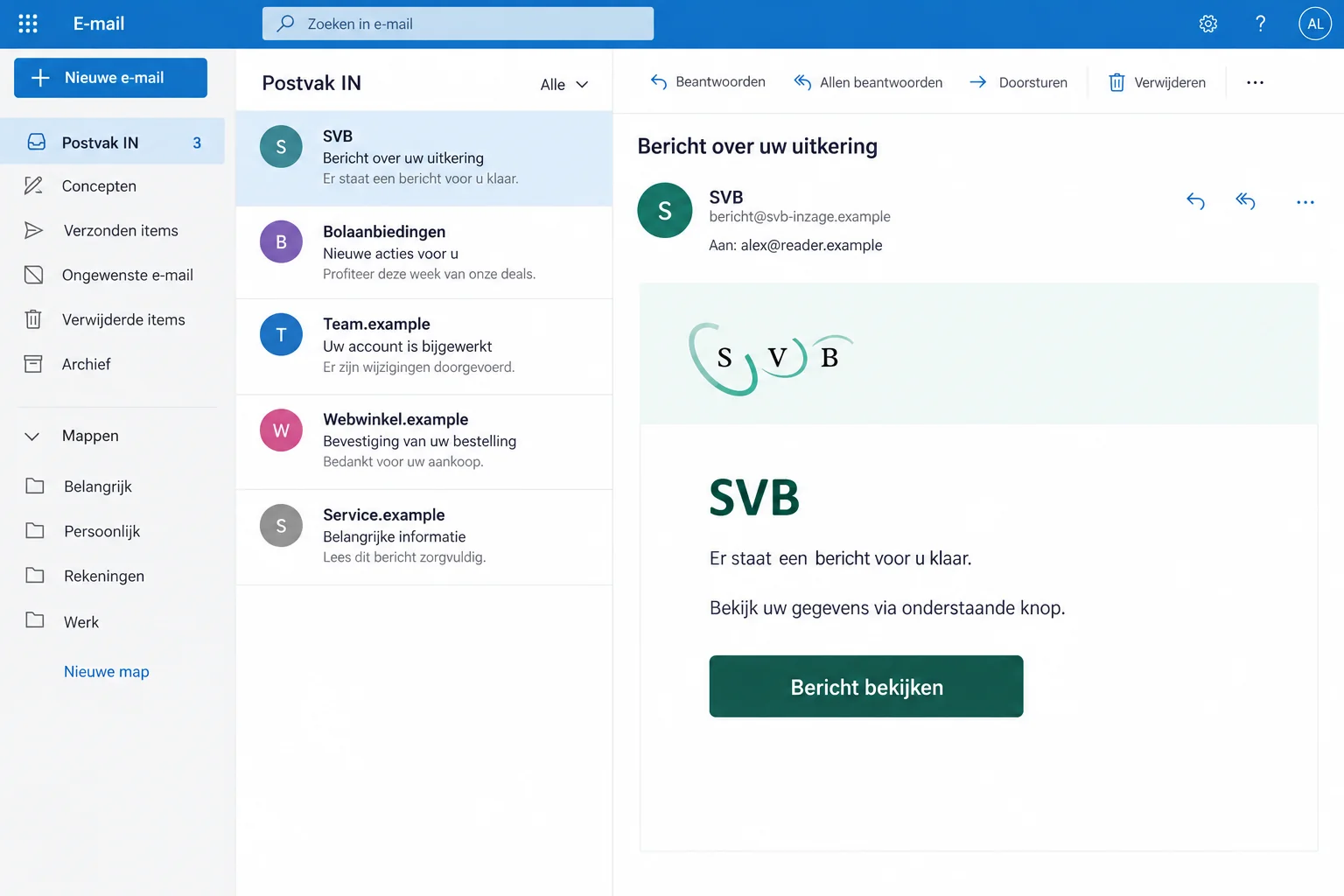
An email appears to come from SVB, the Dutch organization handling national insurance schemes. It asks you to open something concerning your details.
Or a caller says there’s a security problem and offers to guide you. With benefits or a pension in mind, you naturally want answers.
Overview
SVB’s Identity Is Used to Reach Your Login Details
The SVB email scam uses a genuine agency’s name to direct recipients toward an untrusted sign-in. The agency also warns about callers claiming to represent it.
The concern isn’t merely an email that looks unusual. SVB describes false websites resembling DigiD or a bank, where submitted login details reach the fraudster.
Someone can recognize the organization and still misunderstand who is asking for information. A familiar name doesn’t authenticate the contact route.
The Agency Describes Both Messages and False Security Calls
SVB’s own phishing warning confirms impersonation emails and calls. Callers may allege a security problem, request login codes, or direct someone to another website.
These are alternative approaches. The warning doesn’t establish that every email is followed by a call or that every recipient loses money.
The image is a generic illustration with fictional wording and addresses. It isn’t a captured original notice or evidence of a particular benefit decision.
Check Your Actual Records Outside the Conversation
Use SVB’s genuine website to reach My SVB, or contact the agency independently. Don’t let the person announcing the problem choose your sign-in page.
- A caller knowing your name doesn’t prove they are an SVB employee.
- A DigiD-looking page isn’t automatically the genuine identity service.
- Protecting a disclosed DigiD and checking benefit records are separate tasks.
- Receiving the message alone doesn’t establish a suspended payment or compromised account.
Why a Benefits Message Gets Opened
People may depend on a regular payment or be waiting for an application decision. A message connected to that relationship can feel difficult to postpone.
You don’t need to be expecting a payment that day. Even a routine-looking request can raise concern that a missing detail will cause trouble later.
The scam benefits from that uncertainty. You’re encouraged to concentrate on resolving an administrative or security issue before establishing who is handling it.
Keep the two questions apart: does your real SVB record need attention, and did this person actually contact you on the agency’s behalf?
The genuine service can answer the first question without requiring trust in the unexpected message. That is the route worth taking.
If you are waiting for a decision, use your existing records to identify the application. Don’t let a new sender create a different case for you.
Likewise, an unexpected phone call doesn’t need an immediate verdict about your benefits. You can end the call and check the underlying concern independently.
How the SVB Email and Phone Scam Works
Step 1: A Trusted Agency Name Opens the Interaction
The approach begins with an identity you recognize. An email display name or a caller’s introduction presents the contact as ordinary SVB business.
That identity hasn’t yet been verified. Anyone writing a message can claim to represent a public organization.
SVB notes that callers can collect personal information before making contact. Knowing a detail about you isn’t the same as having authority over your account.
Don’t confirm additional details just because the caller already knows some. Start with independently establishing who you are speaking to.
Step 2: A Request Moves You Away From Your Normal Sign-In
An email can direct you toward a false page. In the phone version, a supposed security issue becomes the reason to provide codes or sign in elsewhere.
The helpful tone can hide that change of route. What began as information from an agency has become an instruction from an unverified person.
You aren’t required to stay connected while checking the story. Don’t use an offered transfer or a new link as independent confirmation.
If a caller objects to you contacting SVB yourself, end the interaction. A real account concern can be discussed through the agency’s established channels.
Don’t read a login code aloud to demonstrate that you’re the account holder. That code belongs in a genuine process you initiated.
Step 3: A Familiar-Looking Login Receives Information Meant for You
SVB explains that phishing destinations may copy the appearance of DigiD or a bank. Information entered there can be sent directly to the fraudster.
The visual resemblance makes the request feel continuous with normal government access. The address and the route by which you arrived still matter.
Don’t enter several passwords after an error. An imitation page can reject an attempt while still receiving what you typed.
The warning describes a recurring mechanism, not one fixed form. No particular cutoff date, benefit amount, or universal set of fields is established here.
Stop at the point of doubt. If you already supplied details, turn to genuine recovery rather than trying to complete the supposed security check.
My SVB and DigiD Handle Different Parts of the Problem
My SVB lets people inspect relevant details, report changes, make claims, and upload documents. Start from the real SVB website.
DigiD is a way to identify yourself when signing in. It isn’t the benefit record itself, and its password isn’t something an SVB caller should collect.
That distinction becomes important after phishing. A credential change protects access, while the organization holding your record needs to examine any unauthorized changes there.
If your login was exposed, don’t stop after replacing a password. Tell the affected organization about suspicious activity so its own records can be reviewed.
Conversely, receiving a frightening email doesn’t establish that any changes occurred. Use actual account information and provider help to find out.
If you use another valid EU login for My SVB, follow that provider’s genuine security process when its credentials were involved.
Tell support which identity method you used without sending its secrets. A factual description helps direct the issue to the right team.
Check Genuine Correspondence, Not Just Whether a Login Works
Successful access tells you that you can sign in. It doesn’t, by itself, answer whether an application, payment detail, or message needs attention.
Review the information relevant to your situation and ask SVB about anything unfamiliar. Don’t assume every item belongs to the phishing attempt.
SVB also describes digital post through the MijnOverheid Message Box. Use the genuine route for that service rather than a new link in the suspicious email.
If you cannot understand a notice, ask the agency to explain it. Don’t pay an unverified intermediary who claims to unlock or translate a benefit decision.
Keep a legitimate deadline visible in your records while handling the scam. Reporting phishing doesn’t automatically settle a real application requirement.
If genuine sign-in fails, use SVB’s own help information. A technical problem doesn’t confirm the stranger’s explanation or make their alternative website safer.
Note where the process stopped without recording a secret code. That helps support distinguish an access problem from a question about a benefit decision.
If someone assists you, ask them to check the agency’s instructions rather than improvise new accounts. Changing identity methods unnecessarily can complicate an already confusing situation.
Once access works, return to the actual message or record you needed. Successful recovery should resolve the genuine task, not the impersonator’s invented one.
What a Leaked DigiD Can Affect
DigiD warns that stolen credentials can enable misuse across connected services. The risk isn’t limited to the logo shown on the false page.
That doesn’t mean every linked service has been accessed. It means the identity-provider response should be considered alongside the SVB account question.
Use the official usage-history feature to look for activity you don’t recognize. If something appears wrong, involve DigiD and the organization concerned.
Keep a note of the date and service for any unfamiliar entry. Those details help support determine which organization should check for unauthorized activity.
If the credentials were typed but no later activity is visible, still protect them. A delayed attempt is possible, and waiting doesn’t improve account security.
If a genuine security notification arrived without an action you recognize, check it independently. Don’t approve a new request just to make the notification disappear.
What to Do if You Have Fallen Victim to This Scam
Start with the part of the interaction that exposed information. An opened message and a disclosed identity credential don’t call for identical responses.
-
End the questionable contact. Leave the linked website or hang up. Don’t accept another code, transfer, or message from the same person as verification.
Write a short timeline of the interaction. Note the categories of details supplied and any approval completed, keeping the secrets themselves out of the notes.
-
Protect the identity credential if it was entered. Use DigiD’s genuine recovery instructions. If access is unavailable, contact its independently located helpdesk.
For a different login provider, use that provider’s process. Don’t ask the caller who collected the information to supervise the reset.
-
Check identity-service usage history. Look for unfamiliar sign-ins or services and keep the details needed to explain them.
A questionable entry should be discussed with the identity provider and relevant organization. Don’t assume one password change repairs records already altered elsewhere.
-
Ask SVB to review the relevant record. Explain suspected impersonation and any information or access exposed. Identify actual changes you don’t recognize.
Ask about your own benefit or application status through genuine support. The fraudulent email isn’t reliable evidence that a payment has stopped.
-
Contact the bank after financial disclosure or payment. Describe whether you supplied banking credentials, a card, a code, or a transaction approval.
Ask what immediate protection or investigation is available. Keep payment records; don’t send another transfer to reverse or verify the first one.
-
Report the false SVB message. The agency lists ValseE-mail@svb.nl for suspicious emails. Obtain telephone contacts through its genuine website.
Preserve the original and any actual loss evidence. If fraud or identity misuse occurred, seek the appropriate police or official identity-fraud reporting assistance.
-
Review the device if the interaction included software. Receiving an agency email doesn’t itself establish infection or remote access.
Malwarebytes may help investigate an unexpected program. AdGuard may help with intrusive advertising or redirects when those are part of the exposure.
Neither changes your DigiD or restores benefit records. If a stranger controlled the device, stop that access and use trusted technical help.
If You Depend on the Next Payment
Tell genuine SVB support about the practical urgency. Ask what your actual record says and what information the agency needs from you.
Keep ordinary living-cost concerns separate from the impersonator’s instructions. Paying a stranger won’t establish or restore an official entitlement.
If access is difficult, ask about genuine assistance options. Don’t let lack of confidence online make an unsolicited caller your default account manager.
A family member can help locate the right website or organize correspondence without taking your password. Keep approval codes private while receiving help.
Agree who is coordinating support so several people don’t start conflicting recovery attempts. Record genuine contacts and any confirmed next steps.
Be precise when explaining the incident: a false email, a disclosed login, an unfamiliar account change, or a missing payment are different facts.
That precision can make the conversation less frightening and more productive. It helps support address the actual problem instead of an assumed worst-case scenario.
If You Only Read the Email or Answered the Call
Receiving or reading a request doesn’t prove that an account has been accessed. Think through whether you entered information, approved anything, or installed a program.
If none occurred, report the attempt and use the real service for any remaining concern. Don’t perform risky checks merely to see what the sender intended.
If you gave only contact details, watch for informed follow-up approaches. Another person knowing the earlier conversation still needs independent verification.
Keep your explanation to others factual. You can warn about the fraudulent request without saying your benefit has been stolen when that hasn’t been established.
Finally, block further unwanted contact where practical. A different number or sender can reuse the same story, so blocking isn’t a substitute for the independent check.
Frequently Asked Questions
Does SVB Confirm Emails and Calls Using Its Name Are Being Faked?
Yes. Its own warning describes impersonation and false login destinations. Check the contact independently before giving information.
Does This Mean SVB or My Benefit Is a Scam?
No. The genuine agency is being impersonated. The warning concerns the message, caller, and false access route.
Should I Give a Caller My DigiD Code?
No. Don’t disclose login secrets to someone contacting you unexpectedly. Reach genuine support separately if a security concern needs checking.
Does Every Email Lead to a Phone Call?
No fixed sequence is established. SVB describes both email and phone approaches; don’t assume every recipient experiences all stages.
Will Changing DigiD Automatically Correct My SVB Details?
No. Secure access and ask the relevant organization about any unauthorized record changes. These are related but separate recovery tasks.
Where Do I Report a Suspicious SVB Email?
SVB publishes ValseE-mail@svb.nl for suspicious messages. Contact your bank too if financial access or money was involved.
The Bottom Line
Don’t share codes or sign in through this SVB email scam’s route. Use the genuine agency to check benefits and an independent identity-provider route for access.
If you disclosed login information, protect it now and review the relevant records with SVB. Contact your bank promptly after any financial exposure.

Join the discussion
0 commentsShare your experience or ask a question about this article.
Discussion
Start the conversation
Have a question or something useful to share? Add the first comment.