

An email says your address has expired and access to DigiD could be restricted. A verification button offers a quick way to keep the account active.
Before pressing it, take a closer look at this DigiD email verification scam. A familiar-looking security notice can ask you to make the wrong next move.
Overview
The message turns an email address into an access emergency
The lure impersonates DigiD, the Dutch digital-identity service used to access participating government and public-service accounts. DigiD itself is legitimate.
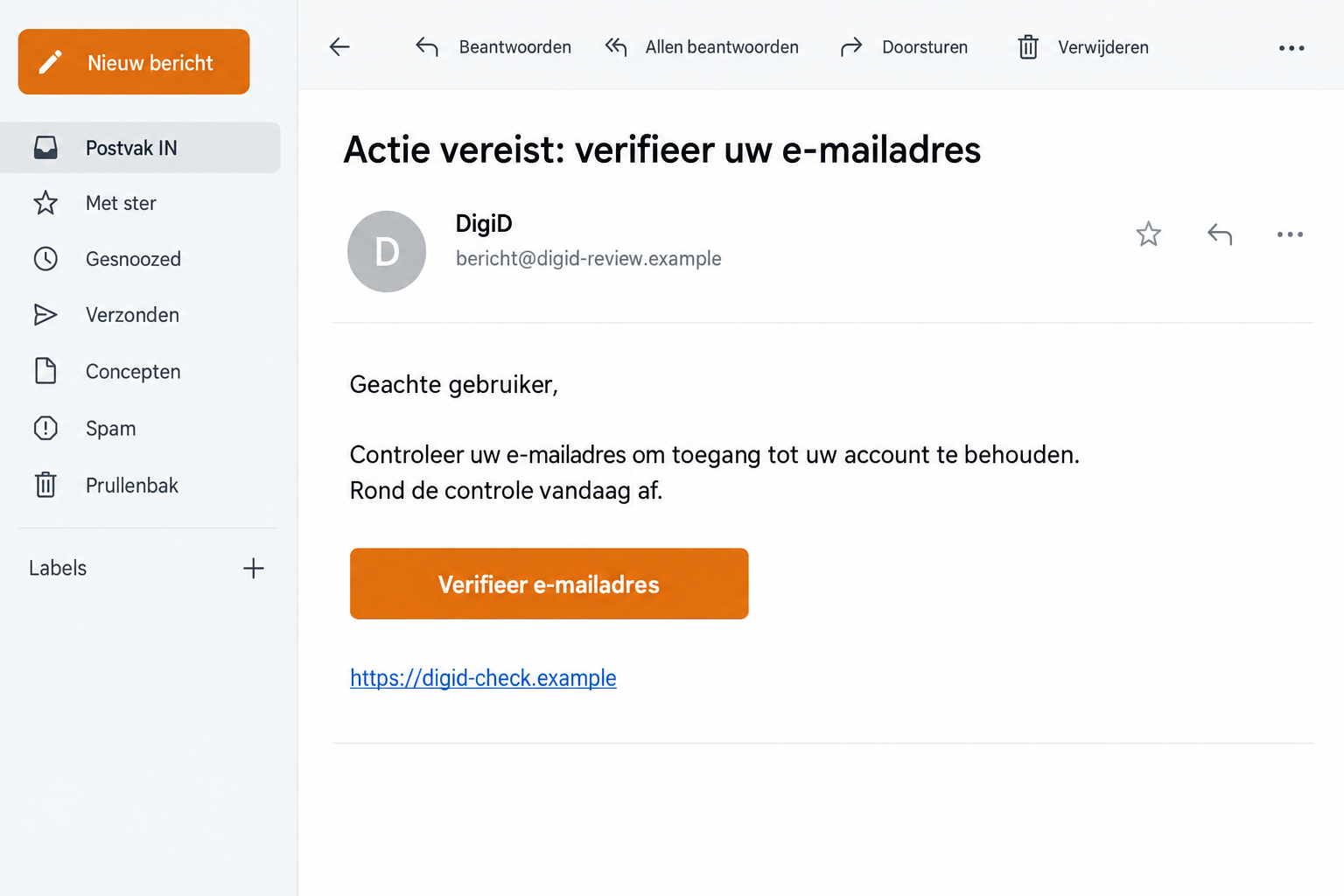
A false email documented by Fraudehelpdesk says the recipient must verify an expired email address to prevent restrictions. Its deadline gives little time to think.
The supposed fix is simple: click the verification link. That makes the request feel like account maintenance rather than a decision about sharing sensitive information.
The lead illustration recreates that sort of message with fictional contact details. It isn’t a genuine DigiD notice or a captured victim’s email.
DigiD’s own message rule exposes the impostor
DigiD’s official phishing guidance says its messages do not contain links or QR codes. A message claiming to be DigiD should not send you into linked verification.
The service confirms that fraudulent messages seek DigiD credentials or banking information. This is institution impersonation, not a complaint about a slow government website.
Genuine account notifications do exist. The correct response is to check the account through your independently opened service, not through the unexpected email.
An account problem may be real while a particular message is false. Don’t let a plausible concern decide which website receives your login.
The details to notice before following any instructions
- The email threatens account restrictions or loss of access unless you act quickly.
- A button or QR code is presented as the required route to verification.
- The sender’s display name invokes DigiD without independently authenticating the message.
- The form requests information that belongs to a protected account.
- The claimed problem hasn’t been confirmed through your genuine DigiD service.
Don’t test the link by entering part of your password. Leave the email and check the account directly through the official service.
If you’ve already supplied information, act on what you actually shared. DigiD access, banking details, and device downloads need different kinds of containment.
Why This Particular Verification Story Works
An email address is easy to overlook. You may have changed providers, stopped using an old inbox, or forgotten which address belongs to an account.
That uncertainty makes a maintenance notice believable. The scam uses a small administrative concern to justify a much more consequential request.
DigiD also supports important tasks. Someone who needs government correspondence or a public-service account may worry that restrictions will interfere with something urgent.
The deadline moves attention away from the sender and toward keeping access. You start asking how to complete verification rather than whether the message is authentic.
A polished email doesn’t resolve that question. Correct language, neat spacing, and familiar colors can be reproduced without access to your actual account.
A reference or a recipient name can make the notice feel personal, but neither proves that DigiD authorized the link taking your information.
Don’t let a polished email choose your login page. Open DigiD yourself and find out whether your actual account needs attention before you share anything.
There’s no need to argue with the sender or ask for a better link. An impostor can keep supplying explanations while you remain in its conversation.
How the DigiD Email Verification Scam Works
Step 1: The notice announces a problem you didn’t report
The email arrives as a security or access notice. It says your contact details need confirmation and suggests that a restriction will follow if you ignore it.
The documented example refers to an expired email address. That phrase gives the reader a reason to doubt an otherwise familiar account.
You may be tempted to correct the record immediately. First establish whether the genuine account actually contains a notice or needs a change.
Step 2: A short deadline makes the linked fix seem necessary
The message narrows the time available and presents verification as a one-time task. This discourages calling support or looking for information elsewhere.
The published example combines a next-day deadline with another expiry warning. You don’t need to untangle the wording to decide against its link.
Even a perfectly consistent deadline wouldn’t authenticate the email. The route it asks you to follow still conflicts with DigiD’s message guidance.
Don’t forward the button to someone else with instructions to complete it for you. That can turn an unverified email into an apparently approved task.
Instead, tell a helper what the email claims and open the real service together. Keep the questionable message separate from the account you’re checking.
Step 3: The verification link moves the trust to another page
Clicking transfers you from the inbox to a destination chosen by the sender. A DigiD-looking page can make that transfer feel seamless.
Lookalike design doesn’t establish control. A login box, familiar heading, or secure-connection symbol can appear on a website that isn’t the service you meant to use.
Official guidance warns that these fraudulent routes can collect credentials or financial information. Don’t assume a field is harmless because it follows a verification heading.
You don’t need to inspect the page further to check your real account. Close it and start again from the genuine service.
Step 4: Submitted information creates a separate recovery problem
Once you share a password or another protected detail, simply deleting the message doesn’t secure that information. The relevant account needs attention.
Possible misuse depends on the data and access involved. A stolen password isn’t proof that every authentication barrier was bypassed or that money has already moved.
But it is enough to justify prompt protection. Use the official recovery route, inspect account activity, and tell affected providers about anything you don’t recognize.
If the page also requested banking details, involve the bank. Protecting DigiD and dealing with a bank-account exposure are related but distinct jobs.
Record any codes or approvals you supplied without sharing them publicly. They help the provider understand the incident; they shouldn’t be sent back to the email contact.
What Exposed DigiD Access Can Put at Risk
DigiD’s fraud guidance explains that someone using stolen access can view personal information in MijnOverheid or change payout account details with the tax authority.
That doesn’t mean a phishing email automatically gives an attacker control of your ordinary bank account. The consequences follow the actual accounts reached and changes made.
A changed payout destination can still matter greatly. A payment you expect may be directed somewhere else if an unauthorized change is accepted.
Account-use history is therefore more useful than guessing from the email’s appearance. It can help identify services accessed at times when you weren’t using them.
If you find an unfamiliar login to a participating organization, contact that organization as well as DigiD. Ask whether information or applications were changed.
A password change can’t correct every record already altered. Follow up on the service where the unfamiliar activity occurred.
Keep the scope factual. Don’t assume a tax payment was diverted solely because you clicked, but don’t overlook a real change because no bank charge appeared.
Protect the email account connected to your identity service, too. Recovery messages and security notices are less useful if that inbox is also exposed.
Genuine Notifications Don’t Always Mean a Compromise
DigiD sends automatic messages after certain account changes. Requests, app activation, password changes, and an account’s expiry can produce genuine notifications.
If you didn’t make the change, check whether the email address is associated with a family member’s DigiD. Their activity may explain the notice.
That is a reason to investigate, not to dismiss every unexpected message. If no legitimate change explains it, contact the official helpdesk.
Don’t use this nuance to excuse the scam’s verification button. A genuine notification process doesn’t authenticate a separate linked form.
The no-link rule concerns messages purporting to come from DigiD. It isn’t a claim that every QR code or sign-in method anywhere online is fraudulent.
For a legitimate task, begin with a verified service you intended to use. You should understand which account is being accessed and why.
If a notification raises doubts, save it while checking. A clear record can help support distinguish an ordinary change from unauthorized access.
What to Do if You Have Fallen Victim to This Scam
-
Stop using the message’s verification route. Don’t submit more details or answer follow-up instructions. Check the real account separately through DigiD’s official service.
If you only read the email, report it as phishing. Reading a warning alone doesn’t establish that your identity account was compromised.
-
Change an exposed DigiD password promptly. Use My DigiD through the genuine website. If you cannot sign in or change it, contact the official helpdesk.
DigiD lists 088 123 65 55 for help when a password can’t be changed. Obtain current support details from its website before trusting an incoming caller.
-
Review usage history. In the official account, inspect the organizations, dates, and times of access. Note entries you cannot explain.
Contact DigiD and the organization concerned about unfamiliar activity. Ask specifically whether applications, personal details, or payout information were altered.
Keep reference numbers from those conversations so you can follow up without starting the incident explanation again.
-
Tell your bank about financial information you supplied. Use its independently verified contact or app. Describe card details, passwords, codes, and approvals separately.
Ask what protections and transaction checks are appropriate. Don’t approve another request from the original contact to reverse or cancel the exposure.
-
Secure reused passwords and recovery accounts. If you reused the exposed password, replace it on those services through their real sign-in pages.
Check email recovery details and available account protections. An account scan can’t remove a password from someone else’s records or correct a changed payout destination.
-
Investigate software exposure if it happened. If the route downloaded or installed something, seek device-security help and use a trusted device for important account changes.
Malwarebytes can assist with checking malicious software after a risky installation. It doesn’t restore identity-account access or reverse financial activity.
AdGuard can supplement web filtering for future browsing. It doesn’t verify an account notice or replace the official recovery process.
-
Preserve evidence and report the impersonation. Keep the email, destination, relevant activity, and support references. Remove passwords and personal identifiers from anything shared publicly.
DigiD accepts suspicious messages at valse-email@digid.nl. Report actual fraud to police; its guidance also points identity-fraud victims toward the CMI support service.
Helping Someone Who Is Worried About Losing Access
Start with their concern, not with a lecture about clicking. They may need the account for an important task and feel that waiting is dangerous.
Explain that the email’s deadline doesn’t decide where they must sign in. Help them open the genuine service instead.
Ask what information they supplied. Knowing whether they entered a password, a bank detail, or only an email address helps avoid both panic and underreaction.
If they shared credentials, prioritize recovery before discussing how convincing the message looked. Quick action is more useful than blame.
When helping family, don’t request their password in a chat. Let the account holder handle protected steps through the official process.
For an unfamiliar activity record, write down the organization and time. That gives support a concrete starting point rather than a general fear that everything was stolen.
After containment, agree on a simple habit: an unexpected identity-service notice gets checked through the genuine account, not its button.
You don’t need to memorize every false sender address. The independent starting point stays useful when the next message changes its wording or appearance.
Frequently Asked Questions
Does DigiD send verification links in its messages?
Its official guidance says DigiD messages don’t contain links or QR codes. Check the account independently rather than following an unexpected verification button.
Is an email-address expiry warning proof my account will close?
No. The documented scam uses that threat as a lure. Establish your real account status through the genuine service, not the message’s deadline.
Are all unexpected DigiD notifications fraudulent?
No. Genuine account-change notifications exist, and an address associated with a family member can explain one. Investigate through official support if the change remains unexplained.
Can stolen DigiD details affect a tax payout?
Potentially. Official guidance warns about changes to payout details with the tax authority. Inspect actual activity and contact the affected organization about unfamiliar changes.
What should I check after entering my password?
Change it through the real service, inspect usage history, and contact support about unfamiliar access. Secure any other account using the same password.
Does clicking the link automatically mean my device is infected?
No. Distinguish a visit from information submission or software installation. Respond to the exposure that occurred rather than assuming every click caused the same damage.
The Bottom Line
Don’t verify DigiD through an unsolicited email button. The documented lure threatens access while steering you away from the service’s genuine message process.
Check the real account independently. If you shared credentials, change them and inspect usage history; involve the bank if financial information or approvals were also exposed.

Join the discussion
0 commentsShare your experience or ask a question about this article.
Discussion
Start the conversation
Have a question or something useful to share? Add the first comment.