

An email says family-benefit payments have been diverted because personal information was misused. It asks you to check your records before the next payment is affected.
The family benefit email scam makes verification sound like protection. Before following its FinanzOnline-style instructions, check who is asking you to secure the payment.
Overview
The email invents a protective reason to check your records
This scam impersonates Austria’s finance ministry and uses Familienbeihilfe, the country’s family benefit, as its hook. The real benefit and government service are legitimate.
The message claims that information was misused to redirect payments. Recipients are told to confirm their details before further transfers can be assured.
An official Austrian security advisory documents the false email and its copied portal. It identifies a phishing route targeting online-banking credentials.
The alarm in the message isn’t evidence that your own payment was diverted. Verify any real problem through the actual benefit service.
The false government form leads to a copied bank login
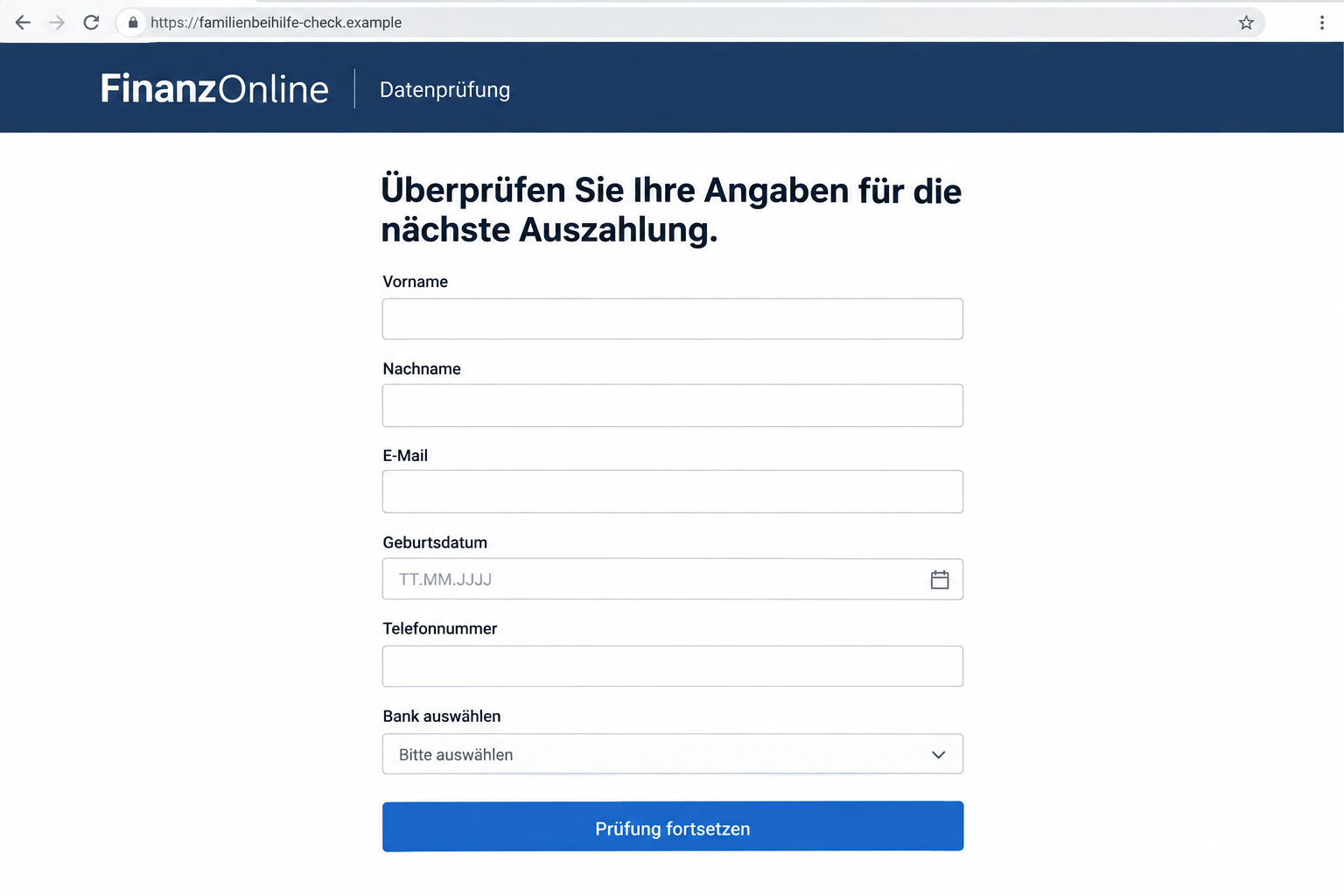
The portal asks for personal and contact details, then presents a bank-selection menu. Selecting a bank opens a window imitating that bank’s online service.
The government-data check has now become a request for banking access. The attacker uses the benefit story to explain why you should provide the login.
The illustrated form shows that kind of transition using a fictional destination and empty fields. It isn’t a current government portal or a captured bank page.
Several message variants have been reported. Their wording changes, but the documented route retains the threatened benefit payment and online-banking phishing.
The information requests that should interrupt the process
- The email alleges payment diversion without an independently confirmed account notice.
- A deadline threatens future family-benefit transfers.
- The supplied portal gathers identity and contact information.
- A bank dropdown turns the supposed benefit check into banking authentication.
- A later contact offers to recover money through another unverified request.
Don’t complete a bank login to reassure the email sender. Leave the message and check the real government account independently.
If you already supplied credentials, speak with your bank promptly. The account exposure needs attention even before you’ve confirmed whether any benefit payment is late.
The Scam Pretends to Fix the Danger It Creates
A warning about stolen personal information can make someone more willing to verify details. They believe they are preventing a problem, not creating one.
The email describes families missing payments and suggests that your records need protection. That combines concern about identity misuse with the practical need for support money.
The offered solution sits inside the same unverified message. Instead of letting you check the account independently, the sender supplies a link and a deadline.
The email says it’s protecting your payment, but then wants banking access. That mismatch is the reason to leave its form and check independently.
Don’t decide based only on whether the story could happen. The question is whether this notice and its verification route belong to the genuine service.
A real payment problem can be checked without trusting the email. You can reject the false form while still investigating an actual missing transfer.
The scam also takes advantage of understandable financial pressure. Someone budgeting around a family payment may feel that a quick check is better than a delay.
But urgency doesn’t change who controls the page. A fast submission to the wrong operator can create a much larger problem than a careful independent inquiry.
How the Family Benefit Email Scam Works
Step 1: The email alleges misuse of personal information
The notice appears to come from the finance ministry. It says unauthorized applications or payment diversions have caused some households to miss the benefit.
That claim gives the recipient a reason to act even if their own account currently looks normal. The supposed check is framed as prevention.
The ministry name and reassuring wording are part of the impersonation. Don’t infer a real government-system breach from the sender’s story.
Step 2: A deadline ties verification to the next payout
The message warns that future transfers can’t be guaranteed without confirmation. A deadline near the end of the week makes the instruction feel immediate.
The recipient may think there is little to lose by reviewing details. The email keeps attention on receiving support rather than on the linked operator.
Don’t let that deadline decide your financial actions. Check any actual requirement through the genuine account or a verified government contact.
If someone helps you manage benefits, tell them the email is unverified. Forwarding it as a task can make its instructions appear already approved.
Step 3: The copied portal collects personal details
The documented form requests information such as name, email, birth date, phone number, and address. These fields can resemble ordinary government recordkeeping.
The page also says the check is associated with FinanzOnline. That familiar service name gives a separate website the appearance of an official process.
Names and contact fields aren’t harmless merely because they come before the bank login. Information already supplied can support a later, more convincing approach.
A detailed form doesn’t prove the operator knows your benefit file. It can ask questions without having any connection to the genuine record.
Stop before providing more. You don’t need to finish the contact section to establish whether the government requested a check.
Step 4: A bank choice opens a false banking window
The form’s bank dropdown lets the recipient select a familiar institution. The next window imitates that institution’s online-banking login.
This personalized-looking transition is the central trap. It makes a request for a username and password appear connected to protecting the family payment.
The copied window isn’t authenticated by the selection you made. A website can display the bank you chose without being connected to that bank.
Don’t enter credentials there or accept its explanation that linking the account is required. Open the genuine bank independently if you need to check activity.
Step 5: Recovery contact can extend the deception
The advisory warns about a second phase involving purported bank employees. They may approach victims offering help with recovering money.
A caller who knows details from the earlier form can seem particularly credible. That knowledge may come from the exposure, not from a genuine banking role.
Don’t send further money or approvals to someone offering a rescue. End the contact and reach the real bank through a channel you independently establish.
This later approach isn’t reported as inevitable for every recipient. It is a documented follow-up risk worth recognizing while the first incident is being contained.
Why the Sender and Portal Names Aren’t Enough
Some documented messages used compromised mail infrastructure associated with unrelated businesses. A real business address can therefore appear beside the false ministry identity.
That doesn’t make the unrelated business responsible for the fraud. Nor does a recognizable company domain turn the content into a government instruction.
Examine the mismatch between the claimed role and the actual sender, but don’t rely on one visible address as the entire check.
The sampled portal used finanzamt-familienbeihilfe-at.com, a ministry-like name on a separate domain. The spelling alone doesn’t authorize it to collect banking credentials.
You shouldn’t visit that destination to investigate your payment. The genuine service provides a safer place to look for account notices or required changes.
Attackers can rotate addresses and page designs. The broader warning is the unsolicited benefit-security message leading into a copied bank login.
When reporting, save the destination that your particular email supplied. Don’t assume another person’s screenshot identifies the exact route you encountered.
Checking a Payment Without Giving Away Banking Access
Start with the government account you normally use, reached independently. Look for information that corresponds to the payment or requested change.
If a payment is genuinely missing, ask the real administering service about its status. Use contact information obtained outside the disputed message.
Your bank can also help verify whether an expected credit arrived. Speak with it through its actual app or verified support route.
Distinguish an account number used to receive a payment from credentials that permit account access. The fact that benefits are paid through banks doesn’t authenticate a password request.
For any authentication involved in a genuine service, understand the destination and operation before acting. A finance-ministry logo doesn’t replace that check.
Don’t submit a second form because the first displayed an error. A failed-looking screen doesn’t establish that the information you entered remained private.
If another family member receives the payment, verify with them through your usual contact. Don’t use the email as proof that their records need updating.
Keep the real benefit issue and the phishing incident separate. One may require an administrative inquiry, while the other needs urgent account protection.
What to Do if You Have Fallen Victim to This Scam
-
Stop the supposed data check. Don’t supply another bank login, correct the form, or answer recovery instructions from the original contact.
Save the email and destination before reporting it. If you only read the message, don’t assume that your benefit account or bank was accessed.
-
Contact your bank after any banking exposure. Explain that a false family-benefit portal collected credentials or financial information. Use independently verified contact details.
List passwords, card data, codes, and approvals separately. The bank can determine what restrictions, resets, or transaction checks are appropriate.
Act even if the page never produced a confirmation. An apparent failure isn’t a guarantee that the submitted information stayed private.
-
Review account activity with the bank. Check pending and completed transfers, unfamiliar recipients, and account changes. Record amounts, times, and references for anything you don’t recognize.
Ask about stopping or disputing unauthorized activity and the applicable deadlines. Don’t assume that a particular reimbursement outcome is guaranteed.
-
Replace exposed credentials through genuine services. Follow the bank’s instructions for its login. If other account passwords were entered or reused, protect those accounts too.
Use a trusted device for the work. Don’t let an incoming caller supply a new login page or remote-access tool for recovery.
-
Check any real benefit issue independently. Contact the legitimate government service about unfamiliar records or an actual missed payment. Don’t ask the impostor to confirm the account.
Give the service a clear description of what happened without transmitting usable passwords or codes. Keep its reference number alongside the bank’s incident record.
-
Investigate downloads if they occurred. If the route also involved software installation or unusual permissions, get security help and keep banking on an unaffected device.
Malwarebytes can help check for malicious software after that exposure. It doesn’t retrieve credentials from the phishing operator or undo a transfer.
AdGuard can supplement protection against some risky pages during later browsing. It isn’t a method for validating a benefit-payment notice.
-
Report and reject recovery fees. Preserve the messages, relevant account records, and official support references. The government advisory recommends making a police report.
Decline anyone demanding money, a new authorization, or privileged account access to recover losses. Continue through the real bank and authorities instead.
A Calm Way to Help Someone Who Followed the Link
Ask what the person entered, not whether they can explain the entire scam. The important distinction is personal details versus credentials, approvals, or software.
If banking access was shared, help them reach the genuine bank first. Investigating the benefit payment shouldn’t delay containment of the account exposure.
Keep a simple sequence of events: email received, page visited, fields completed, approvals made, and unfamiliar activity noticed. It helps support identify the relevant stage.
Don’t ask them to reopen the false page for a demonstration. Existing messages and records are safer evidence than repeating the interaction.
When they fear the next payment will disappear, help check the real service. Independent information can remove the pressure that made the false form persuasive.
Avoid blaming them for responding to a protective message. The scam deliberately presents disclosure as the way to prevent someone else’s misuse of information.
After recovery begins, agree that unexpected benefit warnings will be checked through the genuine account. The message shouldn’t decide where the next login happens.
Frequently Asked Questions
Is the Austrian family benefit itself a scam?
No. Familienbeihilfe is legitimate. The warning concerns criminals impersonating its administration and using a false data check to seek banking credentials.
Does the email prove that my payment was diverted?
No. That is the impostor’s claim. Verify your actual account and payment status through the genuine service or bank, independently of the message.
Why does the form ask me to choose my bank?
In the documented scam, the selection opens a copied online-banking login. Choosing a familiar institution doesn’t authenticate the window that appears.
Can a real business sender address make the notice genuine?
No. The advisory describes compromised business mail infrastructure. The business name doesn’t establish a ministry connection or responsibility for the fraudulent message.
What if the false form stopped working after I entered details?
Don’t assume that protected your information. Tell the relevant providers what was entered and stop using the form rather than attempting another submission.
Should I trust a bank caller offering to recover the money?
Verify the contact independently. The advisory warns about fake recovery approaches; knowledge of the earlier form isn’t proof that the caller works for your bank.
The Bottom Line
Don’t use an unsolicited family-benefit email to access online banking. The documented fake FinanzOnline check turns a promised security review into credential collection.
Verify the payment through the genuine service. If banking information was supplied, contact the bank immediately and refuse unverified recovery requests.

Join the discussion
0 commentsShare your experience or ask a question about this article.
Discussion
Start the conversation
Have a question or something useful to share? Add the first comment.