

An email notification announces that every incoming and outgoing message has been placed on hold. Verification supposedly restores the account before communications pile up.
For someone awaiting a reply, the Email Account Restriction scam is difficult to ignore. The message depends on that urgency.
Overview
The warning pretends normal communication has already stopped
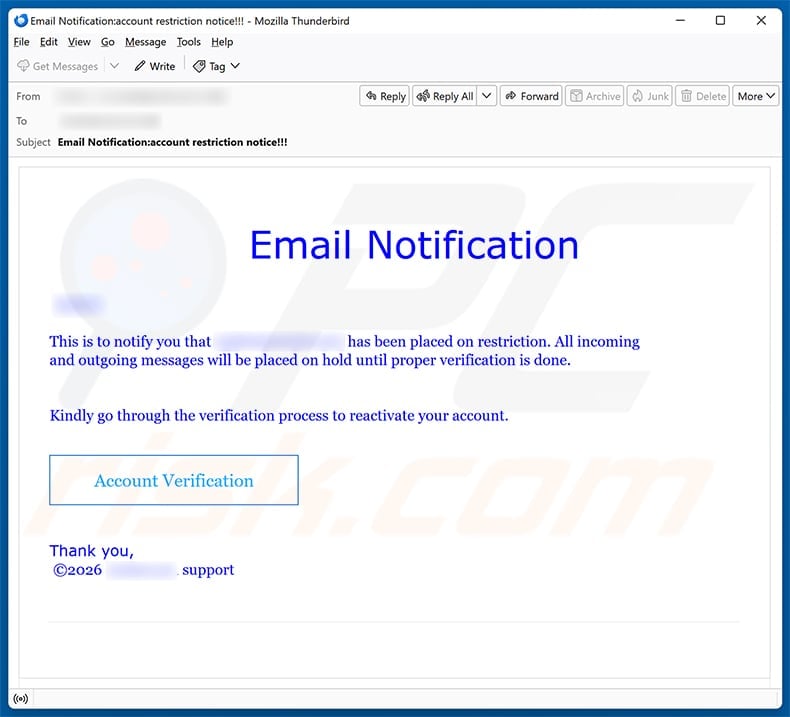
The captured notice says the recipient’s mailbox “has been placed on restriction” and claims all messages will remain held until verification finishes.
It offers no provider name, blocked-message count, server code, start time, or authentic support reference.
The subject contains crowded punctuation, while the signature simply attaches “support” to a blurred account identity.
“Kindly go through the verification process” directs attention toward the button without explaining why the restriction occurred.
This construction creates a problem that cannot be seen, then makes the sender’s link appear to be the only available diagnostic tool.
The verification page sits on a food-related domain
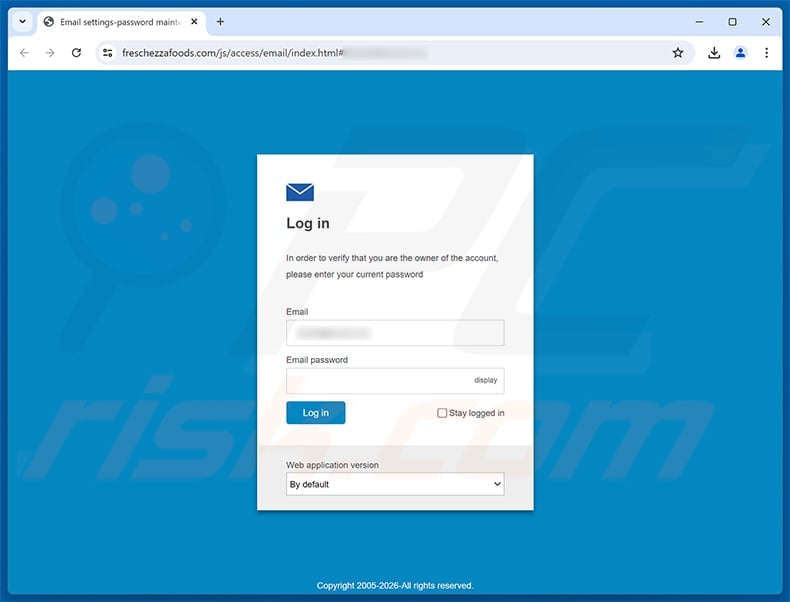
The Account Verification button in the observed email opens freschezzafoods[.]com, not the recipient’s webmail provider.
Its page is styled as an email settings panel and may display the target address before requesting the current email password.
A hostname associated by name with food has no evident reason to perform ownership checks for unrelated mailboxes.
The mismatch is more important than the page’s blue background, envelope icon, copyright line, or SSL status.
Entering the password gives the phisher the secret needed to test the account.
No legitimate service is responsible for this campaign
The lure avoids naming a real provider, which prevents any company from verifying the alleged restriction inside its own systems.
The criminal page uses generic mail language precisely so it can be shown to users of many different services.
This case is verified credential phishing, not a customer-support dispute or evidence that an inbox truly stopped sending.
Simply seeing the message does not surrender an account. The critical exposure occurs when the false portal receives credentials.
- The notification supplies no identifiable provider.
- Incoming and outgoing mail are both supposedly blocked.
- The message offers no independently checkable incident details.
- “Account Verification” is the single route presented.
- The link opens freschezzafoods[.]com.
- The destination requests an email password.
- Page decorations cannot establish authorization.
- The legitimate mailbox must be inspected separately.
How the Email Account Restriction Scam Works
Step 1: The lure targets the fear of missed communication
A blocked inbox threatens more than convenience because email carries purchase confirmations, work assignments, legal notices, and personal conversations.
The scam claims both directions are affected, so the victim may blame silence from others and assume sent messages never arrived.
That two-sided warning can explain almost any recent communication gap in the reader’s mind.
No actual mail-server data is required because the recipient supplies their own examples of messages that might be missing.
The fear grows strongest for users whose work depends on immediate customer or supplier replies.
Step 2: Missing specifics prevent easy contradiction
The notice does not name one held sender, subject, timestamp, quota, security event, or policy violation.
Specific information would let the recipient compare the claim with sent folders, delivery reports, and provider notifications.
Instead, broad language keeps the allegation flexible when the account appears to function normally.
The phisher presents verification as a repair rather than proving the restriction exists.
This reverses the burden, asking the user to surrender a password before receiving evidence.
Step 3: A button moves the victim outside the real account
The link does not open an authenticated settings page belonging to the recipient’s mail system.
It crosses to freschezzafoods[.]com, a destination whose registered name does not match the service being impersonated.
Criminals sometimes compromise legitimate websites and place phishing pages inside hidden directories, so the broader domain owner may also be a victim.
Whether hijacked or intentionally used, that server has no authority to ask for another provider’s email password.
The mismatch alone is sufficient reason to close the page.
Step 4: A counterfeit settings screen asks for the current secret
The page presents a login box labeled for email ownership verification, with the address already filled and a field for the password.
Prefilling creates continuity between the email and website, although the address could simply be embedded within the original URL.
An on-page “display” option beside the password field should make the request even more concerning.
The copyright date and application-version selector are cosmetic features copied to simulate administrative software.
None connect the form to the provider that actually controls the mailbox.
Step 5: The operator uses the credentials beyond verification
The submitted combination can be tried directly against webmail, remote-mail protocols, single sign-on systems, and services where the password was reused.
If the first attempt succeeds, the criminal can read mail and change settings before the owner returns to the real account.
If it fails, the captured address still remains useful for additional phishing or password-spraying campaigns.
Some fake forms deliberately show failure and request a second password, collecting alternatives from users who maintain several accounts.
The webpage’s final behavior never determines whether collection already occurred.
Step 6: A hijacked inbox helps hide the next fraud
Attackers can create filters that archive replies, delete security alerts, or forward selected correspondence to another address.
They may study billing routines before sending altered invoices at a moment that matches real business activity.
Personal accounts can expose tax records, travel plans, family contacts, healthcare messages, and photographs of documents.
The compromised identity can distribute the same lure to contacts who recognize the sender and lower their guard.
Containment must therefore address both unauthorized access and fraudulent communication sent during that access.
Red Flags in the Restriction Notice
The message cannot name the organization restricting anything
Service notices should identify the provider, customer account, reason, and support route.
A blurred address followed by “support” is not a verifiable department.
Generic branding is especially suspicious when the requested action involves a reusable credential.
Punctuation and phrasing imitate urgency instead of process
The subject ends with multiple exclamation marks, and the body repeatedly insists on “proper verification.”
Real administrators normally describe a condition, offer a ticket reference, and explain how status can be viewed after a safe login.
Pressure without evidence is a social-engineering pattern, not a technical diagnosis.
The button conceals a domain conflict
Button text can say “Account Verification” while sending the browser anywhere the author chooses.
Hovering or inspecting the destination exposes the unrelated freschezzafoods[.]com hostname.
On a mobile screen, users should avoid opening it and instead check account status through the provider’s saved application.
The form asks for data the real provider already verifies
A mail service authenticates users on its own infrastructure and never needs a food-themed third party to collect current passwords.
Support personnel should not ask customers to disclose that password by email, telephone, or external form.
The correct recovery process resets secrets rather than requesting them in plain form fields.
Sender, Domain, and Page Checks
Expand the complete sender information
Display names can be written freely and may have no relationship to the actual sending mailbox.
Inspect the From, Reply-To, Return-Path, and authentication results when your email client makes them available.
One suspicious field is enough to require independent verification, while perfect-looking headers still do not justify a third-party password request.
Read the registered domain, not the surrounding path
Attackers can place reassuring terms before or after the important hostname.
Identify the portion controlled by the registrant and compare it exactly with the provider’s known domain.
In this campaign, freschezzafoods[.]com remains the controlling name regardless of folders or fragments added after the slash.
Check account health from inside the service
Open the normal webmail address and send a harmless test message to a separate account you control.
Review delivery, storage, security, and policy notices inside the authenticated dashboard.
If a workplace server is involved, ask its administrator to examine logs rather than experimenting with the suspicious page.
Separate the hosting site from the phisher when facts are limited
A malicious page on a domain does not automatically prove every person associated with that domain knowingly participated.
Websites can be compromised, abandoned, or misconfigured.
The safe conclusion is that this observed path hosted phishing and should not receive mailbox credentials.
Damage That Can Follow a Mailbox Takeover
Financial correspondence can be redirected
Invoice threads show amounts, schedules, counterparties, and approval language that support convincing payment diversion.
An attacker may wait silently until a genuine transfer is expected, then replace the destination account.
Verbal confirmation through a known telephone number is essential whenever payment details change.
Private records can support identity theft
Inboxes often contain addresses, birth dates, employment forms, insurance documents, passport scans, and tax attachments.
These materials can be combined with breached data from elsewhere to answer security questions or open fraudulent accounts.
Assume sensitive attachments were available whenever an intruder maintained mailbox access.
Password recovery can spread the compromise
The mailbox may receive reset links for cloud storage, social platforms, stores, and financial services.
An adversary who controls recovery communication can set fresh passwords unknown to the rightful owner.
Protecting email quickly reduces that expansion and restores control over subsequent resets.
Contacts can be targeted from a trusted identity
Messages sent from the genuine account pass simple sender checks and may continue existing conversations.
Friends or coworkers might comply with urgent requests because the language references real events.
Warn them clearly and provide a separate method for confirming future requests.
What to Do if You Have Fallen Victim to This Scam
- Close the fraudulent portal. Do not submit more information, download a supposed security tool, or grant browser notification access.
- Secure the real mailbox first. Reach it through a saved route, replace the password with a unique one, and use account recovery if access was lost.
- Terminate unauthorized sessions. Remove unfamiliar devices, tokens, application passwords, delegates, and third-party connections from the provider’s security panel.
- Audit hidden mail controls. Inspect forwarding addresses, inbox rules, blocked senders, aliases, signatures, deleted folders, and automatic replies for changes you did not make.
- Add stronger authentication. Prefer a passkey or physical security key, then an authenticator application when origin-bound options are unavailable.
- Contact workplace defenders promptly. Administrators can inspect server logs, block the phishing path, reset related sessions, and warn other recipients.
- Replace the password everywhere it was reused. Handle payment, identity, storage, and recovery accounts before lower-risk subscriptions.
- Examine the device after additional interaction. Run Malwarebytes and built-in antivirus if anything executed or downloaded. AdGuard can limit later malicious advertising, not reverse stolen credentials.
- Confirm sensitive conversations separately. Contact banks, suppliers, colleagues, and relatives if altered payments or unusual requests may have left the mailbox.
- Keep a reliable incident record. Save the original message, full headers, destination, login history, screenshots, bank activity, and support case numbers.
Safer Habits for Future Verification Messages
Make the inbox the source of truth only after direct login
Notifications can alert users to investigate, but the supplied route should never control the investigation.
Start a separate session through the known provider and compare the claim there.
Use unique credentials on every service
A password manager turns one exposed secret into a contained incident rather than a key that opens multiple accounts.
It also reduces manual typing on pages whose domains do not match saved records.
Enable security alerts through trusted channels
Configure genuine alerts from within account settings and learn which sender domains and app notifications the provider uses.
Remember that even authentic-looking alerts should lead to independent checks.
Encourage reporting without blame
People report faster when they expect help rather than punishment.
Early disclosure can prevent fraudulent payments, protect contacts, and reveal other targeted mailboxes before attackers act.
Frequently Asked Questions
Are my incoming and outgoing emails really on hold?
The examined message supplies no evidence of a restriction. Verify delivery and account status through the real provider or your organization’s mail administrator.
Is freschezzafoods.com an email verification service?
The reviewed path on that domain displayed a counterfeit settings page requesting an email password. It should not be used to authenticate another provider’s mailbox.
Does the prefilled email field prove the page knows my account?
No. A phishing URL can carry the recipient address and place it into the form automatically without connecting to the genuine mail server.
Could the domain itself have been compromised?
Yes, that possibility exists. It does not make the phishing page safe, and credentials should never be entered while attribution remains uncertain.
What if I submitted the wrong password?
Treat that value as exposed wherever it is valid. The form may also record your address, browser details, and engagement for later targeting.
Will changing the password remove every attacker session?
Not always. Sign out everywhere and inspect forwarding, recovery options, app passwords, delegates, and authorized applications after the change.
The Bottom Line
The Email Account Restriction scam claims communication has stopped, then routes the recipient to an unrelated server that asks for an email password.
No blue panel, copyright date, or filled address can bridge the gap between freschezzafoods[.]com and the real mail provider.
Verify restrictions inside the account itself. If the false page received credentials, contain the mailbox, connected services, devices, and outgoing impersonation as one incident.

Join the discussion
0 commentsShare your experience or ask a question about this article.
Discussion
Start the conversation
Have a question or something useful to share? Add the first comment.