

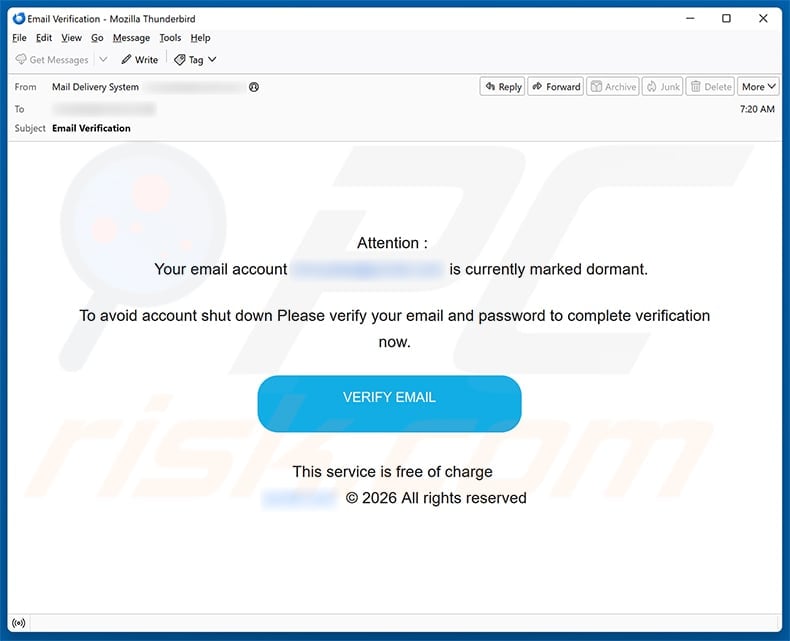
An “Email Verification” notice says your mailbox has quietly been marked dormant. A large blue button promises to stop an approaching shutdown.
The Email Account Marked Dormant scam avoids a complicated story. The entire decision is compressed into one warning and one click.
Overview
The dormant label is invented to make ordinary silence feel dangerous
The captured email states that the recipient’s account is “currently marked dormant,” although it provides no activity date or usage history.
No provider name appears in the warning, and “Mail Delivery System” functions only as a generic display label.
The wording asks users to verify both their email and password, something a genuine provider would never require inside an unsolicited message.
“This service is free of charge” adds unnecessary reassurance, as though avoiding account closure could otherwise require payment.
The sparse design leaves few details to question, which can make the blue VERIFY EMAIL button appear like the obvious solution.
The button crosses into an unrelated website
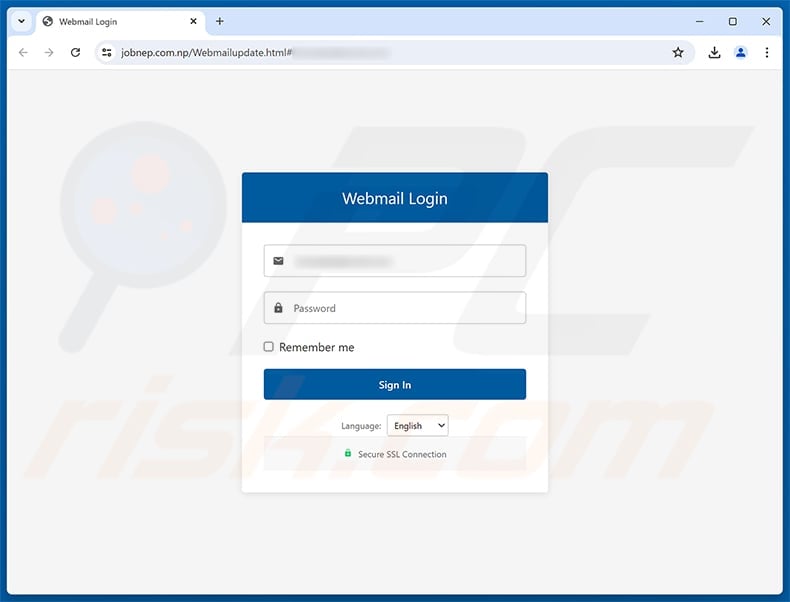
The link observed in this campaign opens jobnep[.]com.np, a hostname that does not represent the recipient’s mail provider.
Its destination shows a generic Webmail Login box and may prefill the target’s email address from information carried inside the link.
Seeing the correct address can feel like account recognition, but the phisher already possessed that address to send the original message.
The page then asks for the missing secret, the email password.
Anything entered can be collected by the page operator and tested against the mailbox and other services.
The sample is credential phishing, not proof of a dormant account
Nothing in the message demonstrates that the recipient’s real provider changed any account status.
The linked domain, generic branding, immediate password demand, and absence of authenticated account context identify the observed campaign as phishing.
Opening or reading the email does not itself confirm a device infection.
Risk increases after visiting the counterfeit page, entering credentials, downloading unexpected content, or accepting browser permissions.
- The subject uses the broad phrase “Email Verification.”
- No provider or help-desk identity can be confirmed.
- The account is supposedly dormant despite receiving new mail.
- Shutdown language pressures a fast response.
- jobnep[.]com.np is unrelated to the mailbox service.
- The page preloads an address to simulate recognition.
- A password is requested by a third-party host.
- The real account should be checked independently.
How the Email Account Marked Dormant Scam Works
Step 1: The criminal chooses a warning that fits nearly every recipient
People use old personal addresses, secondary work accounts, alumni mailboxes, and hosting accounts they may not visit every day.
The word “dormant” exploits that uncertainty without needing actual access logs.
A recipient who recently used the mailbox may still worry that another system component, subscription, or server has become inactive.
No personalized usage evidence is offered because the message is designed for bulk distribution.
The phisher needs only one anxious reader to treat a generic label as a private diagnosis.
Step 2: The threatened shutdown creates a one-button decision
Account closure implies lost conversations, photographs, receipts, recovery messages, and contact history.
That emotional cost discourages careful investigation, especially when the supposed fix looks free and immediate.
The message does not explain when shutdown will occur or where the relevant policy can be read.
Vagueness helps the criminal, because specific claims could be disproved against a real service dashboard.
The blue button dominates the page and turns verification into a reflex rather than a reasoned choice.
Step 3: The destination borrows the victim’s own address
The malicious link can carry the recipient address as a parameter, allowing the destination form to display it automatically.
This is not proof that jobnep[.]com.np connected to the real mailbox.
Email addresses are commonly available through marketing lists, public websites, previous breaches, compromised contacts, and simple workplace naming patterns.
The address is the username the attacker already knows. The phishing page exists to obtain the password paired with it.
Users should treat prefilled personal data as evidence of targeting, not evidence of legitimacy.
Step 4: Generic webmail styling hides the missing provider relationship
The page uses a dark-blue header, envelope icon, password field, language selector, and “Secure SSL Connection” message.
Those elements describe an interface, but none establish ownership by Gmail, Outlook, a hosting company, or the user’s employer.
SSL only protects traffic between the browser and jobnep[.]com.np. It does not authorize that site to receive an email password.
The correct hostname should correspond to the provider or an organization’s approved single sign-on service.
A generic login on an unrelated domain fails that test before any password is considered.
Step 5: Submitted credentials are tested while the victim waits
After submission, the page may claim verification succeeded, show an error, or send the user toward a harmless website.
The operator can immediately attempt a real mailbox login from another location.
Successful access may trigger a genuine security alert, but the phisher can delete that warning if the session is established quickly.
Repeated password prompts sometimes collect multiple passwords from people who assume they mistyped.
Every value entered should be considered exposed, even when the fake page never displays a confirmation.
Step 6: The inbox is converted into identity and recovery access
Messages reveal which accounts use that address, while search terms such as “invoice,” “reset,” and “statement” quickly surface valuable records.
The attacker can request password resets, intercept confirmation links, or pose as the owner in active conversations.
Filters may route bank warnings or security notices away from the inbox before the victim sees them.
Contact lists provide a new audience that trusts the compromised sender more than an unknown account.
What began as a single fake dormancy notice can therefore become account theft, payment fraud, or targeted impersonation.
The Clues Hidden in the Message
A real service would identify itself
An accountable provider can name the product, account, applicable policy, support channel, and exact place where status appears after normal authentication.
This email provides none of those anchors.
Generic authorship is useful to a phisher because it prevents recipients from comparing the notice with one provider’s established language.
The request contains its own contradiction
The mailbox receives the warning while supposedly being dormant enough to face shutdown.
Some providers do retire unused accounts, but their policies involve documented timelines and authenticated notifications.
A password entered on an unrelated website cannot prove activity to the actual operator.
The destination country code does not match the service
The .com.np address belongs to Nepal’s namespace, while the page presents no explanation for why an unnamed provider would outsource verification there.
Country codes are not inherently malicious, and legitimate Nepali websites should not be stigmatized.
The problem is the complete mismatch between this hostname and the service whose password it requests.
“Secure” language is not a security control
The green lock text inside the webpage is drawn by the page itself.
Even a genuine browser padlock would confirm encryption to the current site, not the site’s right to impersonate a mail provider.
Authorization must be established through domain ownership and an independently verified account path.
Why Mailbox Credentials Are So Valuable
The inbox maps the owner’s digital life
Registration notices, receipts, newsletters, and security messages reveal where the address has been used.
That index saves criminals from guessing which financial, retail, travel, or cloud accounts might be worth attacking.
Historical messages may contain customer numbers and partial account details useful during fraudulent support calls.
Email controls many recovery journeys
Reset links often represent a second authentication path that bypasses the original password.
An attacker who controls the inbox may capture those links and set new credentials before the owner realizes another service is affected.
This makes securing email the first priority, not one item at the bottom of a longer recovery list.
Conversation history creates believable impersonation
The criminal can copy greetings, signatures, project names, and current obligations from previous correspondence.
A payment request becomes more persuasive when it refers to a real contract or arrives as a reply within an authentic thread.
Sensitive requests should always be confirmed out of band, regardless of how much correct context the sender appears to know.
Reused passwords multiply the exposure
Automated credential stuffing can test the same email-password combination against popular services soon after collection.
Unique passwords contain the damage to one account, while reuse lets a single form unlock several doors.
A password manager reduces this risk and also notices when the current domain does not match the saved login.
How to Verify a Dormancy Notice Without Using Its Link
Log in through a known route
Open the official application, choose a trusted bookmark, or type the established provider address yourself.
Look for banners, account-status notices, storage warnings, or policy messages inside the authenticated session.
A legitimate issue should not exist solely on a website reached from an unsolicited email.
Review the provider’s published inactivity policy
Search the provider’s help center from its real homepage and identify the documented period, warning process, and recovery procedure.
Compare those rules with your recent activity and the language in the message.
Do not rely on search advertisements that may imitate support pages.
Contact support from account settings
Use the help link displayed after a normal login or a telephone number published by the organization.
Work users should consult an internal directory rather than calling any number introduced by the warning.
Support does not need your current password to confirm whether an account is active.
Examine the actual URL before entering anything
On desktop, hover over the button and read the destination. On mobile, long-press without opening when the client safely supports previews.
Stop when the registered domain has no connection to the provider.
Words like mail, verify, secure, or login inside the path do not repair an unrelated hostname.
What to Do if You Have Fallen Victim to This Scam
- Leave the counterfeit site. Do not test the form again, approve a prompt, or follow instructions that appear after the first submission.
- Replace the email password immediately. Reach the provider through its real application or typed address, then choose a new credential used nowhere else.
- Revoke active access. Sign out unknown devices and all sessions, remove suspicious app passwords, and disconnect unfamiliar third-party authorizations.
- Check recovery and routing settings. Confirm the telephone number, backup address, forwarding destinations, inbox rules, delegates, and default reply settings still belong to you.
- Turn on multi-factor protection. Use a passkey, hardware key, or authenticator where available, and keep emergency codes outside the mailbox.
- Change reused credentials. Begin with banking, payment, cloud, shopping, and social accounts, because automated login attempts can happen quickly.
- Review recent activity carefully. Search for sent messages, deleted alerts, password resets, new labels, unusual logins, and purchases made during the exposure window.
- Check the device when more happened. If downloads, extensions, or permissions were involved, scan with Malwarebytes. AdGuard can help block later malicious advertising and known tracking routes.
- Notify affected people or administrators. Explain that the address may have sent deceptive messages, and ask recipients to verify any unusual request separately.
- Document the event. Preserve headers, URLs, screenshots, login records, and transaction evidence for the provider, workplace security team, bank, or fraud-reporting service.
Practical Defenses for Personal and Business Email
Use a password manager as a domain alarm
Saved credentials normally fill only on the website where they were created.
When autofill unexpectedly fails, pause and inspect the registered domain instead of copying the password manually.
Prefer origin-bound authentication
Passkeys and hardware security keys verify the website requesting authentication, which makes a counterfeit host far less useful to the attacker.
Deploy them first on email and other recovery accounts.
Give users a simple reporting path
An obvious phishing-report button or known help-desk address lets employees ask for help without replying to the suspicious sender.
Fast reporting can reveal that many recipients received the same lure.
Separate administrative notices from email-only decisions
Organizations should repeat important status changes inside an authenticated portal and avoid requesting passwords through message links.
Consistent communication makes imitation easier to recognize.
Frequently Asked Questions
Is the Email Account Marked Dormant warning real?
The examined version is fraudulent. Its VERIFY EMAIL button leads to jobnep[.]com.np, where a generic form requests the recipient’s mailbox password.
Why was my email address already shown on the page?
The address can be copied from the phishing link. The sender already needed it for delivery, so displaying it does not prove account access.
Does “Secure SSL Connection” make the login trustworthy?
No. That label is ordinary page text. Encryption, when present, protects traffic to the current host but does not validate an impersonated provider.
Can a genuinely active mailbox still receive this message?
Yes. The campaign is distributed without reliable activity data, so active, unused, personal, and workplace addresses can all receive the same claim.
What should I do if the old password was reused elsewhere?
Change it on every affected service, beginning with email and financial accounts, then enable multi-factor authentication and review each service’s sessions.
Is a malware scan necessary after only viewing the email?
Viewing the message does not show that malware was installed. Scan when files ran, software downloaded, permissions changed, or the device behaves unexpectedly.
The Bottom Line
The Email Account Marked Dormant scam manufactures an invisible status problem and offers a counterfeit login as the only apparent escape.
Its unrelated jobnep[.]com.np address and password request reveal the real goal. The page recognizes an email because the attacker supplied it.
Check account health from the genuine provider. If credentials reached the form, secure the inbox, connected services, recovery settings, and contacts without delay.

Join the discussion
0 commentsShare your experience or ask a question about this article.
Discussion
Start the conversation
Have a question or something useful to share? Add the first comment.