

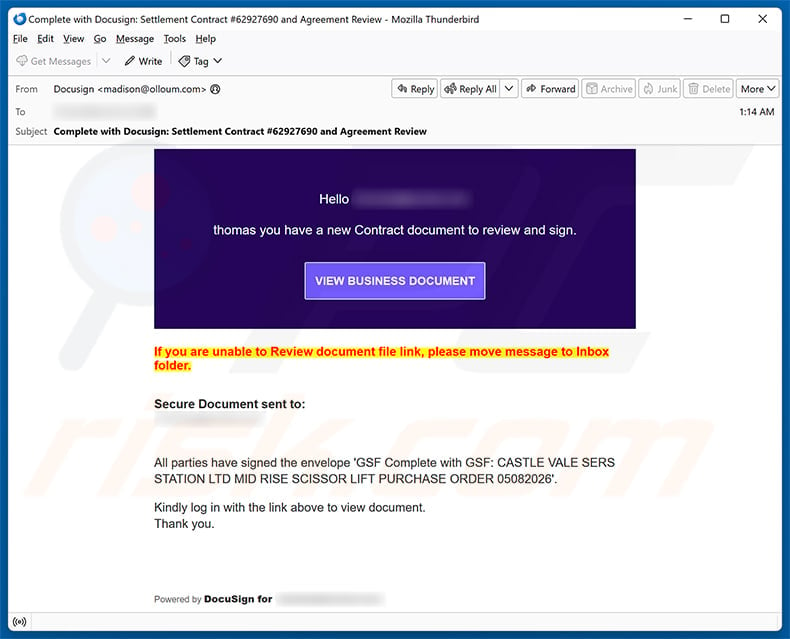
A settlement contract appears ready for review, complete with a purchase-order reference and a prominent VIEW BUSINESS DOCUMENT button. The message looks tied to real work.
That business context gives the DocuSign Contract Review email scam unusual weight. Before opening anything, its route and requested sign-in deserve closer examination.
Overview
The email combines DocuSign language with a detailed contract story
The captured subject says “Complete with Docusign” and references Settlement Contract #62927690 plus an agreement review.
Its body tells a named recipient that a new contract awaits review and signature.
Further text mentions a specific purchase order involving a mid-rise scissor lift, creating the texture of an existing commercial transaction.
The sender address shown in the sample does not belong to DocuSign, despite the display language and “Powered by DocuSign” footer.
Specific details may be copied from exposed business material, invented, or borrowed from another victim. They do not authenticate the delivery.
The journey unexpectedly changes from DocuSign to Adobe
Selecting VIEW BUSINESS DOCUMENT does not open a genuine DocuSign envelope.
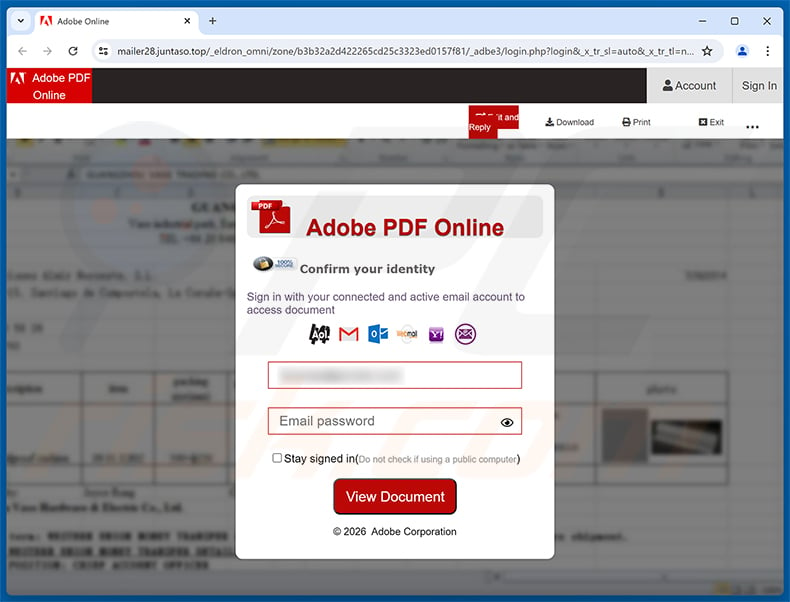
The observed destination is mailer28.juntaso[.]top, where a page imitates “Adobe PDF Online” and places a blurred document behind a login overlay.
That brand switch is a critical break in the story. A DocuSign notification should not require an email password on an unrelated Adobe imitation.
The panel displays several mail-provider logos, then requests an address and password to “access document.”
Whatever is submitted can be taken by the page operator instead of unlocking a contract.
DocuSign and Adobe are impersonated, not implicated
Both companies provide legitimate document services and have no connection to this phishing campaign.
The criminal borrows DocuSign to make the invitation familiar, then borrows Adobe to make the destination feel like a protected PDF viewer.
The alleged transaction also should not be blamed on a company merely because its name appears inside copied purchase-order text.
Evidence supports a credential-stealing chain attached to this message, not wrongdoing by the brands used as scenery.
- The sending domain does not match DocuSign.
- The subject pushes a settlement contract requiring attention.
- Purchase-order detail supplies false business context.
- The button leaves the genuine DocuSign ecosystem.
- mailer28.juntaso[.]top hosts the observed destination.
- The page changes its disguise to Adobe PDF Online.
- Several email-provider logos broaden the target pool.
- The requested email password is unrelated to document signing.
How the DocuSign Contract Review Email Scam Works
Step 1: A contract notification interrupts the workday
Contracts carry deadlines, money, legal commitments, and executive attention, so employees hesitate to ignore them.
The subject resembles a routine electronic-signature alert rather than an obvious prize or security threat.
A recipient may assume another department, supplier, or manager initiated the document without providing advance notice.
That ambiguity is common in busy organizations where many people exchange files and purchasing paperwork.
The phisher depends on workflow confusion, not necessarily on technical sophistication.
Step 2: Transaction details lower skepticism
The email includes a long purchase-order description, a numeric contract identifier, and language suggesting other parties already signed.
Specificity feels like evidence because random spam often remains generic.
However, criminals can lift details from breached mailboxes, public procurement records, compromised suppliers, or documents posted online.
They can also invent credible industrial language without knowing the recipient’s actual duties.
Every unexpected agreement should be confirmed with the supposed sender before its link is opened.
Step 3: The call to action hides the real destination
“VIEW BUSINESS DOCUMENT” describes an expected task but reveals nothing about the website behind the button.
In the captured campaign, the destination belongs to juntaso[.]top, not docusign.com or adobe.com.
The mail adds an odd instruction to move the message into the Inbox if the link fails.
That request may be intended to escape spam-folder protections or increase the message’s perceived trust inside the mail client.
A legitimate envelope should remain accessible through a verified DocuSign account without training the spam filter to trust an unsolicited sender.
Step 4: A blurred document keeps curiosity alive
The fake viewer places an indistinct business page behind the authentication box, suggesting valuable content is present but protected.
Blur removes the need to create a convincing contract while encouraging the reader to unlock it.
The top bar offers familiar concepts such as Download, Print, Account, and Sign In.
None of those controls prove the page is operated by Adobe, especially when the address bar shows mailer28.juntaso[.]top.
The document is theater designed to make credential entry feel like the final administrative step.
Step 5: The form accepts credentials for several providers
Gmail, Outlook, Yahoo, and other icons imply the user may authenticate with whichever mailbox they already use.
Real document services use their own login system or a deliberate identity-provider flow with clearly matching domains.
They do not need a personal email password collected directly by a third-party viewer.
The multi-provider design is evidence of broad phishing, since one page can harvest credentials from recipients across different organizations.
An error after submission may simply prompt another attempt and supply the attacker with a second candidate password.
Step 6: Mail access enables higher-value business fraud
Once inside a work inbox, an intruder can study contracts, invoices, calendars, management relationships, and supplier communication.
The attacker may continue the same thread, replacing bank details or requesting confidential documents from people who trust the compromised account.
Cloud applications connected through single sign-on may also become reachable, depending on the organization’s controls.
Stolen mail can reveal internal terminology that makes future phishing far more accurate.
This explains why a simple document lure can become business email compromise rather than ending with one mailbox login.
Why the Two-Brand Switch Matters
DocuSign normally preserves a consistent envelope journey
Recipients can verify genuine envelopes by opening DocuSign independently and reviewing pending agreements inside their account.
An unexplained transfer to a different brand and unrelated top-level domain breaks that trustworthy route.
The presence of a DocuSign footer inside the email cannot repair the destination mismatch.
Adobe branding does not authorize an email-password request
Adobe offers real PDF products, but a copied red logo and viewer header are trivial to reproduce.
An external page asking for the password to Gmail, Outlook, or Yahoo is not an Adobe authentication process.
Users should never treat a provider-logo menu as permission to disclose credentials.
Brand stacking creates borrowed credibility
Each familiar name answers a different moment of doubt: DocuSign explains the invitation, while Adobe explains the protected-looking document.
The criminal hopes the reader evaluates each logo separately and overlooks the missing relationship between them.
Following the domains from sender to destination exposes that gap.
Legitimate services are victims of the impersonation
Reporting should identify the scam as fake DocuSign and Adobe content, not accuse those services of stealing credentials.
Clear wording helps recipients retain trust in genuine notifications while learning to verify how those services actually operate.
It also directs abuse reports toward the infrastructure truly hosting the fraudulent page.
Business Checks Before Opening an Unexpected Contract
Confirm the initiator by a separate route
Call the known employee, supplier, lawyer, or customer using contact information from an existing directory or prior verified correspondence.
Do not use a telephone number introduced by the suspicious email.
Ask for the envelope ID, contract purpose, and expected signers without revealing information contained only in your organization.
Open the document platform independently
Type docusign.com or use the established company portal, then review pending envelopes after normal authentication.
If the document is absent, request that the sender resend it through the known platform.
Never authenticate an email account through a document viewer reached from a surprise message.
Compare the sender and reply path
Expand the complete From and Reply-To addresses, then identify the registered domains.
A random mailbox at an unrelated provider cannot become DocuSign by placing that name before the @ symbol.
Organizations should also inspect SPF, DKIM, and DMARC results, while remembering that compromised legitimate accounts can still send harmful mail.
Treat copied project details as clues, not proof
Accurate names or purchase references may indicate prior exposure elsewhere.
Notify the security team if the email contains nonpublic details, because another mailbox, supplier, or document repository may already be compromised.
Do not assume the listed company authored the lure without corroborating evidence.
What a Stolen Work Email Can Expose
Financial timing and payment routines
Messages reveal when invoices are due, who approves transfers, which banks are used, and how exceptions are communicated.
Fraudsters can wait for a real payment and introduce a plausible last-minute account change.
Contracts and confidential attachments
Legal drafts, pricing, customer data, designs, and identity documents may be stored directly in messages or linked cloud files.
Unauthorized access can therefore become a reportable privacy or contractual incident.
Trusted internal identity
An attacker speaking from a real mailbox can request payroll changes, gift cards, passwords, or sensitive files with less resistance.
Existing signatures and conversation history make the deception look operationally normal.
Wider access through single sign-on
Some organizations connect email identity to collaboration tools, storage, customer platforms, and administrative dashboards.
Multi-factor authentication, conditional access, and rapid session revocation can limit that movement.
What to Do if You Have Fallen Victim to This Scam
- Exit the false Adobe page. Avoid further password attempts, document downloads, browser prompts, or contact with details displayed on that site.
- Report the incident internally at once. Business users should alert security, legal, finance, and the mail administrator because contract context can support targeted follow-up fraud.
- Change the exposed mailbox credential. Use a verified company device and approved portal, creating a unique password that has never protected another service.
- Revoke sessions and identity tokens. Administrators should invalidate active logins, app passwords, delegated access, OAuth grants, and remembered browsers associated with the account.
- Review email configuration and activity. Inspect forwarding, transport rules, inbox filters, recovery options, sent messages, deleted notices, and sign-ins from unfamiliar locations.
- Contact the alleged sender independently. Confirm whether any genuine contract exists and warn the named company that its details may be circulating in phishing.
- Protect financial processes. Freeze changes to payment instructions until suppliers and bank details are reconfirmed through established telephone or in-person procedures.
- Check for software exposure. When a file downloaded or executed, run Malwarebytes plus enterprise endpoint protection. AdGuard can reduce later malicious-ad contact but cannot invalidate stolen credentials.
- Search for secondary compromise. Examine cloud storage, electronic-signature accounts, collaboration tools, and reused passwords connected to the affected identity.
- Retain forensic evidence. Preserve the message with headers, the landing URL, screenshots, security logs, submitted values, and any fraudulent conversation for responders and authorities.
Reducing Document-Signing Phishing at Work
Route agreements through a known process
Teams should know which platform, account, and approver normally handle contracts.
Unexpected documents can then be compared with a stable workflow instead of judged by appearance alone.
Protect email with origin-aware authentication
Passkeys and hardware keys resist many counterfeit login pages because authentication is bound to the legitimate website.
High-risk departments such as finance, legal, executive support, and procurement should receive priority.
Require verbal checks for bank changes
A signed-looking document or familiar email thread should never be sufficient to replace supplier payment details.
Call a previously validated number and record the confirmation.
Investigate unusually specific phishing
When a lure includes confidential project names or accurate purchase orders, responders should determine where that information originated.
The immediate recipient may be only the visible edge of a broader compromise.
Document how the request entered the organization and whether filtering systems identified its impersonated brands.
That review can improve mail rules without relying solely on employees to recognize every future variation.
Rapid reporting preserves logs and options.
It also gives partners time to reject altered documents or payment instructions before ordinary business activity makes those requests appear credible.
Frequently Asked Questions
Is the Settlement Contract #62927690 email from DocuSign?
The examined message is not legitimate DocuSign mail. Its sender is unrelated, and the button leads to mailer28.juntaso[.]top.
Why does the message mention a detailed purchase order?
Details can be fabricated, copied from public records, or stolen from prior correspondence. Confirm the transaction with the supposed sender using a trusted channel.
Is Adobe PDF Online asking for my mailbox password normal?
No. A PDF viewer should not collect the password to Gmail, Outlook, Yahoo, or another unrelated email service through its own form.
Are DocuSign or Adobe responsible for this phishing page?
No. Their names and designs are being abused. The legitimate companies do not operate the sender address or the captured juntaso[.]top destination.
What if I clicked but entered no information?
Close the site and monitor the browser. Scan if anything downloaded, ran, or gained permissions, but a click alone does not equal a stolen password.
Should my company investigate even after I changed the password?
Yes. Administrators should review sessions, rules, tokens, outgoing mail, cloud access, and possible exposure of the contract details used in the lure.
The Bottom Line
The DocuSign Contract Review email scam uses believable commercial detail, then swaps DocuSign for a counterfeit Adobe screen on an unrelated domain.
Its purpose is not document delivery. The multi-provider form is designed to collect email credentials from whichever recipient reaches it.
Verify surprise contracts through known people and genuine platform accounts. After submission, treat the event as a potential business compromise, not merely a mistyped password.

Join the discussion
0 commentsShare your experience or ask a question about this article.
Discussion
Start the conversation
Have a question or something useful to share? Add the first comment.