

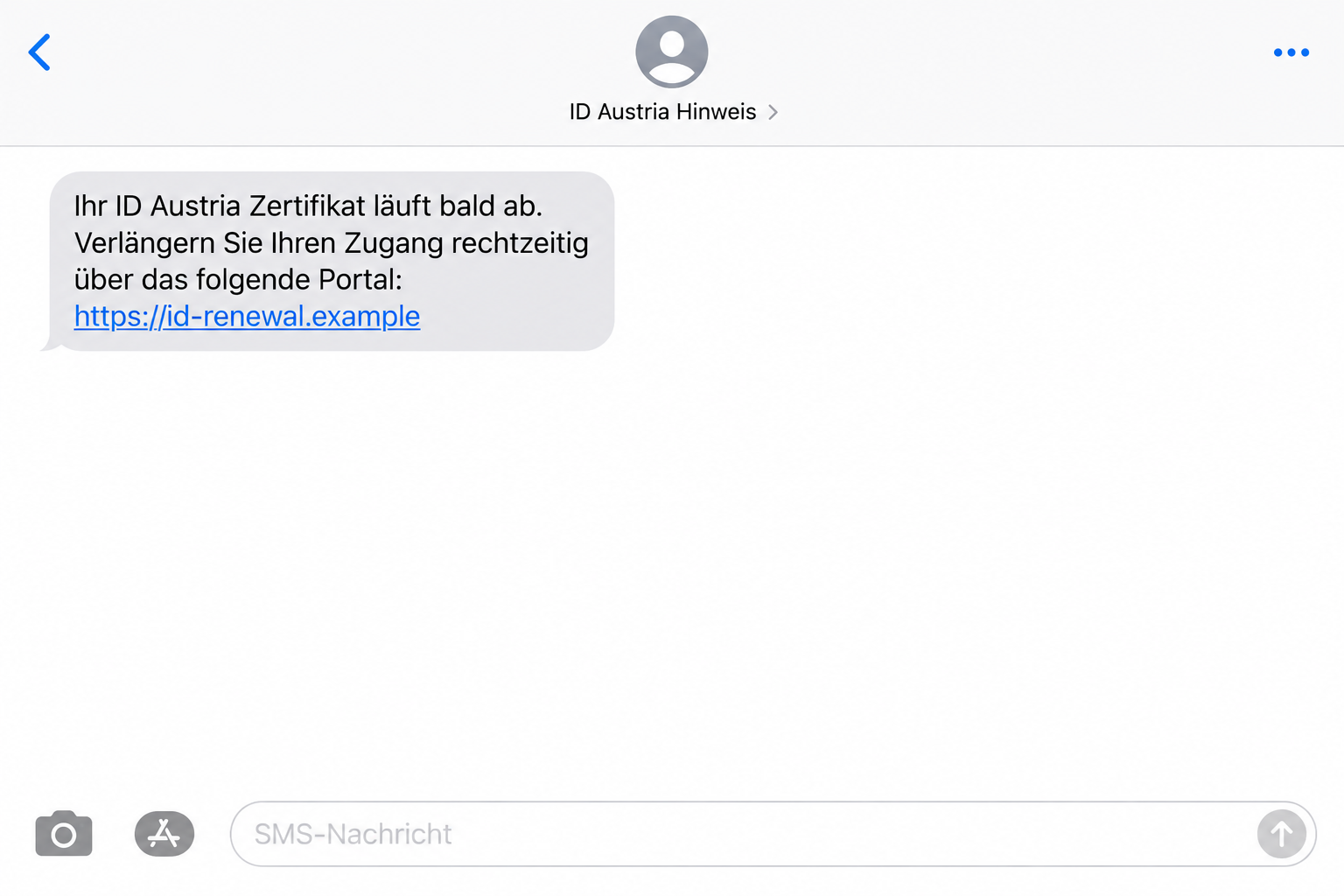
A text warns that your ID Austria certificate will expire soon. It gives you a short window to renew and a link to a convenient portal.
The ID Austria renewal text scam is convincing for a particular reason: certificates really can expire. What matters is how the message tells you to respond.
Overview
A real expiry concern is used to justify a false renewal route
ID Austria is Austria’s legitimate digital-identity service. Criminals impersonate its renewal process through messages warning that a certificate is about to lose validity.
The Austrian government’s security portal documents texts leading to copied websites that collect usernames, passwords, banking details, or card information.
The genuine possibility of expiry doesn’t make the text genuine. A correct general statement can still introduce a fraudulent destination.
The lead image illustrates an expiry message with a fictional address. It isn’t a real government notification or a capture of an active phishing form.
The losses confirm this was not an isolated complaint
An October police update says the spring certificate-renewal phishing wave affected around 100 people, with losses of nearly €500,000.
Those figures refer to the reported scam, not to everyone whose certificate expired. A genuine renewal population and a victim count are different things.
The fake portals exploit both identity-service trust and financial information. The title’s warning concerns the impostor messages, not the legitimate ID Austria service.
Don’t supply banking information to preserve an identity certificate. The payment provider’s warning says genuine renewal does not require bank or payment-card data.
The point where you should leave the message
- A surprise text sets a brief deadline for certificate renewal.
- The supplied destination differs from the official identity or certificate-provider service.
- A renewal form starts requesting card or online-banking information.
- A contact asks you to act before checking the actual certificate.
- Your bank’s approval concerns an operation unrelated to an identity renewal.
Open the real service independently to check validity and renewal eligibility. Don’t use an unverified text as the starting point for that check.
If you already entered information, protect the relevant identity and financial accounts. Deleting the notice doesn’t undo what the form received.
Why a True Expiry Date Doesn’t Authenticate the Text
Scammers don’t need to invent every part of a story. Borrowing a real administrative event can make the invented instructions harder to spot.
Certificate renewal is exactly that kind of event. A person who has used the service for years may reasonably expect that something needs updating.
The text supplies urgency and an easy-looking shortcut. Following its link can seem more practical than searching for the correct official procedure.
That is where the choice of destination matters. Knowing that renewal exists doesn’t tell you who operates the page opened by an unsolicited message.
A copied portal can repeat true information about ID Austria while asking for details the genuine renewal doesn’t need. Evaluate the request, not just its introduction.
Don’t compare only the deadline with your memory of registration. Even a plausible expiry date cannot turn an unrelated banking form into an authorized certificate process.
Check the actual certificate through its provider. If it needs attention, follow the instructions reached from the verified service instead.
That protects against both mistakes: giving information to an impostor and ignoring a genuine renewal task because a scam text happened to mention it.
How the ID Austria Renewal Text Scam Works
Step 1: The message creates a countdown to lost access
The text says the certificate is expiring and you must act within a few days. It turns a possible future inconvenience into an immediate task.
The sender may be an unfamiliar mobile number. A recognizable service name inside the message doesn’t establish that the identity provider sent it.
Don’t answer to ask whether the warning applies to you. Use the genuine certificate information instead of extending the unverified conversation.
Step 2: The renewal link opens a lookalike portal
The documented destinations include domains that mimic ID Austria’s name. An official-looking phrase inside a hostname can distract from the actual site being visited.
A copied design adds another layer of familiarity. The reader sees an identity-service heading and expects the next fields to belong to the genuine renewal.
HTTPS doesn’t settle that question. A secure connection to a separate website doesn’t establish that the website is authorized to manage your certificate.
You don’t need to open the suspect portal repeatedly to inspect it. The official validity check gives you the information you actually need.
Step 3: Identity verification becomes a request for protected details
The false pages ask for sensitive information, including login or financial details. The renewal story makes the request appear connected to keeping the service active.
A username and password should only go into a verified service you intended to access. Don’t let the text choose that service for you.
Card details or a bank login are a particularly important mismatch. They relate to financial access, not simply to the expiry of an identity certificate.
If that mismatch appears, stop. Don’t try a different card or continue because the form describes the information as necessary for verification.
Record what you supplied if you’ve already reached this stage. Recovery depends on whether the exposure involved identity access, a card, banking credentials, or approvals.
Step 4: The affected accounts need protection after submission
The reader may wait for a renewal confirmation while the submitted information creates another problem. An apparent success screen doesn’t establish that a certificate was extended.
Use the genuine service to check certificate status. Ask the bank or card issuer to assess financial information given to the impostor.
Don’t wait for an unauthorized charge before reporting exposed payment details. The issuer can decide what containment and monitoring are appropriate.
If identity credentials were also shared, protect that access separately. A replacement card alone doesn’t address an identity-service password.
How to Check the Real Certificate
A-Trust provides an official certificate-data page for viewing information including the certificate type and expiry date.
Reach that provider through an independently verified address, not through the text. Genuine account access is different from entering credentials into a copied renewal form.
Checking the expiry first also avoids guessing about eligibility. You need to know the certificate’s actual status before choosing the renewal or registration process.
Record the genuine expiry date before contacting support. It helps separate a certificate still eligible for renewal from one requiring a different procedure.
PayLife’s renewal warning explains that an eligible, still-valid full-function ID Austria can be extended online without providing banking data.
An expired certificate or a basic-function identity may require a new registration instead. Don’t assume every certificate can be fixed through a quick online renewal.
Ask the genuine provider about your situation if the status is unclear. An impostor’s promise to bypass the normal process isn’t a useful alternative.
A name or registration detail shown in a message shouldn’t change the check. The real certificate record, not the SMS, tells you about validity.
You don’t need to share a bank password with a caller to learn whether a certificate remains valid. Keep the questions attached to the actual identity service.
After a legitimate renewal, confirm the result through the real account. A confirmation sent by the disputed text contact isn’t independent evidence.
What to Do if You Have Fallen Victim to This Scam
-
Stop the false renewal. Close the unverified page and don’t submit more details. Save the text and destination while checking the certificate through the genuine service.
If all you did was read the message, you don’t need to assume account theft. Report or block the unwanted contact using your messaging tools.
-
Contact the card issuer after card exposure. Use a verified app, the card’s printed contact, or an independently obtained provider number.
Describe the fields you completed and any approval you made. Ask whether the card or related access needs blocking, replacement, or additional checks.
-
Tell the bank if you supplied banking credentials. Don’t wait to establish the entire campaign before asking for protection. Explain that a certificate-renewal page collected the login.
Follow the bank’s recovery instructions through its genuine channels. Examine pending and completed activity and report anything unfamiliar with dates and reference numbers.
If a version asks for a code or bank approval, read the provider’s own description. A label on the false page doesn’t explain the actual operation.
Decline anything you don’t recognize and contact the provider independently. A genuine authentication message doesn’t authenticate the website that caused the request.
Tell the bank which prompts you approved and when. A screenshot of the operation description can help, provided you don’t expose usable codes publicly.
Never approve an incoming caller’s request to “undo” the exposure. End the call and reconnect with the real bank yourself.
-
Protect ID Austria access through its provider. Contact ID Austria or A-Trust support about shared credentials and unfamiliar activity.
The provider can guide password, session, or certificate protection as appropriate. Don’t attempt a new procedure supplied by the original text sender.
-
Secure reused credentials. If the same password protects other accounts, replace it through those services. Start with accounts involved in recovery or sensitive communications.
Use an unaffected device if suspicious software was installed. Changing a password on a potentially compromised device may leave another exposure unresolved.
-
Assess any unexpected software or permissions. If the journey included a download, installation, or browser permission, investigate that separately from the financial and identity incidents.
Malwarebytes can assist with device checks after software exposure. A scan cannot revoke a disclosed credential or guarantee that a fraudulent transaction is recoverable.
AdGuard can add filtering for later web browsing. It doesn’t determine your certificate’s expiry or authorize a renewal page.
-
Keep evidence and report. Preserve the message, domain, relevant account notifications, and provider case references. Don’t include usable codes or complete financial information in public screenshots.
The government guidance advises reporting the incident to police. Keep following up with the affected providers even after you have filed that report.
Don’t Let a Second Contact Take Over the Recovery
After sharing information, you may receive a convincing explanation from someone claiming to be support. Familiar details aren’t proof that the new contact is genuine.
The earlier form may have provided a name, number, or account information. A later caller can repeat those details without being your bank or identity provider.
Keep recovery conversations on independently established channels. An incoming contact shouldn’t choose the number, website, or software used to protect your accounts.
If someone requests a new payment or remote access to fix the certificate, stop and verify. Those requests need their own assessment, not automatic trust.
Don’t share another code to prove that you’re the victim. Real recovery should be handled through the provider’s verified process.
Tell anyone helping you which contact has been verified. A family member may otherwise continue the impostor conversation while you speak with genuine support.
A Renewal Habit That Survives Changing Scam Messages
After checking the legitimate service, keep its address in your own records. Return there when a future message raises an expiry concern.
Use the actual certificate date to plan a genuine task. A deadline in an unsolicited text shouldn’t replace information from the provider.
If you’re helping an older relative, check together without asking them to send credentials through messaging. Let the account holder handle protected authentication steps.
Explain the key distinction in ordinary terms: renewal may be real, but this text doesn’t get to choose where banking information is entered.
For a missed genuine deadline, ask the provider about registration. Don’t trust a shortcut merely because the normal procedure now feels inconvenient.
The habit doesn’t depend on spotting every misspelled domain. It depends on controlling your starting point and understanding the request before supplying sensitive information.
Frequently Asked Questions
Can ID Austria certificates genuinely expire?
Yes. That real concern is why the scam is convincing. Check your certificate independently instead of accepting the text’s deadline or linked renewal route.
Does renewal require my card or online-banking password?
The payment provider’s warning says bank and payment data aren’t required for genuine renewal. Don’t supply them to a page reached from an unsolicited expiry message.
Were all expiring certificates counted as scam victims?
No. The police update describes around 100 victims and nearly €500,000 lost in the spring campaign. Certificate-expiry figures describe a different population.
Can every expired certificate be renewed online?
No. Eligibility matters. An expired certificate or a basic-function identity may require registration; check the genuine provider’s instructions for your particular account.
Is a real bank code proof that the renewal site is safe?
No. Check the operation described by the bank. A genuine approval process can be triggered by a fraudulent request using information you supplied.
What if the fake page says renewal was successful?
That display doesn’t establish a real extension. Verify status through the official service and protect any identity or financial information already exposed.
The Bottom Line
Don’t renew ID Austria through an unverified text link or supply banking details for a certificate. The documented phishing campaign caused real financial losses.
Check validity through the genuine provider. If you already submitted information, contact the affected identity service and bank or card issuer immediately.

Join the discussion
0 commentsShare your experience or ask a question about this article.
Discussion
Start the conversation
Have a question or something useful to share? Add the first comment.