

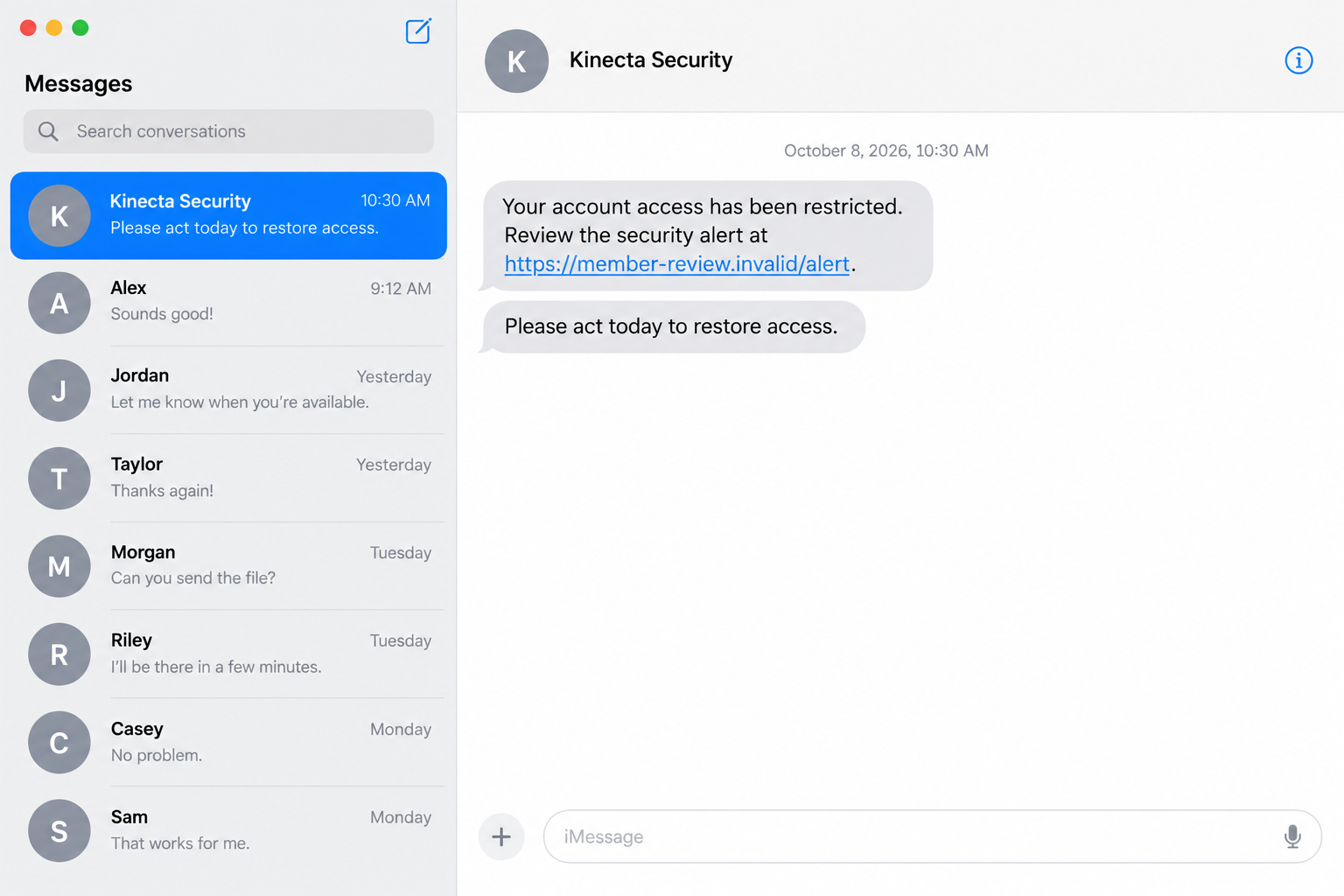
A text says your account access has been restricted. You were not trying to sign in, but the warning makes checking your money feel suddenly urgent.
Kinecta scam texts take advantage of that interruption. Before replying, tapping the link, or speaking with a supposed security agent, check which contact you can actually verify.
Overview
The impostor uses the credit union’s identity
Kinecta Federal Credit Union is a real financial institution. This article concerns people impersonating its employees or communications, not a scam operated by the credit union.
The message can describe a security issue and demand a quick response. The next request may involve a login, password, one-time PIN, or verification code.
A warning about money deserves attention, but attention does not mean following the sender’s route. Confirm the account issue through your own independently accessed service.
Do not decide from the name alone. A familiar label and an unverified instruction can appear together in the same message.
Kinecta’s current warning identifies the sensitive requests
The official fraud page warns about impersonators making urgent security claims. It identifies requests for one-time PINs, security codes, and banking credentials.
Kinecta says it will not call, text, or email to request those confidential details. An unsolicited person’s verification explanation does not make disclosure safe.
The page confirms the risk, not the exact fictional alert illustrated here. No specific attacker’s number, captured endpoint, or loss amount is attributed to this example.
Real informational messages also exist. A safe guide must distinguish those from requests that try to obtain account access.
Choose your own route back to the account
The practical check is to reconnect independently. The warning can be investigated without letting the incoming contact decide where you log in or whom you call.
- Open the banking app or saved account address you normally use.
- Read the actual account activity rather than the text’s description.
- Obtain support details from your card, statement, or official contact page.
- Do not read an authentication code to an unexpected caller.
- Reject a request to move money for supposed protection.
- Explain any disclosure promptly to genuine account support.
A short independent check can protect both concerns: avoiding an impostor and dealing with any genuine security event that actually appears in your account.
Why Kinecta Scam Texts Can Sound Like Real Alerts
Security is a plausible subject for the credit union
Financial providers monitor unusual activity and help customers protect accounts. A scammer does not need an entirely imaginary subject to make a contact seem relevant.
You may remember a recent purchase, changed device, or declined transaction. The message can encourage you to connect that memory to a claim it has not proved.
Keep the account event and the sender’s identity separate. A real transaction does not establish that the incoming person works for the provider.
Likewise, a suspicious caller does not mean you should disregard an unfamiliar transaction. Review the account through a channel you control.
An access restriction creates pressure before any proof arrives
The phrase restricted access can make someone worry about being locked out of money needed for bills. The promised review becomes an appealing shortcut.
That shortcut may be the unsafe part. If the remedy requires confidential credentials, the contact is asking you to hand over something valuable.
You do not need to solve the alleged problem while remaining in the original conversation. End it and begin a separate inquiry.
A genuine concern should be explainable through the provider’s records. It should not depend on trusting an unknown person merely because they describe themselves as security staff.
How the Kinecta Scam Works
Step 1: A security claim makes the account feel at risk
An incoming text, email, or call uses Kinecta’s name and describes a problem. Possible pretexts include restricted access, suspicious activity, or information that supposedly needs confirming.
These examples explain the impersonation pattern. They do not establish that every recipient gets one exact subject, transaction description, or sender address.
The contact wants the recipient to act before independently checking the situation. Urgency can make normal verification seem like an unnecessary delay.
Your first response should be to inspect the account safely, not to supply the requested access details. The message’s confidence is not account evidence.
Step 2: A link or conversation becomes the proposed remedy
A link may offer to restore access or review a security alert. A caller may instead ask you to remain on the line while they investigate.
In both versions, the person presenting the claim also controls the route used to resolve it. That is not an independent check of their authority.
A page can repeat the credit union’s name without being part of its banking system. A telephone label can also be misleading.
Use an independently obtained support route. Do not search only the materials the suspect contact supplied and treat their consistency as proof.
Step 3: Account information is presented as harmless verification
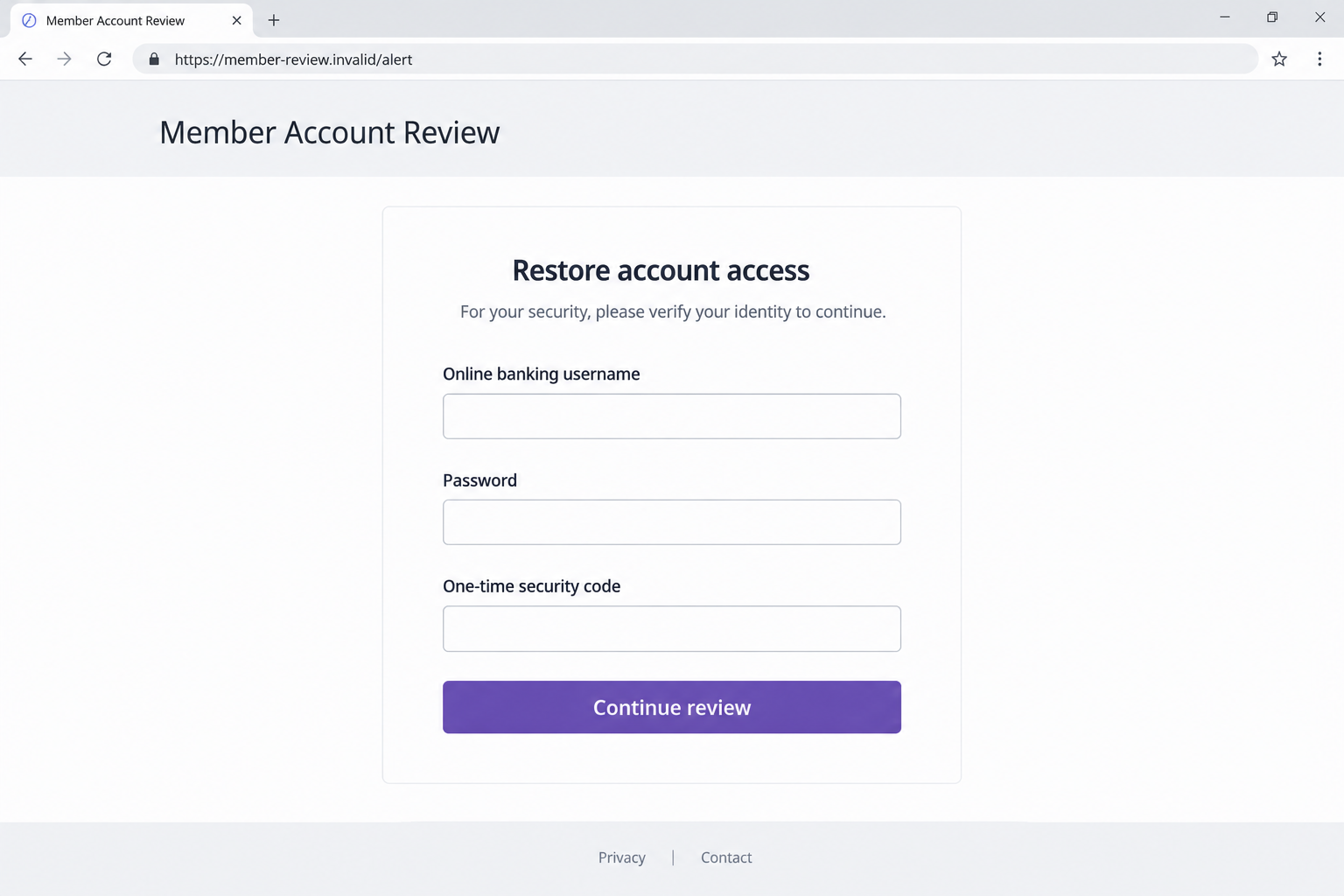
The request may move to the online-banking username and password. The recipient can be told that these are necessary to confirm account ownership or remove a restriction.
Those details can permit access regardless of the label attached to the request. Calling them verification does not change what they control.
The illustrated page below is a fictional example of this switch. Its address is nonfunctional, and it is not a captured Kinecta login or live phishing page.
Never type a real password into a page merely to see what happens next. Investigation should not require exposing the account you are trying to protect.
Step 4: A genuine code can be misrepresented as part of the review
A criminal attempting account access may cause the real service to send a code. The unverified contact can then ask the recipient to disclose it.
The arrival of a genuine notification does not authenticate the person who wants its contents. It may indicate an attempted action needing your approval.
Read the notification carefully and keep the code private. Ask the real provider about the event without relying on the caller’s explanation.
If you already disclosed one, report its wording and timing. Do not guess that every code authorizes the same login, change, or payment.
Step 5: The account exposure becomes a separate problem to contain
Once credentials or a code are disclosed, the response needs to address potential access. Merely deleting the original text does not change the information supplied.
Check for unfamiliar account activity, security changes, or transactions. Tell genuine support what you provided and what happened afterward.
Do not assume a loss already occurred, but do not wait for a loss to report meaningful exposure. The provider can assess available protections.
An impostor may keep requesting further information to complete the supposed repair. Stop that interaction rather than letting one disclosure lead automatically to another.
Recognizing Real Kinecta Messages
Informational texts are different from requests for secrets
Kinecta’s contact page describes informational texts. That means the mere presence of a message is not enough to declare it fraudulent.
Look at what it asks you to do. Providing a confidential login or code is a different action from reading a notice and checking independently.
Do not attempt to authenticate the entire message from an unfamiliar short code alone. Sender formats can be confusing, and the request still needs examination.
If something seems unusual, ask Kinecta about the specific communication. You do not need to respond to the suspect sender first.
The official contact route must fit the affected account
The contact page lists the Member Contact Center at 800.854.9846. Confirm current details through the official page or your existing account documents before calling.
It also lists separate card-service routes. A general contact number is not a promise that every issue uses an identical procedure.
When you reach staff independently, explain whether the concern involves digital banking, a debit card, a credit card, or identity information.
Be clear about any payment you made. A disclosed password, an unfamiliar card charge, and a transfer you approved are not interchangeable events.
Use secure messaging when it provides a trusted starting point
For customers with access, Kinecta’s contact page describes its digital-banking Message Center. Start from your own account rather than a link sent by the unknown person.
State the account question and requested action. Ask whether the provider can verify the contact or sees an event that matches the warning.
Keep your description concise and factual. Staff need the channel, date, information disclosed, and any resulting activity more than a theory about the attacker.
If the account is inaccessible, use the published assistance route instead. Do not let a failed login push you back toward the original stranger’s offered solution.
What to Check After a Suspicious Interaction
Separate viewing, sharing, and approving
Reading a text, opening a link, entering credentials, and approving a transfer are different actions. Write down which ones actually occurred.
That distinction helps avoid both overreaction and delay. You should not invent a password exposure, but you should promptly address a password you submitted.
A screenshot of the suspicious request can help explain the situation. Do not publish the code, account number, or private data while asking other people for advice.
Use the actual bank or account record for transaction details. A number mentioned in the text may be invented and should not become your reported loss automatically.
Check the notification’s purpose, not just its arrival
If a code was received, preserve the message describing the action. Its purpose can be important to the account investigation.
A person may claim it is only a cancellation reference. The original notification may describe a sign-in or another action instead.
Explain that difference to independently reached support. Do not generate additional codes at the unknown caller’s request to test their story.
Review follow-up messages with the same care. Familiarity created during a suspicious conversation is not a reason to relax the next identity check.
A device problem is not the same as an account problem
If you installed software or allowed remote access, the device needs attention as well. Account protection alone may not remove that access.
If there was no installation or browser change, do not assume the device is infected just because a caller sounded convincing.
Tell support about both exposures when both occurred. A useful response should not force several distinct problems into one vague description of being hacked.
Keep the priorities practical: end unsafe contact, reach the real provider, secure exposed access, and document any financial activity.
What to Do if You Have Fallen Victim to This Scam
-
End the unverified contact. Stop the call, leave the page, and decline requests for another code, transfer, or repair step.
Save the text and any existing conversation records. You do not need to remain available to the person in order to preserve evidence.
Do not call their supplied number to demand an explanation. The next contact should be the institution reached through a trusted source.
-
Inform Kinecta promptly. Use its official contact page, account messaging, or trusted account documents and explain the specific incident.
List each credential, code, document, or approval involved. Ask staff to review relevant activity and explain the available protective actions.
Keep a case reference and any written instructions. This makes follow-up clearer if another team handles cards, transactions, or account recovery.
-
Replace exposed credentials. Change the affected password through the real banking service and replace matching passwords used on other accounts.
Review recovery details and authentication settings using official guidance. Protect a linked inbox too if its credentials were shared or reused.
Do not turn off a security control because the impostor claimed it blocks a repair. Discuss any actual access difficulty with the provider instead.
-
Report the exact financial activity. Review account transactions and card activity for anything unfamiliar, then tell the relevant provider what you found.
If you approved a payment under deception, say that clearly. Ask about its review or recovery process without changing the facts to fit a preferred dispute category.
The FTC recommends prompt payment-provider contact. Keep supporting records, and do not assume every payment can be reversed.
-
Handle additional identity or software exposure. For personal-document risks, use IdentityTheft.gov or the appropriate official service for your situation.
If downloaded software or remote access was involved, seek trusted device help and run Malwarebytes or another reputable security check.
Review unwanted browser permissions and consider AdGuard for advertising or redirects. Those protections do not revoke an exposed code or replace the institution’s fraud response.
-
Report the communication and monitor afterward. Give Kinecta the preserved message and use your email or mobile provider’s available scam-reporting option.
Check for later account changes and retain genuine support responses. The absence of an immediate charge does not establish that supplied information was harmless.
Ignore strangers offering guaranteed recovery for payment. Keep assistance within verifiable provider and official reporting channels rather than another unsolicited conversation.
Frequently Asked Questions
Are all texts mentioning Kinecta fraudulent?
No. Kinecta documents informational messages. Verify the particular request independently, especially when it seeks a confidential password, banking login, or authentication code.
Can caller ID confirm that a security agent is genuine?
No. Obtain contact details independently and reconnect yourself. A displayed name or number is not a complete identity check.
Why would a real login code arrive during a scam call?
Someone may be attempting an account action. The code’s arrival does not prove the caller works for Kinecta or should receive it.
What should I do if I shared the code already?
Tell genuine support promptly, including the notification’s purpose and time. Review account activity instead of assuming the code caused one particular outcome.
Which number does Kinecta list for member assistance?
Its current contact page lists 800.854.9846 for the Member Contact Center, with separate routes for some card services. Confirm the route applicable to your issue.
Does receiving an account-alert text mean my device has malware?
No. Assess any actual link, download, installation, or remote-access exposure. Receiving the message alone does not establish a software infection.
The Bottom Line
Kinecta scam texts use a legitimate institution’s identity to make unsafe requests feel protective. Confidential account access should not pass to the person who interrupted you.
Reopen your own banking route, contact the institution independently, and report exactly what was shared or approved. Respond to the real exposure, not the impostor’s story.

Join the discussion
0 commentsShare your experience or ask a question about this article.
Discussion
Start the conversation
Have a question or something useful to share? Add the first comment.