

A Waternet bill arrives while you’re clearing your inbox. The branding feels familiar, and the message suggests an unpaid balance needs your attention.
Before you settle it, take a closer look at the route that email wants you to follow.
Overview
A familiar bill, a different destination
The Waternet email scam uses an ordinary household obligation as its opening. A bill is waiting, and the easiest-looking option is the payment button.
The problem isn’t that water bills arrive electronically. It’s that an impostor can copy the message while replacing the place your money goes.
Waternet’s official fraud warning confirms copied emails leading to a false payment website. It warns that the money reaches criminals, not Waternet.
What makes this a confirmed scam
This is documented impersonation, not a disagreement over a genuine bill. The payment request borrows a legitimate organization’s identity to misdirect the recipient.
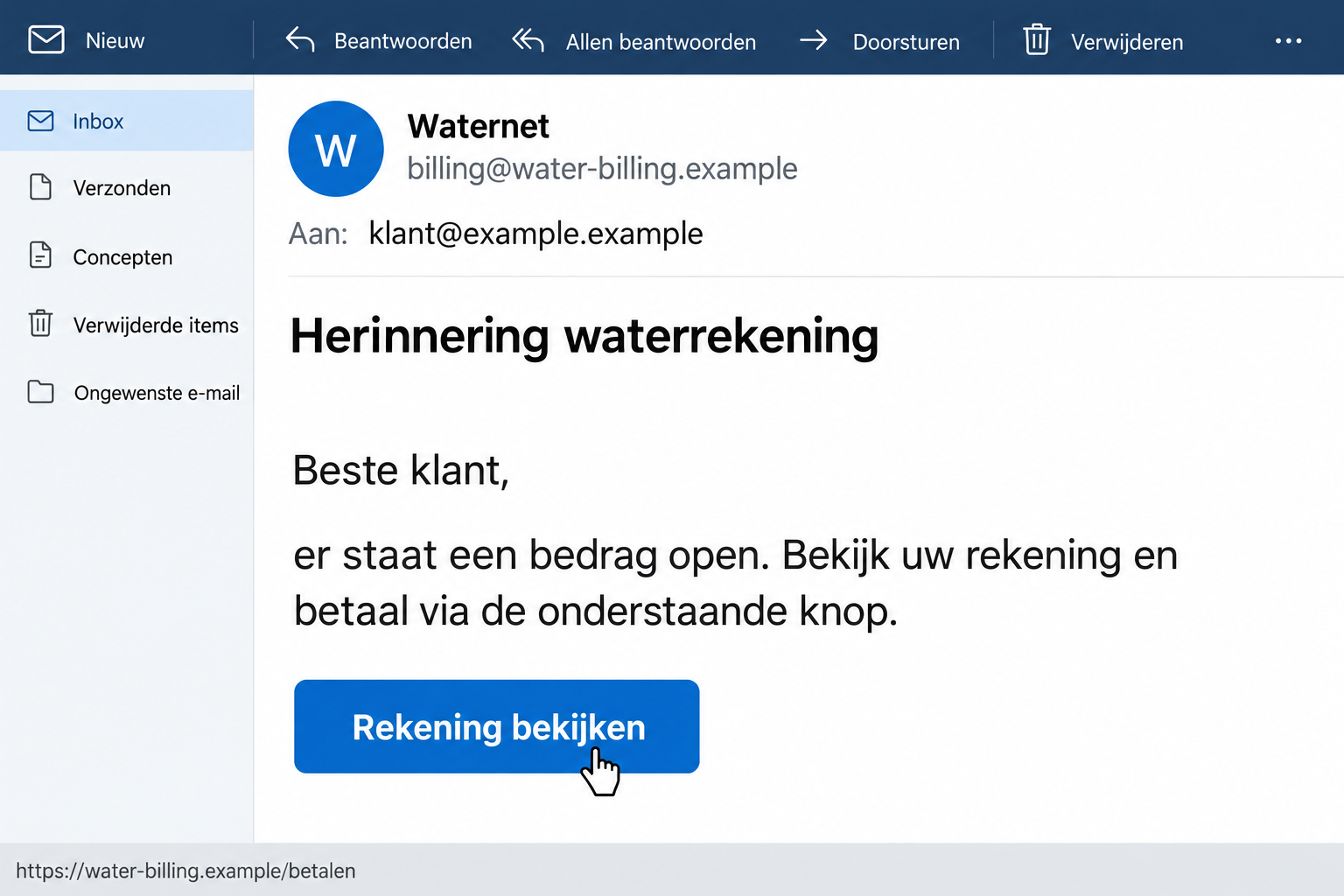
The illustration above uses fictional addresses and sample wording. It explains the approach without pretending to be a recovered original email.
Keep these distinctions in mind when checking a message:
- A company name beside an email is not proof of who sent it.
- A copied bill can point somewhere different from the real customer account.
- A recognizable payment method does not establish that Waternet receives the money.
- An independently checked account is more useful than the email’s own reassurance.
The decision you need to make
Don’t pay a doubtful bill through its email link. Check your balance separately, then use the genuine account or ask Waternet about the specific invoice.
If you already acted, start with what actually happened. Sending money, sharing a password, and merely opening a message require different responses.
Why a Water Bill Is Such an Effective Cover
You don’t need to believe an extraordinary promise for this scam to work. You only need to think you’ve missed something routine.
That makes a utility bill different from an obvious prize message. Most households expect ongoing charges, and few people remember every invoice reference.
An unexpected reminder can even seem plausible when you’ve recently moved, changed payment arrangements, or helped someone manage their household accounts.
Those circumstances don’t prove targeting or a data breach. They simply explain why a broadly sent message may reach someone at a convincing moment.
The useful question isn’t whether the bill sounds possible. It’s whether this particular request matches an obligation you can verify without using its links.
Don’t let the fear of being late turn the email into your only source of information. A genuine balance can be checked outside that message.
Likewise, deleting a fake reminder doesn’t settle any real outstanding bill. Keep fraud checks and ordinary account management separate.
How the Waternet Email Scam Works
Step 1: The email introduces an unfinished payment
The approach starts with the appearance of normal billing correspondence. Waternet’s name gives the message a reason to be in your inbox.
A request to resolve something already overdue can feel more urgent than a new invoice. You’re encouraged to fix the supposed problem immediately.
You may find yourself searching your memory instead of checking records. That’s an unreliable test when several household payments fall around the same time.
Pause before answering that uncertainty with a payment. The sender should not get to define both the problem and the only acceptable solution.
Step 2: Familiar presentation makes the link feel routine
The logo, spacing, greeting, and payment button can all be copied. None of those elements requires access to your genuine Waternet account.
Even a convincing sender line needs scrutiny. A display name is easy to choose, and a visible email address can sometimes be spoofed.
Don’t rely on poor spelling as your main defense. A polished message can still lead to an unrelated destination.
On a computer, hovering over a link may reveal its target without opening it. On a phone, avoid tapping simply to investigate where it goes.
Step 3: The payment page borrows the supplier’s identity
The reported route leads from the false email to a website made to resemble Waternet. The apparent continuity makes the next click feel expected.
Waternet identifies energie-factuur.site as one reported false destination. Treat that as an example from its warning, not an exhaustive list of scam addresses.
A different domain isn’t cleared just because it doesn’t match that example. Compare your route with the official service reached independently.
A padlock only tells you the connection is encrypted. It doesn’t tell you that Waternet owns the page or receives the payment.
Step 4: The familiar checkout hides the wrong recipient
The warning describes payment through iDEAL | Wero on the false site. A recognizable payment flow can make an unfamiliar request seem safer.
But a payment system processes an instruction. Its branding does not independently confirm that the debt exists or that the recipient is Waternet.
Read the recipient, amount, and purpose before approving anything in your bank app. Cancel if those details do not match an independently verified invoice.
After an approval, a convincing confirmation page is still not proof the supplier received payment. Your bank record and real account matter more.
Check the Bill Without Following the Email
Start with an independent account session
Close the suspicious page. Open a fresh tab and enter Waternet’s official address yourself, or use a trusted bookmark you’ve used before.
Navigate to the account from there. Don’t search the suspicious email for a second button labeled support or customer service.
Check the account holder, service address, billing period, invoice reference, amount, and payment status. Compare them with your own records.
A matching amount alone is weak evidence. Two unrelated requests can ask for the same sum, particularly when recurring household payments are involved.
If another person normally pays the bill, ask them through a contact route you already know. Don’t assume an unexplained reminder means they’ve missed it.
For a shared household, one person should confirm the genuine payment before anyone sends another. That prevents confusion and accidental duplicate payments.
Use support for the remaining uncertainty
Waternet’s official contact page provides account and billing help. Reach it independently rather than trusting contact details inside the doubtful message.
Ask whether the invoice reference belongs to your account and whether a balance remains. You don’t need to send a password to get that checked.
If the account is hard to access, that doesn’t make the email safer. Solve the access problem through the genuine site’s recovery or support route.
If you need a copy for comparison, download the invoice from the authentic account. Keep that separate from an attachment supplied by the unexpected sender.
Compare the underlying payment instructions, not just the PDF’s first page. A copied heading can distract from a changed recipient or link elsewhere in the document.
Don’t alter your saved invoice to match the reminder. Keep the originals so support can understand exactly which details differed.
For water authority tax questions, follow the appropriate official authority route. Don’t assume every charge mentioning water belongs in the same customer account.
Avoid rules that would reject genuine correspondence
Waternet’s English guidance describes a trial involving payment texts after earlier correspondence. A blanket claim that every Waternet payment SMS is fraudulent would be inaccurate.
That doesn’t make an unexpected text trustworthy. It means you should verify the individual request instead of relying on a sweeping rule.
Nor is a PDF attachment automatically safe because invoices commonly use PDFs. File appearance doesn’t authenticate the sender or any link inside.
Use the same independent check whether the request arrives by email, text, or forwarded screenshot. The delivery format doesn’t establish the debt.
If You Clicked, Work Out What Was Exposed
Start with a short factual timeline. Note when the message arrived, what you opened, what you entered, and whether anything was approved.
Don’t include passwords in those notes. Write the type of information supplied, such as a customer-account password or bank authorization code.
A page opening briefly doesn’t automatically mean money was stolen. Equally, an error after submitting a form doesn’t establish that the form failed.
Data can leave a page before any confirmation appears. If you typed sensitive information into an impostor site, treat that information as exposed.
Check your browser’s download list if you aren’t sure whether a file arrived. A downloaded file and an executed installer are different events.
This reported billing scam doesn’t establish that every version installs malware. Device cleanup becomes relevant when your actual interaction involved software or suspicious browser changes.
What to Do if You Have Fallen Victim to This Scam
-
Stop using the payment route. Close the false page and don’t return to test it, request a refund, or see whether another bank works.
If someone contacts you about finishing the payment, don’t let that conversation restart the process.
-
Contact your bank promptly if money moved. Use your bank’s app, card, or established contact details, not a number supplied by the sender.
Explain that a Waternet impersonation led you to a false recipient. Give the transaction reference, amount, time, and recipient shown in your records.
Ask what recovery or protective measures remain available. Don’t assume a completed transfer can be reversed, and don’t let uncertainty delay reporting.
-
Tell the bank about credentials or approvals too. A disclosed login, one-time code, or unexpected authorization may require action even without a visible loss.
Describe the screens you saw and the actions you approved. The bank needs that detail more than your guess about the scam’s technical name.
-
Secure any password you gave away. Change the affected account password through its real website, using a trusted device if the original device seems compromised.
Replace that password anywhere else you reused it. If an email-account password was involved, inspect recovery details and forwarding settings as well.
-
Check the real Waternet account. Confirm the genuine balance and explain the false payment. A scam receipt doesn’t necessarily discharge an authentic invoice.
Keep this conversation separate from your bank’s fraud report. The supplier can clarify billing; the bank handles the financial transaction and exposed banking access.
-
Save useful evidence privately. Retain the original message, link text, screenshots, transaction information, and any later contact before removing the message from daily view.
When warning others, hide names, customer numbers, bank details, and personal addresses. Share the pattern rather than exposing another person’s information.
-
Address software exposure only if it happened. If you ran an unexpected file or installed a supposed billing helper, stop using that device for banking.
A Malwarebytes scan can help check for unwanted software. AdGuard may help reduce malicious ads and redirects, but neither reverses transfers or repairs stolen credentials.
Unexpected notification permissions also deserve review. Remove permissions for unfamiliar sites through the browser’s settings rather than clicking their alerts.
-
Report and watch for a second approach. Waternet recommends contacting the bank and reporting payment fraud to police. Use official reporting routes.
Reject anyone demanding an advance fee to recover your payment. A person who knows the invoice story is not automatically connected to your bank.
Help Someone Else Check Without Taking Over Their Account
If a relative forwards the email, tell them to stop before paying. Avoid asking them to send you their login code or password.
Check whether their bank already shows the payment as pending or completed. That distinction is useful when helping them describe the incident.
Help them find the official website and compare the invoice with their own account. They should keep control of credentials and payment approvals.
If they already paid, help gather the bank reference and timeline. Those concrete details are more useful than repeatedly questioning why they trusted the message.
Agree on who will contact the supplier and who will help with reporting. A simple division prevents the same facts being lost across several conversations.
Afterward, keep the verified supplier route somewhere easy to find. Reducing the effort of checking makes the next unexpected reminder easier to handle calmly.
Frequently Asked Questions
Is Waternet itself running this scam?
No. This warning concerns people impersonating Waternet. The company has publicly described false emails and websites that misdirect payments using its identity.
Does an email showing @waternet.nl prove it’s genuine?
No. Visible sender information can be spoofed. Check the actual request against your independent account instead of treating one familiar address as conclusive.
Can a fake bill use a real payment service?
Yes. A familiar payment method does not verify the debt or intended recipient. Review those details separately before authorizing a transaction.
Should I open the suspected website to check it?
You don’t need to. Your real account and official support can verify the invoice without interacting with a destination you already doubt.
What if I paid the impostor but still owe Waternet?
Report the fraudulent transaction to your bank and ask Waternet about the genuine balance. Don’t assume either organization automatically receives the other’s report.
Does clicking mean I must cancel every bank card?
Not automatically. Tell your bank what you entered or approved. Protective measures should match the exposed details and actual transaction, not just the click.
The Bottom Line
Do not settle a doubtful Waternet email through its payment link. The confirmed scam copies a legitimate bill while sending the payment somewhere else.
Verify the invoice independently. If you already paid or exposed banking access, contact your bank now, then check the genuine Waternet balance separately.

Join the discussion
0 commentsShare your experience or ask a question about this article.
Discussion
Start the conversation
Have a question or something useful to share? Add the first comment.