


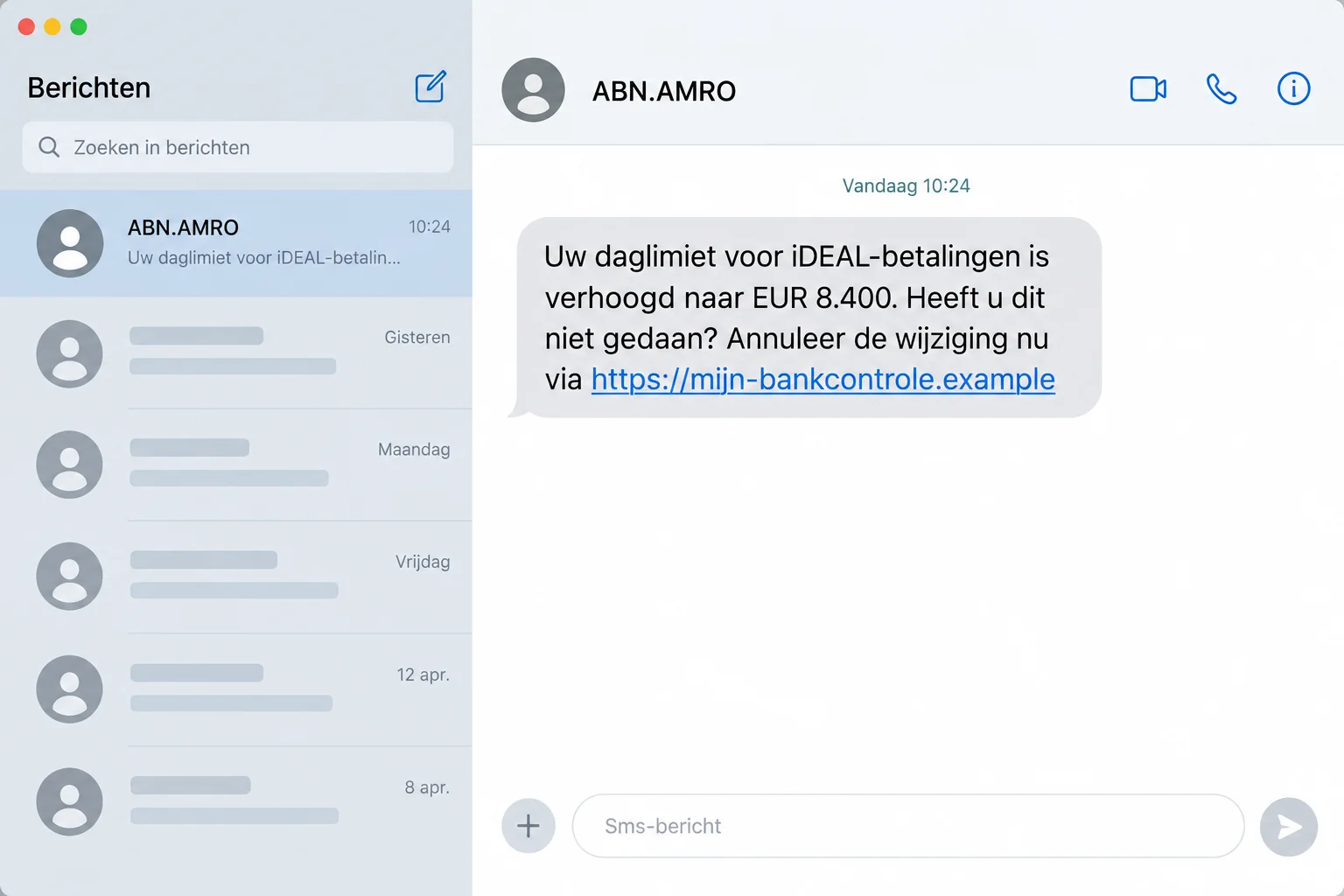
An ABN AMRO text says your daily iDEAL limit has risen to €8,400. You didn’t change anything, and there’s a link to cancel it.
The message makes doing nothing feel risky. Before following its instructions, open your banking app yourself and check which part of the warning is actually real.
Overview
An alarming limit change introduces a false cancellation link
The ABN AMRO limit text scam claims that a large payment limit has been enabled on your account. It then presents a link as the remedy.
The documented message uses €8,400 to make the situation feel urgent. The sender wants you to visit an unrelated website before checking your actual account.
This is impersonation of ABN AMRO, not evidence that the bank is running the scam. The alleged limit change comes from the fraudulent notice.
The reported example was confirmed as phishing
The published warning about this SMS records the bank’s confirmation that the supplied link leads to a fraudulent page.
The message uses an altered bank label and an ordinary mobile sender number. Those are additional clues, not the only way to recognize the deception.
ABN AMRO’s own phishing guidance explains how criminals use false email and SMS instructions to obtain information or induce unsafe actions.
The safest response doesn’t require trusting the SMS
- Check account activity and settings through the app you normally use.
- Do not sign in through the cancellation address in the message.
- Do not approve an unexplained request to reverse an alleged change.
- Contact ABN AMRO independently if anything in the real account looks unfamiliar.
The image is a generated example, with fictional interface details and a nonfunctional address. The actual reported link used a different domain.
An authentic account check can address a genuine security concern. You don’t need to accept the sender’s website as the place where that check happens.
The Trick Is in the Word “Cancel”
A request to increase a limit might make you suspicious. A request to stop an increase can feel like the responsible thing to do.
The scam reverses the emotional meaning of a risky action. Clicking an unfamiliar link becomes, in your mind, the step that prevents financial harm.
You may be thinking about the amount rather than the address. That is the advantage the sender gains by placing a large figure before the instruction.
But the message has not demonstrated that the change occurred. It has only said that it happened and offered its own route for responding.
A useful way to interrupt that pressure is to separate the claim from the proposed solution. You can investigate the claim without accepting the proposed solution.
Open the established banking app. If the account shows a real unauthorized change, the bank can help you address it from there.
If it does not, the text still deserves reporting. It does not deserve your login details just because its invented emergency sounds expensive.
How the ABN AMRO Limit Text Scam Works
Step 1: The sender claims a major account setting has changed
The text announces a higher daily iDEAL payment limit. For somebody who did not request that change, the obvious concern is that another person controls the account.
The €8,400 amount is part of the reported lure, not a universal marker. A different figure could be used to create the same reaction.
Similarly, the presence of a banking term does not establish access to bank systems. Criminals can describe a familiar feature without having changed it.
The message can reach someone who has no relevant account at all. A broadly distributed impersonation attempt doesn’t need to identify every recipient correctly.
Being an actual ABN AMRO customer makes the pretext more relevant, but it doesn’t make the delivery channel trustworthy.
Step 2: A cancellation instruction creates a deadline in your head
The sender tells you to cancel the change if you didn’t make it. That converts an alarming notice into a seemingly helpful task.
You may rush even without an explicit countdown. The possibility of a large payment can supply its own imagined deadline.
The wording also discourages independent checking. Going elsewhere can feel like delaying a cancellation, even though the supplied route hasn’t been verified.
Don’t let that framing decide your next action. A genuine security concern can be checked through a banking app or independently contacted bank representative.
You are not obliged to complete an unexpected form because it calls itself cancellation. The label doesn’t explain who receives its contents.
Step 3: The message directs you away from the genuine bank
The reported cancellation address was mijn[.]toegang-klant[.]com. Its Dutch wording suggests customer access, but the domain is not ABN AMRO’s official banking address.
Words such as customer, secure, login, or access can appear in an address registered by somebody unrelated to the organization being impersonated.
The link’s position inside a bank-themed text adds no authority. An attacker controls both the alarming claim and the destination placed underneath it.
In that reported address, mijn is a subdomain of toegang-klant[.]com. The customer-access wording doesn’t make it a subdomain of abnamro.nl.
Read an address as an address, not as a reassuring sentence. Familiar Dutch words can describe a banking task while belonging to an unrelated website.
When the full address is difficult to inspect on your phone, don’t guess. Leave the link unused and open the bank through the route you normally trust.
This also avoids mistaking a copied logo for ownership. The page’s branding and the website controlling the form are separate facts.
You don’t need to visit that destination to investigate it personally. Use the app already installed for your banking or navigate independently to the bank’s website.
Addresses can also disappear or redirect. A later failure to load does not make the original instruction genuine or tell you what happened during an earlier visit.
Step 4: A fake bank page can ask for access instead of cancelling anything
A fraudulent page may present a sign-in or verification task. Its appearance can make disclosure feel like a routine part of reversing the alleged change.
If you entered information, tell the bank what the form requested. Don’t wait for proof of a theft before reporting exposed banking details.
That distinction matters when assessing your own exposure. Entering banking credentials is different from opening the address and immediately leaving it.
Likewise, a request in your banking app should be read for what it authorizes. The web page’s cancellation story doesn’t change an approval’s actual purpose.
Stop if the process asks you to authenticate unfamiliar activity. Verification should happen through a route you selected independently, not a sequence arranged by the message.
Step 5: The sender may exploit whatever the victim provides
Shared login information or approvals can create account risks. A completed payment, installed application, or disclosed identity document adds a different problem to address.
Don’t assume all of those occurred just because the text arrived. Instead, reconstruct the steps you actually took after receiving it.
If someone later calls about the same incident, their knowledge isn’t proof that the call is legitimate. Details can travel within the fraudulent interaction.
Leave the entire supplied contact chain. A new number offered by the original message or caller is not an independent route back to the bank.
Your bank needs a factual account of the exposure. Describe what you typed, clicked, installed, approved, or paid rather than repeating what the page said it accomplished.
Small Details That Help, and Ones That Can Mislead
The altered sender label is a clue, not a complete test
The reported message uses ABN.AMRO, with a dot between the initials and the name. That differs from the bank’s usual presentation.
A future version could remove that error. Don’t conclude that a message is safe simply because its spelling and branding are tidier.
Sender labels and telephone numbers can also be manipulated. A familiar conversation heading should not replace checking the instruction and destination.
A real change should be investigated in the real account
If the app shows an unfamiliar setting, don’t dismiss it just because this particular text is fraudulent. Contact the bank promptly through an independent channel.
You could have two separate problems: a false message and account activity that needs attention. Neither one authenticates the other.
Tell the bank whether you personally initiated any recent limit change. Keep the time of your own actions separate from the time claimed by the SMS.
A successful-looking cancellation screen proves very little
A website can display a reassuring confirmation after you submit a form. That does not establish that a real banking setting was reversed.
Check the actual account and ask the bank about unfamiliar access. Don’t let a green tick on the supplied page close the investigation for you.
The same applies to an error message. It may not mean the information you entered was discarded; report the disclosure if it happened.
Before You Reply From a Shared or Family Phone
An alarming bank text can be forwarded between partners or relatives. The next person may see only the claim, without the original sender or destination.
If you are helping somebody, ask them not to use the link while you check. Don’t request their login credentials or ask them to read security codes aloud.
The useful task is organizing independent contact with the bank. The account holder can explain the issue and follow the bank’s own verification process.
Keep the original message available. A cropped screenshot may omit the exact domain, sender information, or time that helps distinguish this attempt from another.
If someone already acted, avoid arguing about whether the message should have looked obvious. Collect the sequence first; account protection is more urgent than assigning blame.
Also check whether the text was forwarded to anyone else who might follow the link. Warn them about the instruction without redistributing a clickable fraudulent address.
What to Do if You Have Fallen Victim to This Scam
-
Stop the cancellation process on the supplied website. Close it, refuse further authentication prompts, and don’t respond to a follow-up person using the same story.
You can still investigate a real limit concern separately. Leaving the false page is not the same as abandoning account security.
-
Open ABN AMRO through your established app or website. Review recent activity and any unfamiliar account changes without returning through the SMS.
Use the bank’s official contact options if you need assistance. Don’t use contact details copied from the alleged cancellation page.
-
Report entered credentials immediately. Tell the bank which information you supplied, including whether you submitted codes or approved a banking request.
Ask what needs blocking, resetting, or reviewing. Don’t assume that changing one password also removes every session, permission, or new device.
-
Identify transactions rather than trusting the fake notice. Record genuine transfers or pending activity in your account and report anything unauthorized.
Give the amount, time, beneficiary, and transaction reference. Ask the bank what urgent recovery or dispute options apply; reimbursement cannot be promised in advance.
-
Check the device if software was involved. If you downloaded a file or allowed remote access, stop the connection and use a trusted device for banking contact.
Malwarebytes can help assess malicious software. It isn’t a way to cancel a transfer or restore the secrecy of details already disclosed.
-
Preserve the original text and the actions that followed. Keep the sender, domain, time, and screenshots, but don’t put passwords or full banking identifiers in public posts.
Follow ABN AMRO’s official process for reporting suspicious messages. The bank can assess the attempt even when the false site no longer loads.
-
Review how the link reached you. Block or report the unwanted message after saving it. If malicious advertising was also involved, address that route separately.
AdGuard offers filtering that may reduce some risky web exposure. No filter makes it safe to approve a stranger’s banking request.
-
Keep later callers outside the trusted circle. A person promising to fix this incident still needs independent verification. Don’t pay a recovery fee to an unsolicited contact.
Where money or identity misuse is involved, preserve the bank’s case reference and report the fraud through appropriate official channels.
Frequently Asked Questions
Did the SMS really increase my iDEAL limit?
The text itself proves no account change. Check your real banking settings independently and ask ABN AMRO about anything you did not authorize.
Is the €8,400 figure always used?
No. It identifies one reported example, not every future attempt. A different amount can support the same false cancellation pretext.
Why is the cancellation link more important than the sender’s spelling?
Branding mistakes can be corrected by criminals. The essential danger is being directed to an unrelated destination and asked to trust its account-access instructions.
What if I clicked but never filled out a form?
Leave the page and don’t approve anything. Note any download or permission request. A click alone doesn’t establish that your bank login was stolen.
Should I trust a page that says the limit change was cancelled?
Not without independent confirmation. A false website can display success even though it has no authority to change settings at your bank.
Can I ignore a genuine unfamiliar change in the banking app?
No. Contact ABN AMRO through an official route. A phishing text doesn’t rule out a separate account-security issue that deserves urgent attention.
The Bottom Line
Don’t use the ABN AMRO limit text’s cancellation link. Its urgent €8,400 warning leads away from the real bank, not toward a trustworthy account check.
Open your normal banking app and investigate there. If you gave information or approved activity, tell ABN AMRO immediately what you actually did.

Join the discussion
0 commentsShare your experience or ask a question about this article.
Discussion
Start the conversation
Have a question or something useful to share? Add the first comment.