


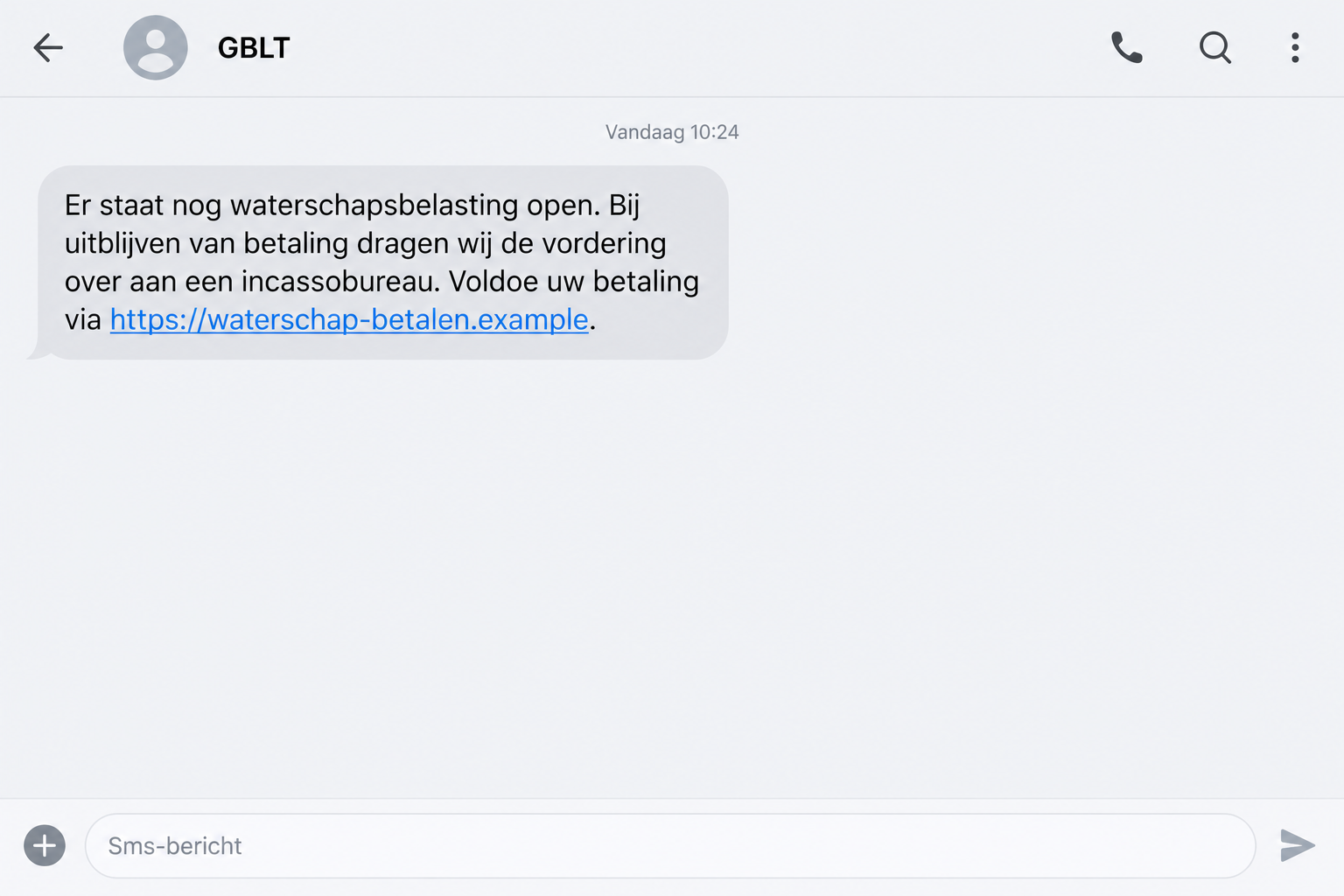
A text says your water tax is unpaid and a collection agency could become involved. There’s a link to settle it before things get worse.
It sounds like an unpleasant bill you should handle quickly. Before opening that link, look at where the supposed payment process takes you.
Overview
An Unpaid Water Tax Is the Starting Story
The GBLT tax text scam impersonates the Dutch organization handling municipal and water-board taxes. The message claims an outstanding bill needs immediate attention.
The collection threat pushes you toward paying before checking the debt. The link is presented as the way to avoid trouble.
The genuine tax collector is being impersonated. This warning concerns the fraudulent SMS and its payment route, not a claim that GBLT’s legitimate bills are scams.
Real tax responsibilities can exist while a specific message about them is false. You need to verify both the amount owed and the route used to pay.
The False Website and Payment Assistant Are Documented
Fraudehelpdesk’s warning describes a false website that collects personal information and then promises assistance with payment.
Multiple people who followed that process reported losing money. The money they sent through the false route was not a verified payment to the tax collector.
The warning does not describe every technical part of the assistant’s involvement. Don’t assume a specific banking app, remote-access program, or payment amount was used.
The established pattern is enough to reject this route: an impersonated tax demand leads away from genuine verification and into a deceptive payment process.
Details That Should Make You Stop
- A tax debt announced through an unexpected linked text.
- Pressure to settle it before a collection agency becomes involved.
- A website asking for personal information before explaining a verified bill.
- An assistant whose identity comes only from the same untrusted process.
- Payment instructions that you cannot confirm with the real tax collector.
The lead illustration recreates the message type with a nonfunctional example link. It is not an original SMS capture or proof of a particular tax account.
A changing sender number or web address should not become your only test. Reject the false route and inspect the underlying tax question independently.
If you already followed the instructions, note whether you shared information, approved a payment, or installed anything. Those actions require different responses.
Why a Collection Threat Is So Effective
People rarely enjoy dealing with tax bills. A message claiming an overlooked payment can produce anxiety before the recipient has checked whether anything is outstanding.
The mention of a collection agency adds a feared consequence. You may worry about fees, embarrassment, or an issue becoming harder to resolve.
That worry can make the link look like an escape rather than a request requiring authentication. Paying seems to promise an immediate end to uncertainty.
The scam also takes advantage of ordinary household administration. Someone else may usually handle these bills, so you can’t confidently remember the payment status.
A busy recipient might assume the tax is real because they live in the relevant region or remember receiving a bill before.
But being a plausible taxpayer is not proof that this sender represents the collector. Many people fit a broadly written tax reminder.
You don’t need to know the whole account history before refusing the SMS link. Start by asking the household’s usual bill handler to check the genuine record.
If that person is unavailable, use the tax collector’s official contact or account route. The threatening text does not get to choose the verification method.
Finding a real unpaid bill would still not authenticate the false website. You should settle genuine obligations only through a verified payment process.
That distinction lets you act responsibly without acting under the scammer’s instructions. You can address the tax question and reject the message at the same time.
How the GBLT Tax Text Scam Works
Step 1: A Text Creates a Debt Problem
The message presents an unpaid water-tax bill as something already established. It doesn’t begin by helping you inspect an authenticated account.
The collection warning then shifts attention from whether the debt exists to how quickly you can resolve it.
A sender label bearing GBLT may reinforce that impression. A displayed name is not sufficient evidence that the organization sent this message.
Do not send account details in a reply asking which bill they mean. That would give an unverified sender information they have not demonstrated they possess.
Step 2: The Link Opens a False Tax Website
The documented route leads to a counterfeit page requesting personal details. The tax-payment story gives those entries a seemingly administrative purpose.
A page can reproduce familiar words and branding without being part of the official service. The appearance tells you little about who receives submissions.
A web address containing a tax-related word is not a collector’s endorsement. Likewise, an encrypted connection does not make the operator legitimate.
The warning does not publish a definitive list of every destination. You don’t need such a list to avoid the link and find the real service.
If you open the page and notice the problem, stop before submitting anything. Closing it is useful even when you have already made the first click.
Step 3: An Assistant Gives the Payment a Human-Seeming Handoff
After the information stage, the false process promises an assistant will help complete payment. That adds reassurance to a route that still hasn’t been authenticated.
The assistant’s exact contact method isn’t established in the published warning. The role matters: someone inside the same deceptive journey appears to guide the next action.
Help can make a suspicious process feel less risky. A recipient may assume there is a real staff member available if anything goes wrong.
But an assistant introduced by the false website is not independent confirmation of that website. They cannot validate their own payment destination.
If assistance involves banking approvals, read those requests carefully and stop. Any claimed tax purpose should be verified outside the conversation.
Step 4: The Attempt to Settle the Bill Can Cost Real Money
Fraudehelpdesk reports monetary losses among people who followed the process. The supposed bill resolution therefore became a financial loss, not a verified tax payment.
That does not establish an identical amount or transaction method in every case. Preserve your own payment details instead of assuming they match someone else’s experience.
A completion screen is not evidence that a real debt has been cleared. Confirm your account status with GBLT separately.
If the false process asks for another payment to finish or correct the first, do not continue. Contact your bank about what has already happened.
The sooner you explain the transaction, the sooner the bank can assess its options. No assistant from the false website can guarantee recovery.
Verify the Tax Question Through the Genuine Collector
Use GBLT’s Own Website to Find the Right Route
Type gblt.nl yourself and locate the appropriate account or customer-contact option. Do not begin with a search result supplied by the SMS sender.
Ask whether any bill is outstanding and how it can be paid safely. Give only the information needed through the genuine channel.
If you have a previously verified assessment or letter, compare its details. Don’t use a phone number printed only on the suspicious message.
There may be a perfectly ordinary explanation for a genuine billing question. Independent checking lets you address it without funding an impersonator.
A Message Link Is Not the Same as a Tax Assessment
GBLT’s phishing guidance warns about fake reminders and remission messages that use links, QR codes, or payment accounts.
Its specific statement that it doesn’t send email payment links applies to email. The false SMS campaign is documented separately.
Don’t stretch one channel rule into a claim about every possible genuine communication. Check the particular request against the collector’s current instructions.
An official-looking title or a tax reference is not enough. You need a verifiable account record and an authentic payment destination.
Check Whose Money Is Moving and Where
Before any real payment, understand the beneficiary and amount through the approved tax-payment route. An assistant’s explanation does not override what your bank displays.
If the banking screen shows an unfamiliar recipient, stop and ask the bank or genuine collector. Don’t proceed merely to avoid the SMS threat.
When another household member owns the account, involve them before authorizing anything. A tax-related story does not give you permission to bypass normal approvals.
That check is also important if the tax amount happens to look familiar. A believable figure cannot authenticate a newly introduced destination.
Why “Helpful” Instructions Still Need Verification
The assistant stage can be persuasive because it appears to reduce the work. Someone else seems ready to walk you through an unpleasant administrative task.
A patient assistant can still guide you toward the wrong recipient. Confirm their role with GBLT before following any payment instructions.
You should be able to stop a payment process to verify it. Refusing to stay in the false journey does not prevent legitimate customer service later.
If the person wants a banking code, app approval, or software installation, treat the action on its own merits. Those requests have consequences beyond reading a bill.
Do not assume remote-access malware was used in this campaign. But if you actually granted remote access, tell your bank and arrange device review.
Similarly, a bank account number submitted to a form is different from a completed transfer. Describe both accurately so the bank can prioritize its response.
When helping an older relative, explain this distinction without blaming them. A person who understands the handoff can resist a second approach more confidently.
Agree who will contact the genuine collector and who will speak to the bank. Clear responsibilities prevent the false assistant from remaining the only apparent helper.
If the original text is still on the phone, preserve it privately and remove it from normal use. No one needs to keep revisiting its link.
What to Do if You Have Fallen Victim to This Scam
-
Stop working with the false payment assistant. Do not make an additional transfer or submit corrected information to finish the alleged tax settlement.
End any associated conversation and close the website. You can investigate a real bill without keeping that person involved.
-
Call your bank without delay if you paid or exposed banking access. Explain how the GBLT text led you to the website and assistant.
Give the actual amount, beneficiary, date, and transaction reference. Ask about blocking further misuse and investigating or recalling the payment where possible.
-
Record every action you took. Include form entries, passwords, approvals, downloads, and any permission granted to another person.
Do not describe a click as a transfer or omit a transfer because the screen called it verification. Precise details help responders.
-
Secure passwords that reached the false site. Change them using the real account services and address any reuse on email, banking, or other accounts.
Use provider support if access has changed. Review recovery details and available session controls rather than relying on a single password reset.
-
Check the genuine tax balance separately. Use GBLT’s official route to find out whether there is an actual outstanding assessment.
A payment to a scammer does not prove a real bill was settled. Ask the collector how to handle any genuine obligation.
-
Report the impersonation with usable evidence. GBLT publishes redactie@gblt.nl for suspicious-message reports. A private screenshot can show the SMS and its link.
Fraudehelpdesk accepts incident reports too. Preserve originals for your bank or police if there was a loss, keeping unrelated personal details out of public posts.
-
Review device exposure only where it applies. If an unexpected application or file was installed, investigate it with Malwarebytes or appropriate technical help.
If the web visit caused intrusive redirects or malicious-looking pop-ups, AdGuard may add browsing protection. Neither replaces bank recovery or account security.
-
Prepare for follow-up claims about the same debt. Someone may use information from your submission to make another approach sound related.
Verify the next contact independently. Decline paid recovery offers and promises that another transfer will release or reimburse the money.
Frequently Asked Questions
Is GBLT Itself a Scam?
No. The fraud impersonates the legitimate tax collector. Its false message and website should not be confused with genuine municipal or water-board tax obligations.
What Does the Fake Text Say I Owe?
The documented variant claims an unpaid water-tax bill and threatens referral to collection. Verify your actual account rather than accepting that claim as an assessment.
Who Is the Payment Assistant?
The warning describes an assistant offered through the false process, not an authenticated GBLT employee. Their exact identity and technical contact method are not established.
Have People Actually Lost Money?
Yes. Fraudehelpdesk reports losses among multiple people who followed this route. It does not provide one universal amount or payment method for every case.
What if I Really Have an Unpaid Tax Bill?
Resolve it through the genuine collector. A real debt does not make the SMS link or assistant legitimate, and a fraudulent payment may not settle anything.
Do I Need to Scan My Phone After Only Reading the SMS?
Reading alone does not establish device infection. Downloads, installed apps, unusual browser behavior, or granted permissions warrant a different review from simply receiving the text.
The Bottom Line
Do not pay through the GBLT tax text or its supposed assistant. The documented route is false and has already cost recipients money.
Check any genuine bill directly with GBLT. If you paid or exposed banking access, contact your bank now and preserve the transaction records.

Join the discussion
0 commentsShare your experience or ask a question about this article.
Discussion
Start the conversation
Have a question or something useful to share? Add the first comment.