


A virtual card number can keep your physical card number out of an online checkout. It won’t tell you whether the seller is real or stop a contract from renewing.
The distinction matters when a payment repeats, a merchant needs to refund you, or a reservation requires a physical card. Check how the card and the purchase work together.
Overview
A different number may still charge the same account
A virtual number can stand in for a card number during an eligible purchase. Charges can still appear on the underlying card account rather than a separate line of credit.
Depending on the issuer, a number can be reusable, restricted to a merchant, or suitable for a narrower purpose. A digital number isn’t necessarily temporary or single-use.
Find out which terms apply in the issuer’s app or help page. The label on the checkout button does not tell you how long that number works.
A limited number doesn’t make the merchant trustworthy
If a store never ships an order, the fact that it received a virtual number rather than your physical number doesn’t fix the delivery problem.
Check the seller independently before relying on either payment number.
Check the total amount, subscription terms, delivery promise, and return route before paying. A more private card number doesn’t make any of those promises easier to enforce by itself.
Don’t enter card details to discover what a suspicious site will do next. If you can’t identify the seller or verify the purchase, you can leave without testing the checkout.
Pick a number that fits what happens after payment
Some orders finish at checkout, while others involve later charges or an in-person card check. These differences determine whether a particular virtual number is a good fit.
Review four situations before using one:
- For a one-time purchase, check whether the merchant accepts it and whether the number can still be identified on the receipt.
- For a subscription, check whether the card supports recurring billing and cancel through the merchant separately.
- For an order you may return, keep the payment reference rather than going by the physical card’s last digits.
- For travel, rentals, or pickup, ask what card and identification you must present at the location.
Check What Your Issuer Actually Gives You
Find the number through a trusted route
Open the bank’s app or website as you normally would.
Do not enter your real card number into a website that claims it can generate a virtual replacement for any bank.
If the issuer offers several options, check which underlying account the number uses, what it can be used for, and who can suspend it.
Review whether the number has its own expiration date or security code.
Don’t copy those details to a note you plan to share with a merchant or someone helping with an order.
Separate browser checkout from in-person wallet payments
Google’s virtual-card guidance distinguishes eligible virtual numbers for online purchases from device-specific payment details used for tap-to-pay. The two don’t have to produce the same digits.
Don’t assume the number you see in a digital wallet will match the number a merchant used last week. Check which payment method the account actually shows for the transaction.
If a merchant verifies a pickup using a number associated with the original order, present only the information it needs through its normal process.
Avoid displaying full card details in a crowded store.
Turn on an eligible card in Google Wallet
Open wallet.google.com and select Payment methods. Choose a card you already recognize, then select Turn on if Google offers the virtual-card option.
Review the terms and confirm only if you want to activate it. If Turn on is missing, check eligibility with the issuer rather than adding the same card repeatedly.
To check which number Wallet shows, reopen Payment methods and select the card. Look for its virtual card details and compare only the last four digits with your receipt.
During a purchase in Chrome, select the virtual version from the payment methods offered. The issuer may ask you to verify your identity before Chrome fills the form.
Read the amount and merchant in any verification prompt before approving it.
An unsolicited code or a mismatch is a reason to stop and check the order in your merchant account.
Check what the security controls promise and what they don’t
Some issuers let you lock or delete a virtual number, limit use to a merchant, or manage a recurring charge. Those features and their exceptions differ.
Ask what happens to pending authorizations, later refunds, and payments from an existing agreement. Don’t infer the answer from a feature name like temporary or one-time.
If the account itself is compromised or the physical card is lost, tell the issuer.
Turning off a single number may not address access to the account or to other cards.
Use a Virtual Number for an Ordinary Online Order
Verify the merchant the same way you would with a physical card
Read the seller name, final price, tax, shipping and terms before selecting a payment method. A card feature can’t substitute for a reliable seller or clear delivery promise.
Where an item is listed on a marketplace, distinguish the marketplace, the seller and the business that will appear on the statement. Keep a record tied to your particular order.
If the deal doesn’t make sense or the merchant directs you outside the checkout to pay, stop.
A virtual card isn’t a reason to take a risk you otherwise wouldn’t accept.
Use an amount and number suited to the actual order
If your issuer offers spending controls, read how they apply to the actual amount. Shipping, deposits, partial fulfillment and changes you approve can affect how the charge appears.
For a physical item, consider whether the seller charges immediately or later at dispatch. A narrowly limited number may not fit an order with a later billing event.
Before confirming, check that you recognize the recipient and total.
If the payment fails, verify the reason with your own issuer rather than sending a different card through a new link.
Use the decision chart when the order includes a later charge, pickup, or refund. Those are often the points where a virtual number behaves differently from what a shopper expects.
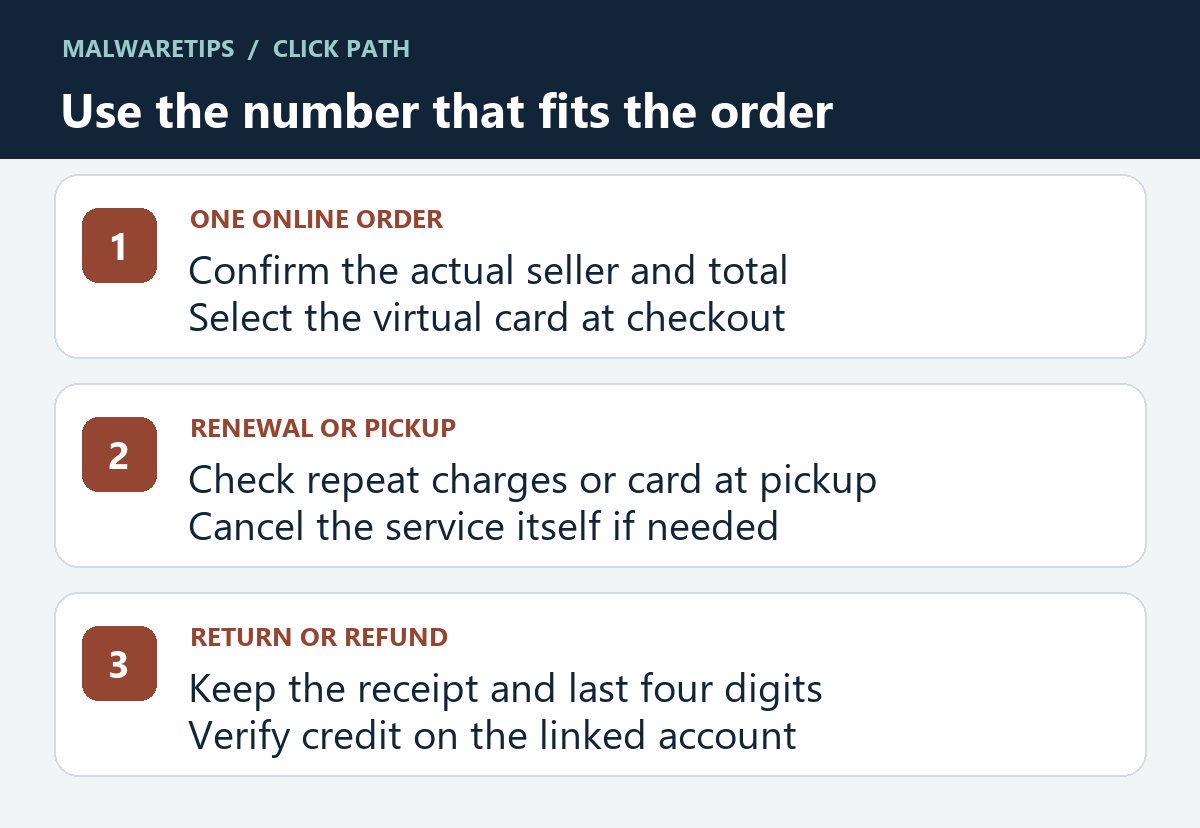
Keep the order evidence without storing the complete number
Save the receipt and the merchant’s order reference. Record the virtual number’s last digits only if helpful, and leave the full number and security code in the issuer’s own controls.
If you later need to establish which number was used, the issuer or wallet has more useful records than a new checkout.
An order receipt is often a better starting point.
That record can also help you distinguish a preauthorization from a settled payment. Don’t call an unfamiliar phone number just because an email claims that one of your payments failed.
Choose a Different Plan for Renewals and Reservations
A virtual number and a subscription agreement are separate
If you sign up for a recurring service, confirm the renewal date, price, cancellation method, and whether the virtual number accepts repeat charges.
Read the policy that applies to the offer.
Open the service through your own account and find the specific plan under billing or subscriptions. Use its cancellation control and save the effective date or confirmation before leaving.
Afterward, reopen the account and verify the plan shows canceled or an end date. Check the card separately for later charges, because disabling a number does not cancel your plan.
If a free trial becomes paid, a payment failure doesn’t tell you whether the provider still considers the agreement open.
Handle the subscription and the issuer’s payment controls as separate tasks.
Check the card-at-pickup requirement before booking
A merchant may accept a booking online but require a qualifying card or deposit at pickup. For hotels, rentals and similar reservations, verify those terms with the actual merchant.
Ask whether it accepts a virtual number for the reservation, what it needs at check-in, and whether any deposit will be taken on a different card.
Get the answer through the company’s verified booking channel. Don’t send your full card information to a contact who appears after booking and offers to fix a supposed card problem.
Decide what happens when a company charges in stages
An order might be split into shipments, or a reservation might include a charge filed later.
Review how your issuer handles those cases before picking a number designed for limited use.
If the store says it needs to change the payment, confirm whether the change is visible in your real order.
Don’t assume a text about a rejected charge came from that store.
If you choose a different method for a reservation or installment order, the reasons should be clear: how the merchant identifies your payment and when charges will occur.
Handle Returns or Unfamiliar Charges Without Sharing the Number
Start with the order and refund reference
For a refund to a disabled virtual number, keep the order confirmation and refund reference. Ask the issuer to check the underlying account for the credit.
When returning an order, check the merchant’s receipt for the payment used. Google’s guide notes that pickup or return verification can require the virtual number’s last four digits.
If you no longer see that number in the checkout view, look at transaction details with the issuer or wallet.
Do not rely on a screenshot of your current physical card.
Keep a dated refund acknowledgement and check the linked account for the credit. If it doesn’t show up as expected, ask the merchant and issuer to trace the original payment.
If the receipt shows digits different from your physical card, don’t assume the seller refunded somebody else. Ask for a reference and compare it with the issuer’s transaction details.
For a split order, check whether the refund covers the whole purchase or one shipment. Two partial credits may show up on different days without indicating an error.
Explain whether you authorized the order
An order that didn’t arrive is a different issue from a payment you never approved.
Tell the issuer what happened and supply matching evidence instead of guessing about the operator’s intent.
If you recognize the service but thought you canceled, keep the cancellation confirmation and renewal terms. If you never authorized the charge, report it through the issuer’s official fraud process.
Changing a virtual number does not undo a settled charge. Keep the transaction information and ask the issuer which payment controls and dispute steps apply to your situation.
Escalate if the underlying account was exposed
If a payment alert points to a number you don’t recognize, check what the issuer knows about it.
A virtual number may have different digits, but unfamiliar activity still deserves review.
If you think someone gained access to your bank or wallet account, tell the provider directly and secure the associated sign-in. Rotating one number doesn’t close an unfamiliar session.
Report actual fraud promptly and don’t assume a particular outcome or reimbursement. Ask which records the provider needs and how to verify the status of any action it takes.
What to Do Before Using a Virtual Card Number
- Verify the seller, price, delivery, and any cancellation or return terms before choosing a payment method.
- Check whether your issuer’s number works for the merchant, billing pattern, and amount.
- Confirm separate requirements for pickup, later charges, or a reservation deposit.
- Save the order reference and check which last digits the receipt identifies.
- Cancel any unwanted subscription with the merchant and keep its confirmation rather than only disabling the card number.
- Report unrecognized activity to the issuer through a known channel and preserve the records that explain it.
Frequently Asked Questions
Does a virtual card use a separate credit limit?
A virtual number attached to an existing card generally uses that card’s account. Check your issuer’s terms rather than assuming the number creates an independent credit line.
Is every virtual card number for one purchase only?
Different issuers handle single-use and reusable numbers in different ways. Check whether your number can be reused, restricted to one merchant, or used for recurring payment.
Will turning off the number cancel a subscription?
No, disabling the number isn’t the same as canceling the service. Use the provider’s cancellation process and preserve its acknowledgment.
What if a store asks for the card I used at pickup?
Find out what it accepts before placing the order. In some cases it may need the virtual number’s last digits, while a reservation can have other requirements.
Can I still ask about a refund after turning the number off?
Keep the original transaction reference and contact the merchant or issuer through verified channels. How they trace or post a credit depends on the payment and card arrangement.
Does a virtual card make an unfamiliar online shop safe?
No, it can reduce exposure of one card number, but cannot verify a seller or guarantee delivery. Check which company and terms apply before paying.
The Bottom Line
Use a virtual card number to limit which card details a merchant receives, not as a substitute for verifying the purchase. Check recurring terms and pickup requirements separately.
Keep enough of the order record to trace a refund or report a dispute. If access to your underlying account is in question, contact the issuer directly.

Join the discussion
0 commentsShare your experience or ask a question about this article.
Community experiences
Did this happen to you?
Your experience could help someone recognize the same scam. Submit a private report for our team to review.
I experienced this tooReports are reviewed before publication. Sharing publicly is always your choice.
Discussion
Start the conversation
Have a question or something useful to share? Add the first comment.