


A sign-in failure on Xbox or PlayStation doesn’t tell you whether the console has a problem or someone changed your account. First check the platform account from another trusted device.
Save any order or account-change records you can reach without delaying recovery. Restoring access, removing other sessions, and resolving a payment are separate parts of fixing the incident.

Overview
Confirm which account or device is affected
Your gaming console can show a local profile even when you cannot sign in to its online account. A working console is not proof that the account is secure.
If the platform’s official website accepts your sign-in but the console doesn’t, compare the console’s error and connectivity. Don’t factory-reset it before looking for an account or service explanation.
If you independently see an altered sign-in address, recovery method, or payment, use the appropriate account recovery route. The error on the console is no longer the most important clue.
Protect the email or device used for recovery
If someone can still open the email account that receives your resets, recovering your gaming account may not stop them from returning. Check that mailbox through its provider.
Use a device you trust to do that check. Don’t type new passwords into a browser or computer where you think you’ve installed an untrusted tool.
If you can’t reach the old email or verification device, tell official support. Avoid unofficial recovery sellers who ask for access to another account or payment outside the platform.
Record payments without confusing purchases with compromise
An unfamiliar charge might be a renewal, a purchase by someone in your household, or actual fraud. Identify the transaction through the platform and the card issuer.
Use these checks in the order your situation requires:
- Verify the account’s ability to sign in from outside the console.
- Secure the recovery email and confirm which sign-in methods you still control.
- Check order records and contact the relevant provider promptly for confirmed unauthorized charges.
- Review console sessions, purchase controls, and linked services after recovering access.
Check What the Platform Actually Recorded
Confirm an alert through a route that wasn’t in the message
Open the console provider’s account page by using a known destination. Check sign-in notices, security settings, and recent transactions instead of opening an unexpected email’s links.
If the account page indicates a recent change, save the date and the affected field. Don’t send yourself or someone else a copy of any passwords or codes.
If you see only an error, check whether the platform has a service interruption or whether the issue occurs on another connection.
A network failure can affect sign-in without changing the account.
Reconstruct the charge using the right date and account
Check Microsoft purchases in your account under Payment & billing > Order history. Choose the period containing the reported charge and open the order to compare its total.
On PlayStation’s website, sign in to Account Management, choose Transaction History, then select the account and date range. A matching subscription renewal may explain a charge without an account takeover.
Locate the order amount, date, and account used. On a card statement, the posted date may differ from the date the platform says the purchase was made.
Look through legitimate household profiles before assuming an order belongs to the account currently selected on the console. Compare subscriptions and add-on purchases with the statement.
The PlayStation unauthorized-charge guide distinguishes transaction history, renewals, family use and cases where somebody used payment details without the cardholder having an account.
Keep an evidence packet with only the necessary details
Keep the dates in the same time zone when making your notes. A purchase posted after midnight can show a different date without representing a second transaction.
If you recognize the game but not the amount, compare the order details with the receipt. An edition upgrade or recurring pass can appear separately from the base game.
The account that can still play the game may not own the purchase. Check the original buyer account before telling support that a purchase disappeared.
You may need an order reference, a date or a case number. Save those records securely before removing a payment method or changing settings when you can safely do so.
If a payment is unfamiliar and ongoing, contact the issuer through a known number or app without waiting to collect everything. Tell it what you actually verified.
If you receive an unsolicited request to verify a console purchase, don’t use the message to call billing support. Find both the platform and the financial provider independently.
Recover the Microsoft Account Used for Xbox
Start with Microsoft account recovery, not a console reset
The Xbox profile you use to sign in is linked to a Microsoft account. Start with the account, even if you first noticed trouble when opening your games.
From a trusted device, open Microsoft’s sign-in helper, enter the email or mobile number for the Xbox-linked account, and continue. Use the recovery route the tool presents.
If Microsoft offers a verification method you control, complete the challenge yourself and set a new password if prompted. If the method isn’t yours, don’t try to use it.
Use the recovery options Microsoft offers when the helper cannot establish your identity. No outside service can legitimately guarantee a way around the platform’s identity checks.
This diagram separates recovering the account from signing out existing sessions. You often need both, because opening the account on your device doesn’t log someone else out.
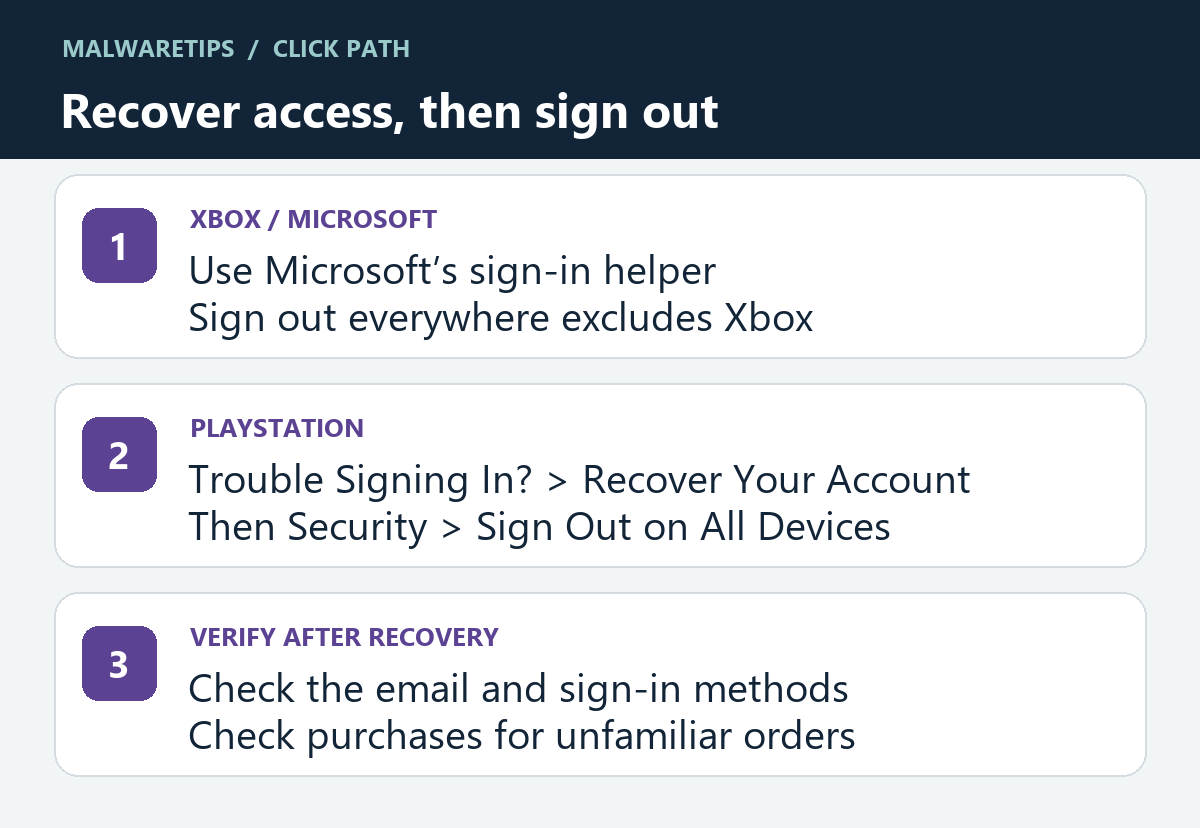
If you think an untrusted download affected the computer you used, don’t use that computer for new credentials until it has been addressed.
Recovery and device cleanup can be separate jobs.
Review which evidence you can still access
When the account is recoverable, check the sign-in information and which methods can be used to verify it. Don’t remove your only dependable method before adding a supported replacement.
If an email address, phone number or recovery route was changed and you cannot get back in, use Microsoft’s own recovery instructions.
Don’t pay for a claim that someone can bypass them.
For a record of a charge, open the Microsoft account or billing support directly. If an order isn’t yours, use the platform’s guidance and contact your card issuer when appropriate.
Remember that signing out online has a console exception
After recovering access, open Additional security options in the Microsoft account dashboard. Scroll to Sign out everywhere and choose Sign out, then confirm if prompted.
Microsoft’s sign-out guidance says this may take 24 hours and does not sign out an Xbox console.
On an Xbox you can reach, press the Xbox button, open Profile & system, select your profile, then choose Sign out. If it’s stolen, contact Xbox support separately.
Once you can sign in safely, check the console itself and review the store access appropriate for your household.
Recovering the account doesn’t automatically set every purchase preference the way you want it.
Recover a PlayStation Account and Review Its Consoles
Use the recovery route that fits what you still control
If you still control the sign-in inbox, open PlayStation Account Management. Choose Trouble Signing In? > Recover Your Account and enter your sign-in email address.
Open the verification email you just requested, use its reset link, and finish resetting the password. Test a sign-in from a separate trusted browser tab before continuing.
For a lost passkey device, sign in using another device with your existing verification method, then register a replacement. If no method works, use PlayStation’s Online Assistant.
If a child uses the account, determine whether the family manager needs to handle the recovery. Don’t try to solve it by sharing an adult account’s credentials.
Separate sign-out from license and device changes
Sign in to PlayStation Account Management, choose Security from the sidebar, then select Sign Out on All Devices and confirm. Sony’s example shows the position of the control.
Expect to sign back in on your own console. Check that the account email and your sign-in methods still match, then review recent transactions before restoring household settings.
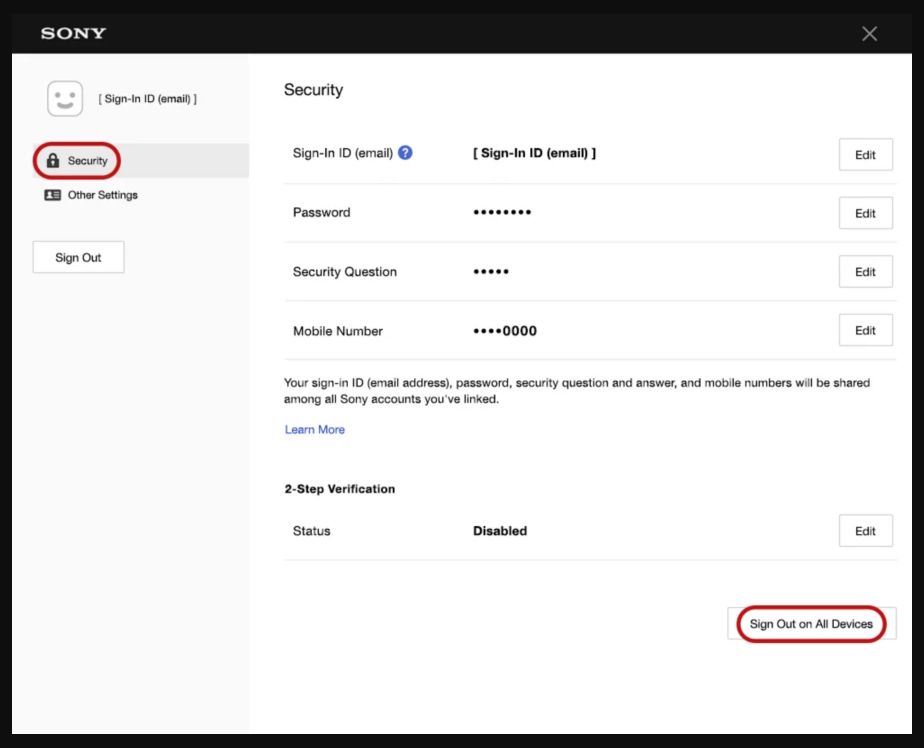
Remote deactivation changes which consoles can use certain licenses. It changes console activation and can affect sharing, so use it only if that is the problem you need to solve.
In Account Management, choose Device Management > PlayStation Consoles > Deactivate All Devices when needed. Sony’s deactivation guide explains the limits and what you’ll need to reactivate afterward.
If your console was stolen, follow the provider’s stolen-console guidance and appropriate local reporting. Don’t confront anyone or send credentials to a person who claims they found it.
Give the platform useful facts about the payment
Tell support whether you know the account, whether you see the order in transaction history, and whether the card appears on other profiles you control.
PlayStation separately describes cases where a payment reversal can lead to suspension during an investigation.
That possible consequence is not a reason to delay reporting genuinely unauthorized activity to your issuer.
Ask the relevant provider about the appropriate dispute route and retain the records. A disputed charge is not automatically refunded simply because the account was recovered.
Rebuild the Setup Without Undoing the Recovery
Verify your access from more than one place
On PS5, use Settings > Users and Accounts > Account > Sign in. On PS4, open Settings > Account Management > Sign in. Check that you loaded the intended profile.
After recovery, check that you can sign in through the provider’s website and your own console. Look at the sign-in methods and account email before marking the issue resolved.
Enable a supported stronger sign-in option if you can also maintain recovery access. Don’t switch off the only method that works on the assumption every device already supports its replacement.
Review linked services and apps you actually recognize. Remove unexpected connections through official account controls rather than approving a new request sent by a stranger who promises to restore games.
Restore the household setup deliberately
Check family spending limits, whether purchases require approval, and which profiles can use saved payment methods. Test controls with displayed settings instead of making an unnecessary purchase.
If you previously used a console-sharing feature, confirm which console it now covers. An account recovery can change access patterns without proving that your purchases themselves were lost.
Tell family members that support won’t need their password or a verification code in an unsolicited chat. Give them the official route if a similar message appears again.
Know what to collect if the account changes again
After confirming your email and recovery methods, make sure you still control the inbox used to restore the account. Check for unfamiliar forwarding and security alerts in that inbox.
If more than one family member uses the console, give each their own sign-in and purchase controls. A child playing on the buyer’s account can complicate both billing and recovery.
If you lost access after a console purchase or service outage, note the exact error. Avoid resetting the console while you’re checking the account email and orders.
Save the new incident time and preserve earlier support case numbers. Verify whether the recovery inbox, a linked account, or another trusted device still has unexpected activity.
Do not repeatedly change unrelated settings to chase one vague sign-in error. A new altered recovery method and a console failing to connect need different support conversations.
If other accounts reused an exposed password, change that reuse through their official sites. Use a different password or supported sign-in method for each important account.
What to Do If Someone Accessed Your Gaming Account
- Verify whether you can reach the platform account and your recovery email from a trusted device.
- Record any actual account changes or new orders and contact the card issuer promptly if you confirm unauthorized payment activity.
- Follow the account recovery process for Microsoft or PlayStation, explaining any verification method you no longer control.
- Review native device and session controls once you regain access, taking the Xbox sign-out exception into account.
- Confirm the legitimate console, linked services, and family purchase controls you mean to keep.
- Save support acknowledgements and check again for unfamiliar activity before considering the incident closed.
Frequently Asked Questions
Does an error on my console prove someone got in?
No, connection and local profile problems can prevent sign-in. Check the account through its official site and look for changes you can confirm.
Will resetting my Xbox or PlayStation recover my account?
Resetting hardware isn’t the same as recovering an online account and can remove local data. Use the platform’s recovery process first, especially if login details changed.
What if I can still open the account but my email changed?
Verify the change from within the official account view and contact the platform promptly. Secure the mailbox used for recovery as a separate step.
Does Microsoft sign-out everywhere remove every Xbox session?
Microsoft excludes Xbox consoles from the general sign-out option. Check its Xbox-specific guidance, especially if you cannot reach a console that has your account.
What if I see a payment but don’t own a platform account?
Contact your card issuer and the platform through independently verified support. Do not create a new account or open a message link merely to try to find the payment.
Should I pay a service to restore a hacked gaming account?
Use the platform’s own recovery process or support. A stranger asking for passwords, codes, or side payments has not demonstrated any legitimate ability to restore it.
The Bottom Line
Recover the online account and its sign-in methods before treating the console itself as the problem. Keep payment evidence and report actual financial activity through the proper provider.
Once access is restored, check sessions, household settings, and saved payment methods separately. Then verify that your own account and console behave the way you expect.

Join the discussion
0 commentsShare your experience or ask a question about this article.
Community experiences
Did this happen to you?
Your experience could help someone recognize the same scam. Submit a private report for our team to review.
I experienced this tooReports are reviewed before publication. Sharing publicly is always your choice.
Discussion
Start the conversation
Have a question or something useful to share? Add the first comment.