


An IRS Identity Protection PIN helps prevent a false return in your name. You’ll need the right year’s number when you file your own federal return.
Treat the PIN as a filing credential, not something to collect once and forget. Check whether you need it, how to retrieve it, and whose return information it belongs with.

Overview
The year you file can differ from the year on the return
The IRS assigns an IP PIN for a calendar year.
If you file a covered prior-year return during the current calendar year, the current filing credential is the one that matters.
Imagine that you prepared one return and then had to file it after the calendar changed.
The year printed on your tax forms did not change, but the applicable IP PIN may have.
Keep a reminder to check the code before submitting, especially if you are catching up on returns, amending a return, or filing later than usual.
The IP PIN is not a passcode for your IRS account
You may need to sign into an official account to obtain an IP PIN. The IP PIN itself is for federal return identity verification, not a password for that account.
It also isn’t the same as the previous-year adjusted gross income or another credential that tax software may request. Read the label before entering anything.
If you receive a message asking you to confirm an IP PIN, don’t send it back to the message.
Use the IRS’s own website or your established tax preparer to check the request.
Each person on a return can have different requirements
One spouse may have an IP PIN and the other may not. A dependent can have a separate IP PIN, and instructions differ for electronic and paper filings.
Before a filing appointment, separate four questions:
- Check whether the IRS assigned a PIN or you enrolled voluntarily.
- Check which calendar year you will actually submit the return.
- Confirm which taxpayer, spouse or dependent the requested credential belongs to.
- Check whether you should retrieve an existing PIN, request one, or seek reissuance.
Get a Code or Retrieve the One Already Assigned
Use the official location instead of a message or an advertisement
The IRS’s IP PIN page explains eligibility, identity checks, and enrollment. The IRS does not charge you to get an IP PIN through its program.
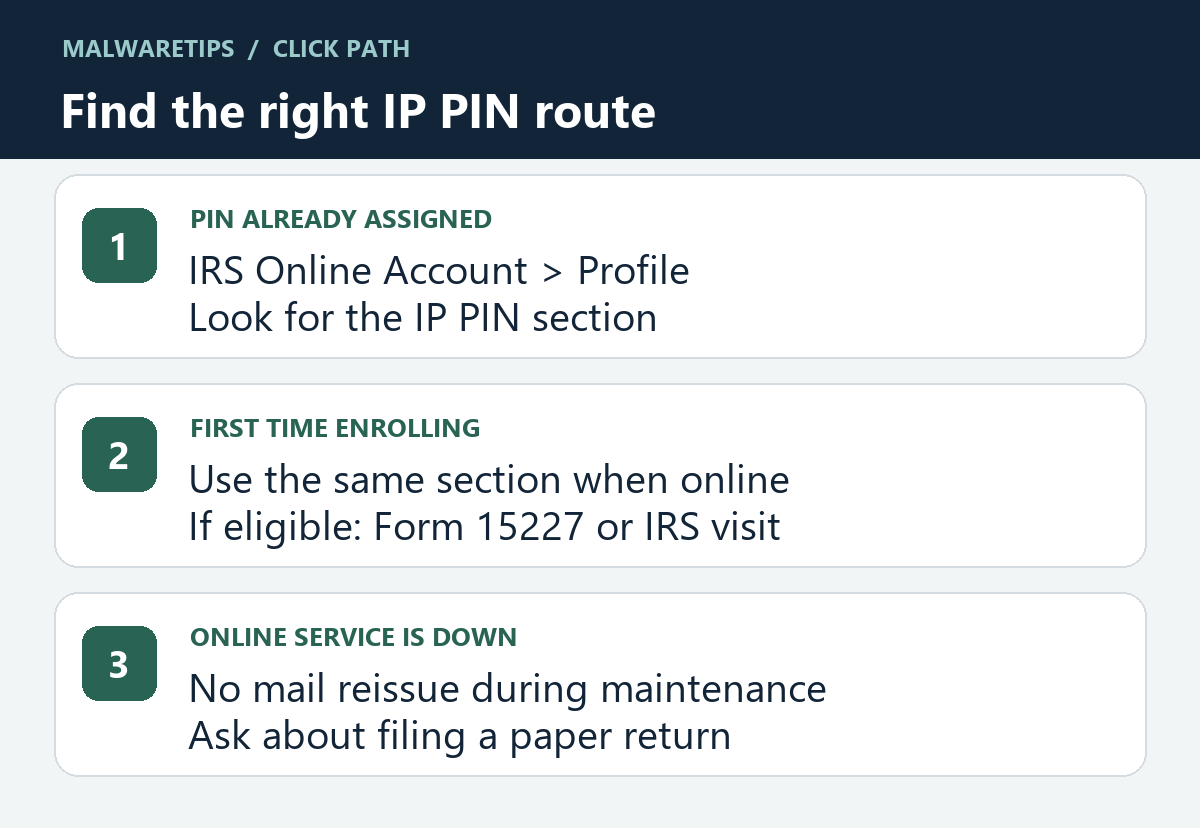
When the system is available, open the IRS Online Account. Sign in, open Profile, and find the IP PIN section. Use the number currently assigned to you.
If you have never enrolled, use that same section to request an IP PIN and complete the IRS identity checks. Keep the issued number with your private tax records.
You don’t need to give someone a taxpayer identification number as a test of whether their advice is genuine. The IRS explains what you need on its own site.
Check the current system status before depending on online access
As of November 23, 2026, the IRS lists planned online IP PIN system maintenance from November 16, 2026, until mid-January 2027.
Check the current IRS notice before making a filing decision.
An outage notice is not evidence that your identity was stolen or your PIN was canceled.
It can mean that the usual online retrieval route is unavailable for everyone during that period.
The IRS cannot reissue a PIN by mail during that maintenance period.
If you need to file now and cannot retrieve it, the IRS describes a paper filing route without it.
Discuss timing and any filing deadline with the IRS or a qualified preparer. A paper return missing an assigned PIN will require additional identity verification and may delay your refund.
The diagram distinguishes enrolling, retrieving an assigned PIN, and what to do if maintenance blocks retrieval. Those routes cannot be used interchangeably.
Separate alternate enrollment from reissuance
For first-time enrollment, check the income and identity conditions on the official Form 15227. If eligible, complete the form using your own contact details and submit it through the IRS.
If you don’t qualify or can’t use the form, make a Taxpayer Assistance Center appointment. Bring government-issued photo identification and a second ID; dependents also need their own documentation.
If the IRS issued a PIN already, start with its lost or missing IP PIN instructions. Reissuing an existing credential is not the same as joining the program.
Outside the maintenance window, call the IRS reissue line at 800-908-4490 from the U.S. if online retrieval isn’t an option. Check the current hours before calling.
An IRS assistor will verify your identity and confirm whether mail reissue is available. Flag a recent move before relying on anything mailed to the address on file.
Do not submit Form 15227 to replace a PIN already assigned to you. A first-time opt-in form won’t substitute for retrieving or reissuing the existing code.
The IRS lists cases where it cannot reissue a PIN by mail and describes further steps.
Read those conditions if you can’t retrieve yours rather than mailing a return by guesswork.
Organize the Right PINs Before You Submit
Identify each person who actually has one
The IRS IP PIN FAQs explain separate PINs for taxpayers on a joint return and instructions for dependents.
If you assemble information for several people, keep the numbers labeled privately by person and calendar year.
Don’t copy one spouse’s PIN into another person’s field to get past a warning.
When filing electronically, check the provider’s instructions for a dependent with an assigned PIN. The IRS does not require a dependent’s IP PIN to be entered on a paper return.
Confirm the rules for this kind of filing
An extension request, a state return, and an eligible federal return do not all use the IP PIN in the same way.
Follow the instructions for the form you are actually submitting.
The IRS says Form 4868 and state tax returns don’t use the federal IP PIN. Its FAQ also addresses the IP PIN requirements for an amended federal return.
Tax software may call the field Identity Protection PIN rather than only PIN. Make sure that you’re looking at the correct person’s field, not a separate electronic-signature box.
Put a late return in the right calendar year
Suppose you work on a prior-year federal return in December and don’t submit it until the following year. Don’t rely on a code you copied into an earlier draft.
Check which PIN the IRS assigned for the calendar year of submission.
Ask your preparer how it will update the return if an unexpected delay takes it across the end of the year.
If you submit multiple returns, keep track of which actually went through and which are still drafts. A saved copy and an acceptance acknowledgement tell you different things.
Understand What Happens After an Enrollment Choice
Learn whether you need to retrieve a new number proactively
The IRS describes continuous and one-time options for eligible voluntary enrollment. One-time enrollment ends with that calendar year, while continuous enrollment means the protection covers future years as well.
If you joined online, don’t assume the IRS will mail a new notice automatically. Check the method the IRS says applies to the way you were enrolled.
The CP01A notice is used in some situations, including enrollment of confirmed victims.
If the IRS says a notice was issued but you haven’t received it, use the official missing-PIN process.
Handle a minor’s PIN as a separate planning decision
A parent or legal guardian can request a PIN for a dependent using routes the IRS describes.
If you enroll a dependent in person, bring two forms of identification for the child. The IRS lists a birth certificate and Social Security card as examples.
When the teenager will submit a return themselves, agree on a private way to retrieve that year’s code. A shared folder with tax documents doesn’t need to contain the PIN.
The process for a minor differs from the online account route available to eligible adults.
For a minor’s assigned IP PIN that is lost or not received, the IRS directs taxpayers to call for reissuance rather than retrieving it online.
Check the IRS reissue hours and restrictions before calling.
Plan for any necessary identity or guardianship documents rather than sending them to an unknown preparer, service, or advertisement. Use the actual IRS instructions to find the appropriate path.
Don’t assume you can opt out to resolve a rejected return
Voluntary participants may have an opt-out option if eligible. The IRS distinguishes their situation from people enrolled because of tax-related identity theft.
Check the current status instead of skipping the field or repeatedly sending the same return.
If the rejection identifies a person on the return, verify the assigned number for that person.
If you think someone already filed using your identity, consult the IRS’s identity theft guidance or a qualified practitioner. A new filing credential alone doesn’t resolve a previously submitted return.
Keep the Credential Private While Getting the Return Filed
Share it with the preparer you actually hired
A trusted preparer handling your return can need the code. Use the secure channel you already arranged, or verify a new upload request through that office’s known number.
If someone contacts you unexpectedly and claims that a refund depends on reading out a PIN, do not give it to them.
Bring the question to the IRS or your preparer independently.
The IRS may call to verify identity in a process you initiated with an eligible form.
That isn’t permission to send a PIN in response to an unrelated call or link.
Record that you have the right year without copying the secret everywhere
Your filing checklist can say that the PIN has been retrieved for the required year without recording the digits in the checklist itself.
If you need a private record, store it where you keep other sensitive tax information. Avoid forwarding copies of the notice or putting its contents in shared reminders.
If a preparer changes or closes a portal, don’t follow a new unsolicited link by default. Confirm the correct place to send information before sharing it again.
Track the filing result independently of tax refunds
A preparer’s portal might show that the document was uploaded before the IRS has received or accepted anything.
Ask which status indicates an IRS acknowledgment rather than intake by the preparer.
If a PIN error names your spouse, check your spouse’s assigned code and the taxpayer position on the return.
Don’t replace both numbers or send a second return without resolving the first.
A successful IP PIN entry is one requirement in the filing process. It does not establish that a return was accepted or that a refund will arrive sooner.
Keep any acceptance or rejection record securely and review the reason if a return does not go through. Don’t submit a guessed number because a filing deadline is close.
Follow the directions for your own return if multiple issues apply. General information about a fraud-prevention program cannot establish how a particular deadline, extension, or filing method applies to you.
What to Do Before Filing With an IRS IP PIN
- Confirm the filing calendar year and identify everyone on the return who has a separate IP PIN requirement.
- Use the official IRS website to check availability and choose enrollment, retrieval or reissuance as appropriate.
- Verify the correct person’s number and match it to the correct federal return field.
- If a trusted preparer needs it, transmit the credential only through the secure channel you’ve confirmed.
- Look at acceptance or rejection independently and correct the specific issue before resubmitting.
- Set a reminder to check the new code before the next calendar year’s filing.
Frequently Asked Questions
Do I use the number from the year printed on an older return?
Use the current calendar year’s IP PIN for an applicable prior-year return filed now. Check IRS instructions if the date or method of filing changes.
What if my spouse has a PIN and I don’t?
Enter the assigned PIN for the person it belongs to, following the instructions for your method of filing. Do not reuse their number in your own field.
Is the IP PIN the code I use to sign into IRS Online Account?
The two codes serve different purposes in the filing process. The IRS account lets you access services, while the IP PIN helps the IRS verify identity on certain federal returns.
What should I do if the online service is down?
Read the IRS’s maintenance and reissuance notices for current options. If a deadline is approaching, ask the IRS or your trusted tax professional about your specific situation.
Does my child’s number go on every type of return?
No, the IRS distinguishes electronic filing from paper filing for dependents. Use the current instructions for the specific return and the person for whom the PIN was assigned.
Can I give my PIN to someone who calls about a refund?
Don’t share it with an unsolicited caller. A verified preparer completing your return can need it, but use a secure channel you confirmed independently.
The Bottom Line
An IP PIN is most useful when you plan for it before submitting a return.
Check who has one, which calendar year applies, and how the IRS says to get it.
Keep the credential private and get confirmation of the filing result separately. If there is a deadline problem or an identity theft issue, seek advice on your specific return.

Join the discussion
0 commentsShare your experience or ask a question about this article.
Community experiences
Did this happen to you?
Your experience could help someone recognize the same scam. Submit a private report for our team to review.
I experienced this tooReports are reviewed before publication. Sharing publicly is always your choice.
Discussion
Start the conversation
Have a question or something useful to share? Add the first comment.