


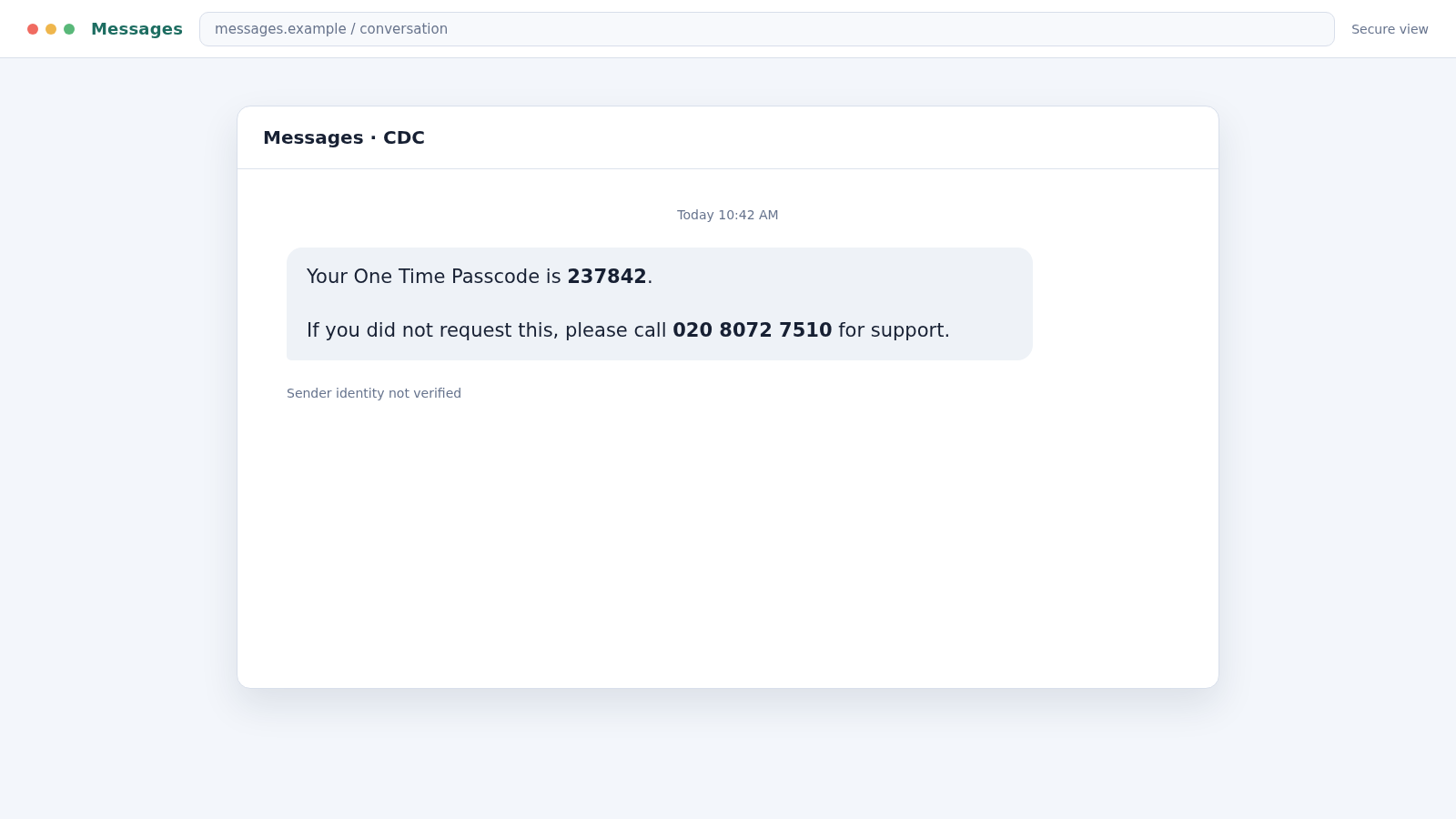
A six-digit code appears in a text you did not request. The message looks automated, carries the sender label “CDC,” and offers 02080727510 as the support number if something is wrong.
Calling feels like the cautious response. In the 02080727510 scam text, however, the support line is not the safety net. It is the entrance to the scam.
Overview
The unexpected passcode is used to manufacture alarm
The 02080727510 scam text claims that a one-time passcode was generated for an account or transaction. Because the recipient did not request it, the message implies that someone else may be trying to log in.
That possibility creates a strong urge to react. Instead of asking the recipient to click a suspicious link, the message provides a London-format callback number and frames the call as the responsible way to protect the account.
The letters CDC do not identify a verified organization
An SMS sender label can be copied or manipulated. “CDC” may remind different recipients of a health agency, company, card service, or security department, but the label alone does not establish who sent the message.
The text commonly omits the exact account, organization, user name, and event that supposedly produced the code. That vagueness is useful because the same lure can be sent to people who use different banks and online services.
The callback lets the scammer choose the next story
Once someone calls, an operator can ask which bank, email provider, or service the person uses. The scammer then adapts the story and pretends that the passcode came from that account.
Common warning signs include:
- A passcode text for an action you did not start.
- A support number placed inside the same unexpected message.
- No clear account name or transaction details.
- A caller asking you to read back the code.
- Requests for a password, PIN, card number, or screen-sharing access.
- Pressure to move money into a “safe” account or approve a security test.
What an Unrequested One-Time Passcode Really Means
A genuine one-time passcode can indicate that someone entered your username and password, attempted a payment, or began an account-recovery process. It can also result from another customer typing the wrong phone number.
The code itself is a second lock. Someone who already has a password may still need that temporary code to complete the login. That is why a genuine company representative should not need you to read it aloud.
The Federal Trade Commission advises people not to share verification codes and not to use a callback number supplied by an unexpected caller or message. Open the official app, type the known website yourself, or call a number from a statement or card.
There is another possibility: the entire passcode event may be invented. A scammer can generate a random number and format a message to resemble an automated security alert, even when no real account login occurred.
How the 02080727510 Scam Text Works
Step 1: A vague security text reaches a large audience
The campaign sends short messages to many mobile numbers. A typical version says, “Your One Time Passcode is…” and instructs anyone who did not request it to call 02080727510 for support.
The sender does not need to know which services you use. Almost everyone recognizes the language of login codes, so the message can feel relevant without naming a real account.
Step 2: The recipient calls to stop a suspected takeover
The callback format is the clever part. People are often trained not to click links in suspicious texts, so a phone number can seem safer. It also moves the conversation away from written evidence.
A number beginning with 020 resembles an ordinary London landline, but the displayed or advertised number does not prove where the operator is located. Calls can be forwarded, handled through internet telephony, or associated with a temporary service.
Step 3: The operator discovers which story will work
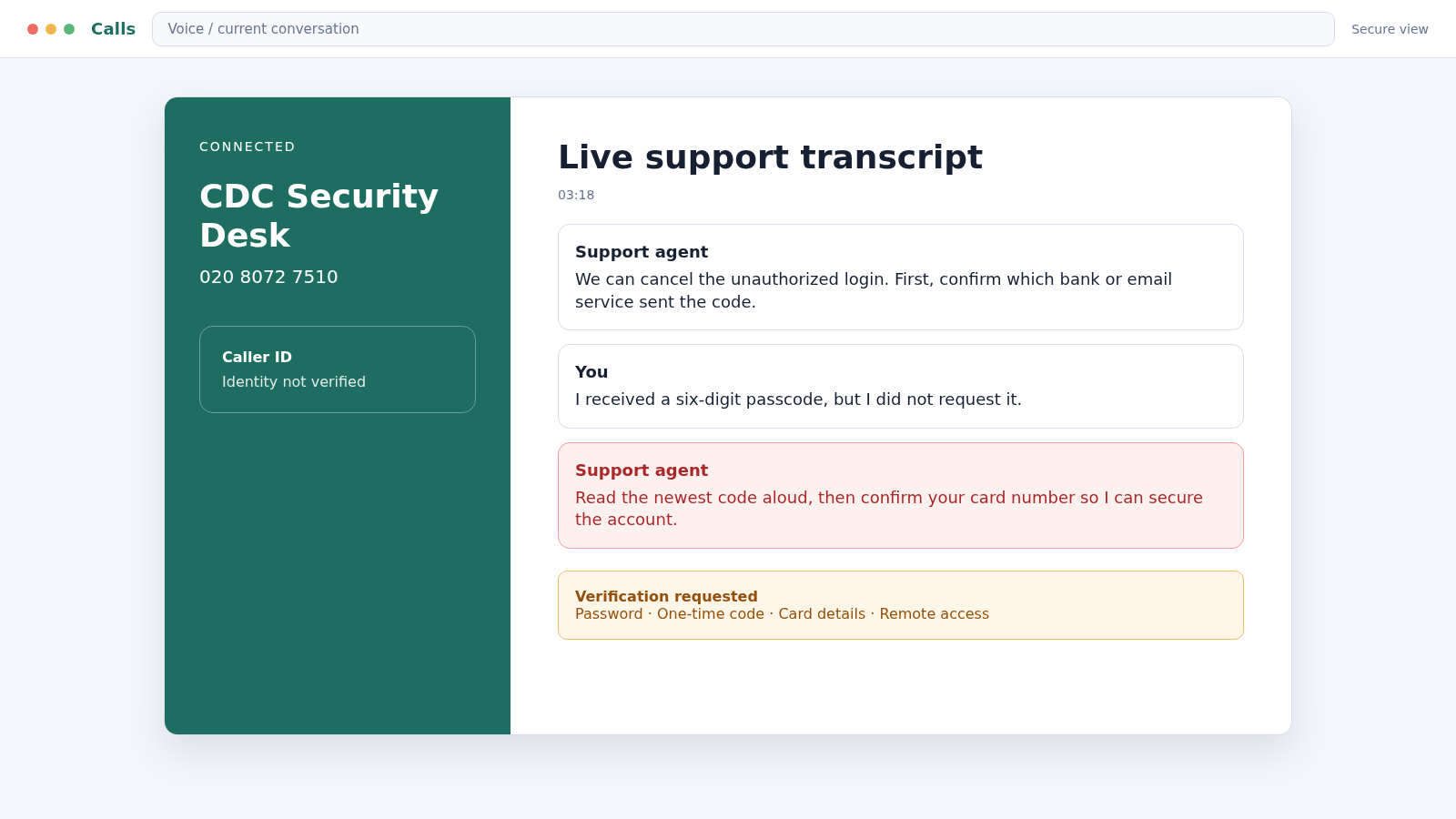
The supposed agent may ask what account you were using, where you bank, or which device received the code. These questions sound diagnostic, but they provide the information needed to personalize the impersonation.
If you say the code might relate to online banking, the caller becomes a bank security specialist. If you mention email, the caller shifts to an account-recovery story.
Step 4: Personal details are collected as “verification”
The caller may request your full name, date of birth, address, email, card digits, or security answers. Each question is presented as a necessary step before the suspicious request can be canceled.
Those details can support identity theft, password resets, targeted phishing, and later calls that sound even more credible. The operator may already know some information from a leaked database and ask you to complete the rest.
Step 5: A real login or payment is triggered
While keeping you on the phone, the scammer may attempt to sign in to your real account using a known or guessed password. That action produces a genuine code from the real service.
The caller then says a second code is required to cancel the fraud. In reality, reading it aloud can authorize the scammer’s login, password reset, digital wallet enrollment, or payment.
Step 6: The victim is kept busy while the account is changed
After receiving the code, the operator may ask you to stay on the line, turn off notifications, or avoid opening the app. This delay gives the scammer time to change contact details, add a device, or move funds.
Some callers request remote-access software and claim they need to inspect the phone or computer. Remote access can expose saved passwords, email, banking sessions, and private documents.
Step 7: The security problem becomes a money emergency
The caller may claim that funds must be moved to a protected account, a suspicious transfer must be reversed, or a small test payment is required. No legitimate security team protects money by asking a customer to transfer it to an unfamiliar account.
Other versions request card details or a payment to replace a compromised account. The urgency is designed to prevent you from ending the call and contacting the real provider.
Step 8: Follow-up messages target the newly exposed accounts
If the scammer obtains a working password, code, or personal details, the campaign can continue through email, messaging apps, and banking calls. Your contacts may receive messages sent from a compromised account.
Even a caller who gets no money may mark your number as responsive. That can lead to more convincing fraud alerts, parcel texts, bank impersonation calls, and recovery offers.
What the Caller Can Do With the Information
A name, address, and date of birth can help a criminal answer weak identity questions or build a more convincing second call. The details become more dangerous when combined with information from an earlier data breach.
A card number can support attempted purchases, but the caller may also request the expiry date, security code, billing address, and one-time passcode needed to complete a transaction.
Email credentials can unlock password resets for many other services. Once inside the mailbox, an attacker can search for bank names, invoices, travel plans, identification documents, and conversations that reveal trusted contacts.
A one-time passcode has a very short life, which explains the caller’s urgency. The operator may interrupt, count down, or claim the case will close because the code must be used while the attacker’s real login is waiting.
Remote access is especially serious because it lets the scammer observe what appears on the screen. The person may see authentication codes, saved passwords, account balances, and new passwords as they are entered.
Company, Address, and Fulfillment Checks
The CDC sender label is not a verified identity
Short labels in a messaging inbox can be spoofed or reused. The message should name the exact service, provide context you can verify inside the real account, and never require disclosure of a one-time code.
Do not assume the message came from a government health agency or any company with those initials. Verify through an official site you already know.
A London-format number is not proof of location
The 020 prefix identifies a London numbering range, not the physical location or legitimacy of the person answering. Internet-based calling can route a number to a call center anywhere.
Phone numbers can also be reassigned. Treat 02080727510 as an indicator tied to the reported message, not as permanent proof about every future use of the number.
The support path should exist outside the text
A real provider publishes its support options in its app, on its verified website, and on statements or cards. If the only place you can find a support number is the alarming message, do not use it.
Search results can contain fraudulent advertisements, so type the known domain or use an official app rather than calling the first number shown online.
The passcode must match an action in your real account
Open the official service directly and review recent sign-ins, devices, transactions, and recovery requests. A genuine security event should leave a record that can be examined without the text’s callback number.
If the account shows nothing, the passcode may have been fabricated. If it shows an attempt, change the password and secure the account through the official channel.
How to Respond Without Helping the Caller
Do not reply to the message and do not call the number. Take a screenshot for reporting, then open the relevant apps independently to look for real alerts.
If you cannot identify which account the code concerns, check your primary email first. Password-reset notifications and new-device warnings often arrive there when someone is attempting a takeover.
Use a different device if the caller persuaded you to install remote-access software. A clean device prevents the person from watching new passwords as you create them.
In the UK, suspicious texts can usually be forwarded to 7726. Your mobile provider can use the report to investigate the sender and associated infrastructure.
What to Do if You Have Fallen Victim to This Scam
- End the call immediately. Do not explain your next steps or continue answering verification questions. Block the number after preserving the message and call log.
- Contact the real provider independently. Use the official app, website, statement, or number printed on your card. Tell the fraud team exactly which code or information you shared.
- Change the affected password from a clean device. Create a unique password and sign out other sessions. Change your email password first if it can reset the rest of your accounts.
- Replace compromised multifactor settings. Remove unfamiliar devices, phone numbers, recovery emails, passkeys, and authenticator entries. Generate new recovery codes where the service allows it.
- Call your bank if any financial detail was disclosed. Freeze affected cards, review pending transfers, and ask the bank to place extra checks on telephone and online transactions.
- Remove remote-access software. Disconnect the device from the internet until the app is removed. Run a full scan with Malwarebytes to check for malware, credential stealers, and unwanted remote-control tools.
- Block malicious follow-up pages. AdGuard can help stop known phishing domains, dangerous advertisements, and trackers used to profile repeat targets. It does not replace account recovery with the real provider.
- Report the text and number. Forward the message to 7726 where supported, report it to your mobile carrier, and submit the incident to the appropriate national fraud-reporting service.
- Watch for secondary impersonation. Treat new calls claiming to be a bank investigator, police officer, or refund specialist with suspicion. Call the organization back using a trusted number.
- Warn affected contacts. If an email or messaging account was accessed, tell contacts not to trust recent messages, payment requests, or links sent from it.
Frequently Asked Questions
Is 02080727510 an official support number?
Do not rely on it as one. The number appears in a reported passcode scam lure. Use the verified contact details inside the relevant service’s official app or website instead.
Does an unexpected passcode mean my password was stolen?
Possibly, but not always. Someone may have attempted a login, entered the wrong number, or fabricated the entire message. Check the real account directly and change its password if you see an unauthorized attempt.
Can a real support agent ask me to read back a one-time code?
No legitimate agent needs a security code to cancel fraud. A code may authorize a login, reset, card enrollment, or payment, so keep it private.
What does CDC mean in this text?
The message does not establish that clearly. A sender label is easy to imitate and should not be treated as proof that any government agency or company with those initials contacted you.
What if I called but did not share anything?
Block the number and remain alert for follow-up attempts. The caller now knows your number is active, but ending the call without sharing information greatly limits the immediate risk.
Should I delete the text?
Take a screenshot and report it first. Then delete it so you do not accidentally call the number later or allow someone else using the device to respond.
The Bottom Line
The 02080727510 scam text turns an ordinary security habit into a callback trap. The random passcode creates anxiety, while the support number delivers the victim directly to an impersonator.
Never share a one-time code and never verify an alert through the contact details inside that alert. Open the real account yourself and let the official activity record tell you what happened.

Join the discussion
0 commentsShare your experience or ask a question about this article.
Discussion
Start the conversation
Have a question or something useful to share? Add the first comment.