


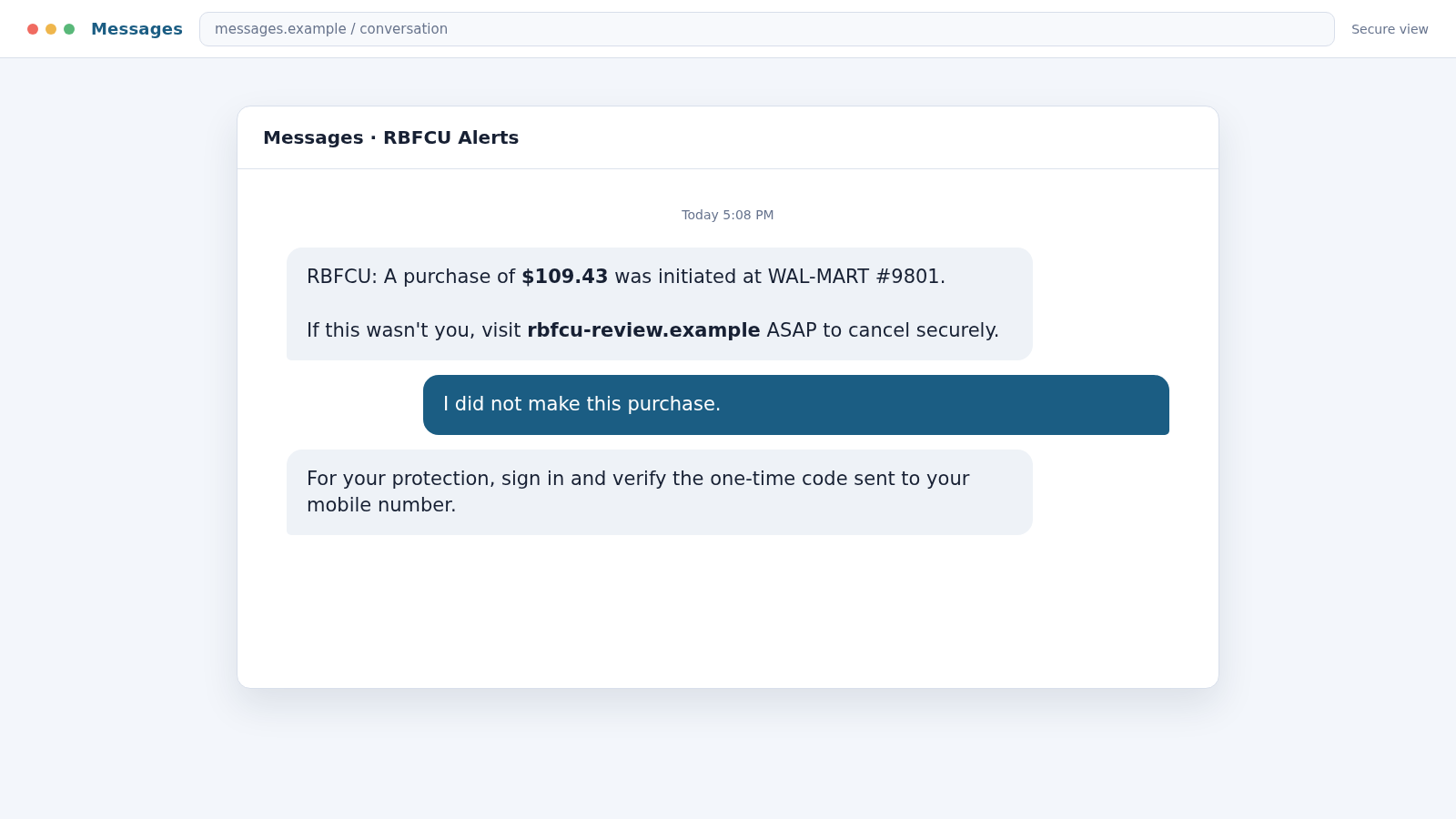
The text looks like a bank doing its job. It names a recent purchase, asks whether you recognize it, and provides a link that appears to stop the charge before money leaves your account.
That sense of protection is the disguise. The RBFCU text scam is designed to make you enter the very information a criminal needs to take control.
Overview
The scam copies a familiar fraud-alert conversation
The RBFCU text scam impersonates Randolph-Brooks Federal Credit Union, a legitimate financial institution. It may claim that a purchase, transfer, sign-in, phone-number change, or card charge needs immediate review.
The message can contain a transaction amount and merchant name to feel specific. It then asks the recipient to click a link, call a number, reply, or approve a security action.
The link or callback moves the victim outside real banking
A phishing page may copy RBFCU colors, navigation, and login fields. A caller may spoof a recognizable number and introduce themselves as a fraud specialist. Neither appearance proves the contact came from the credit union.
RBFCU states that employees will not initiate contact asking for sign-in information, passwords, security answers, multifactor codes, recovery codes, one-time passcodes, card details, or Social Security numbers.
The takeover often happens while the victim thinks fraud is being stopped
Credentials entered on the fake page are sent to the scammer. The criminal may immediately try them on the real banking site, causing a genuine one-time passcode or sign-in approval to reach the member.
Warning signs include:
- An unsolicited RBFCU alert containing a website link.
- A full phone number or strange sender instead of a known alert channel.
- A domain that contains “rbfcu” but does not end in the official rbfcu.org domain.
- Pressure to act within minutes or lose access to the account.
- A request for a password, one-time passcode, card PIN, or Social Security number.
- A caller asking you to approve a sign-in or transfer they claim is part of an investigation.
RBFCU Is Real, but the Alert May Not Be
Randolph-Brooks Federal Credit Union is not the scam. Criminals borrow its name because members recognize it and understand that a real credit union may contact them about suspicious activity.
That overlap makes simple rules difficult. A legitimate alert can ask a member to confirm a transaction, but RBFCU says its fraud text alerts do not include website links. A text that sends you to a login page deserves immediate suspicion.
RBFCU also warns that caller ID can be spoofed. A call may display a genuine institutional number while actually coming from a criminal using internet-based calling technology.
The safest test is independent contact. Close the text, open the RBFCU app yourself, type rbfcu.org into the browser, or call the number on your card or statement.
How the RBFCU Text Scam Works
Step 1: A fake transaction alert creates urgency
The scam begins with a text about a purchase at a familiar retailer, an outgoing transfer, or a login from a new device. The amount is often believable enough to avoid looking absurd.
Recipients who do not use RBFCU can dismiss it. Members, former members, and people whose family uses the credit union may worry that the alert is real.
Step 2: The message supplies its own solution
The text may say “If this wasn’t you” and provide a link or support number. This structure discourages the recipient from pausing to find an official contact channel.
The link may use a subdomain, hyphenated name, URL shortener, or free hosting service. Seeing “rbfcu” somewhere in the address is not enough. The registrable domain is what matters.
Step 3: A copied banking page collects credentials
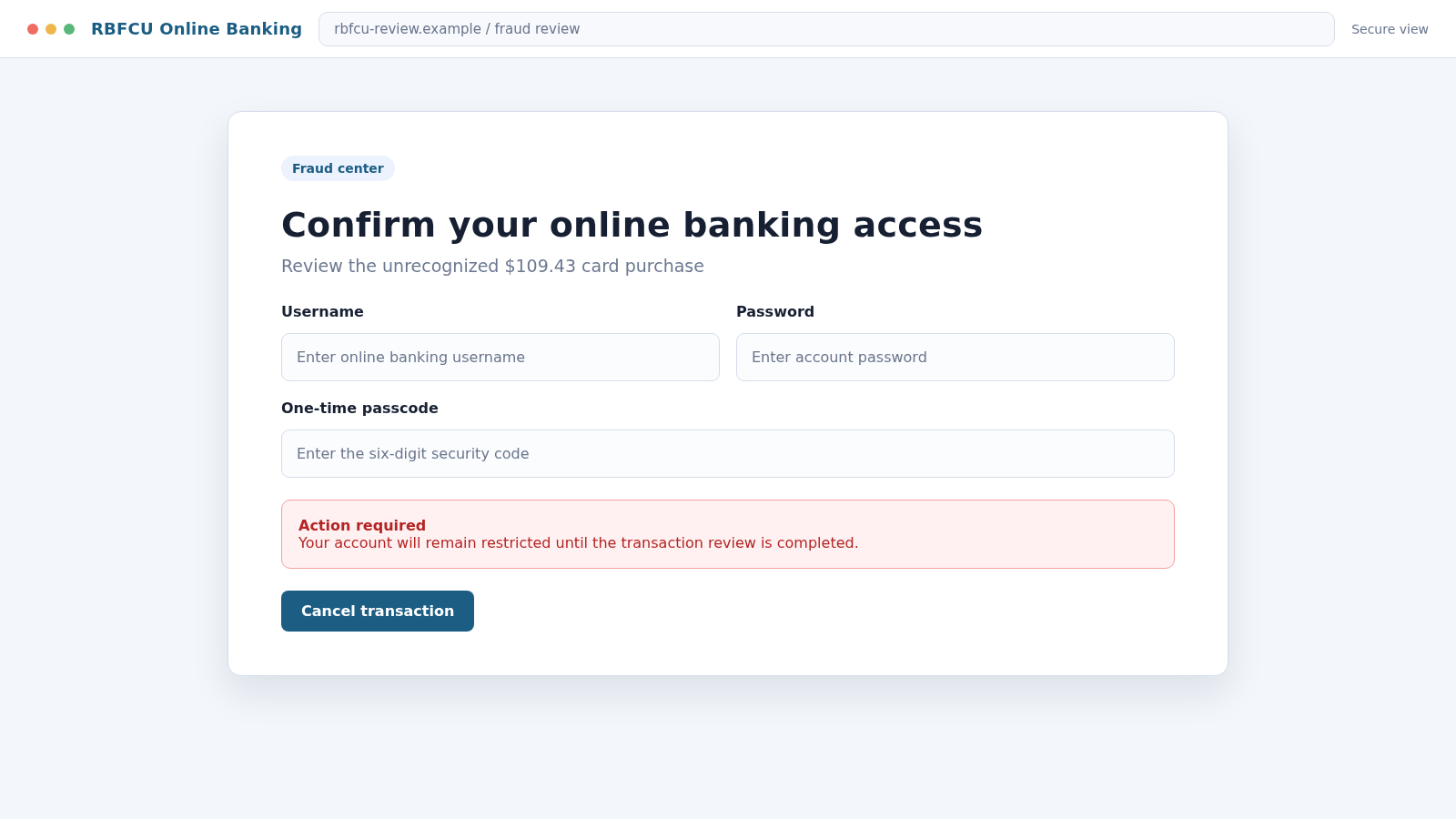
The page asks for an online banking username and password. It may include a security banner, loading animation, or fake fraud case number to appear connected to a live system.
Submitting the form sends the credentials to the attacker. An error message may appear so the victim tries again, giving the scammer a second password or confirming the first entry.
Step 4: The scammer uses the credentials in real time
While the victim remains on the fake page, the attacker attempts to sign in to the genuine account. If the password works, RBFCU may send a real one-time passcode or sign-in approval request.
The phishing page asks for that code as the next “verification” step. A caller may say the code will cancel the suspicious transaction, but entering or reading it can authorize the attacker’s session.
Step 5: Account details and recovery settings are changed
Once inside, the criminal may review balances, transaction history, linked accounts, contact details, and transfer options. They may add a new phone number, device, payment recipient, or digital wallet.
Changing recovery information can make it harder for the member to regain control. The attacker may also search statements for information useful in later impersonation calls.
Step 6: Money is moved through a fast payment route
Funds may be sent by internal transfer, person-to-person payment, ACH, wire, card purchase, or a newly enrolled wallet. The chosen route depends on what the compromised account permits.
In a phone version, the caller may claim the member’s money must be withdrawn or moved to a secure account. RBFCU warns that impersonators have even used courier-style stories involving cash pickup.
Step 7: The member is told not to interrupt the process
The scammer may ask the victim not to open the banking app, call the branch, or tell another employee. A fake investigation number and confidentiality warning make the isolation sound official.
This delay gives unauthorized transactions time to process. A legitimate institution will not object if you end an unexpected call and contact it through a verified number.
Step 8: The stolen account supports more scams
A compromised email or banking profile contains names, merchants, balances, and contact details. Criminals can use that information to craft convincing follow-up calls or target relatives.
If the transfer is stopped, another caller may pose as a recovery agent or law-enforcement officer. They may ask for a fee or another transfer to release funds, creating a second loss.
What a Stolen Banking Session Can Expose
Online banking contains more than a balance. Transaction history can reveal where a member shops, which companies are paid regularly, and when income normally arrives. Those details make later impersonation much more convincing.
Statements may contain partial account numbers, addresses, employer deposits, loan information, and merchant disputes. A criminal can use this material to answer verification questions or pose as a knowledgeable employee.
Linked accounts and transfer recipients show where money can move. The attacker may test a small transfer first, then attempt a larger one after learning which security controls are triggered.
A compromised session may also expose secure messages with the credit union. Criminals can read earlier support conversations and imitate the language, names, and case formats used by real representatives.
If the same password protects email or another financial account, the loss can spread quickly. Password reuse turns one successful phishing form into several separate account takeovers.
Digital-wallet enrollment is another risk. A scammer who obtains card data and an authentication code may add the card to a device they control, allowing purchases even after the phishing page is closed.
This is why a victim should describe every field entered, not only whether money was sent. RBFCU’s fraud team can respond differently when a password, card number, one-time code, or full identity profile was exposed.
Company, Address, and Fulfillment Checks
The RBFCU name is not authentication
Sender names and caller ID can be spoofed. Treat the display label as decoration until the alert is confirmed inside the official app or through a trusted number.
RBFCU is the impersonated institution, not the operator of the scam. Avoid blaming the real credit union for a message sent through unrelated infrastructure.
The destination address matters more than the page design
Look at the complete domain before entering anything. A page on a free hosting platform or a domain such as “rbfcu-secure-example.com” is not the official rbfcu.org site.
Do not test a suspicious link by opening it. Navigate independently to the official site and compare the alert with the account’s real activity.
Support should remain verifiable when you hang up
A legitimate fraud team can be reached through the number on your card, statement, app, or official website. RBFCU lists 210-945-3300 and 1-800-580-3300 for member contact.
End the incoming call first. Dial the verified number yourself, because selecting a recent call entry may reconnect to the spoofed caller.
The transaction must exist in the genuine account
Open the official app and review pending and posted activity. A fake message may describe a transaction that does not exist, while a real unauthorized charge should appear in the institution’s records.
Even if the transaction is real, do not use the alert’s link. Criminals sometimes time phishing messages around a genuine account compromise.
How Legitimate RBFCU Text Alerts Differ
RBFCU’s security guidance says legitimate fraud alerts generally use short codes and do not link to a website. Some alerts may ask for a simple YES or NO response about a card transaction.
Other RBFCU products can use different formats after a member takes an action, so no single visual clue is perfect. The decisive check is whether you initiated the activity and can confirm the message through the official account.
RBFCU employees do not need your password or one-time passcode to investigate fraud. They also do not need to sign in as you, ask you to approve their login, or move funds to a supposedly safer account.
If you are unsure, caution is appropriate. The credit union specifically encourages members to contact it and confirm a message before taking action.
Do not search for a support number while panicking and call a sponsored result. Fraudulent ads can place impersonator numbers above the institution’s real listing.
Use a saved bookmark, the official mobile app, a statement, or the number printed on the back of the card. Independent navigation removes the scammer’s most important advantage.
What to Do if You Have Fallen Victim to This Scam
- Stop responding and close the fake page. Do not submit another code or approve any sign-in request. Preserve a screenshot of the text, sender, URL, and call details.
- Contact RBFCU through a verified number. Call 210-945-3300 or 1-800-580-3300, or use the secure channel inside the official app. Explain exactly what you entered, shared, or approved.
- Change the online banking password. Use a clean device, create a unique password, sign out other sessions, and remove unfamiliar contact details, devices, and transfer recipients.
- Protect the email account. Email often controls password resets. Change its password, enable strong multifactor authentication, review forwarding rules, and remove unknown recovery addresses.
- Freeze exposed cards and dispute transactions. Review pending and posted activity with the fraud team. Ask whether transfers, digital wallets, checks, or new payees were added.
- Never approve an unfamiliar code. Deny sign-in prompts and tell RBFCU if a one-time passcode was disclosed. The institution may need to reset authentication or issue new account credentials.
- Scan any device used on the phishing page. If you downloaded an app, profile, or attachment, run a full scan with Malwarebytes to detect malicious software and remote-access tools.
- Block repeat phishing pages. AdGuard can reduce exposure to known phishing sites, malicious ads, and trackers. It cannot recover an account, so complete the bank’s security process first.
- Report the message. RBFCU asks recipients to send suspicious text screenshots or emails to abuse@rbfcu.org. You can also report the incident to ReportFraud.ftc.gov and the FBI’s IC3 if money or credentials were stolen.
- Monitor credit and identity records. If a Social Security number or identity document was shared, place a fraud alert or credit freeze and watch for unauthorized accounts.
Frequently Asked Questions
Is RBFCU itself a scam?
No. Randolph-Brooks Federal Credit Union is a legitimate institution. The scam is an impersonation campaign that copies its name and security language.
Does RBFCU send fraud alert texts?
Yes, but RBFCU says its fraud alert texts do not include website links. Confirm any unexpected alert inside the official app or by calling a verified number.
Can the caller ID show the real RBFCU number?
Yes. Caller ID can be spoofed, so a familiar number does not authenticate an incoming call. Hang up and dial the official number yourself.
What if I entered my password but not the one-time code?
Change the password immediately and contact RBFCU. The code may have blocked the first takeover attempt, but the exposed password remains dangerous.
Should I reply STOP to a suspicious RBFCU text?
Do not reply to a message you believe is fraudulent. Take a screenshot, report it to RBFCU, then block and delete it.
Where should I report a fake RBFCU message?
Send the screenshot or suspicious email to abuse@rbfcu.org and contact RBFCU through its official number. Report financial loss to the FTC and IC3 as well.
The Bottom Line
The RBFCU text scam disguises credential theft as fraud prevention. Its greatest advantage is urgency: the victim believes every second spent verifying the message gives a criminal more time.
Reverse that pressure. Do not use the link or incoming caller. Open the real account and contact RBFCU independently, because a genuine fraud team will never need your password or one-time code.

Join the discussion
0 commentsShare your experience or ask a question about this article.
Discussion
Start the conversation
Have a question or something useful to share? Add the first comment.