


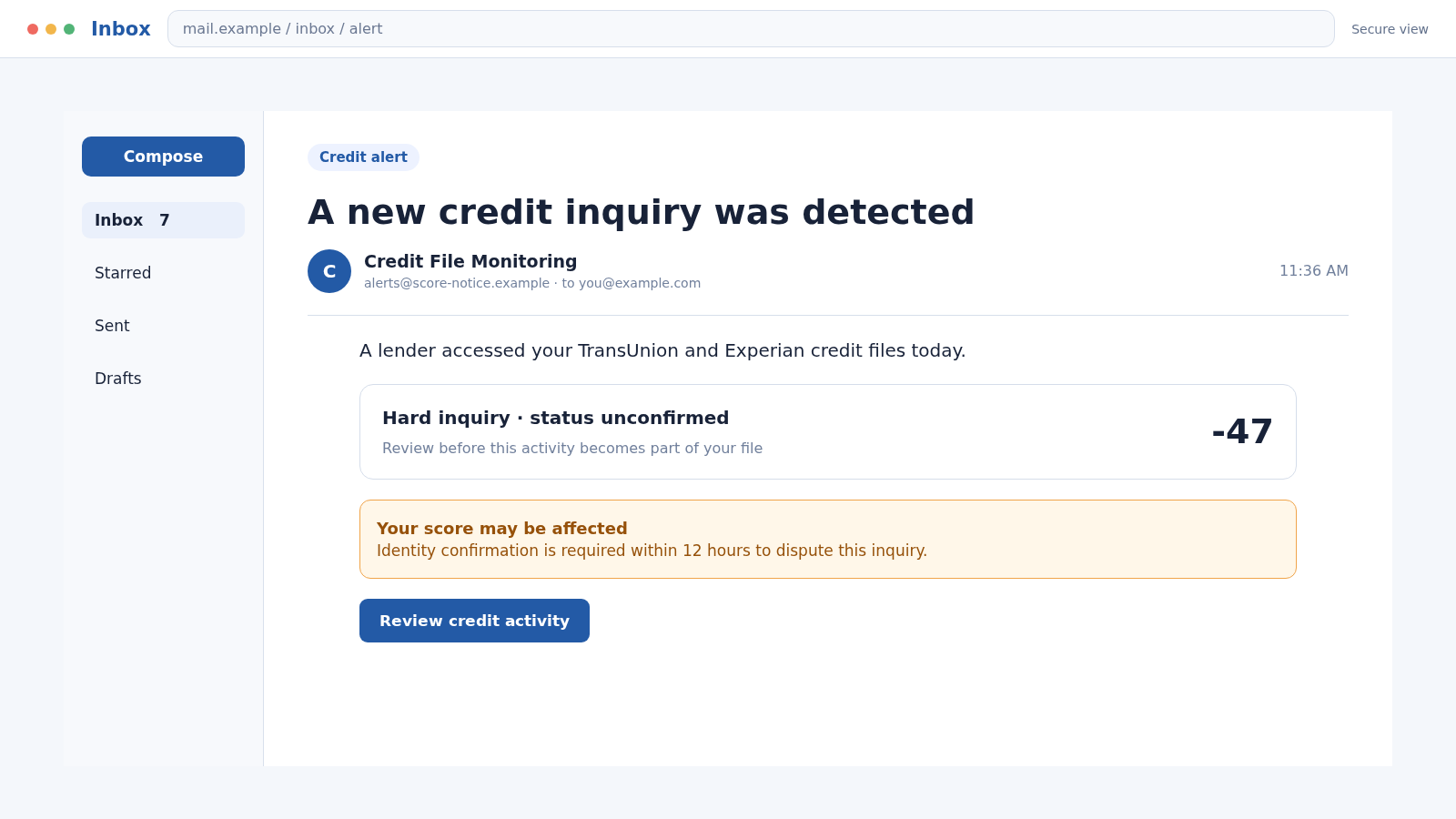
An alert says your credit score just dropped, a new loan appeared, or someone accessed your file. The message carries the name of a major credit bureau and offers one button to see what changed.
It is exactly the kind of warning a careful person would not want to ignore. The TransUnion and Experian scam turns that responsible instinct into a route for stealing identity data.
Overview
Fake alerts imitate a service people already expect
The TransUnion and Experian scam uses emails, texts, advertisements, calls, or copied websites that impersonate one or both credit bureaus. The message may claim a credit-score change, hard inquiry, new account, data exposure, locked report, or expiring fraud alert.
TransUnion and Experian are legitimate consumer reporting companies. Their names are being borrowed to make a fake alert or service feel authoritative.
The lure asks for the keys to an identity
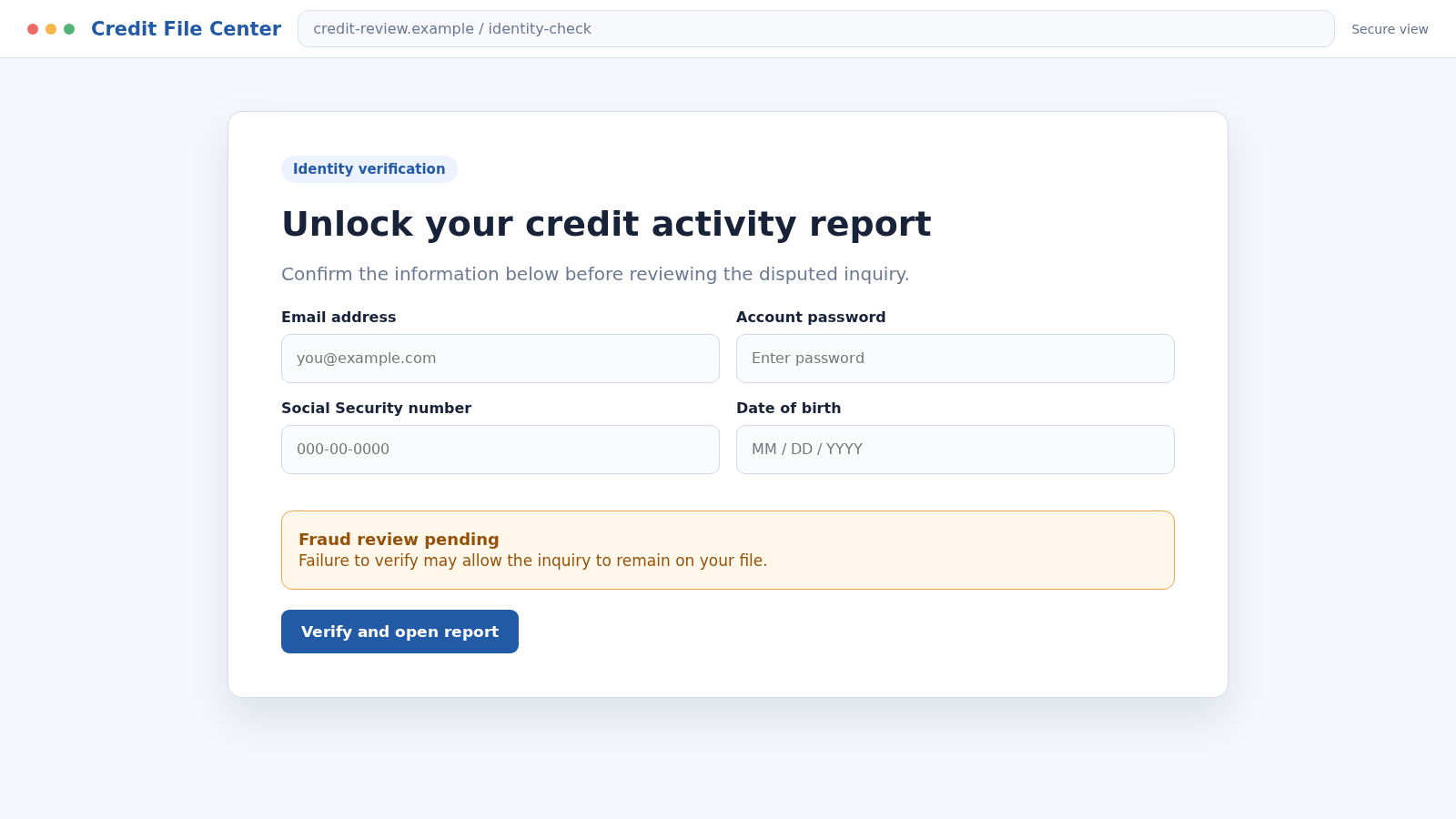
A fake “Review report” link can open a sign-in page that asks for an email, password, Social Security number, birth date, address, and identity-verification questions. Those details can support account takeover and new-account fraud.
Other versions sell a questionable credit-repair or monitoring subscription. A low trial charge may lead to recurring billing, while an upfront-fee company may promise to remove accurate negative information that cannot legally be erased on demand.
Several scams can hide behind the same credit-report story
The visible message may lead to different forms of harm:
- A phishing page that captures a credit-bureau username and password
- An identity form collecting a Social Security number and date of birth
- A fake fraud-alert or freeze service charging an unnecessary fee
- A credit-repair pitch promising impossible score changes
- A rental or job scam demanding a report through an affiliate link
- A malware attachment presented as a dispute or credit-report document
The safest response depends on the route, but it always starts by leaving the message and reaching the bureau or report provider independently.
Why Credit Alerts Create Such Strong Pressure
Credit files affect borrowing, housing, insurance, and sometimes employment decisions. A message suggesting that someone opened an account can feel like a threat to years of financial work.
The fraudster does not need to show a real account. A vague alert such as “Your score decreased” is broad enough to worry almost anyone who has recently applied for credit, moved, rented, or checked a report.
Credit terminology also sounds technical. Words such as inquiry, tradeline, dispute, lock, and identity verification can make an ordinary data-collection form feel like a regulated process.
A countdown or warning about limited dispute rights adds urgency. In reality, a legitimate dispute or fraud response should remain available after you independently confirm the issue.
What Legitimate Credit Protection Actually Costs
Consumers can obtain free weekly reports from all three nationwide credit bureaus through AnnualCreditReport.com, the federally authorized source. You do not need a stranger’s link or paid membership to begin reviewing a suspicious account.
A security freeze can restrict access to a credit file and make new-account fraud harder. Placing and lifting a freeze is free. A company demanding payment to perform that basic action deserves scrutiny.
An initial fraud alert is also free. When placed with one nationwide bureau, that bureau notifies the other two. The alert tells potential creditors to take additional steps before opening credit.
Credit-monitoring products may be legitimate paid services, but they are not the same as a freeze. A message that deliberately confuses the two may be trying to sell urgency instead of protection.
How the TransUnion and Experian Scam Works
Step 1: A message announces a frightening credit event
The victim receives a notice about a new inquiry, score decline, loan application, address change, or exposed credit file. The message may name TransUnion, Experian, Equifax, or combine several bureau names.
No account-specific evidence is necessary. The sender relies on the possibility that the recipient recently checked credit or is already worried about identity theft.
Step 2: The design mimics a bureau or monitoring service
Logos, score gauges, lock icons, report categories, and formal disclosure language make the alert look familiar. A display name can be copied, and visual assets are publicly available.
The message may also use a sender domain with extra words such as secure, score, report, identity, or monitoring. Those additions are not proof of an official relationship.
Step 3: Urgency directs the victim to one supplied route
The alert says the event must be reviewed today, a fraud flag will expire, or a score will be damaged unless the recipient acts. The only offered route is a link, phone number, attachment, or QR code.
This restriction is strategic. The scammer does not want the victim to open an existing bureau account, obtain a free report independently, or contact the creditor named on the real file.
Step 4: A copied page requests sensitive identifying data
The fake portal asks for a username and password, then claims additional identity checks are required. It may collect a Social Security number, date of birth, previous address, phone number, or answers drawn from a credit file.
These are not ordinary contact details. Combined, they can help a criminal apply for credit, pass knowledge-based authentication, or impersonate the victim with financial providers.
Step 5: Payment details or recurring billing are introduced
A page may offer a small trial to unlock the complete report, score, or dispute. The checkout can obscure a recurring membership or route the card data directly to a fraudster.
A fake repair agent may instead demand a large upfront fee and promise to remove accurate records, create a new credit identity, or deliver an immediate score increase.
Step 6: The criminal tests stolen credentials in real time
Credentials captured on the fake page may be tried against the genuine bureau, email account, or other financial sites. Password reuse makes one successful form much more valuable.
If a real service sends a code, the phishing page or caller asks the victim to repeat it. That code may authorize a login, password reset, or change to account recovery details.
Step 7: The page simulates a result and ends the session
The victim may see a generic report, a reassurance that no fraud was found, or a message saying the dispute is under review. These screens explain why no immediate change appears.
The site can then redirect to a legitimate credit bureau or disappear. A real page opening afterward does not make the earlier data form authentic.
Step 8: Identity data is reused beyond the credit alert
Stolen information may support new accounts, tax fraud, mobile-account takeover, benefit fraud, targeted phishing, or sale to other criminals. Harm may appear weeks or months later.
Follow-up scammers may call as investigators and already know the information entered. Their familiarity is evidence of the leak, not proof that they represent a bureau.
Company, Address, and Fulfillment Checks
A bureau name is not the sender’s identity
TransUnion and Experian provide real credit-reporting and identity services. A scam message can mention both companies without being connected to either one.
Authenticate the contact by signing in through a saved bookmark or address you type yourself. Do not rely on the visible logo, sender label, or caller ID.
The domain must match the service you intended to reach
Lookalike domains may rearrange words, add hyphens, use subdomains, or attach brand terms to an unrelated ending. Read the registered domain, not just the first familiar word.
A secure connection and padlock do not validate the operator. Phishing pages can obtain encryption certificates just as legitimate sites do.
Support should not depend on the suspicious message
Use the bureau’s independently located support route to check account access, alerts, freezes, and disputes. A phone number embedded in the lure may lead directly to an impersonator.
If the alert names a lender or card issuer, contact that company through its own official channel. Do not let the supposed bureau agent transfer the call.
A promised report or repair must be traceable
Before paying, identify the legal company, written terms, complete price, cancellation method, and exact service. An unexplained score page is not evidence that a credit report was obtained.
Be especially cautious when a seller promises to delete accurate information, create a new identity, or requires payment before providing credit-repair work.
Warning Signs of a Fake Credit Report Alert
- The notice arrives unexpectedly and gives no verifiable account detail.
- The full sender address or destination domain does not match the bureau.
- A deadline threatens permanent score damage or lost dispute rights.
- The page asks for a complete Social Security number immediately.
- A caller requests a password, one-time code, or remote device access.
- You must pay to place a standard fraud alert or security freeze.
- A repair service guarantees deletion of accurate negative information.
- A landlord or employer insists you use one unfamiliar report link.
A genuine concern can be checked without the message. Obtain reports directly and contact the creditor or bureau through a verified route.
How to Tell a Freeze, Fraud Alert, and Credit Lock Apart
A security freeze restricts access to a credit file and is governed by federal law. It is free to place and lift. Consumers generally contact each nationwide bureau separately to manage freezes on all three files.
A fraud alert asks businesses checking the report to verify identity more carefully. Placing an initial alert with one nationwide bureau causes that bureau to notify the other two, making it useful after suspected exposure.
A credit lock is a bureau product that may be bundled with monitoring or other features. Terms can differ by provider. A sales page that calls every option the same thing may be hiding what the customer is actually buying.
None of these tools repairs accurate negative history or guarantees that every form of fraud will stop. Their purpose is protective, and they should be activated through the bureau’s real service rather than an unsolicited alert.
What to Do if You Have Fallen Victim to This Scam
- Leave the page and stop speaking with the sender. Do not submit more information, approve another authentication request, or pay a supposed security fee.
- Change exposed account passwords. Begin with the credit-bureau account and connected email. Replace reused passwords elsewhere and remove unknown recovery details or sessions.
- Freeze your credit files. Contact Equifax, Experian, and TransUnion through their official sites. A freeze is free and can make it harder to open new credit in your name.
- Place a fraud alert if appropriate. An initial alert is free and can be placed with one nationwide bureau, which will notify the others. Follow the bureau’s official instructions.
- Review all three credit reports. Use AnnualCreditReport.com and look for unfamiliar accounts, inquiries, addresses, and personal information. Dispute errors through the official bureau process.
- Contact any named creditor independently. If a real account or inquiry appears, call the lender using its verified website or statement. Tell the fraud department that identity information may be compromised.
- Notify card issuers about payment exposure. Replace a submitted card and challenge unauthorized or misleading charges. Ask how to stop recurring transactions without relying only on the seller’s cancellation page.
- Scan the affected device. If you opened an attachment, installed software, or allowed unusual browser prompts, run a full Malwarebytes scan. It can help detect malicious files or programs involved in the phishing session.
- Block known scam destinations. AdGuard can help block many malicious domains, deceptive ads, and tracking requests used by similar campaigns. Continue verifying financial pages independently.
- Create an identity-theft recovery plan. Report the incident at IdentityTheft.gov if sensitive identity data was taken. Save the recovery steps and documentation for creditors.
- Preserve evidence and reject recovery pitches. Keep emails, URLs, screenshots, receipts, and call details. Do not pay anyone who contacts you promising to erase the incident or recover money immediately.
Frequently Asked Questions
Are TransUnion and Experian scams?
No. They are legitimate nationwide credit bureaus. Criminals impersonate them or misuse credit-report language to make phishing and deceptive service offers appear credible.
Do I have to pay to freeze my credit?
No. Placing, lifting, and removing a security freeze is free. Use each bureau’s official channel rather than a link supplied by an unsolicited message.
Where can I get my official free credit reports?
AnnualCreditReport.com is the federally authorized source for free reports from Equifax, Experian, and TransUnion. Enter the address yourself or use a trusted bookmark.
What if the alert describes a real credit inquiry?
A scammer may exploit a real event or reach you by coincidence. Verify the inquiry on your independently obtained report and contact the listed creditor through its official details.
Can a scammer open credit with only part of my information?
Partial data may be combined with information from other breaches. Treat the exposure seriously, freeze files, monitor reports, and follow an identity-theft recovery plan.
Will a paid credit repair company instantly remove bad records?
No legitimate company can guarantee removal of accurate, current negative information. Errors can be disputed for free, while accurate records generally remain for the legally allowed period.
The Bottom Line
The TransUnion and Experian scam weaponizes the fear of identity theft. A fake credit alert can lead to the very outcome it claims to prevent by collecting passwords, Social Security numbers, and payment details.
Ignore the supplied route. Check all three reports independently, use free freezes and fraud alerts when needed, and respond to real entries through verified bureau and creditor channels.

Join the discussion
0 commentsShare your experience or ask a question about this article.
Discussion
Start the conversation
Have a question or something useful to share? Add the first comment.