

An email says there’s money waiting from Vitens. After months of paying household bills, a water-account refund sounds like welcome news.
The message asks you to take the next step. Before you do, check whether that step belongs in a real refund process.
Overview
A household credit becomes the excuse to click
The Vitens refund email scam presents an apparent repayment as something you must claim. The familiar water-company name makes the offer seem grounded in an account.
Vitens has warned about false emails alleging both money owed to customers and unpaid balances. This is confirmed impersonation, not a complaint about refund delays.
The article focuses on the money-back version. A promise of a credit can lower your guard just as effectively as a threat of an overdue bill.
The refund rule worth remembering
Vitens’s phishing guidance says customers do not need to sign up or submit an application for a refund.
That gives you a practical way to challenge an unexpected claim process. Don’t register through a message simply because it says money is available.
Pause if the offer asks you to:
- Start a separate application to release a supposed water-account repayment.
- Follow an unfamiliar destination rather than check your actual account.
- Disclose banking credentials or approve a transaction you did not intend.
- Pay money as a condition of receiving the advertised refund.
What is evidence and what is an example
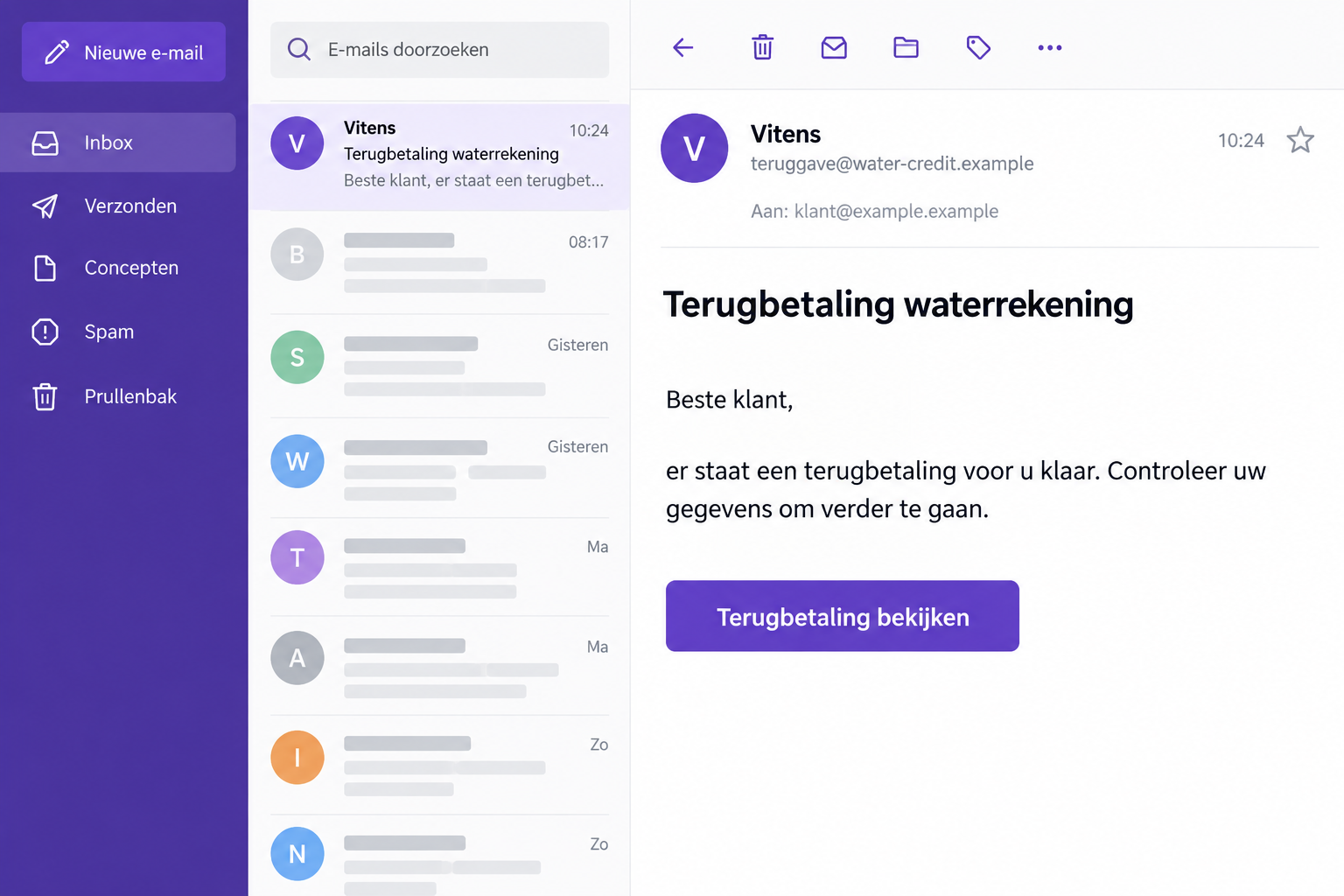
The image uses invented sender details and illustrative wording. It isn’t an original intercepted Vitens email or evidence of a specific refund amount.
The warning establishes the impersonation and refund pretext. It does not establish one fixed form, a particular loss, or malware in every version.
Why Money Back Can Be More Persuasive Than Money Owed
A demand for payment may make you defensive. A refund can make the same unfamiliar link feel like a benefit you might miss.
You may assume a company returning money has no reason to deceive you. But the name on the message doesn’t establish who controls the request.
Household accounts also produce genuine adjustments. A moving-home bill, changed usage, or previous overpayment can make the broad idea of a credit feel reasonable.
You might genuinely be owed money and still receive a fake email about a refund. Check the credit without trusting the sender’s instructions.
Focus on the requested action rather than deciding whether a refund sounds possible. Where does the sender want you to go, and what must you provide?
If the answer involves a new claim form or unexplained bank approval, stop. The promised benefit doesn’t justify abandoning the normal account route.
You don’t need to prove the whole operation before declining it. An unverified request for sensitive information is enough reason to check independently.
How the Vitens Refund Email Scam Works
Step 1: A message announces a supposed water-account repayment
The sender presents the refund as connected to Vitens. This makes a generic money-back offer look like ordinary correspondence from a household supplier.
A message doesn’t need to include your entire billing history to feel convincing. A familiar name and plausible reason for contact can be enough.
Don’t fill the missing details with your own assumptions. If you’ve recently moved or expected an adjustment, check that actual account event separately.
Step 2: The refund is made to depend on your response
The tempting part is not just the promise of money. It’s the suggestion that a simple action will make the payment happen.
This is where the genuine supplier’s no-application guidance matters. A separate enrollment or claim process deserves immediate skepticism.
Don’t mistake a convenient-looking button for an official procedure. The sender wrote the instruction and chose the destination.
Likewise, a message saying your details need confirmation doesn’t establish that the real provider has missing information. Verify that through the genuine account.
Step 3: The link or code moves you away from the trusted account
Vitens warns recipients not to follow links or scan QR codes in messages they don’t trust. Both can lead to a destination chosen by the sender.
A QR code isn’t safer because it looks like a billing feature. It is another way to open an address, often on a second device.
Don’t use your phone to investigate a doubtful code displayed on your computer. That can carry the same unverified request into a different browser.
Instead, open the official supplier website independently. The real account should be your starting point for checking a credit, not the email’s claim page.
Step 4: A supposed refund check can become a disclosure or payment
Once you leave the trusted route, evaluate every field and approval by what it actually does. Receiving a refund is not the same as authorizing an outgoing transfer.
If a page requests a password, card detail, code, or payment, don’t assume the refund label makes that request appropriate.
These are possible exposure points to watch for, not a claim that every reported Vitens email contains identical fields or a particular banking flow.
After any response, the key facts are what you submitted and approved. Even an error page doesn’t prove a completed form failed to transmit information.
Check a Real Credit Without Applying Through the Message
Find your account independently
Type the official Vitens website address into a fresh browser tab. Navigate from there to Mijn Vitens rather than using the unexpected refund link.
Review the relevant bill and payment history. Match the account holder, service address, invoice period, and any recorded adjustment.
If you have moved, make sure you are checking the correct address and final bill. A plausible reference to an old property still needs verification.
Don’t change bank information on an unfamiliar form simply because it promises to correct where the refund goes. Use the real account or genuine support.
If you cannot find the claimed credit, keep the message and ask about it. The absence of an immediate answer doesn’t make its supplied route legitimate.
Keep genuine payment messages in perspective
Vitens does use legitimate payment links in certain emails and QR codes on bills. A blanket rule that every such feature is fraudulent would be wrong.
Its guidance identifies betalingen.vitens.nl for that payment route. The important distinction is an independently verified request, not the mere presence of a payment button.
A real bill payment and a refund application are different tasks. Don’t approve the first while believing you’re completing the second.
If a screen shows money leaving your account, read it as an outgoing payment regardless of what the preceding email called it.
Ask the actual company about the disputed message
Use Vitens’s official contact options for account questions. Find the route yourself instead of replying to the alleged refund sender.
Ask whether your account has a credit and how it will be handled. You do not need to establish eligibility with an unknown third party.
Before sending support a document, remove unrelated bank transactions or household information they don’t need. Ask which details will help them locate the genuine account item.
Don’t send a complete card photograph as evidence of a refund problem. A transaction reference or redacted statement may answer the relevant question with less exposure.
Keep any requested sensitive paperwork within the organization’s verified process. A reply to the suspicious email is not that process.
If another household member manages billing, compare records with them. A forwarded promise of a refund shouldn’t become an instruction for someone else to pay.
For someone helping a relative, keep the relative in control of their credentials. Explain the distinction between reviewing a balance and authorizing a transaction.
Before You Panic, Separate the Possible Exposures
Opening the email without following anything is different from entering bank credentials. Your response should reflect the interaction, not the worst imaginable version.
If you only visited a page, close it and check for downloads or permissions you didn’t intend. Don’t keep revisiting it to see whether it changes.
If you entered a password, protect the affected account. If you shared banking information or approved something, involve the bank even before a loss appears.
If you disclosed an address or customer reference, record that too. It may make later contact sound more convincing without proving someone controls the genuine account.
Write those categories down before calling support. A precise account of the exposure helps them give more useful advice than simply saying you clicked a scam.
What to Do if You Have Fallen Victim to This Scam
-
Leave the claim process. Close the page and stop replying. Don’t send another payment, code, or document to recover an earlier mistake.
If the sender says your refund will be cancelled, verify the account separately. Their threat is not a reliable statement about your genuine credit.
-
Contact your bank about financial exposure. Report any card details, banking login, security approval, or outgoing payment involved in the supposed refund.
Use your bank’s established channel. Explain that you believed you were receiving money and describe what the actual banking screen asked you to do.
Ask what can be blocked, disputed, or recalled. Keep expectations realistic; neither a refund label nor prompt reporting guarantees reimbursement.
-
Change passwords you submitted. Go directly to the affected service, preferably from a device you trust if unfamiliar software was installed.
Replace reused credentials elsewhere and review available security settings. Check account recovery details so a password reset doesn’t leave an impostor’s changes in place.
-
Confirm the real account position. Ask Vitens whether any genuine repayment or account correction is due. Don’t treat the scam’s confirmation screen as a provider receipt.
If banking details were altered in your genuine account, tell the company. That is separate from asking the bank to handle an unauthorized transaction.
-
Preserve the message and your actions. Save the original email, the visible address you visited, screenshots, and any bank references before removing the message.
Record the order of events while you remember it. Whether you entered a code before or after a payment prompt can help explain the incident.
-
Report the impersonation through the real channel. Vitens lists beveiligingsmelding@vitens.nl for reports and copies of suspected phishing messages.
Use genuine contact details for account questions, and make any necessary fraud report separately. A supplier report doesn’t automatically open a banking dispute.
-
Check software only where relevant. If the page prompted a download or you installed an unfamiliar application, stop sensitive use of that device until checked.
Malwarebytes can help inspect unwanted software. AdGuard may limit malicious ads and redirects, but cannot take back disclosed information or recover a transfer.
Also review unexpected site notification permissions. A browser alert urging another refund check should not pull you back into the same process.
-
Reject refund-recovery offers from strangers. Don’t pay an investigator, support agent, or supposed bank worker who contacts you unexpectedly promising to release the lost money.
Verify later contact using the case reference and official route you already established. Knowledge of your refund story isn’t enough to authenticate the speaker.
Make the Next Household Refund Easier to Verify
Keep supplier bookmarks and account references where the household can find them. That makes checking easier when an unexpected credit message arrives.
Separate old addresses and closed accounts from current ones in your records. Confusion about a final bill can otherwise give an unfamiliar message undeserved credibility.
Agree that no one changes payment details from an unsolicited email alone. A short independent check is especially useful when several people share responsibility for bills.
Don’t rely on remembering one scam address or subject line. The durable check is whether the promised credit and requested action match the genuine account.
If you warn others, explain that difference clearly. A useful warning helps them verify a message; it doesn’t teach them to distrust every genuine refund.
Frequently Asked Questions
Is the Vitens refund email scam confirmed?
Yes. Vitens has warned about impersonation emails claiming customers will receive money back. The legitimate company is the copied identity, not the scam operator.
Do I need to apply for a genuine Vitens refund?
Vitens says a refund doesn’t require customers to sign up or request it. Verify any unexpected application instruction through the real account or official support.
Are all Vitens payment links and QR codes fake?
No. Genuine billing can use them. Verify the individual request independently, and don’t confuse an outgoing payment screen with receiving a refund.
Does a familiar sender name establish who sent the email?
No. A display name can be copied. Check the actual request through your authentic account rather than relying on the name at the top.
What if I approved a payment while expecting money back?
Contact your bank immediately and explain both the refund pretext and actual approval. Save the transaction details and stop interacting with the sender.
Should I send more details to cancel the false application?
No. Don’t give the impostor another opportunity to collect information. Protect affected accounts and handle reporting through the genuine organizations instead.
The Bottom Line
Do not apply for a Vitens refund through an unexpected email. The documented scam uses a plausible household credit to move you away from trusted account checks.
Confirm any real repayment directly. If you exposed financial details or authorized money out, contact your bank and preserve the message for a phishing report.

Join the discussion
0 commentsShare your experience or ask a question about this article.
Discussion
Start the conversation
Have a question or something useful to share? Add the first comment.