

The caller says someone has entered your Knab account. They sound prepared, know your name, and want you to complete one quick security check.
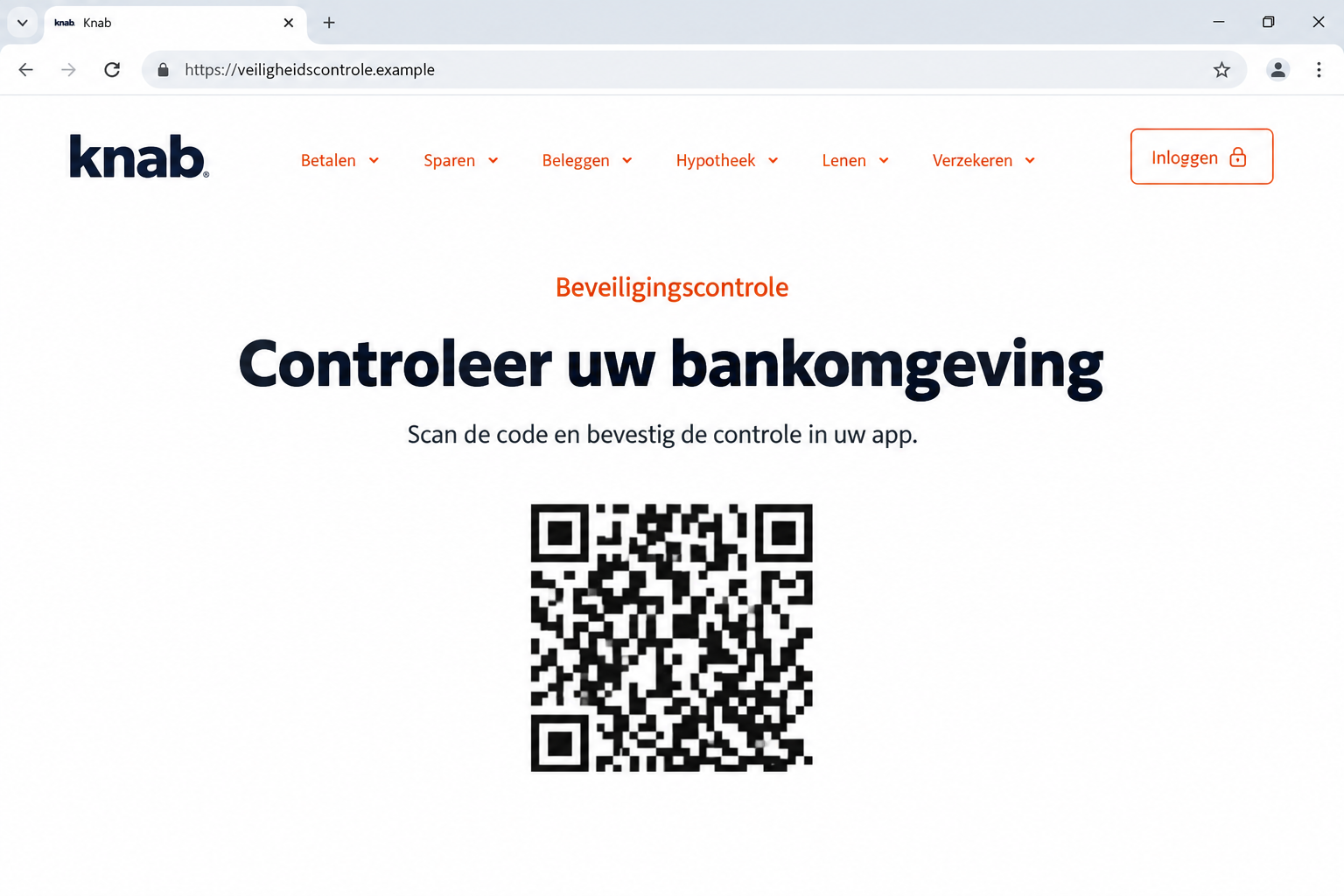
Then a page opens with a familiar bank logo and a QR code. Before scanning it, look at what your app is actually asking you to approve.
Overview
A security check that can authorize somebody else’s login
The Knab QR code scam combines bank impersonation with a misleading login page. A supposed employee tells you to scan a code to protect your account.
The dangerous part is the approval inside your real banking app. You may think you’re confirming a safety check while actually allowing another person to sign in.
This is not a claim that Knab’s normal QR login is fraudulent. Criminals are misusing a legitimate feature and disguising whose login you’re approving.
The warning comes from the bank itself
Knab’s bank-helpdesk fraud warning describes callers who direct customers to websites and ask them to scan QR codes.
Its explanation identifies the key deception: the code can belong to a login the fraudster started on the genuine banking website.
The caller supplies a different story about what that action means. A familiar logo, convincing voice, or recognizable telephone number doesn’t make that story true.
The checks that matter before you touch the code
- Did you independently open the bank’s website to sign in?
- Does your app describe a login rather than the caller’s supposed security procedure?
- Is a stranger instructing you to approve something while keeping you on the phone?
- Are you being asked to move money, install software, or reveal codes?
The page pictured here is a generated illustration with a fictional address and a QR-like placeholder. It demonstrates the pretext, not a captured criminal website.
If somebody else arranged the page and is coaching the approval, stop. Restart the conversation through the Knab app or another contact route you already trust.
Why a Genuine Banking App Can Still Appear in the Scam
People often expect fraud to involve an obviously fake app. Here, the banking application on your phone can be entirely genuine.
The misunderstanding happens between two screens. One screen tells you that you’re completing security maintenance; the other requests permission for a particular account action.
A QR code carries information. It doesn’t independently establish that the person who displayed it is a bank employee or that their explanation is accurate.
Think about who started the login. When you visit your bank independently, you know why you need access. During an unexpected call, somebody else controls that context.
The caller may describe a routine approval as cancellation, verification, or protection. Those words don’t change what the banking system processes.
This is why reading the app matters more than listening to the explanation over the phone. An instruction to approve a login isn’t the same as cancelling fraud.
You also don’t need to prove your innocence by cooperating. Being cautious with an unexpected instruction is sensible, even if the caller becomes impatient.
How the Knab QR Code Scam Works
Step 1: An urgent bank call interrupts your day
The approach starts with a problem that sounds expensive to ignore: suspicious activity, an unfamiliar device, or money that supposedly needs protecting.
Knab warns that criminals can already possess personal information. Knowing your name or other details can make the conversation feel less like a random cold call.
That familiarity isn’t an employee check. Information can come from earlier phishing, exposed records, public sources, or things you disclose while answering questions.
The caller may also manipulate the displayed telephone number. Seeing a bank’s number on your screen doesn’t establish who is speaking.
The practical test comes next. A genuine concern can be checked independently; a fraudster needs you to remain inside their instructions.
Step 2: The caller sends you to a convincing-looking page
You are told to open a website for verification. Its wording may describe an updated banking environment or a procedure for undoing suspicious activity.
A copied logo makes the page recognizable. It does not make the address belong to Knab, and the caller’s assurance cannot fix an unrelated domain.
Some addresses place a bank name inside a longer string. Read the actual domain, not just the familiar letters at its beginning.
Knab identifies its personal banking address as persoonlijk.knab.nl. For a real login, type that address yourself instead of following a caller’s supplied route.
Don’t use a search advertisement as a substitute for that check. The first result can still be an unsuitable destination for an urgent banking conversation.
Step 3: A real login request is presented as a safety measure
The fraudster can begin a login through the genuine service and put the resulting QR code into the misleading page you are viewing.
You scan it believing that the task concerns your own security. The bank’s app then asks you to confirm the associated action.
The code’s appearance isn’t the decisive warning. Even a functional code can serve the wrong person’s request when its purpose has been misrepresented.
At this point, put the phone conversation aside and read the request literally. Does it ask you to sign in or authorize access?
If you didn’t initiate that login independently, decline it. You do not need to finish a suspicious procedure to find out whether the caller is trustworthy.
Step 4: Approval can give the fraudster access
Confirming the login may let the criminal enter your online banking environment. The approval can be genuine even though your reason for giving it was deceptive.
A confirmed login and an approved transfer are different actions. Tell the bank about each prompt you accepted, even if no money has moved yet.
The caller may continue asking for additional approvals or actions. What they call a reversal could instead be another request requiring your permission.
Stop when an unfamiliar login or transaction appears. A person who says they are cancelling fraud should not need you to approve unexplained account activity.
If you already approved the login, tell Knab immediately. Waiting for a missing balance wastes time when unauthorized access may already exist.
Step 5: The story can expand into money transfers or remote access
Knab also warns about supposed safe accounts, requests for security codes, and instructions to install software that lets another person view or control a device.
If the call moves on to transfers or software, stop there too. When contacting Knab, explain those instructions alongside the QR approval.
Moving savings to a new destination does not become protective simply because the caller describes it that way. Verify the recipient and purpose outside the conversation.
A remote-support application can be legitimate software with a dangerous permission granted to the wrong person. Its presence in an app store doesn’t validate the caller.
Once the instructions reach your banking permissions, security codes, or computer controls, the conversation has moved far beyond a harmless account notification.
Check the Request, Not the Performance
A confident voice doesn’t establish employment
A case reference, professional greeting, or detailed account story can sound reassuring. None of those details independently proves that the speaker works for Knab.
Don’t let the caller choose how you verify their identity. End the call and start a fresh contact through your established banking application.
If they object that hanging up will interrupt an investigation, treat that pressure as another reason to leave. You can explain the concern to the real bank.
A padlock doesn’t approve the page’s purpose
A browser’s secure-connection symbol concerns the connection to a website. It isn’t a certificate that the page’s instructions are honest.
A fraudulent site can have an encrypted connection. The relevant questions remain who controls the address and what action the page wants you to authorize.
For the same reason, a clean-looking screen isn’t enough. Focus on the address and the approval request rather than how closely the colors resemble your bank.
Your own app is where the action becomes clear
Read the wording before confirming. If an approval names a login, a device, or a payment, evaluate that action directly.
Don’t substitute the caller’s explanation for the message on screen. Ask yourself whether you would approve the same request without the caller’s story.
When the answer is no, decline it. You can investigate safely after leaving the staged security check.
What to Tell Knab When You Can’t Remember Every Tap
Fraud calls can move quickly. You may remember scanning something but feel uncertain about the buttons you pressed or the order in which screens appeared.
Don’t postpone contacting the bank while trying to reconstruct a perfect account. Start with what you know and clearly identify what you cannot remember.
For example, distinguish seeing a QR code, scanning it, opening the app, and confirming a request. Those are separate events, even when they happened within seconds.
Tell the bank whether the caller watched through screen sharing or only spoke over the phone. That changes what the other person may have observed.
Describe the wording you remember from the approval screen. If you saved a screenshot, provide it through the bank’s own secure reporting process.
If you didn’t take a screenshot, don’t reopen the suspicious page or repeat the scan to reproduce it. You could create another exposure while collecting evidence.
Also mention any confirmation that arrived after the call ended. A later notification can help establish what was processed, even if you no longer trust the caller’s explanation.
Keep your own actions and the caller’s claims in separate sentences. You might know you approved a login while only being told that money was protected.
Finally, identify which device you used for the page and which held the banking app. Don’t assume the bank will infer that arrangement from the phrase QR scam.
A clear, imperfect timeline is more useful than a confident guess. Let the genuine fraud team assess account records while you explain the parts you actually witnessed.
What to Do if You Have Fallen Victim to This Scam
-
Stop the guided session. End the telephone conversation, close the supplied page, and decline outstanding approvals. Don’t ask the same caller to undo the situation.
If they call again, you do not owe them another explanation. Keep the next contact separate from the channel that delivered the suspicious instruction.
-
Tell Knab exactly what you approved. Use the bank’s app or independently obtained official contact information. Report a scanned QR code and confirmed login explicitly.
Knab’s official warning lists its fraud alarm line as 020 303 1659. Check the number on its own website before using it.
-
Ask the bank to address active access. Explain whether you shared credentials, approved a device, or saw a successful login. A password change alone may not address everything.
Ask which sessions, permissions, account settings, and payment restrictions need reviewing. Follow instructions from the independently contacted bank, not the previous caller.
-
Identify any money movements. Check recent transfers and pending activity with Knab. Give the amount, time, destination, and explanation the caller used.
Request an urgent fraud assessment and ask whether stopping or recalling a payment is possible. Recovery depends on the circumstances; no outside caller can guarantee it.
-
Deal separately with remote-control access. If you installed software or shared your screen, stop the connection and avoid banking on that device until it is assessed.
A Malwarebytes scan can help investigate malicious downloads. It cannot revoke a banking session or retrieve money transferred during the call.
-
Save a useful record. Keep the messages, page address, approximate call time, requested actions, and transaction references. Never preserve passwords inside your notes.
Write down what you remember while it is fresh. Separate actions you completed from instructions you refused, so the bank can prioritize the remaining risks.
-
Reduce exposure to the same entry route. Report the message and discuss the incident with someone you trust, especially if the caller keeps applying pressure.
AdGuard can help filter advertising and some malicious web destinations. It cannot establish a caller’s identity or make an approval safe.
-
Reject paid recovery promises. Report financial fraud to the police through official channels. Be suspicious of anyone demanding an advance fee to recover the lost balance.
A second caller who already knows about the incident may still be exploiting it. Let the bank’s independently contacted team handle account protection.
Frequently Asked Questions
Is every Knab QR code a scam?
No. Knab offers legitimate QR-based login. The problem is being coached into authorizing somebody else’s request through a misleading page or unexpected call.
Can the scam work if I never reveal my password?
A login approval can be valuable without a spoken password. Tell Knab if you scanned a supplied code and confirmed the resulting request.
Does seeing Knab’s number mean the caller is genuine?
No. Caller-ID information can be spoofed. Start your own conversation through the bank’s app instead of relying on the number displayed during an incoming call.
What if I scanned the code but rejected the approval?
Rejecting is different from confirming access. Stop the interaction and report the attempt. Explain any other information or permissions you gave before rejecting it.
Should I wait until money disappears before calling Knab?
No. An approved unfamiliar login is enough reason to contact the bank promptly. Early action can address account access before you identify a financial loss.
Will uninstalling a remote-access app solve the banking problem?
Not by itself. Device access, bank sessions, disclosed credentials, and payments are separate issues. The bank needs the full sequence to assess what remains exposed.
The Bottom Line
Don’t scan a caller’s Knab security code or approve a login you didn’t start yourself. The real app can authorize access while the caller misrepresents its purpose.
If you already confirmed the request, contact Knab immediately through an independent route. Report the approval first, even if your balance still looks normal.

Join the discussion
0 commentsShare your experience or ask a question about this article.
Discussion
Start the conversation
Have a question or something useful to share? Add the first comment.