

A message says your ICS credit card has just paid Bitvavo. You haven’t bought cryptocurrency, and the notice gives you a number to stop the transaction.
It looks like the kind of alert you should handle immediately. Before dialing, check who supplied that number and whether the payment exists outside the message.
Overview
The payment alert is bait for a support conversation
The ICS Bitvavo payment scam uses an alarming card-charge claim to make you contact an impersonator. The supposed fraud response starts through details supplied by the fraudster.
The immediate claim is not evidence that money reached Bitvavo. A criminal can write a transaction amount, recipient, or foreign login location into an invented notice.
ICS and Bitvavo are legitimate services whose names are being borrowed. Neither organization becomes responsible for a message merely because its name appears inside it.
Both email and text versions have been documented
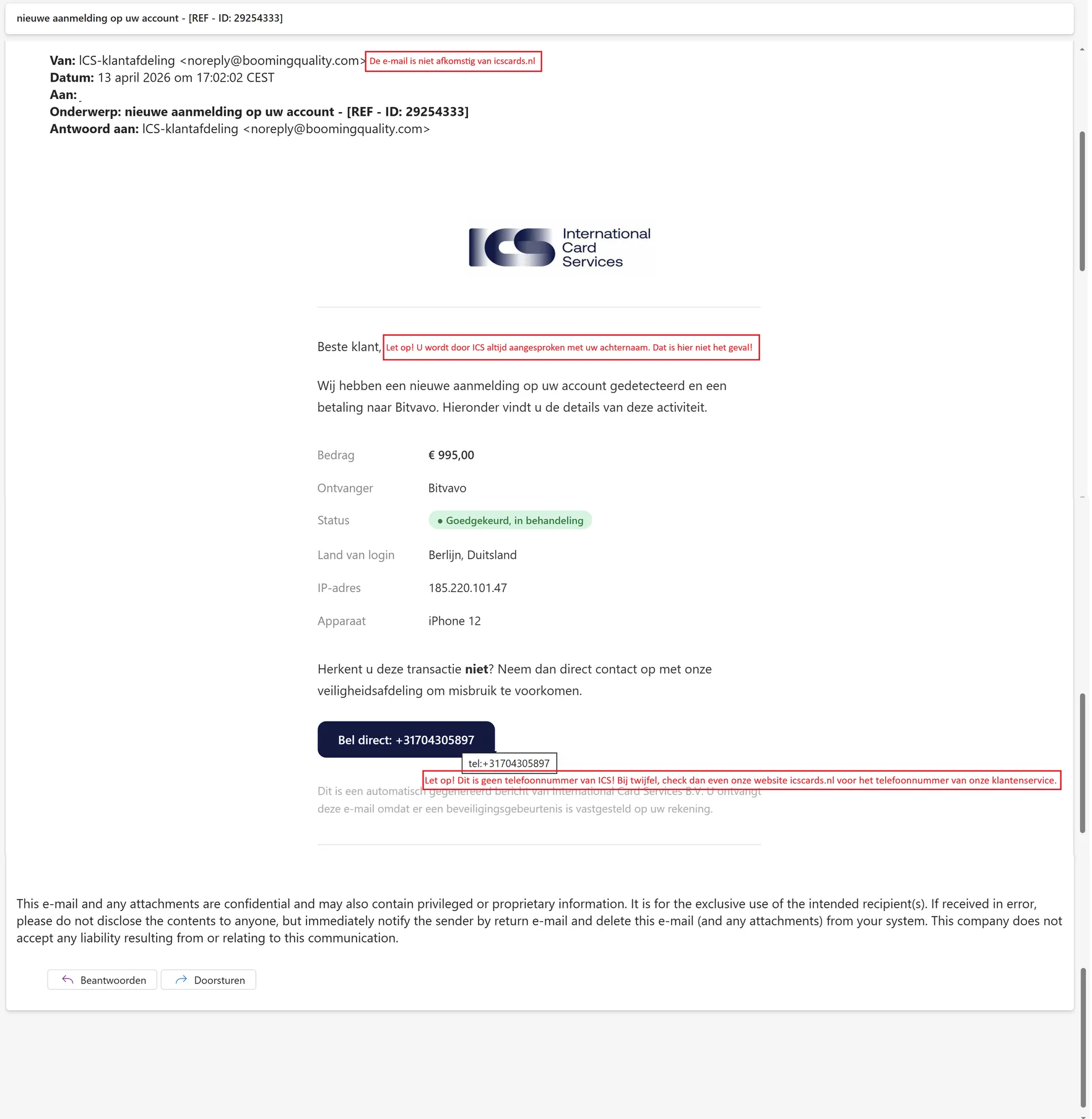
ICS publishes a genuine example of the phishing email, including a false account-login warning and an alleged Bitvavo payment.
The original image above comes from that official warning. Its red annotations were added by the issuer to identify misleading details; they are not our reconstruction.
A separately documented SMS also invokes a Bitvavo payment. ICS confirmed that message was phishing, not a legitimate instruction to call its embedded number.
The alert needs independent checking, not immediate cooperation
- Look for the payment in your normal ICS account or app.
- Use the contact details on your card or the issuer’s official website.
- Don’t authorize a transaction because a caller labels it a cancellation.
- Keep passwords, security codes, and card details out of unexpected support conversations.
A convincing amount or reference number isn’t the deciding detail. The important question is whether you reached the issuer independently or followed the message’s instructions.
If a real unauthorized transaction appears in your account, report it urgently through ICS. An invented notice and a genuine card problem require different conclusions.
What the Original Email Actually Shows
The published email claims that a new account login was detected. It pairs that warning with an alleged €995 payment to Bitvavo.
The sender’s display name resembles an ICS customer department. The underlying email address uses an unrelated domain, rather than authenticating the supposed department.
Other details add texture: a foreign login location, an IP address, a device description, and a transaction status. They make the invented event feel complete.
Those fields shouldn’t be treated as verified technical evidence. In a fraudulent notice, the sender controls the story as well as its supporting details.
The email ends the alarming section with a call instruction. That is the turn from receiving a claim to entering a conversation controlled by its sender.
Its telephone number is not a verified route to ICS. Publishing the original warning does not make that number suitable for checking your own card.
Nor does the issuer’s example prove that every current version uses €995, the same domain, or an identical layout. Recognize the method, not one fixed template.
How the ICS Bitvavo Payment Scam Works
Step 1: A financial alert creates a reason to react
The message names your card issuer and a cryptocurrency service. That combination can feel especially urgent if you have never used Bitvavo.
Rather than offering a prize, the scam threatens a loss already in progress. The requested action seems defensive: contact support before more money disappears.
The criminal does not need to prove the transaction at this stage. They need you to accept the possibility long enough to follow their contact instruction.
A visible reference number or precise amount can strengthen that impression. Precision makes a claim specific; it doesn’t make the claim true.
Pause before replying and check your actual account. You should not have to enter an unfamiliar support channel to learn whether an issuer’s alert is genuine.
Step 2: The message makes its own contact route look official
The email or text supplies a number and presents it as the way to dispute the event. Following that route gives the sender the next conversation.
A person answering professionally can appear to confirm the alert. In reality, the notice and the answer may be two parts of the same deception.
Repeating a case number is not independent verification when the caller already controls that number. It only shows that the two messages agree.
Don’t judge a callback solely by its area code. An ordinary-looking Dutch number can still lead somewhere other than the issuer’s customer service.
The safe comparison is with contact information obtained elsewhere. Use the number on the card or navigate to ICS yourself before starting the conversation.
Step 3: A supposed helper asks you to resolve the emergency
After contact begins, a fraudster may ask for information or actions under the pretext of identifying you, cancelling a charge, or protecting the card.
ICS warns customers not to disclose passwords, security credentials, or sensitive card information to impersonators. It also warns against approving transactions somebody else initiated.
Pay attention to verbs on your actual banking screen. Approving, paying, registering, or signing in are not made harmless by a voice calling them cancellation.
You may be asked for details, an approval, or another action. Don’t continue because the supposed helper says the first charge is almost cancelled.
You can refuse an unexplained instruction without resolving the whole story. End contact and ask the real issuer to check the account.
Step 4: Additional permissions can turn the call into a larger loss
Some fake-support conversations go beyond card questions. A request to install software, share a screen, or move money creates a separate exposure.
A received message doesn’t mean your device has been accessed. The urgency changes if you installed a program or let somebody view your screen.
If you did grant access, however, don’t report the incident merely as an unwanted text. Tell the issuer which permissions or approvals followed it.
A criminal may continue the conversation while a real authorization request appears. Read that request yourself rather than relying on the caller’s description.
The most useful intervention is to stop supplying new permissions. A hurried effort to undo one claimed transaction should not authorize another.
Don’t Confuse the Card Issuer, the Crypto Exchange, and the Impersonator
A named recipient is not a verified transaction
Bitvavo’s appearance in the notice doesn’t establish a transfer, an exchange account in your name, or misconduct by the exchange. Check actual account records before drawing conclusions.
If a genuine unauthorized card payment exists, give its recorded details to ICS. The issuer can assess the payment rather than the fictional version in a message.
Don’t open a cryptocurrency account to help the caller investigate. You don’t need a new financial relationship to dispute an unfamiliar notice.
An authentic-looking email isn’t the issuer’s app
The published example has branding and a detailed financial summary. A criminal can reproduce both without having access to the genuine card account.
Check the full sender address when reviewing an email, but don’t stop there. A familiar display name is easy to copy.
Even useful warning signs can change. A more personalized greeting or tidier grammar would not make the same false callback instruction trustworthy.
Real notifications still deserve a careful response
It would be wrong to conclude that every ICS notification is fraudulent. The issuer offers legitimate account communications and card-alert features.
The better rule is to investigate without using the message’s contact route. You can take a warning seriously while declining the sender’s preferred next step.
That approach protects you in both situations: a fabricated alarm doesn’t get your cooperation, and a real account issue still reaches the proper team.
Could Money Have Left Your Card Already?
The fake notice and your real card account are different records. One cannot establish the contents of the other.
Start by looking through your normal account access, not by following a link in an email that claims to summarize it.
Compare the amount, time, and merchant information with your own purchases. Don’t search only for the precise description the fraudulent message supplied.
If a genuine entry is unfamiliar, report that entry to ICS. Ask about its status and the appropriate response rather than relying on a stranger’s interpretation.
Something shown as pending is not a reason to accept a caller’s special cancellation procedure. The issuer can explain the recorded authorization through its official channels.
Likewise, finding no matching charge doesn’t prove that information disclosed during the call is safe. A stolen password or approval needs attention in its own right.
This separation helps avoid two mistakes: ignoring a real card problem because you recognized a fake email, or treating a fake email as proof of a completed loss.
You can also check a Bitvavo account you already hold through its established app or website. Don’t create one or follow a supplied link merely to satisfy the caller.
How the Reported SMS Differs From a Real Card Alert
ICS identified additional problems when assessing the reported text. It lacked the last four card digits that the issuer said its legitimate messages include.
The sender label was Service rather than ICS. The text also contained an incomplete sentence beside the instruction to call.
Those details help explain why that particular SMS was rejected. They are not a checklist that makes a corrected version automatically safe.
A criminal could fix a spelling error or change a display name. Partial card information, if already exposed elsewhere, would not transform an impersonator into an employee.
The same report distinguishes the fraudulent notice from legitimate Card Alerts. Customers can choose notifications concerning certain card spending or online payments.
That distinction matters if you already receive authentic alerts. Don’t disable useful notifications or dismiss genuine unfamiliar spending just because a false message also arrives.
Instead, check which communication settings you actually enabled and compare the alert with your account. Let the official issuer explain anything that remains unclear.
Even when a real transaction needs attention, you can reach support through the card’s own contact information. The incoming message doesn’t have to choose your agent.
And if you never enabled the kind of alert described, mention that when reporting it. It helps explain the mismatch without requiring you to investigate the supplied number.
What to Do if You Have Fallen Victim to This Scam
-
Leave the callback conversation. Hang up and stop responding to follow-up texts. Don’t allow the supposed agent to transfer you to another department.
Let the next call be one you initiate with independently checked issuer information. A transfer arranged by the first speaker is not a fresh identity check.
-
Inspect the card account through your usual route. Look for actual transactions, pending authorizations, changed details, and messages in the official account environment.
If the claimed charge isn’t there, report the false notice without inventing a payment loss. If something unfamiliar is present, give ICS the transaction reference.
-
Explain any disclosed card information. Tell ICS whether you shared the card number, expiry, security code, login information, or an authentication code.
Ask whether the card or account needs restricting or replacing. The issuer needs the type of information exposed, not another copy of the fraudster’s reassurance.
-
Describe every approval accurately. Report prompts you accepted, payments you initiated, or a card you added to another service at the caller’s direction.
Do not summarize an approval as a refund merely because that was the explanation you were given. What the system processed is what matters now.
-
Separate device access from card access. If a support application was installed or your screen was shared, stop that connection and explain it to the issuer.
Use Malwarebytes to check suspicious software where relevant. A clean scan cannot cancel a card authorization or establish that shared credentials remain private.
-
Keep the original notice for reporting. Save the sender information, callback number, message, call time, and relevant payment details without publishing personal card data.
ICS explains how to submit phishing reports. Its instructions include forwarding suspicious material to the issuer’s designated reporting address.
-
Watch for the next contact attempt. Another caller may claim to investigate the first one. Use your own verified contact route again rather than trusting familiarity.
AdGuard can reduce some malicious advertising and web exposure. It doesn’t screen the intentions of a person who answers a telephone.
-
Request recovery help through the payment provider. Ask ICS or your bank what can be stopped, disputed, or investigated based on the actual activity.
Keep case references and report fraud to police where appropriate. Never pay an unsolicited recovery agent who promises to retrieve money through a special connection.
Frequently Asked Questions
Does this message prove I have a Bitvavo account?
No. A phishing message can name a service you have never used. Check your card records instead of assuming the sender’s transaction description is accurate.
Is ICS responsible for the fake payment warning?
No. The documented messages impersonate the issuer. ICS has published an example and advice to help customers recognize the fraudulent contact route.
What if the caller knows the reference number in the email?
That doesn’t authenticate them. A fraudster who arranged the message can also know its reference number and repeat its invented transaction details.
Can a real card alert arrive by text?
Yes, legitimate notifications exist. Check an unexpected alert through the official account or a separately obtained issuer number rather than the contact instruction inside it.
Should I block my card just because I received the SMS?
Receiving it alone doesn’t establish card compromise. Contact ICS promptly if you disclosed details, approved activity, or found a real unauthorized transaction.
What should I tell ICS if I already called?
Describe what you shared, installed, paid, or approved. Simply dialing differs from giving a security code, authorizing a transaction, or granting remote access.
The Bottom Line
Don’t call the number supplied by an unexpected ICS Bitvavo payment warning. Verify the card activity and reach the issuer through information obtained independently.
If the conversation already led to shared details or approvals, contact ICS now and describe those actions precisely. The fake alert isn’t the record of what happened.

Join the discussion
0 commentsShare your experience or ask a question about this article.
Discussion
Start the conversation
Have a question or something useful to share? Add the first comment.